
Our Short List of 3
All 5 Picks at a Glance
| Product | Specs | Action |
|---|---|---|
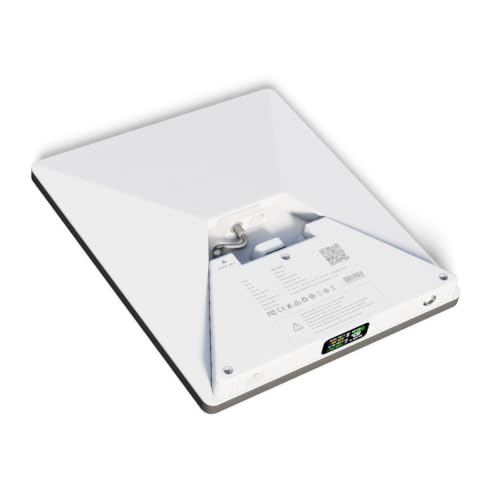 PeakDo LinkPower 1 Power Bank (ASIN: B0F9YH5ZWS) | Check price on Amazon | |
 Lymorexan Magnetic Roof Mount Kit (ASIN: B0DM25V3PK) | Check price on Amazon | |
 Nexiview Tripod Mount with Adapter (ASIN: B0DQNRGYRB) | Check price on Amazon | |
 HLHGR Starlink Mini Case (ASIN: B0GGRQX2YD) | Check price on Amazon | |
 ATISEK USB-C to DC Power Cable, 16.4FT (ASIN: B0F6Y57Y2X) | Check price on Amazon |
Disclosure: As an Amazon Associate, we may earn from qualifying purchases made through links on this page, at no additional cost to you.
Best Accessories for Starlink Mini
The Starlink Mini packs a satellite dish and Wi-Fi router into a single panel that is small enough to ride in a backpack, but the kit in the box is only a starting point. Out of the box you get the dish, a kickstand, a pipe adapter and a power supply that expects a wall outlet. The moment you take the Mini on the road, three gaps show up: it needs power away from the mains, it needs a stable way to sit or mount wherever you stop, and it needs protection while it bounces around in a vehicle. The accessories below are chosen to close those gaps, and every one of them is made specifically for the Starlink Mini rather than adapted from the larger Starlink dishes.
This roundup covers five jobs. A snap-on battery pack turns the Mini into a self-powered unit for off-grid stops. A magnetic roof mount and a tripod give you two very different ways to position the dish on vehicles and on the ground. A waterproof hard case protects the kit in transit and can even host the dish while it runs. Finally, a long USB-C to DC cable lets you feed the Mini from the USB-C power stations and high-wattage chargers many travelers already carry. Details below come from each maker’s Amazon listing.
Our Top Picks
Top 3 picks at a glance
Quick Picks
- PeakDo LinkPower 1 Power Bank (ASIN: B0F9YH5ZWS) — View on Amazon — the snap-on battery that makes the Mini truly portable.
- Lymorexan Magnetic Roof Mount Kit (ASIN: B0DM25V3PK) — View on Amazon — the fastest way to put the dish on a steel vehicle roof.
- Nexiview Tripod Mount with Adapter (ASIN: B0DQNRGYRB) — View on Amazon — a compact ground stand for campsites and yards.
- HLHGR Starlink Mini Case (ASIN: B0GGRQX2YD) — View on Amazon — a waterproof hard case the Mini can run from.
- ATISEK USB-C to DC Power Cable, 16.4FT (ASIN: B0F6Y57Y2X) — View on Amazon — the long cable that connects the Mini to USB-C PD power sources.
PeakDo LinkPower 1 Power Bank (ASIN: B0F9YH5ZWS)
The LinkPower 1 is a 27,500mAh, 99Wh lithium-ion battery shaped to match the back of the Starlink Mini. A snap-on buckle design holds it against the dish, so the battery and dish travel and deploy as one unit instead of as two loose pieces of gear. It weighs 1.42 pounds and measures 9.56 by 4.52 by 1.06 inches, which keeps the combined package slim. PeakDo rates the pack for over four hours of Mini runtime, and because the capacity sits just under 100Wh, it stays within the size airlines generally allow in carry-on baggage without special approval. Three standard 1/4-inch screw holes in the casing also let the battery double as a mounting plate for tripods.
Power handling is the strong point. The USB-C port is bidirectional Power Delivery, with up to 100W of input and 65W of output, and the pack supports pass-through charging, so the Mini keeps running from the DC port while the battery itself refills through USB-C. A physical switch controls the DC output to the dish, an LCD shows the remaining charge, and the companion app adds remote monitoring and control. The box includes the battery, a DC cable and a USB-C charging cable. Note that USB-C input defaults to a 65W maximum and needs a software adjustment to reach the full 100W input rate.
Highlights:
– Custom snap-on fit for the Starlink Mini, with 1/4-inch screw holes for tripod use
– 99Wh capacity with pass-through charging, so the dish never has to shut down to refuel
– LCD charge display, physical power switch and app-based monitoring
– DC cable and USB-C cable included in the box
Considerations:
– Fits the Starlink Mini only; it does not suit other Starlink models
– The switch controls the DC port only, while the USB-C port stays active at all times
– The maker notes the charge gauge may need a few full charge cycles at first to calibrate
Lymorexan Magnetic Roof Mount Kit (ASIN: B0DM25V3PK)
This Lymorexan kit is a metal frame mount that grips a vehicle through magnetic bases, aimed at RVs, vans, trucks, boats and yachts with steel roofs or decks. The design uses a quick-release arrangement, so the dish can come off the roof in moments when you park up and want it on the ground instead, and rubber protection on the contact surfaces is there to guard the vehicle’s finish while the magnets hold. Lymorexan lists the kit as model QBSJK, in metal, at 2 kilograms — a substantial frame rather than a lightweight bracket.
A magnetic mount solves a specific problem: drilling into an RV or van roof is permanent, and suction cups can let go in heat or cold. Magnets give you a tool-free install that is still easy to undo at the end of a trip. The same brand sells ladder, pole and suction variants, so make sure the variant on the listing is the Magnetic Mount version before ordering.
Highlights:
– Tool-free magnetic mounting on steel roofs and decks, with quick release
– Rubber-protected contact points to protect vehicle paintwork
– Metal frame construction, listed at 2 kilograms
– Suited to RV, van, truck, boat and yacht use
Considerations:
– Magnets only grip ferrous steel; aluminum and fiberglass roofs will not hold it
– A flat, clean contact area is essential for a secure hold
– It is a temporary mount, so check it before every drive
Nexiview Tripod Mount with Adapter (ASIN: B0DQNRGYRB)
The Nexiview tripod is the ground-based option in this roundup: an aluminum stand with a ball head that gives 360 degrees of tilt, three levels of height adjustment and a maximum height of 17.24 inches. It ships with the Starlink Mini tripod adapter in the box, which matters because many generic tripods need the Mini’s own pipe adapter or a separate accessory to make the connection. Nexiview lists the stand under model number 001, with aluminum as the material and a ball-head design for leveling the dish on uneven ground.
A short tripod like this earns its place at campsites, in yards and at rest stops, where the kickstand alone can leave the dish sitting in grass, gravel or puddles. Raising the panel a little over a foot clears low obstructions and makes fine tilt adjustments easier than shimming a kickstand. The ball head is the useful part: you can level the mount first and then angle the dish, instead of hunting for a flat patch of ground.
Highlights:
– Adapter for the Starlink Mini included, no separate purchase needed
– Ball head with 360-degree tilt for leveling on uneven ground
– Three height levels up to 17.24 inches, aluminum construction
– Folds down into a compact, portable stand for camping and RV travel
Considerations:
– The listing rates it as not water resistant, so bring it in during heavy weather
– Maximum height is modest; it will not clear fences, vehicles or tall brush
– Soft or sloping ground still needs care to keep the stand stable
HLHGR Starlink Mini Case (ASIN: B0GGRQX2YD)
HLHGR’s case is a hard carrying case rated IP67 waterproof, built around a useful twist: the Starlink Mini can operate from inside the opened case, so the case doubles as a deployment base rather than just luggage. Inside there is a dedicated battery slot sized for a power bank, which pairs naturally with a battery like the PeakDo above for a tidy, self-contained setup. The case is black, weighs 2.2 pounds, and the package dimensions are 15.5 by 15.36 by 6 inches, giving room for the dish and its core accessories in one rigid shell.
For anyone who moves the Mini weekly, a hard case is the difference between a kit that survives years of truck beds and one that picks up a cracked housing in a month. The IP67 rating is the headline for wet climates and dusty job sites, since the sealed shell keeps water and grit off the dish in transit. Using the case as the base also keeps the dish off wet ground at camp, with cables routed from inside the case.
Highlights:
– IP67 waterproof hard shell for travel, camping and job sites
– Designed so the Mini can run from inside the opened case
– Dedicated battery slot for carrying a power bank with the dish
– Rigid protection for the dish and accessories in one 2.2-pound case
Considerations:
– The dish still needs an open lid and a clear view of the sky to connect
– Confirm the interior layout fits your full kit, including cables and adapters
– A hard case adds bulk compared with a soft sleeve for backpack carry
ATISEK USB-C to DC Power Cable, 16.4FT (ASIN: B0F6Y57Y2X)
This ATISEK cable is the bridge between the Starlink Mini and the USB-C power gear you may already own. It runs 16.4 feet (5 meters), uses 18AWG copper conductors, and has a built-in Power Delivery trigger chip that negotiates a stable 20V, 5A output when it is connected to a USB-C PD source of 65W or more. That length lets the power station or charger stay inside the vehicle or tent while the dish sits outside with a clear sky view. The DC end uses a waterproof gasket, the outer jacket is PVC, and ATISEK backs the cable with a stated 24-month warranty service.
Cable choice matters more than it looks with the Mini. The dish’s DC input expects a higher voltage than a basic 5V USB port provides, which is why these trigger cables exist: the chip requests the correct PD profile from the source instead of leaving the dish underpowered. A longer, heavier-gauge cable also loses less voltage along its run than a thin one, which is exactly the failure mode that causes mystery reboots at the far end of a cheap cable.
Highlights:
– 16.4-foot reach keeps the power source sheltered while the dish stays outside
– PD trigger chip delivers a stable 20V output from 65W-plus USB-C sources
– 18AWG conductors and a waterproof connector gasket for outdoor use
– Plug and play, with no drivers, apps or tools required
Considerations:
– It is a cable only; you still need a USB-C PD source with enough wattage
– Output is a 20V profile, so check your source can supply it before relying on it
– Coil the full length loosely in storage to avoid kinks in the conductors
How to Choose
Start with how your Mini actually travels. If the dish lives on a vehicle, decide between the magnetic mount for steel roofs and the tripod for ground deployment; many owners end up with one of each because campsites and parking spots rarely offer the same surface twice. If the dish moves in and out of a bag every day, the hard case protects your investment better than any mount improves your signal.
Power deserves its own pass. A snap-on battery like the LinkPower 1 is the cleanest off-grid answer, but its runtime is measured in hours, so match capacity to your sessions. If you already carry a USB-C power station, a trigger cable may be the only purchase you need, provided the station’s USB-C port can deliver at least 65W. Vehicle owners running the dish on long drives should look at dedicated 12V adapters instead.
Finally, check fit before anything else. Cases, snap-on batteries and form-fit mounts are molded for the original Starlink Mini, and Starlink has already announced a newer generation. Read the compatibility line on each listing and confirm it names your exact dish model.
Key Specifications Explained
Watt-hours (Wh). Battery capacity in watt-hours tells you roughly how long a pack can run the dish: divide the watt-hours by the dish’s average draw in watts to estimate hours. The 99Wh size is popular for the Mini because it sits just under the 100Wh threshold airlines use for carry-on batteries without special approval.
USB-C Power Delivery profiles. The Mini’s DC input needs a higher voltage than plain USB provides. Trigger cables and adapters use a chip to request a fixed profile, commonly 20V, from a PD source. If the source cannot supply that profile at enough wattage, the dish may reboot or refuse to start, which is why the 65W minimum appears on so many listings.
Wire gauge (AWG). A lower AWG number means thicker conductors and less voltage lost along the cable. On a run of 16 feet or more, 18AWG is a sensible floor for a dish that draws meaningful current at 20V.
IP ratings. IP67 means a product is dust-tight and can survive immersion in water up to one meter deep for 30 minutes under test conditions. For a case, that rating describes the sealed shell in transit, not the dish operating underwater.
Magnet hold. Magnetic mounts depend on the surface as much as the magnet. Full contact with flat, clean steel gives the rated grip; curved panels, thick paint, rust or an aluminum roof all reduce or eliminate it.
Setup and Use Tips
Run the obstruction check in the Starlink app before you commit to a mounting spot; a mount that is convenient but points the dish at a tree line wastes the whole setup. With the battery pack, charge it fully before the first trip and let the gauge settle over the first few cycles, as the maker advises. When pairing the battery with a tripod, the screw holes in the battery casing let the whole stack mount as one unit.
For the magnetic mount, wipe both the roof and the magnet faces before placing it, and give the frame a firm tug test before driving. For the cable, keep the PD source ventilated, avoid pinching the cable in door seals, and route it so nobody trips the dish out of alignment. With the case, practice your layout at home: dish, battery in its slot, cables coiled in their places, so setup at camp takes minutes.
Common Mistakes to Avoid
The most common buying error is ordering accessories for the wrong dish. Standard and Gen 3 Starlink accessories do not fit the Mini, and Mini accessories are now splitting by generation as well, so match the model name on the listing to your hardware. The second error is underpowering the dish: a phone charger or a low-wattage USB-C port cannot run a Mini through a trigger cable, no matter what the plug shape suggests.
Mounting mistakes come next. A magnetic mount on an aluminum or fiberglass roof will not hold at all, and a tripod planted in soft mud will slowly tilt. Closing a hard case over a running dish blocks the sky view the panel needs. Finally, do not judge runtime by milliamp-hours alone; watt-hours and the dish’s actual draw decide how long a battery lasts.
FAQ
Do these accessories fit the newer Starlink Mini generation?
Fit-specific items such as the case and the snap-on battery are molded around the original Mini. Starlink has announced a successor model, so check the compatibility statement on each listing and order only when your exact model is named.
How long will a 99Wh battery run the Starlink Mini?
PeakDo rates the LinkPower 1 at over four hours. Real runtime varies with the dish’s workload, since heating, obstruction searching and heavy traffic all raise power draw, so treat the rating as a planning figure rather than a guarantee.
Can I power the Mini from a vehicle without an inverter?
Yes. The Mini runs on DC power, so a suitable 12V vehicle adapter or a USB-C PD source with a trigger cable can feed it directly. What matters is that the source delivers the voltage profile and wattage the dish requires.
Is a magnetic mount safe to leave on while driving?
It is designed for vehicle use on flat steel, but you should verify the hold before every drive, keep the contact surfaces clean, and remove the dish for car washes or severe weather. When in doubt, move the dish inside the vehicle for transit.
Can the Starlink Mini connect while sitting in the HLHGR case?
Yes, with the case open. The case is designed for the dish to operate from inside it, but the panel still needs an unobstructed view of the sky, so the lid stays open and nothing can cover the dish face.
Final Verdict
For most Starlink Mini owners, the highest-value first purchase is power: the PeakDo LinkPower 1 turns the dish into a genuinely self-contained unit, and the ATISEK cable covers anyone who already owns a strong USB-C power station. Add the Lymorexan magnetic mount if your dish lives on a steel-roofed vehicle, the Nexiview tripod if you deploy on the ground, and the HLHGR case if the kit travels hard. Buy them in that order, matched to how you actually use the dish, and the Mini becomes the go-anywhere connection it was designed to be.
Related guides
More from Amazon
Programs that pair well with the guide above. Offers and eligibility are set by Amazon and may change.
Free shipping on eligible items, Prime Video and more. Eligible new members can start with a free trial.
Start a Prime free trialAd-free music streaming. Eligible new subscribers can start with a free trial.
Try Music Unlimited freeA Prime membership for ages 18-24 with a trial period. Eligibility is set by Amazon.
See Prime for Young AdultsAudiobooks and podcasts to listen to on the go. Eligible new members can start with a free trial.
Try Audible freeAs an Amazon Associate we earn from qualifying purchases.


