
Our Short List of 3

- Best for: Players who want full-size console controls on a phone or a small tablet.
- USB-C connection with passthrough charging
- Full-size TMR thumbsticks with 2 swappable caps
- 2 back buttons and 2 claw grip bumpers
- Fits phones, iPad mini, and Android tablets up to 8 inches

- Best for: Players who want the most comfortable wide grip with haptics and lighting.
- USB-C connection
- Full-size analog sticks and triggers
- Mecha-tactile buttons
- Chroma RGB lighting
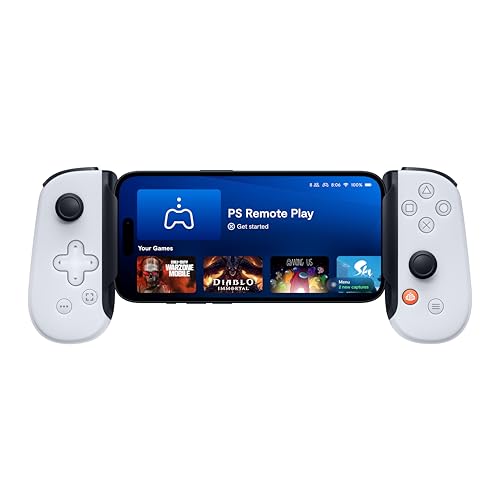
- Best for: PlayStation players who stream through PS Remote Play.
- USB-C connection
- PlayStation-style face buttons (Triangle, Circle, Cross, Square)
- Ultra-wide analog triggers
- High-precision clickable thumbsticks
All 5 Picks at a Glance
| Product | Specs | Action |
|---|---|---|
| Razer Kishi V3 Pro |
| Check price on Amazon |
| Razer Kishi Ultra |
| Check price on Amazon |
| Backbone One PlayStation Edition USB-C |
| Check price on Amazon |
 8BitDo Ultimate Mobile Gaming Controller for iPhone |
| Check price on Amazon |
 MC500 Mobile Gaming Controller |
| Check price on Amazon |
Touch controls can carry a casual game, but they start to fight back once a match demands precise aiming, quick camera work, or long sessions. A mobile controller changes that exchange entirely: physical sticks, triggers, and buttons put the game back under your thumbs, while the phone screen stays clear of your fingers. The choice is not only about comfort, though, because the connector, the phone fit, and the stick technology decide whether a controller works with your device at all.
This guide is for iPhone and Android players who want a controller that matches how they actually play, from cloud streaming on the couch to competitive shooters on the commute. It also covers tablet players who want a wider grip and parents looking for a single controller that can move between a phone and a console-style handheld. Every pick below comes from its Amazon listing name and stated specifications, so you can match the connector, fit range, and controls to your phone before you buy.
Our Top Picks
Top 3 picks at a glance
Quick Picks
As an Amazon Associate we earn from qualifying purchases
| Product | Best for | Key spec from title |
|---|---|---|
| Razer Kishi V3 Pro | Full-size console controls on a phone or small tablet | Full-size TMR thumbsticks with swappable caps |
| Razer Kishi Ultra | A large ergonomic grip with lighting and haptics | Chroma RGB with Sensa HD haptics |
| Backbone One PlayStation Edition USB-C | PlayStation Remote Play on iPhone or Android | USB-C with PlayStation-style face buttons |
| 8BitDo Ultimate Mobile Gaming Controller for iPhone | Xbox cloud gaming over Bluetooth | Hall Effect joysticks with 2 Pro back buttons |
| MC500 Mobile Gaming Controller | One wireless pad for phone and Switch-style play | TMR joysticks with Hall triggers |
How to Choose
Match the Connection to Your Phone
A controller is useless if it cannot talk to your phone, so start with the port and the wireless standard. Wired USB-C controllers plug straight in, draw power from the phone, and add almost no delay, which suits shooters and rhythm games where timing matters. They only work, though, when your phone has a USB-C port, so older iPhones with a Lightning port need a different model entirely. Bluetooth controllers pair with almost any modern phone and keep working when you switch devices, but they carry a battery that needs charging and can add a small amount of delay. Check your phone model and port first, then narrow the list to controllers that match it.
Check the Phone Fit Before Anything Else
Mobile controllers stretch or clamp around your phone, and every model states a length range it accepts. Measure your phone with its case on, because a case adds millimetres that can push a borderline phone past the limit, and a controller that almost fits will press buttons or sit crooked. Telescopic models such as the Kishi range stretch wide enough for small tablets, while compact Bluetooth clamps usually stop at 170mm. If you swap between a phone and a small tablet, pick a model whose stated range covers both. A controller that fits loosely will wobble during play, and one that fits too tightly can stress the connector, so treat the stated range as a limit, not a suggestion.
Choose Sticks and Triggers That Resist Drift
Stick drift is the failure that ruins a good controller, and the sensor type decides how likely it is. Hall Effect and TMR sticks use magnets instead of physical contacts, so they do not wear down the same way and hold their centre far longer than standard potentiometer sticks. Analog triggers matter just as much, because they let you feather acceleration or aim pressure instead of firing at full strength with every press. Back buttons add another layer, giving you jump, reload, or crouch without lifting a thumb from the sticks. If you play competitive shooters or long sessions every day, put drift-resistant sticks and analog triggers at the top of your list, and treat extra buttons as a bonus.
Decide Which Extras Actually Matter
Beyond sticks and triggers, controllers differ in the extras that shape long sessions. Passthrough charging keeps the phone alive during marathon play, while a headphone jack gives you lag-free audio without pairing earbuds. Haptics add feedback you can feel, and companion apps let you remap buttons or tune stick sensitivity for specific games. A carrying case, swappable stick caps, and a battery readout all help, but none of them rescue a controller with the wrong connector or a poor fit. Rank extras after the fundamentals: connection, fit, sticks, and triggers first, then pick the extras that match the games you play most, and skip features you will never touch.
The 5 Best Options
Razer Kishi V3 Pro
- Best for: Players who want full-size console controls on a phone or a small tablet.
- USB-C connection with passthrough charging
- Full-size TMR thumbsticks with 2 swappable caps
- 2 back buttons and 2 claw grip bumpers
- Fits phones, iPad mini, and Android tablets up to 8 inches
Players who want full-size console controls on a phone or a small tablet.
It is the largest grip here, so check the fit range and your bag space before you buy.
The Kishi V3 Pro is the full-size option for players who want their phone to feel like a console in handheld form. Its telescopic bridge stretches across phones and small tablets up to 8 inches, so it covers an iPad mini as well as a flagship phone. Full-size TMR thumbsticks with swappable caps, two back buttons, and claw grip bumpers give competitive players the inputs they need without crowding the layout. USB-C passthrough charging and a headphone jack keep long sessions running, and the Razer Nexus app handles game launching and control setup.
Watch out for: It is the largest grip here, so check the fit range and your bag space before you buy.
Razer Kishi Ultra
- Best for: Players who want the most comfortable wide grip with haptics and lighting.
- USB-C connection
- Full-size analog sticks and triggers
- Mecha-tactile buttons
- Chroma RGB lighting
Players who want the most comfortable wide grip with haptics and lighting.
Some companion-app features work only on Android, so confirm iPhone support for the settings you need.
The Kishi Ultra suits players who want the biggest, most comfortable grip in the Kishi family. Its full-size analog sticks and triggers sit in a wide ergonomic body that stays comfortable through long sessions, while mecha-tactile buttons give each press a crisp, deliberate feel. Chroma RGB lighting and Sensa HD haptics add atmosphere without changing how the controls respond. It connects over USB-C to Android phones, iPhone 15 and 16 models, and iPad Mini, and it also streams PC and console games to your phone through remote play.
Watch out for: Some companion-app features work only on Android, so confirm iPhone support for the settings you need.
Backbone One PlayStation Edition USB-C
- Best for: PlayStation players who stream through PS Remote Play.
- USB-C connection
- PlayStation-style face buttons (Triangle, Circle, Cross, Square)
- Ultra-wide analog triggers
- High-precision clickable thumbsticks
PlayStation players who stream through PS Remote Play.
Confirm the listing shows model BB-51-P-WS with USB-C, since Backbone also sold a Lightning version.
The PlayStation Edition of the Backbone One is the natural pick for players who spend their time in PS Remote Play. Its face buttons carry the familiar Triangle, Circle, Cross, and Square symbols, and the controller identifies itself as a PlayStation controller, so supported games show the right prompts. Ultra-wide analog triggers and clickable thumbsticks keep the feel close to a console pad, while passthrough charging and a headphone jack cover long sessions. It works with USB-C iPhones and most Android phones, and a Backbone+ trial comes included.
Watch out for: Confirm the listing shows model BB-51-P-WS with USB-C, since Backbone also sold a Lightning version.
8BitDo Ultimate Mobile Gaming Controller for iPhone
- Best for: Xbox Cloud Gaming players who want a wireless controller for iPhone and Android.
- Bluetooth connection
- Hall Effect joysticks and triggers
- 2 Pro back paddle buttons
- Xbox button
Xbox Cloud Gaming players who want a wireless controller for iPhone and Android.
Bluetooth adds slight delay next to a wired link, and the companion app has no iOS version for remapping.
The 8BitDo Ultimate Mobile is the Bluetooth pick for players who stream games from the cloud. It pairs with iPhone and Android over Bluetooth, so it keeps working when you switch phones, and its official Xbox licensing means Xbox Cloud Gaming treats it as a first-class controller. Hall Effect joysticks and triggers resist drift, two Pro back buttons cover extra inputs, and metal joystick rings add durability where thumbs wear fastest. The stretchable body fits phones from 100 to 170mm, and the companion software handles remapping on mobile.
Watch out for: Bluetooth adds slight delay next to a wired link, and the companion app has no iOS version for remapping.
MC500 Mobile Gaming Controller
- Best for: Players who want one wireless controller for a phone and Switch-style consoles.
- Wireless connection
- TMR joysticks
- Hall linear triggers
- Macro back key, assignable with up to 21 values
Players who want one wireless controller for a phone and Switch-style consoles.
Listing versions differ on stick sensors, so confirm TMR sticks and Hall triggers on the listing you buy.
The MC500 is the one-controller answer for players who split time between a phone and Switch-style play. Its wireless design covers iPhone, Android, Switch, and Switch OLED, so a single pad follows you across devices instead of living in a drawer. TMR joysticks and Hall linear triggers give it drift-resistant aiming, while a macro back key stores up to 21 inputs for combos you repeat often. Dual motor vibration and RGB lighting add feel and flair, and the telescopic body fits phones from 10.5 to 20cm, even with a regular case still on.
Watch out for: Listing versions differ on stick sensors, so confirm TMR sticks and Hall triggers on the listing you buy.
Which One Fits Your Situation
You Play on a Phone and a Small Tablet
Pick the Razer Kishi V3 Pro. Its telescopic bridge stretches to fit tablets up to 8 inches, so the same controller covers your phone on the commute and an iPad mini at home. Full-size TMR sticks and two back buttons keep the controls consistent across both screens, and passthrough charging means the tablet stays powered through long sessions.
You Mainly Stream Games From the Cloud
Pick the 8BitDo Ultimate Mobile for iPhone. Bluetooth pairing works across iPhone and Android, and official Xbox licensing makes Xbox Cloud Gaming feel native rather than bolted on. Hall Effect sticks hold their centre over time, and the two Pro back buttons give you extra inputs for games that expect a full controller layout.
You Live in the PlayStation Ecosystem
Pick the Backbone One PlayStation Edition. Its face buttons match the DualSense layout, supported games show PlayStation prompts, and PS Remote Play is the setup it was built around. USB-C keeps latency low, passthrough charging covers long sessions, and the included Backbone+ trial gathers your library and streams in one place.
You Want One Controller for Phone and Console-Style Play
Pick the MC500. Its wireless design works with iPhone, Android, Switch, and Switch OLED, so you buy one controller instead of one per device. TMR joysticks and Hall triggers keep aiming steady, the macro back key handles repeated combos, and the telescopic body fits cased phones from 10.5 to 20cm.
Common Mistakes
- Buying a controller with the wrong connector for your phone, such as a USB-C model for a Lightning iPhone
- Skipping the phone-length check and finding the clamp will not close around a cased phone
- Assuming every game supports controllers, then finding a favourite title stays touch-only
- Forgetting that Bluetooth controllers need charging before a session
- Picking a controller for its extras while ignoring fit, sticks, and triggers
Frequently Asked Questions
Do mobile controllers work with every game?
No. A controller only works in games that include controller support, so check the game first before you buy. Native mobile titles, cloud streaming services, and emulators usually support controllers, while some casual games stay touch-only. If a game you love has no controller mode, no controller in this guide will change that.
Is a wired or Bluetooth controller better for mobile?
Wired USB-C controllers add almost no delay and never need charging, which suits shooters and timing-heavy games. Bluetooth controllers pair with more phones, work with cases more easily, and keep working when you switch devices, but they need charging and can add slight delay. Choose wired for the lowest latency and Bluetooth for the widest compatibility.
Will a mobile controller fit my phone with its case on?
It depends on the case and the controller. Measure your phone with the case on and compare that length with the stated fit range, which runs from 100 to 170mm on compact clamps and wider on telescopic models. Slim cases usually fit, while thick rugged cases often do not. If your case is bulky, look for a telescopic model or a case-friendly design.
Can I charge my phone while using a mobile controller?
Many wired controllers include passthrough charging, so you can plug a cable into the controller and keep playing while the phone charges. Bluetooth controllers leave the phone port free, so you can charge normally, though a cable can get in the way of your grip. Check the listing for passthrough charging before you buy if long sessions matter to you.
Related guides
More from Amazon
Programs that pair well with the guide above. Offers and eligibility are set by Amazon and may change.
Free shipping on eligible items, Prime Video and more. Eligible new members can start with a free trial.
Start a Prime free trialAd-free music streaming. Eligible new subscribers can start with a free trial.
Try Music Unlimited freeA Prime membership for ages 18-24 with a trial period. Eligibility is set by Amazon.
See Prime for Young AdultsAudiobooks and podcasts to listen to on the go. Eligible new members can start with a free trial.
Try Audible freeAs an Amazon Associate we earn from qualifying purchases.


