
Liverpool against Everton is the Merseyside derby, and following it means working around a broadcast system that divides matches between partners and shifts kickoff times to suit television. The service that carried the previous matchweek may not carry this one, and a time printed at the start of the season may have moved since. The question that matters is where this derby is licensed in your country, and checking the listing in the days before the match is what keeps the plan simple.
This guide is for Liverpool and Everton supporters, for neutrals who tune in when a derby catches their eye, and for viewers abroad who need a licensed route. It covers how Premier League rights are shared, how to track a fixture that moves, how to choose between season-long access and a single match, and how to catch up afterwards.
As an Amazon Associate we earn from qualifying purchases
Our Top Picks
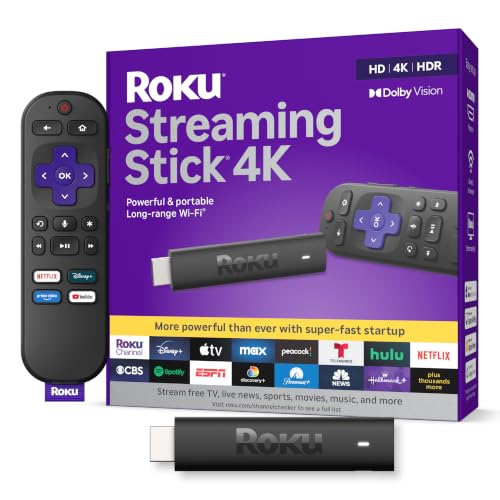 Roku Streaming Stick 4K with Voice Remote1 Count (Pack of 1)3.7 x 0.8 x 0.45 inches0.1 poundsCheck on Amazon
Top 3 picks at a glance
How to Choose
Learn How Premier League Rights Are Shared
Premier League matches are divided between several broadcast partners in each country, and no single service shows every fixture, so the first step is learning which partners operate where you live. The league publishes a list of rights holders by territory, and each partner’s schedule shows the fixtures it carries for a given matchweek. Find your country on the league’s list, then search the named partner’s schedule for Liverpool against Everton by team name. If the derby appears, you have a licensed route, and if it does not, another partner in your country may carry it instead, so check each name on the list before concluding the match is unavailable. Rights can also differ between live coverage and highlights, so a partner that shows a short package may not show the full match, and that distinction matters when you are planning an evening around a derby. Keep the league’s list as your starting point rather than trusting a search result or a social media post, because only the league’s list names the partners that actually hold the rights in your territory.
Check the Fixture Listing in the Week of the Match
Premier League fixtures move for television, so a kickoff time printed at the start of the season is only a starting point, and the confirmed time often appears a few weeks before the match. Check the league’s fixture page and the rights holder’s schedule in the week of the derby, and confirm the day, the time and the channel together, since any one of the three can change without the others moving. If you follow Liverpool or Everton, the club’s own website usually carries the broadcast details as well, which gives a second source to confirm against. Save the confirmed listing once you have it, because a derby that shifts late is easy to miss, and a reminder set from an early listing can go off at the wrong hour. When you convert the time, work from the listing itself rather than from a time quoted in a forum, since a conversion copied from another country can be hours out.
Weigh Season Access Against a Single Match
Supporters who follow a club every week usually want season-long access, while viewers who care about one derby may only need a single match, and the right choice depends on how often you will actually watch. A season-long route suits fans who tune in most weekends and follow the table, since it removes the weekly search for a licensed showing, while a single-match route suits viewers who only want this fixture and nothing else. Compare what each option includes before you commit to anything, such as replays, highlights and coverage of other fixtures, and check whether the option you choose covers this derby specifically rather than the league in general. A season route that omits this matchweek would leave you searching again, and a single-match route that only covers highlights would not give you the live game. Think about the rest of the season too, since a derby is often the match that starts a habit of watching every week.
Set Up Your Viewing Before Matchday
A derby is easier to enjoy when the practical side is settled before the day arrives, so open the partner’s app in advance, sign in and confirm the subscription is active. Run a brief clip from an earlier matchweek to confirm picture and sound, since fixing a login fault during the opening minutes means missing the start. If you watch on a television, confirm the app is installed and updated, and if you watch on a phone, charge it fully and check your data allowance. A few minutes of preparation on the day before the match is worth far more than a scramble at kickoff. Test the connection from the seat where you will watch, because a signal that works in one room can falter in another, and a wired connection removes that doubt entirely. If other people in the household will watch with you, make sure the screen and the sound are ready before they arrive.
Which One Fits Your Situation
You Follow Liverpool Every Week
Liverpool supporters who watch weekly should start from the league’s rights list and learn which partners carry the club’s fixtures, since one partner rarely shows every Liverpool match. Bookmark the partner’s schedule and check it each matchweek, since the broadcaster can change from one fixture to the next. If a derby is not shown live where you are, the highlights package and the club’s match centre are the licensed ways to keep up, and they will show the goals within a few hours of full time.
You Follow Everton Every Week
Everton supporters face the same weekly check, because the partner and the kickoff time can both change from one fixture to the next. Search the rights holder’s schedule by team name each matchweek, and confirm the day and time together before you plan your evening. Open the app early on matchday, test the stream, and if the fixture is highlights only in your country, plan around the package and avoid the score until you watch.
You Watch From Outside the UK
Premier League rights differ by country, so a viewer abroad may find the derby on a different service from the UK showing. Check the league’s rights list for your country, then search the named partner’s schedule by team name. Convert the kickoff time yourself, since the listed time is usually given in UK time, and if no partner shows the fixture live where you are, the highlights package is the licensed fallback.
You Only Want This One Derby
If this is the only match you want this season, a season-long route is more than needed, so look for a single-match option from the rights holder in your country. Confirm the option covers this fixture, check the kickoff time and channel, and test the app before the day arrives. If no single-match option exists where you are, the highlights package will still show the goals, and the club’s match centre will carry the key moments.
Common Mistakes
- Assuming the service that showed last weekend’s match will show this one is the most common error, because Premier League rights are split between partners and the broadcaster changes from fixture to fixture. Fans who open the same app out of habit can spend the opening minutes searching for a derby that was never going to appear there. Check the league’s rights list for your country, find the partner named for this fixture, and confirm it by name in that partner’s schedule before matchday. A short check beats a missed start, and it tells you whether to plan for a live showing or a highlights package. The rights list is published by the league itself, so it is the one source worth trusting over any forum post or social media claim.
- Trusting a kickoff time printed weeks ago is another trap, because Premier League fixtures move for television and the confirmed time often appears only a few weeks before the match. A time copied from an early fixture list, or from a post in another time zone, can be hours out, and a derby that starts earlier than you expect is easy to miss entirely. Recheck the league’s fixture page and the rights holder’s schedule in the week of the match, convert the listed time into your own time zone yourself, and set a reminder for at least thirty minutes before the start. If the fixture shifts late, the league’s page and the rights holder’s schedule will both show the change, so a final check on matchday is the habit that saves the evening.
- Leaving the app setup until kickoff turns a small fault into a missed start, because a forgotten password, an expired subscription or a pending update can each take ten minutes to fix while the match is already underway. Open the partner’s app the day before, sign in, confirm the subscription is active and run a brief clip to confirm picture and sound. A short test the evening before is worth far more than a frantic scramble in the opening minutes, and it also shows whether your connection can hold a steady stream for the full match. If the test stutters, shift closer to the router or plug in a cable before matchday, since a weak signal only gets worse once the match begins and the network grows busier.
- Watching a derby on a phone over mobile data without checking the allowance can use up a capped plan, because a full match at a decent quality uses a large amount of data and the allowance can run out before full time. Connect to a stable wireless network where possible, keep the charger nearby so a low battery does not end your viewing early, and lower the stream quality in the app settings before kickoff if mobile data is the only option. A wired connection avoids the issue completely, and a quick look at the allowance shows whether mobile data can last the whole match. The data a match uses depends on the quality setting, so lowering it before kickoff is the simplest way to stay within a capped plan.
- An unlicensed link from a social media post can look like an easy answer, yet it usually leads to a page that asks for a download or a sign-up before any football appears, and the picture that follows is often unreliable. The stream may freeze during a goal, vanish in the second half, or fill the screen with pop-ups that are hard to close on a phone. The licensed partner named on the league’s list is the safer route, even when it asks you to sign in, because it will actually show the fixture and it keeps your device and your details safe. A few minutes spent setting up the official route is nothing beside an evening spoiled by a link that disappears at the worst moment.
Streaming Devices That Make Match Day Easier
Knowing where the Liverpool vs Everton coverage is shown is only half of it. A reliable streaming device keeps the apps, the picture and the Wi-Fi connection steady when the game starts. These options cover different budgets and TVs.
Roku Streaming Stick 4K
A compact 4K stick that adds Dolby Vision support and long-range Wi-Fi. A good fit when the router sits in another room and you want a steady picture during live matches.

Chromecast with Google TV (4K)
A streaming stick with a remote and a built-in app home screen. It works well if you already use a Google account and like to cast from a phone or tablet.

ONN 4K Streaming Device
An Android TV box with a voice remote and an HDMI cable in the box. It is an easy way to add the common sports and live TV apps to an older television.

Anker HDMI 2.1 Cable
A certified high-speed HDMI cable that handles 4K at high refresh rates. A solid cable matters when a streaming box and a soundbar share the same input chain.

Frequently Asked Questions
Can I watch Liverpool vs Everton live for free?
That depends on the rights holder in your country, since some territories carry Premier League fixtures on free-to-air channels while others place them behind a subscription. Check the league’s rights list, find the partner named for your country, and look at that partner’s schedule to see how this fixture is offered and whether a free option exists where you live.
Why do Premier League fixtures change time?
Fixtures move because broadcasters choose matches for television, and a game picked for a live slot is often shifted to suit the schedule. The league confirms the changes a few weeks before each matchweek, so a time printed at the start of the season is only a starting point. Check the fixture page in the week of the match for the confirmed time.
Where do I find the official listing for this fixture?
Start with the league’s own channels, which publish the rights holders by territory and the fixture schedule for each matchweek. Find the partner named for your country, open that partner’s own schedule or app, and search for Liverpool against Everton by team name. That route keeps your viewing licensed and confirms the channel and time in one place.
What if I am travelling on matchday?
Rights differ by country, so the service that shows the fixture at home may not carry it abroad. Check the league’s rights list for the country you will be in, and search the named partner’s schedule by team name. If no partner there shows it live, the highlights package and the league’s own updates are the licensed ways to follow the match.
Related guides
More from Amazon
Programs that pair well with the guide above. Offers and eligibility are set by Amazon and may change.
Free shipping on eligible items, Prime Video and more. Eligible new members can start with a free trial.
Start a Prime free trialAd-free music streaming. Eligible new subscribers can start with a free trial.
Try Music Unlimited freeA Prime membership for ages 18-24 with a trial period. Eligibility is set by Amazon.
See Prime for Young AdultsAudiobooks and podcasts to listen to on the go. Eligible new members can start with a free trial.
Try Audible freeAs an Amazon Associate we earn from qualifying purchases.


