
A Portugal against USA match at the Women’s World Cup draws viewers from two passionate football nations, and the real decision is not which team to support but how to watch the game legally without wasting the first half on dead links and buffering streams. Unofficial pages promise a free feed and then deliver pop-ups, malware, and a picture that freezes at the worst moment, so planning the viewing route in advance matters more than anything else on match day.
This guide is for fans in any country who want a lawful way to follow the game live, whether they watch on a television, a laptop, a phone, or a tablet. It explains how to find the licensed broadcaster for the region, what to check on the device before the match starts, and how to fall back to radio commentary or a live text feed when video is not available. As an Amazon Associate we earn from qualifying purchases.
Our Top Picks


Top 3 picks at a glance
How to Choose
Start with the licensed broadcaster in your region
The rights to show Women’s World Cup matches are sold country by country, so the legal way to watch depends on where the viewer sits rather than on the teams playing. The first step is to check the tournament organiser’s own website or the official competition pages, which list the licensed broadcaster for each territory. A stream that works in one country may be blocked in another, and a service that shows the match in one region may not carry it elsewhere. Confirming the local rights holder before kickoff avoids the frustration of opening a stream that refuses to play. Write down the broadcaster name and whether it needs a subscription, a free account, or a television licence, so nothing has to be worked out while the teams walk out.
Decide between a live stream and a television broadcast
A live stream suits viewers who move around the house or watch away from home, while a television broadcast suits a living room where several people watch together on the largest screen. Streaming needs a stable internet connection and a device that can hold the picture for ninety minutes without dropping, while a broadcast needs the right channel on the household television package. Some viewers watch the first half on television and switch to a phone stream for the second half when they leave the room. Think about who watches, where they sit, and whether the household internet can carry a high-quality stream alongside other devices before choosing one route over the other.
Check the device and connection before kickoff
A stream fails most often in the last ten minutes before kickoff, when every viewer in the region logs in at once and the service slows down. Testing the chosen app the day before the match, or at least an hour early, reveals login problems, expired passwords, and apps that need an update. The device should have enough charge or a cable nearby, the browser should be current, and the connection should be tested with a short video from the same service. Closing other apps and downloads frees bandwidth for the match, and a wired connection beats wireless when the router sits far from the viewing spot. These checks take ten minutes and save a frantic search during the opening minutes. Keep a second device ready as a backup, such as a phone with the same app installed, so a failure on the television does not end the viewing altogether.
Know the legal fallback when video is unavailable
Some regions have no licensed video stream for a particular match, or the viewer may be travelling where the usual service is blocked. In that case the lawful fallback is a live radio commentary or a live text feed from a reputable sports outlet, which follows the game minute by minute without video. Many licensed broadcasters also offer a short highlights package after the final whistle, which covers the goals and key moments for viewers who missed the live action. Avoid sites that claim to show the full match for free without naming a rights holder, since those feeds are usually unlicensed and often carry security risks. A legal fallback keeps the viewer informed without breaking any rules.
Watching the Match Legally
Find the official stream for your country
The tournament organiser publishes a list of broadcast partners by territory, and that list is the safest starting point for any viewer. Search for the competition name together with the country name on the organiser’s own pages, and follow the link to the named broadcaster rather than trusting a search result that promises a free stream. The broadcaster’s own app or website then shows whether the match sits behind a subscription, a free registration, or a pay-per-view option. Bookmark the match page in advance, and sign in early so the stream is one tap away when the game begins. If the organiser’s list names no broadcaster for the country, the match may be shown on a free-to-air channel or not shown live at all, and the highlights route becomes the plan.
Watch on a television, laptop, phone, or tablet
Most licensed broadcasters support more than one screen, so the viewer can pick the device that fits the occasion. A smart television app gives the biggest picture and the simplest remote control, while a laptop browser suits a viewer who wants to keep a second window open for statistics or a group chat. A phone or tablet works for watching on the move, though the small screen makes it harder to follow play at the far end of the pitch. Casting from a phone to a television combines the two, but the cast connection should be tested before kickoff, since some apps block casting for live sports. Whichever device is chosen, keep the charger nearby and the app updated.
Understand free trials and subscription timing
Some broadcasters offer a short free trial that covers a single match, while others need a monthly subscription that starts immediately. A viewer who only wants this one game should read the trial terms carefully, note when the trial ends, and set a reminder to cancel if the service is not wanted afterwards. A subscription that starts on match day may renew automatically, so the renewal date matters as much as the viewing itself. Free trials also sometimes require a payment method up front, and the viewer should check whether the trial covers live sports or only on-demand programmes. Planning the subscription around the match avoids paying for a service that is never used again. A calendar reminder on the day the trial ends is the simplest safeguard, and it takes less than a minute to set.
Follow the game without video when needed
When no video stream is available, a live text commentary from a major sports outlet follows every chance, card, and substitution as it happens. Radio commentary adds the atmosphere and the emotion that text cannot carry, and many licensed broadcasters offer an audio feed alongside the video service. Social media accounts run by the teams and the tournament also post goal updates within seconds, though they do not replace a full commentary. A viewer who follows the game this way still gets the shape of the match, and the highlights package after the game fills in the visual moments. This route works anywhere with a basic internet connection.
Which One Fits Your Situation
You are watching at home with family or friends
Choose the television broadcast or the broadcaster’s smart television app, since the large screen suits a group and the remote control keeps things simple. Set up the channel or app an hour before kickoff, test the sound, and make sure the stream holds steady while other devices in the house stay connected. If the household internet is shared, ask others to pause large downloads during the match so the picture does not stutter at a key moment. Arrange seating so everyone can see the screen without blocking the view, and keep a phone nearby for a live text feed that adds statistics while the television shows the play.
You are travelling or away from home
Use the broadcaster’s phone or tablet app, and check before leaving that the service works in the destination country, since rights can change across borders. Download the app in advance, sign in while on a reliable connection, and carry a charger or a power bank for a full ninety minutes of streaming. If the hotel or mobile network is weak, a live text feed or radio commentary keeps the viewer in touch without burning through data.
You only want to catch the goals and key moments
Wait for the licensed highlights package, which most broadcasters publish shortly after the final whistle. The highlights cover the goals, the near misses, and the turning points in a few minutes, and they work on any device without a live subscription. A live text feed during the game also flags each goal as it happens, so the viewer knows when to open the highlights. This route suits a busy schedule and avoids the cost of a full subscription.
You want the full match with replays and analysis
Pick the broadcaster’s full live stream with its pre-match build-up and post-match analysis, since that package includes replays, expert discussion, and interviews. Start the stream early to catch the team news and the line-ups, and keep the app open after the final whistle for the reaction. A laptop or television gives the best view of replays, and a second screen can carry the statistics while the main screen shows the game. Many services also let the viewer pause live play or rewind to a key moment, which helps when a goal needs a second look or a decision needs checking against the replay.
Common Mistakes
- Clicking the first search result that promises a free stream, which usually leads to an unlicensed feed full of pop-ups and security risks.
- Waiting until kickoff to log in, then discovering an expired password or an app update that takes ten minutes to install.
- Assuming a stream that works at home will work abroad, when broadcast rights change from one country to another.
- Watching on a phone with low battery and no charger, so the stream dies before the second half.
- Paying for a subscription without reading the renewal terms, then finding the service renews automatically after the match.
Antennas and Streaming Gear for Watching Live Sports at Home
For Portugal vs USA, some coverage may also be available on local broadcast channels depending on where you live. An indoor antenna and a streaming device give you both routes on the same TV. Check your signal and your local listings before the event.
Channel Master FLATenna Indoor Antenna
A thin, flat antenna with a long coaxial cable. In areas with strong signals it can pick up local broadcast channels that carry some live games for free, so check coverage for your address first.
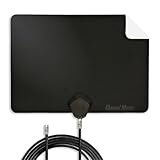
HIDB Indoor Digital TV Antenna
A magnetic indoor antenna with an amplifier. It is a low-cost way to try over-the-air channels, though results depend heavily on your distance from the transmitter.

Roku Streaming Stick Plus
A small 4K streaming stick with HDR10+ support and a voice remote. It plugs straight into the TV and loads sports apps quickly, which is handy when you want to be ready before kickoff.

Anker HDMI 2.1 Cable
A certified high-speed HDMI cable that handles 4K at high refresh rates. A solid cable matters when a streaming box and a soundbar share the same input chain.

Frequently Asked Questions
Is there a legal free stream for Portugal vs USA?
It depends on where the viewer lives, because the licensed broadcaster differs by country and some territories carry the match on a free-to-air channel or a free service. Check the tournament organiser’s list of broadcast partners for the country, then open the named broadcaster’s app or website to see whether registration or a subscription is needed. Avoid any site that streams the match without naming a rights holder.
What should I do if my stream keeps buffering?
First close other apps and downloads that share the connection, then lower the stream quality in the app settings, which often steadies the picture. A wired connection helps when the router is close, and moving nearer to the router improves a wireless signal. If the problem continues, restart the app and try again, since a fresh session often clears a stalled stream.
Can I watch the match on my phone?
Yes, most licensed broadcasters offer a phone app that carries the live stream, and the same account usually works across phone, tablet, laptop, and television. Download the app before match day, sign in early, and keep a charger nearby, since ninety minutes of video drains a battery quickly. A phone also works well for a live text feed when the video connection is weak.
Where can I find highlights if I miss the live match?
Licensed broadcasters usually publish a highlights package shortly after the final whistle, covering the goals and key moments. The tournament organiser and the teams also post short clips on their official channels. These highlights are the safest way to catch up, since they come from the rights holder and carry none of the risks of an unlicensed stream.
Related guides
More from Amazon
Programs that pair well with the guide above. Offers and eligibility are set by Amazon and may change.
Free shipping on eligible items, Prime Video and more. Eligible new members can start with a free trial.
Start a Prime free trialAd-free music streaming. Eligible new subscribers can start with a free trial.
Try Music Unlimited freeA Prime membership for ages 18-24 with a trial period. Eligibility is set by Amazon.
See Prime for Young AdultsAudiobooks and podcasts to listen to on the go. Eligible new members can start with a free trial.
Try Audible freeAs an Amazon Associate we earn from qualifying purchases.


