
Manchester City against Wolves draws viewers well beyond the two clubs, and that wide interest makes finding a legal stream more confusing rather than less. Premier League coverage is divided between rights holders in each country, and the broadcaster for a given match can change from one week to the next. Kickoff times shift too, once television selections are made, so the time on the original fixture list may not hold.
This guide is for Manchester City fans, Wolves fans, neutrals, and viewers watching from another country who want to follow the match through a licensed outlet. It explains how to identify the rights holder where you are, confirm the fixture is listed, choose between season-long access and a single game, and act when no live broadcast is available in your territory. No channel, time, or outlet is named here, because those details vary by country and by matchweek.
As an Amazon Associate we earn from qualifying purchases
Our Top Picks
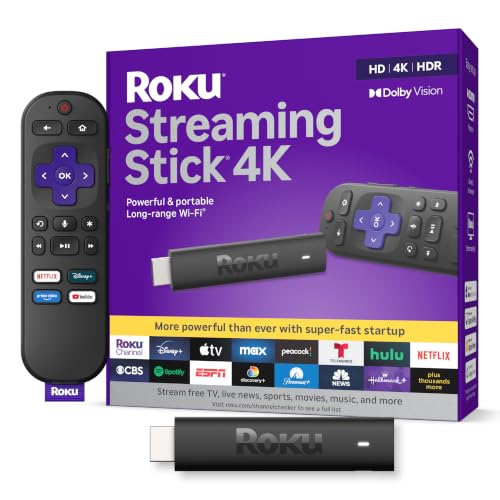 Roku Streaming Stick 4K with Voice Remote1 Count (Pack of 1)3.7 x 0.8 x 0.45 inches0.1 poundsCheck on Amazon

Top 3 picks at a glance
How to Choose
Look up the rights holders for your own territory
The league keeps a public list of its rights holders, broken down by country, and that list is the best place to start. Find your country on it and note all the partners named, because several outlets can hold rights in one territory. Then open each partner’s matchweek schedule and search for Manchester City against Wolves by either team name. A listing for the fixture confirms that partner carries the game, while the absence of a listing means you should move on to the next partner. Keep in mind that some partners show the full match live and others offer only highlights, so read the listing closely enough to know which kind of coverage you are getting.
Check the settled kickoff time in matchweek
The date and time on the first published fixtures are a starting point, not a promise, because broadcasters move matches to new days and slots through the season. The firm version appears in the weeks leading up to the game, so the check that matters is the one you make during matchweek. Compare the league’s fixture page with the partner’s schedule and confirm that the day, the hour, and the outlet all agree. Club websites are a useful extra source, since Manchester City and Wolves both publish broadcast information for supporters. Write the confirmed details down in your own time zone and set a reminder with time to spare, because a reminder based on the original fixtures can ring at the wrong moment.
Choose access based on how many games you follow
A supporter who watches every week gets the best value from a season subscription, while a viewer who only wants this match is better served by a single-game pass or a short-term option. Bundles that include other competitions can be good value if you watch them, and a waste if you never do, so weigh the extras honestly before paying. Whatever you choose, check whether replays and highlights are included, because a live-only pass is no use if you arrive late or the stream drops. Also read the renewal terms, so a one-off purchase does not turn into a charge you did not expect.
Sort the viewing setup before the day arrives
A stream usually fails for a simple reason, such as a forgotten password, an app that has not been updated, or a connection that struggles at peak time, and all of those are easy to fix a day early. Open the service on the device you plan to watch on, play a short clip, and confirm that the picture runs smoothly on the network you will use. Keep a second device ready as a backup, and make sure the login works well before kickoff. A few minutes of testing the evening before the game removes most of the faults that spoil a live match. Check for app updates too, since an update that starts at kickoff can lock you out of the service for several minutes.
Before Kickoff: The Checks That Matter
Confirm the rights holder, the listing, and the login
The three checks that count are the rights holder for your country, a listing for this fixture, and a login that works. The league’s rights list tells you which outlets may legally show the game where you live, and the outlet’s schedule tells you whether Manchester City against Wolves is among its matches this week. Search by either team name and treat a listing as confirmation only when it names the fixture itself. Once that is settled, sign in the day before the game and play a short clip, which proves the account works and the app plays on your device. A login fixed a day early is a small job, while the same problem at kickoff can cost you the opening minutes.
Have a replay plan ready in advance
Some viewers will find that no licensed outlet in their country carries this match live, and the right move then is to plan a replay or a highlights package instead of hunting for an unofficial feed. Check the rights holder’s schedule for a replay time, and check the league’s own channels for highlights that appear after the final whistle. Both clubs publish goals and key moments soon after the game ends. An unofficial stream may look like a shortcut when the legal live options run out, but it can cut out mid-match, bury the picture under aggressive advertising, or expose your device to harmful software, so a delayed legal viewing is the safer choice.
Have a backup device ready
A stream can fail on one device while working fine on another, so a charged second device is the cheapest insurance for a live match. Keep a phone or a tablet logged in and ready beside the television, with the same service open, so a fault on the main screen costs seconds rather than minutes. Test the backup the day before, because a second device with a dead battery or a forgotten password is no backup at all. The few minutes this takes are nothing against the opening minutes of the game.
Which One Fits Your Situation
You support Manchester City and watch every week
A season subscription from the rights holder in your country is the obvious fit when Manchester City is your team and you follow most weeks. It covers the fixtures across the season and normally includes replays for the games you miss. Check that the service works on your television as well as your phone, since a season of football deserves a proper screen. The service should also cover replays, since a season always includes a match you cannot watch live.
You support Wolves and watch every week
The same season-long option works for a Wolves supporter, with one extra habit worth building: check the club’s broadcast page each week, because Wolves fixtures move across broadcast slots through the season. A broad league package covers the club home and away, and the club page tells you which outlet has each game. Keep it bookmarked and check it before every match.
You are watching from another country
Use the rights holder for the country you are visiting, since the licence follows the place you watch from rather than your home. Find that country on the league’s rights list and take the partner shown for it. Confirm the listing a day ahead while travelling, because the partner abroad can differ from the one at home.
You only want to see this match
For a viewer who only cares about this fixture, a single-match pass or a short trial is the sensible choice. Check that a replay is included, so a late start does not leave you with nothing, and put a reminder in place to cancel anything that renews by itself. One match should stay one match, not a subscription you forgot about.
Common Mistakes
- Trusting the kickoff time from the original fixture list instead of the settled time in matchweek.
- Assuming the broadcaster from last week will carry this game, when rights change by matchweek.
- Paying for a full season to watch one fixture and forgetting to cancel it.
- Finding at kickoff that the login does not work, because nobody tested it the day before.
- Reaching for an unofficial stream when no licensed live broadcast exists, instead of waiting for a replay or highlights.
Streaming Devices That Make Match Day Easier
Knowing where the Man City vs Wolves coverage is shown is only half of it. A reliable streaming device keeps the apps, the picture and the Wi-Fi connection steady when the game starts. These options cover different budgets and TVs.
Roku Streaming Stick 4K
A compact 4K stick that adds Dolby Vision support and long-range Wi-Fi. A good fit when the router sits in another room and you want a steady picture during live matches.

Google TV Streamer 4K
A set-top style streamer with a fast processor and a voice remote. It suits households that switch between several streaming services and want menus that stay responsive.

Roku Streaming Stick HD
A low-cost HD stick for a bedroom or kitchen TV that does not need 4K. It covers the basic apps and keeps setup simple.

Frequently Asked Questions
Is there a free way to watch Man City vs Wolves?
A free legal way to watch live exists only where a free-to-air partner holds rights for selected matches, which is true in some countries and not in most. Look at the league’s rights list for your country to see whether such a partner is named. Where there is none, the legal routes are a paid pass or a delayed highlights package.
Why does the kickoff time keep moving?
Broadcasters pick matches for television as the season unfolds, and each selection can push a game to a new day or a new slot. The first published time is only a starting point, and the settled time is fixed in the weeks before the match. The day and hour should always be confirmed during matchweek.
How do I check the official listing?
Look up Manchester City against Wolves on the league’s fixture page, then check the schedule of the rights holder for your country for either team name. If the fixture appears there, the broadcast is confirmed; if it does not, that partner is not carrying it. The clubs carry the same information on their own websites for supporters.
Can I watch while I am abroad?
Use the rights holder for the country you are visiting, because the licence is tied to where you watch from. The league’s rights list is arranged by territory, so find the country you are in and take the partner listed for it. It may not match the partner you use at home, so confirm the listing the day before the game.
Related guides
More from Amazon
Programs that pair well with the guide above. Offers and eligibility are set by Amazon and may change.
Free shipping on eligible items, Prime Video and more. Eligible new members can start with a free trial.
Start a Prime free trialAd-free music streaming. Eligible new subscribers can start with a free trial.
Try Music Unlimited freeA Prime membership for ages 18-24 with a trial period. Eligibility is set by Amazon.
See Prime for Young AdultsAudiobooks and podcasts to listen to on the go. Eligible new members can start with a free trial.
Try Audible freeAs an Amazon Associate we earn from qualifying purchases.


