For competitive FPS players, a Hall-effect board with Rapid Trigger such as the Wooting 60HE or the Razer Huntsman V3 Pro is the pick reviewers favour; for a mainstream all-rounder with wireless, an OLED display and strong software, the SteelSeries Apex Pro TKL Gen 3 is the usual choice; and if you mainly want a good typing and gaming board without analog features, a quality mechanical keyboard with hot-swap switches covers most needs at a lower tier.
As an Amazon Associate we earn from qualifying purchases at no extra cost to you.


Our Top Picks

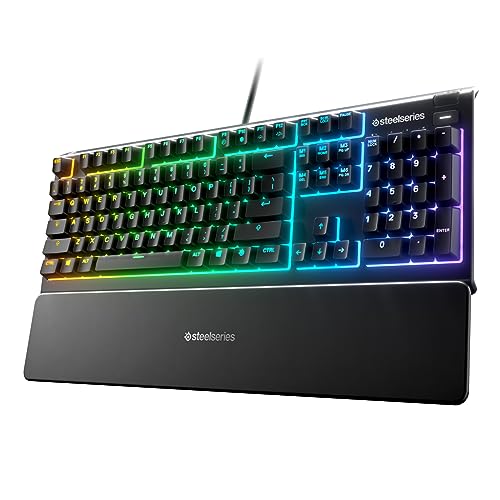


Top 3 picks at a glance
At a Glance: Gaming Keyboards Compared
| Keyboard | Best for | Key stated specs | Limits |
|---|---|---|---|
| Wooting 60HE (v2) | Competitive 60% layout | Hall-effect switches with Rapid Trigger; outlets name it the top compact competitive board | No function row or arrow cluster by default; wired |
| Razer Huntsman V3 Pro (TKL, 8KHz) | Competitive TKL | Analog Optical Gen-2 switches, 0.1 to 4.0 mm adjustable actuation, Rapid Trigger | Check the variant, since polling rate differs between versions |
| SteelSeries Apex Pro TKL Gen 3 | Mainstream all-rounder | Adjustable actuation, OLED display, Protection Mode, 1000 Hz polling | Reviewers score its competitive latency below Wooting and Razer |
| Hot-swap mechanical board (various) | Budget tier typing and gaming | Linear or tactile switches, swappable | No adjustable actuation |
Why Hall-Effect Keyboards Dominate Competitive Roundups
Traditional mechanical keyboards register a key press when metal contacts touch at a fixed point. Hall-effect and analog-optical keyboards measure how far the key has travelled using magnets or light, which allows adjustable actuation points and a feature called Rapid Trigger. Rapid Trigger resets the key the moment you start releasing it, instead of waiting for a fixed reset point, so you can strafe and stop in shooters faster.
Outlets and comparison sites tracking pro settings report that Wooting and Razer boards are widely used among Counter-Strike 2 and Valorant professionals. One site reports the Huntsman V3 Pro ranking second among CS2 pros and third among Valorant pros on ProSettings.net as of October 2026. Treat these as popularity snapshots rather than proof of an advantage for casual players.
Wooting 60HE: The Compact Competitive Pick
Most 2026 roundups name the Wooting 60HE, now in a v2 version, as the leading compact competitive board. One review site scores it 9.3 out of 10. A comparison article claims measurably lower latency for the 60HE than for the Apex Pro Gen 3, though this comes from a single source and numbers vary by test method. The trade-off is layout: a 60% board drops the function row, navigation keys and dedicated arrows, so you reach them with a function layer. If you use many shortcuts, a TKL layout is easier to live with.
Razer Huntsman V3 Pro: For Standard Layouts and Onboard Profiles
The Huntsman V3 Pro uses Razer’s Analog Optical Gen-2 switches with adjustable actuation from 0.1 to 4.0 mm and Rapid Trigger. Outlets describe it as a dependable tool for tournament players because its onboard profiles travel with the keyboard. The TKL 8KHz version supports 8000 Hz polling, whereas the full-size version is listed at 1000 Hz, so check which model you buy if polling rate matters to you.
SteelSeries Apex Pro TKL Gen 3: The Mainstream Choice
TheGreatReviewer names the Apex Pro TKL Gen 3 its top pick, and TechGearLab also rated an Apex Pro model best overall. Its selling points include an OLED display, adjustable actuation, Protection Mode (which reduces accidental adjacent key presses) and a wireless version in the range. In performance-oriented lists, it scores lower than Wooting and Razer: Asumetech rates it 8.8 compared with 9.3 for the Wooting 60HE v2 and 9.2 for the Huntsman V3 Pro. The Gen 3 is limited to 1000 Hz polling.
Key Specs to Compare
- Switch type: Mechanical (linear, tactile, clicky), optical, or Hall-effect. Hall-effect and analog-optical add adjustable actuation.
- Polling rate: 1000 Hz is standard; 4000 to 8000 Hz boards exist but need a USB port that supports them and rarely matter outside high-end esports.
- Layout: Full-size, TKL (no number pad), 75%, or 60%. Smaller boards free up mouse space for low-sensitivity players.
- Connectivity: Wired gives lowest risk of lag; modern 2.4 GHz wireless is close, Bluetooth is for convenience.
- Software: Check whether settings are stored on the keyboard and whether the software is required for daily use.
- Keycaps: Double-shot PBT keycaps resist shine better than ABS.
Compatibility and Fit Notes
- Plug wired boards directly into a motherboard USB port rather than a hub, especially at high polling rates.
- Check desk space; a TKL or 60% board leaves more room for mouse movement.
- Wrist rests are useful with full-size boards. 60% boards can be paired with a low-profile rest.
- Rapid Trigger and adjustable actuation are enabled by software or the board’s built-in menu. Some games and anti-cheat systems have specific policies; check the maker’s guidance for tournament rules.
- Keyboards with software like Razer Synapse, SteelSeries GG or Wootility need installation on your PC to change settings.
Budget Tier Trade-offs
| Tier | What you get | What you give up |
|---|---|---|
| Budget | Mechanical board with standard switches, often hot-swap | Adjustable actuation, Rapid Trigger, premium build |
| Mid-range | Entry Hall-effect boards, wireless options | Top-tier polling and finish |
| Premium | Wooting, Razer, SteelSeries flagships | Higher cost, software dependence |
Pick X If …
| Pick this | If you |
|---|---|
| Wooting 60HE v2 | play Valorant or CS2 and like a compact layout |
| Razer Huntsman V3 Pro TKL 8KHz | want a TKL layout with onboard profiles and 8 kHz polling |
| SteelSeries Apex Pro TKL Gen 3 | want wireless, an OLED display and a polished retail experience |
| Hot-swap mechanical board | want a lower-tier board for gaming and typing |
Alternatives to Consider
- Other Hall-effect boards: Several makers offer Rapid Trigger models at a lower tier; compare switch quality and software.
- Wireless low-profile keyboards: Good for tidy desks, with slightly different key feel.
- Standard mechanical boards with Cherry-style switches: A solid tier for general gaming.
Getting the Most From Adjustable Actuation
Adjustable actuation lets you decide how far a key must travel before it registers. A shallow setting, such as around one millimetre, makes movement keys react almost instantly but increases the risk of accidental presses. Many players set movement keys shallow and keep action keys slightly deeper to avoid misfires. Rapid Trigger sensitivity is another setting; very small values feel highly responsive but may register jitter on light touches, so start with a moderate value and tighten it gradually.
Both Wooting and Razer provide software and web-based tools to configure these features, and SteelSeries offers its own app with profile support. Save your profile to onboard memory if the keyboard supports it so that your settings follow you to other PCs and events.
Typing Feel and Noise
Linear switches are smooth and quiet for gaming, tactile switches give feedback that suits typing, and clicky switches are loud and not ideal for shared spaces. Foam dampening and a plate material change both sound and feel, so reading reviews that describe acoustics can help. If you stream or use a microphone, a quieter board may save you from noise filtering.
Maintenance
- Remove keycaps occasionally and clean with a soft brush or compressed air.
- Use a keycap puller designed for your board to avoid damage.
- Keep liquids away; few gaming keyboards are fully spill resistant.
- Update firmware only from the maker’s official tool.
Matching a Keyboard to Your Games
Different genres reward different features. Tactical shooters such as Counter-Strike 2 and Valorant benefit most from Rapid Trigger and shallow actuation because precise stopping matters. Battle royale and MMO players often prefer a TKL or full-size board for the extra keys and dedicated macro options. Racing and flight players may value analog input, where the depth of a key press maps to throttle or steering, a feature the Hall-effect and analog-optical boards can offer when the game supports it.
For players who also type for work, tactile or linear switches with a moderate actuation point reduce accidental presses. If you share a desk or room, quieter switches and sound-dampened cases are kinder to others. Finally, consider travel: a 60% or 75% layout fits in a bag, and onboard profile memory means your settings come with you to a friend’s PC or a LAN event.
Whichever you pick, give yourself a week to adapt. Adjustable-actuation boards reward experimentation, and many players change their settings several times before settling.
Frequently Asked Questions
What is Rapid Trigger?
Rapid Trigger resets a key as soon as you begin releasing it, instead of at a fixed point. This allows faster direction changes in shooters.
Do I need Hall-effect switches?
Not for casual play. They help most in competitive shooters where fast counter-strafing matters.
Is wireless good enough for gaming?
Modern 2.4 GHz wireless performs well for most players. Competitive players often prefer wired for peace of mind.
Which size should I choose?
60% saves desk space but needs layers for arrows and function keys. TKL keeps arrows and navigation keys without the number pad.
Does polling rate matter?
1000 Hz is enough for most players. Higher rates can reduce input delay slightly but need a capable USB port and gain little for most users.
Are hot-swap boards worth it?
Yes if you want to try different switches without soldering. Check that the sockets match the switch pins you plan to use.