
The best pop filter for most streamers is the 512 Audio 512-POP, a metal-mesh screen on a gooseneck with a swivel clamp that wipes clean and holds its shape on a boom arm or desk stand. If you want a cheaper fabric option for a Blue Yeti or similar USB mic, the dual-layer and three-layer Aokeo, SUUNTOK and no-name designs below do the same basic job. A pop filter is a mesh screen placed between your mouth and the microphone to soften the bursts of air from “p” and “b” sounds, so those plosives stop thumping in your stream.
Our Top Picks
 Aokeo Professional Microphone Pop Filter Mask Shield ForPop Filter12 x 6.2 x 1.1 inches0.4 poundsCheck on Amazon
 512 Audio by Warm Audio 512-POP Professional Metal20.16 x 5.51 x 0.4 inches0.46 poundsCheck on Amazon
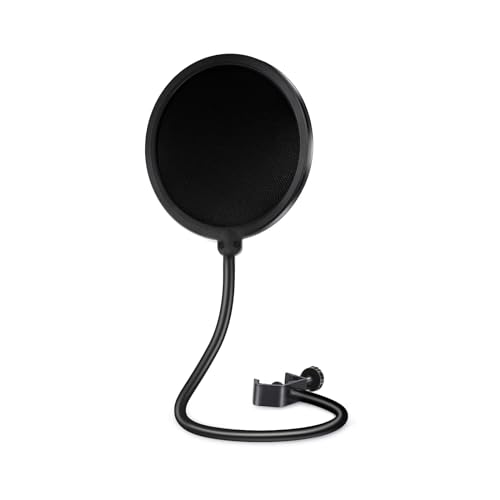 SUUNTOK Microphone Pop Filter for Blue Yeti and6.9in Wide16.38 x 7.76 x 1.37 inches0.6 poundsCheck on Amazon


Top 3 picks at a glance
Quick List
- 512 Audio 512-POP – best for a rugged, wipe-clean metal screen on a boom arm
- Aokeo three-layer pop filter – best for strong plosive control with a flexible 360-degree gooseneck clip
- Aokeo dual-layer mask shield – best for a simple Blue Yeti add-on
- Double-layer 5.91-inch metal-arm filter – best for studio-style setups with a larger screen
- SUUNTOK dual-layer pop filter – best for a lightweight clip-on for Blue Yeti and similar mics
- Dual-layer mic wind mask shield – best for a no-frills spare for a desk mic
Which One Is Right for You?
| If you… | Choose |
|---|---|
| want the sturdiest build and an easy wipe-clean screen | 512 Audio 512-POP |
| speak close to the mic and want three layers of fabric | Aokeo three-layer pop filter |
| use a Blue Yeti on a desk stand and want a basic add-on | Aokeo dual-layer mask shield or SUUNTOK dual-layer filter |
| use a larger studio-style mic on a boom arm | Double-layer 5.91-inch metal-arm filter |
| need a second filter for a guest or backup mic | Dual-layer mic wind mask shield |
| want a flexible clip that bends exactly where you need it | Aokeo three-layer pop filter or SUUNTOK |
Think about how you mount your microphone before you think about the screen. A boom arm leaves plenty of room for a clamp-on gooseneck, while a mic sitting on its own desk stand may leave only a narrow edge to hold. Choose the filter whose clamp matches your mounting method, then check the clip opening, arm length and screen size on the product page.
All 6 Picks in Detail
1. Aokeo Dual-Layer Mask Shield – Best for a Simple Blue Yeti Add-On
As an Amazon Associate we earn from qualifying purchases at no extra cost to you.

The older Aokeo mask shield is a dual-layer wind screen with a flexible gooseneck clip, marketed for the Blue Yeti and other microphones. It is the straightforward option for a streamer who wants a basic screen without any extras. A Blue Yeti sits on a stand with a thick body, so the clip is generally attached to the stand or a nearby support while the gooseneck bends the screen into place a few inches from the grille. Because it has two layers rather than three, it is slightly more transparent to the voice, which many people prefer for tone. It is a sensible first pop filter for a new streamer who is still learning how close to sit and does not want to spend time comparing small differences between similar screens.
- Screen: dual-layer fabric wind pop screen
- Mount: flexible gooseneck with clip
- Marketed for: Blue Yeti and other microphones
- Size: confirm screen diameter on listing
- Clip opening: confirm on listing
- Weight: light; confirm on listing
Pros
- Simple and light
- Dual layers cut common plosives
- Works with many desk microphones
Cons
- Clip may not suit every stand thickness
- Fabric screens need cleaning over time
If you need heavier plosive protection than this model offers, the three-layer Aokeo is the natural step up.
2. Aokeo Three-Layer Pop Filter – Best for Close-Talkers
This Aokeo model stacks three layers in its wind screen and uses a flexible 360-degree gooseneck clip to hold the screen in front of the mic. The extra layer helps diffuse air from strong plosives, which suits energetic streamers, gaming commentators and anyone who speaks within a few inches of the capsule. Because the listing says it works with all microphones, it can serve as a general-purpose filter if you change mics later. A flexible clip that bends in any direction also means you can angle it away from the mic body and keep your view of the screen or camera clear. It is also a good fit for anyone who streams with a camera close to the mic, because the arm can be swung aside between takes without loosening anything.
- Screen: three-layer wind pop screen
- Mount: flexible 360-degree gooseneck clip
- Fit: listed for a range of microphones; confirm clip opening
- Material: fabric screen, details to confirm on listing
- Size: confirm screen diameter on listing
- Use: streaming, recording and voice chat
Pros
- More layers for plosive control
- Flexible clip positions the screen where you need it
- Lightweight and easy to travel with
Cons
- Fabric needs occasional cleaning
- Three layers can slightly muffle high frequencies if you sit too close
Compared with the two-layer Aokeo mask shield, it handles heavier plosives but adds a bit more bulk in front of the mic.
3. 512 Audio 512-POP – Best for a Rugged Metal Screen

Warm Audio’s 512 Audio brand sells the 512-POP as a professional metal pop filter with a gooseneck and clamp. Metal mesh differs from the usual nylon: it does not absorb moisture, wipes clean with a cloth and keeps its shape through repeated bending. That makes it a sensible pick for streamers who talk for hours and tend to stand close to the microphone. The sturdy gooseneck holds a position without sagging, and the clamp attaches to a boom arm, mic stand or desk edge, so you are not limited to one mounting style. The manufacturer does not state the screen diameter in every public listing, so confirm the size on the product page if you need an exact fit. Because the clamp is part of a rigid metal assembly, it also suits streamers who bump their desk or reposition the mic often, since the screen is less likely to drift out of place between sessions.
- Screen: metal mesh, described as easier to clean than nylon
- Mount: swivel clamp with a flexible gooseneck
- Intended use: podcasts, streaming, voice-over and vocals
- Compatibility: any mic where the gooseneck can reach; confirm clamp opening on the listing
- Build: metal and plastic parts per the listing
- Screen diameter: confirm on listing
Pros
- Wipes clean and does not hold moisture
- Rigid gooseneck holds position
- Clamp works with boom arms and stands
Cons
- Metal can affect the tone slightly for some voices, so listen and adjust distance
- Needs enough room to clamp on a crowded desk
It is a step up in durability from the fabric Aokeo and SUUNTOK filters, which are lighter and easier to fit on a Blue Yeti but less rugged.
4. Double-Layer 5.91-Inch Metal-Arm Pop Filter – Best for Studio Setups

This listing describes a double-layer wind screen with a 360-degree flexible metal arm and a clamp, and gives a size of 5.91 inches. It targets recording studios and broadcast setups, which tends to mean larger large-diaphragm microphones on boom arms. A bigger screen gives you more room to move your head without leaving the protected zone, which helps on long streams where posture shifts. As the listing does not make clear which dimension the 5.91-inch figure refers to, confirm that on the product page before you buy. The metal arm and clamp are meant to stay put instead of drooping. If you have a large-diaphragm condenser on a boom arm, this layout keeps the screen in front of the capsule while leaving your hands free for a keyboard and mouse.
- Screen: double-layer wind screen
- Arm: flexible 360-degree metal arm
- Size: 5.91 inches per the listing; confirm what it measures
- Mount: clamp
- Intended use: recording studio and broadcast
- Brand: not clear from the listing title; confirm on listing
Pros
- Studio-style layout suits boom arm setups
- Metal arm should hold its position
- Larger coverage if the figure refers to the screen
Cons
- Brand and exact dimensions need confirming
- May look large on a small desk
It occupies the same slot as the 512-POP but with a fabric screen, so choose the 512 if you prefer a metal mesh.
5. Dual-Layer Mic Wind Mask Shield – Best as a Backup Filter

This listing describes a professional microphone pop filter shield with a dual-layered wind pop screen, aimed at Blue Yeti and any other microphone. Its title does not name a brand, so the main case for it is as a low-commitment spare: keep it in a drawer for a guest, a second mic or a replacement when your main screen gets stretched. Treat it as a functional basic filter and confirm the clip opening, arm length and screen size on the product page, since those are the details that decide whether it fits your stand. If it arrives and the clamp is too small for your setup, a spare like this is still useful on a second desk or a guest recording session.
- Screen: dual-layered wind pop screen
- Mount: clip and flexible arm per the listing; confirm details
- Marketed for: Blue Yeti and other microphones
- Size: confirm screen diameter on listing
- Brand: not stated in the listing title
- Material: confirm on listing
Pros
- Handy second filter to keep spare
- Dual layers for general plosive control
- Broad microphone compatibility claim
Cons
- Limited brand information
- Build quality details need confirming
Next to the SUUNTOK and Aokeo dual-layer filters it is the least differentiated option, so buy it for convenience rather than for any standout feature.
6. SUUNTOK Dual-Layer Pop Filter – Best for a Light Clip-On for Blue Yeti

SUUNTOK’s pop filter advertises a dual-layer wind screen with an enhanced flexible 360-degree gooseneck clip and compatibility with Blue Yeti and other microphones. The enhanced clip stabilizing arm suggests the maker tried to address a common complaint about cheap pop filters: gooseneck arms that slowly sag. For a streamer who changes mics occasionally, a light clip-on design means the filter can move with you. Treat it as a practical middle option, offering the dual-layer protection of the Aokeo mask with a clip the manufacturer says is sturdier. Because it is light, it also works as a travel filter that can ride in a laptop bag next to a USB mic without adding much weight.
- Screen: dual-layered wind screen
- Mount: flexible 360-degree gooseneck with stabilizing clip
- Marketed for: Blue Yeti and other mics
- Size: confirm screen diameter on listing
- Clip: confirm opening width on listing
- Material: fabric screen, details to confirm on listing
Pros
- Stabilizing arm designed to resist sag
- Light and easy to reposition
- Works across several mic types
Cons
- Fabric screen needs cleaning
- Clip fit varies by stand
It offers a similar layout to the Aokeo dual-layer shield, with a stabilizing clip emphasized as the main change.
Specs Compared
| Model | Screen | Mount | Marketed for | Size |
|---|---|---|---|---|
| 512 Audio 512-POP | Metal mesh | Gooseneck with swivel clamp | Podcast, streaming, vocals | confirm on listing |
| Aokeo three-layer | Three-layer fabric | 360-degree gooseneck clip | All microphones | confirm on listing |
| Aokeo dual-layer | Dual-layer fabric | Gooseneck with clip | Blue Yeti and others | confirm on listing |
| 5.91-inch metal-arm filter | Double-layer | Metal arm and clamp, 360 degrees | Studio and broadcast | 5.91 inches per listing |
| SUUNTOK dual-layer | Dual-layer fabric | 360-degree gooseneck, stabilizing clip | Blue Yeti and others | confirm on listing |
| Dual-layer wind mask shield | Dual-layer | Clip and arm; confirm | Blue Yeti and others | confirm on listing |
The table shows how similar most of these filters are on paper. Only the 512-POP is described with a metal screen, and only the Aokeo three-layer model advertises more than two fabric layers. That means the details that separate them in daily use are the clip, the arm and the way you position the screen. If a listing says to confirm, check the photos for the clip opening and compare it with the thickness of your stand or boom arm.
How We Chose These
We compared these six pop filters by reading each listing’s title and description, then looking at manufacturer and public information on how pop filters work and what mounting styles suit streaming microphones. The criteria were screen material and number of layers, the mounting arm and clamp, stated microphone compatibility, how easy the screen is to clean, and how clearly the listing states its dimensions. Where a detail was missing, we say to confirm it on the product page instead of guessing. We favored durability and clear specifications over marketing language and did not rank by brand recognition alone.
What to Look For
What a pop filter actually does
Plosive sounds such as “p”, “b” and “t” push a burst of air toward the microphone capsule. The capsule reads that burst as a low-frequency thump, which you hear as a boom or pop in your stream. A pop filter does not block your voice. It slows and spreads the air before it reaches the capsule, so the sound is far gentler. This is different from a foam windscreen that slips over the mic head, which also reduces plosives and breath noise but sits right against the grille. A separate screen on a gooseneck adds distance, and distance is one of the most effective plosive reducers there is.
Distance and positioning
A common rule of thumb is to place the filter about two to three inches from the microphone and to speak from two to three inches behind the filter, so your mouth is roughly four to six inches from the capsule. That gap lets the air spread out before it reaches the mic. Angle your voice slightly off-axis rather than directly into the capsule, and avoid pressing your lips against the screen. If you still hear thumps, move back an inch or lower your gain. If your voice sounds distant, move closer in small steps. As a worked example, if you are currently six inches from the mic with no filter, adding a screen at three inches leaves you with a comfortable three-inch gap behind it.
Fabric versus metal screens
Fabric screens use nylon or similar mesh and are inexpensive and light. They absorb some moisture over time, so they benefit from a gentle wash or replacement when they start to look stretched. Metal screens use perforated or woven metal that resists moisture and wipes clean with a cloth. Some engineers feel metal screens diffuse air less smoothly, while others like their durability. For streaming, either approach works if the distance is right, and cleaning is the deciding factor for people who talk for several hours a day.
Clamps, goosenecks and compatibility
Most pop filters attach by a clamp on a gooseneck arm. For a Blue Yeti sitting on its own stand, the clamp may attach to the stand’s neck or to a nearby support, which depends on thickness. For boom arms the clamp usually attaches to the arm tube, and a longer gooseneck gives you more flexibility to avoid the mic’s cable. Check the clamp opening, the arm length and whether the arm holds position under the weight of the screen. If you use a shock mount, make sure the clamp does not touch the mount, because vibration can transfer to the mic. Finally, remember that streaming webcams and lights may block the arm path, so plan the layout of your desk before you tighten anything.
A worked setup for a Blue Yeti streaming desk
Imagine a streamer with a Blue Yeti on its stand, a webcam on a monitor and a keyboard in front. Set the Yeti in cardioid mode with the front facing you. Clamp the filter to the stand or to a small boom behind the mic, and bend the gooseneck so the screen sits about two inches from the grille and slightly below mouth level. Sit upright, say “Peter picked a pack of pickled peppers” at a normal volume, and listen to the recording. If you hear a thump, shift the screen another inch away or angle it slightly. Once the pops are gone, mark the position with a small piece of tape on the desk so you can find it again after you move the mic for cleaning.
Do you need one at all?
If your microphone is a dynamic model with a built-in grille and you talk a few inches away and slightly off-axis, you may get by with a foam cover. If you use a condenser mic such as a Yeti, a pop filter is usually worthwhile because condenser capsules are more sensitive to plosives. Software tools can reduce pops after the fact, but prevention at the source sounds more natural.
Questions
How far should a pop filter be from the microphone?
About two to three inches from the mic, with your mouth another two to three inches behind the screen. Adjust in small steps until plosives disappear without making your voice sound distant.
Will a pop filter fit a Blue Yeti?
Several of these listings advertise Blue Yeti compatibility, but the clamp must fit your stand or support. Check the clip opening on the product page and compare it with the part you plan to clamp onto.
Is metal better than fabric?
Metal is easier to clean and holds its shape, while fabric is light and inexpensive. Neither is automatically better; position matters more than material.
Can I use two pop filters at once?
You can, but it rarely helps. Stacking screens can dull the sound. A single well-placed filter, or a filter plus a foam cover for an especially breathy voice, is usually enough.
How do I clean a pop filter?
Wipe metal screens with a damp cloth. Wash fabric screens gently with mild soap and let them air-dry fully before using them again. Do not use heat.
Does a pop filter replace a noise gate or software filter?
No. A pop filter only reduces air bursts from plosives. Background noise and room echo need separate treatment such as a noise gate or acoustic panels.
Update History
- October 21, 2026 – Initial publication; product set drawn from current catalog listings.
- Check the product page for current specifications and availability before buying.
Sources
- Manufacturer product pages and public specifications for 512 Audio and Warm Audio
- Retailer listing titles and specification fields for all six products
- General microphone technique references on plosive control and mic placement
Related guides
More from Amazon
Programs that pair well with the guide above. Offers and eligibility are set by Amazon and may change.
Free shipping on eligible items, Prime Video and more. Eligible new members can start with a free trial.
Start a Prime free trialAd-free music streaming. Eligible new subscribers can start with a free trial.
Try Music Unlimited freeA Prime membership for ages 18-24 with a trial period. Eligibility is set by Amazon.
See Prime for Young AdultsAudiobooks and podcasts to listen to on the go. Eligible new members can start with a free trial.
Try Audible freeAs an Amazon Associate we earn from qualifying purchases.


