Our Short List of 3

- Best for: Gamers who want the most lighting effects and a full set of programmable buttons in a budget RGB mouse.
- 16.8 million-color RGB backlight with 7 lighting effects
- Up to 10,000 DPI adjustable optical sensor
- 7 programmable buttons out of 9 total buttons
- Polling rate up to 1,000 Hz, switchable 125/250/500/1,000 Hz

- Best for: Smaller hands and claw or fingertip grips that want bright three-zone lighting and simple software.
- 8,000 DPI gaming-grade optical sensor
- LIGHTSYNC RGB with about 16.8 million colors across 3 zones
- 6 programmable buttons with mechanical button tensioning
- 1,000 Hz polling rate
- Best for: Palm and claw players who want a light ergonomic shell with a high-DPI sensor.
- 12,000 DPI optical sensor
- 6 programmable buttons
- Omron switches rated for more than 20 million clicks
- Weight 85 g, contoured right-handed shape with rubber side grips
All 4 Picks at a Glance
| Product | Specs | Action |
|---|---|---|
| Redragon M711 Cobra |
| Check price on Amazon |
| Logitech G203 LIGHTSYNC |
| Check price on Amazon |
| Corsair Harpoon PRO RGB |
| Check price on Amazon |
 HyperX Pulsefire Core |
| Check price on Amazon |
A glowing mouse can change the whole feel of a desk setup. The right RGB gaming mouse adds color that matches a keyboard, a headset and a light strip, while the sensor and switches still do the real work in every match. This guide gathers five wired RGB mice that sit in the budget tier, each one with real lighting control, a solid sensor and buttons that can be remapped for the games you play most.
Every pick below uses a wired USB connection, so there is no battery to charge and no wireless lag to think about. The group covers light 77-gram shells, compact shapes for smaller hands, and roomy ergonomic bodies for palm grips. Lighting ranges from a single glowing logo to three separate zones, and every mouse here lets you tune colors and effects through its own software. Pick the shape and sensor that fit your hand first, then let the lighting be the tiebreaker.
Our Top Picks
- Logitech G203 Wired Gaming Mouse for Laptop &One Name1.5 x 2.45 x 4.59 inches0.14 poundsCheck on Amazon
Top 3 picks at a glance
Quick Picks
As an Amazon Associate we earn from qualifying purchases
| Product | Best for | Key spec |
|---|---|---|
| Redragon M711 Cobra | Most lighting effects on a tight budget | 16.8 million-color RGB, 10,000 DPI |
| Logitech G203 LIGHTSYNC | Compact shape with bright three-zone lighting | 8,000 DPI, 6 programmable buttons |
| Corsair Harpoon PRO RGB | Light-feeling ergonomic pick | 12,000 DPI, 85 g |
| HyperX Pulsefire Core | Comfortable symmetrical shell | 6,200 DPI, 7 programmable buttons |
| SteelSeries Rival 3 | Best all-round sensor and switches | 8,500 CPI, 60-million-click switches |
How to Choose
Lighting Zones and Software
Each mouse here lights up, but the lighting is not the same from model to model. Some mice glow in one color across the whole shell, while others split the shell into separate zones that can each show a different color. Software matters as much as the hardware: a good companion app lets you pick colors, set effects like breathing or wave, and save a profile to the mouse itself. Check whether the app runs on your system before buying, since a few apps only unlock full lighting control on Windows. If you want lighting that reacts to games, look for a mouse whose app supports game-driven effects.
Sensor and Sensitivity
Sensor numbers look huge on the box, and most of them matter less than the spec sheet suggests. Every mouse in this guide tracks cleanly at the sensitivity most players actually use, from 400 DPI for careful aiming to 3,200 DPI for fast desktop work. The top-end figures, from 6,200 to 12,000 DPI, are headroom for very high-sensitivity players rather than a daily setting. A 1,000 Hz polling rate is the more useful number: it means the mouse reports its position a thousand times per second, which keeps cursor movement smooth. Look for a sensor with no smoothing or acceleration baked in, so the cursor goes exactly where your hand moves.
Shape, Weight and Grip
Shape decides comfort more than any spec. The mice in this guide weigh between 77 and 87 grams, which is light enough for quick flicks without feeling hollow. Compact shells suit claw and fingertip grips and smaller hands, while longer ergonomic bodies suit palm grips and larger hands. Measure your hand from wrist to middle fingertip: under 17 cm usually fits a compact shell, while over 19 cm usually fits a full-size body. Side buttons should fall under your thumb without a stretch, and the shell should let your ring finger rest without dragging on the pad.
Buttons, Cable and Build
Extra buttons turn a mouse into a shortcut panel. Six or seven programmable buttons cover the usual loadout: DPI steps, push-to-talk, reload, and a couple of game macros. Onboard memory is worth having, because it keeps your DPI steps and lighting on the mouse when you move to another computer. All five picks here are wired, so look at the cable: braided cables resist tangles better, while plain rubber cables are lighter and more flexible. A mouse with switches rated for tens of millions of clicks should keep its click feel consistent for years of daily play.
The 5 Best Options
Redragon M711 Cobra
- Best for: Gamers who want the most lighting effects and a full set of programmable buttons in a budget RGB mouse.
- 16.8 million-color RGB backlight with 7 lighting effects
- Up to 10,000 DPI adjustable optical sensor
- 7 programmable buttons out of 9 total buttons
- Polling rate up to 1,000 Hz, switchable 125/250/500/1,000 Hz
Gamers who want the most lighting effects and a full set of programmable buttons in a budget RGB mouse.
The cable is stiff and can hold kinks, and the software takes some patience to learn.
The M711 Cobra is the most light-focused mouse in this group, and it backs the glow up with a capable sensor. Its shell carries 16.8 million-color RGB lighting across seven effects, including breathing, wave and reactive modes, and five memory profiles each keep their own lighting color for quick identification. Seven programmable buttons cover DPI steps and macros, and the sensor tracks up to 10,000 DPI with a 1,000 Hz polling rate. The braided cable resists kinks, and the right-handed shell suits palm and claw grips.
Watch out for: The cable is stiff and can hold kinks, and the software takes some patience to learn.
Logitech G203 LIGHTSYNC
- Best for: Smaller hands and claw or fingertip grips that want bright three-zone lighting and simple software.
- 8,000 DPI gaming-grade optical sensor
- LIGHTSYNC RGB with about 16.8 million colors across 3 zones
- 6 programmable buttons with mechanical button tensioning
- 1,000 Hz polling rate
Smaller hands and claw or fingertip grips that want bright three-zone lighting and simple software.
The rubber cable can drag on a desk surface, and full lighting control needs Logitech G HUB.
The G203 LIGHTSYNC is the compact all-rounder of the group, and it is the easiest pick to recommend for smaller hands. Its egg-shaped shell measures just 116.6 mm long and weighs 85 grams, so it suits claw and fingertip grips without crowding the palm. LIGHTSYNC RGB runs across three zones with about 16.8 million colors, and Logitech G HUB handles lighting, DPI steps and button assignments. The 8,000 DPI sensor and 1,000 Hz polling rate keep tracking smooth in fast games, and onboard memory carries your settings to another computer.
Watch out for: The rubber cable can drag on a desk surface, and full lighting control needs Logitech G HUB.
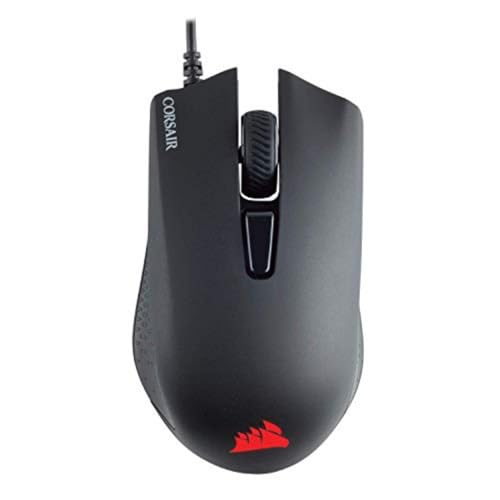
Corsair Harpoon PRO RGB
- Best for: Palm and claw players who want a light ergonomic shell with a high-DPI sensor.
- 12,000 DPI optical sensor
- 6 programmable buttons
- Omron switches rated for more than 20 million clicks
- Weight 85 g, contoured right-handed shape with rubber side grips
Palm and claw players who want a light ergonomic shell with a high-DPI sensor.
Wired only, with six buttons rather than the larger sets found on MMO mice; budget-tier status can shift with deals, so confirm the current listing before buying.
The Harpoon PRO RGB is the light-feeling ergonomic mouse here, and its contoured shell is built for long sessions. At 85 grams it moves fast across the pad, and rubber side grips keep the hold secure when your palm gets warm. The 12,000 DPI optical sensor is the highest ceiling in this guide, and six programmable buttons handle DPI steps and common commands through Corsair iCUE. Omron switches rated for more than 20 million clicks give the main buttons a crisp, consistent feel. It works the moment you plug it in, with no setup needed before the first match.
Watch out for: Wired only, with six buttons rather than the larger sets found on MMO mice; budget-tier status can shift with deals, so confirm the current listing before buying.
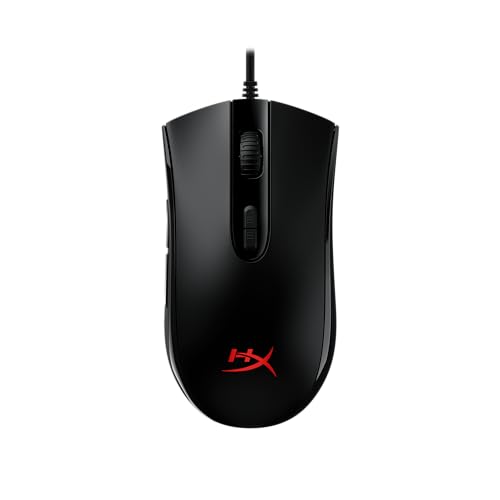
HyperX Pulsefire Core
- Best for: Players who want a comfortable symmetrical mouse with straightforward software and clean tracking.
- Pixart 3327 optical sensor with native DPI up to 6,200
- 7 programmable buttons
- Switches rated for 20 million clicks
- Software-controlled RGB light effects with NGenuity software
Players who want a comfortable symmetrical mouse with straightforward software and clean tracking.
The NGenuity software is heavy on disk space, and the shell suits claw and palm grips more than fingertip grips.
The Pulsefire Core is the comfortable middle ground of this guide, a symmetrical shell that fits a wide range of hands and grips. Its Pixart 3327 sensor tracks cleanly up to 6,200 DPI with no hardware acceleration, so the cursor follows your hand exactly. Seven programmable buttons use switches rated for 20 million clicks, and HyperX NGenuity software handles macros, lighting and DPI, saving everything to onboard memory. The RGB logo and light strip add color without turning the desk into a light show, and the 87-gram body stays easy to move through long sessions.
Watch out for: The NGenuity software is heavy on disk space, and the shell suits claw and palm grips more than fingertip grips.
SteelSeries Rival 3
The Rival 3 is the strongest all-round pick in this guide, pairing the best sensor here with the most durable switches. Its TrueMove Core optical sensor tracks at a true 1-to-1 ratio up to 8,500 CPI, with 300 IPS tracking speed and 35G acceleration, so fast flicks stay accurate. Mechanical switches rated for 60 million clicks keep the same crisp feel over years of play, and three independently controlled RGB zones make it the brightest mouse in the group. Six programmable buttons, onboard memory for five profiles, and a 77-gram shell round out a mouse that punches well above its tier.
Specs
- TrueMove Core optical sensor, 100 to 8,500 CPI in 100 CPI increments
- 300 IPS tracking speed, 35G acceleration, 1,000 Hz polling rate
- 6 programmable buttons with split trigger design
- Mechanical switches rated for 60 million clicks
- 3 independently controlled Prism RGB zones
- Weight 77 g, dimensions 120.6 x 67 x 37.9 mm
- 1.8 m rubber cable, wired USB connection
- Model 62513
Best for: Players who want the best sensor, the longest-lasting switches and the brightest RGB in a budget mouse.
Watch out for: The cable is not braided and cannot be removed, and the shell is right-handed only.
Which One Fits Your Situation
You Want the Brightest Desk Setup
If lighting is the main event, the Rival 3 and the M711 Cobra lead the group. The Rival 3 runs three independently controlled RGB zones that sync with other SteelSeries gear, while the Cobra offers seven effects and five memory profiles that each keep their own color. Either one turns a plain desk into a light show. The G203 adds a third option with its three-zone LIGHTSYNC glow in a smaller shell.
You Play Fast Shooters Most of the Time
Fast shooters reward light shells, clean sensors and quick polling. The Rival 3 pairs a true 1-to-1 sensor with a 77-gram body, and the Harpoon PRO RGB adds a 12,000 DPI ceiling with an ergonomic grip that stays steady during long matches. Both report at 1,000 Hz, so cursor movement stays smooth when you flick between targets. Keep DPI steps simple and let muscle memory do the work.
You Have Small Hands or a Claw Grip
Small hands and claw grips fit best on compact shells. The G203 LIGHTSYNC is the smallest mouse here at 116.6 mm long, and its egg shape lets the fingers curl naturally around it. The Pulsefire Core is the next step up, a symmetrical shell that suits claw and palm grips in medium hands. Try to hold the shape before buying if you can, since a few millimeters change the feel a lot.
You Want the Simplest Setup
If you want to plug in and play, the Harpoon PRO RGB works the moment it connects, with no software needed for basic play. The M711 Cobra is also ready out of the box, with on-the-fly DPI buttons on top. Save the companion apps for later: install them once to set your lighting and buttons, then let onboard memory carry those settings wherever the mouse goes.
Common Mistakes
- Buying a mouse for its top DPI number alone, when the sensor quality at everyday sensitivity matters more.
- Picking a shell that is too large or too small for your hand, then blaming the sensor for missed shots.
- Skipping the companion software, which leaves lighting stuck on the default effect and buttons unmapped.
- Forgetting that a single-color LED is not RGB: check that the mouse lists full-color lighting before buying.
- Choosing a heavy mouse for fast flick shots, then fighting the extra weight in every match.
Frequently Asked Questions
Do budget RGB mice have real full-color lighting?
Yes, when the listing says RGB. Every mouse in this guide offers full-color lighting with millions of colors and several effects, controlled through its companion app. Watch out for mice that only glow in one fixed color, since a single-color LED is not RGB even when the box looks colorful. Check the lighting section of the listing before buying.
Is a wired RGB mouse better than a wireless one at this tier?
At this tier, wired mice usually give you more for your money: a better sensor, more buttons and brighter lighting, with no battery to charge. A wired connection also removes wireless lag from the equation entirely. Wireless mice in the same tier often cut the sensor or the lighting to fit the battery and radio into the shell.
How many DPI do I actually need for gaming?
Most players aim well between 400 and 3,200 DPI, and every mouse here covers that range with room to spare. Higher ceilings like 8,500 or 12,000 DPI are headroom for very high-sensitivity players, not a daily setting. Set your DPI to match your grip and your mousepad space, then adjust in small steps until aiming feels natural.
Can I use these mice for work as well as gaming?
Yes. All five work as everyday mice, with programmable buttons that can hold copy, paste, browser shortcuts or media controls. The lighting can be dimmed or set to a single calm color for office use, and the sensors track smoothly on cloth pads and hard desk surfaces alike. Keep a separate profile for work and one for play.
Related guides
More from Amazon
Programs that pair well with the guide above. Offers and eligibility are set by Amazon and may change.
Free shipping on eligible items, Prime Video and more. Eligible new members can start with a free trial.
Start a Prime free trialAd-free music streaming. Eligible new subscribers can start with a free trial.
Try Music Unlimited freeA Prime membership for ages 18-24 with a trial period. Eligibility is set by Amazon.
See Prime for Young AdultsAudiobooks and podcasts to listen to on the go. Eligible new members can start with a free trial.
Try Audible freeAs an Amazon Associate we earn from qualifying purchases.