
Quick answer: A dimmer switch for LED lights must be LED-rated (labelled “LED+”, “CL”, “ELV” or “LED compatible”), match your circuit (single-pole for one switch, 3-way for two), and have an LED load rating that covers the total wattage of your bulbs, usually 150W LED on a standard wall dimmer. Your bulbs must also say “dimmable.” For 12V or 24V LED strip lights, you need a low-voltage inline PWM dimmer instead of a wall dimmer.
Get those points right and you avoid the problems that make people give up on dimming LEDs: flicker, buzzing, lights that will not turn off fully, or a dimming range that stops at 40%. This guide explains the dimmer types, how to size one correctly, a basic installation outline and how to fix flicker, plus three proven options for common setups.
Disclosure: we may earn a commission when you buy through product cards on this page, at no extra cost to you.
Why LED Lights Need a Different Dimmer
Old dimmers were built for incandescent bulbs, which draw a lot of power and respond smoothly to any reduction in voltage. An LED bulb draws a fraction of that power and contains a small electronic driver that has to interpret the dimmer’s signal. Many older dimmers have a minimum load of 25W to 40W or more. Three or four 9W LED bulbs barely reach that, so the dimmer cannot regulate them steadily, and you get flicker at low levels, buzzing or the lights refusing to turn on below a certain point.
LED-rated dimmers solve this with lower minimum loads, an adjustable low-end trim and circuitry designed for electronic drivers. Most LED-compatible wall dimmers use trailing-edge (reverse-phase) control or a hybrid design, which tends to be quieter and smoother with LEDs than older leading-edge dimmers.
Types of LED Dimmers
| Dimmer type | Works with | Best for | Watch for |
|---|---|---|---|
| LED-rated wall dimmer (CL, LED+, ELV) | Dimmable 120V LED bulbs and fixtures | Replacing a standard wall switch | Check LED wattage rating and 3-way needs |
| Smart dimmer switch | Dimmable LED bulbs and fixtures | Schedules, voice control, remotes | Some need a hub or a neutral wire |
| Plug-in lamp dimmer | Dimmable LED lamp bulbs | Floor and table lamps, renters | Lamps only, not hardwired lights |
| Inline PWM dimmer (12V/24V DC) | Single-color LED strip lights | Under-cabinet, shelf and desk strips | Match voltage and amp rating |
| Built-in app or remote dimming | Smart bulbs and smart strips | Govee, Hue, Kasa and similar | Never add a wall dimmer to smart bulbs |
Trailing edge vs leading edge
Leading-edge dimmers cut the start of each AC wave and were designed for incandescent and magnetic loads. Trailing-edge dimmers cut the end of each wave and generally handle the small electronic loads of LEDs more smoothly and quietly. If a box or spec sheet says “ELV” or “reverse phase,” it is trailing edge. Many mainstream LED dimmers, such as Lutron’s CL line, are engineered to work with both styles of LED driver, so in practice the LED rating and the bulb compatibility list matter more than the label.
How to Choose the Right Dimmer Switch for LED Lights
- Confirm the bulbs are dimmable. The package or base will say “dimmable.” Non-dimmable LEDs on a dimmer will flicker and can fail early.
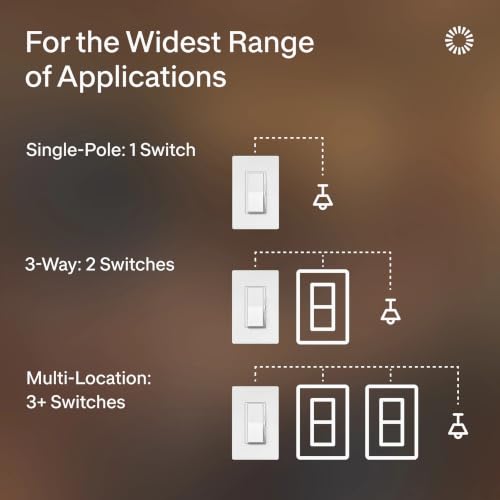
- Count the switches. One switch controlling the light means single-pole. Two switches controlling the same light, such as at the top and bottom of stairs, means 3-way. Many LED dimmers support both.
- Add up the LED wattage. Multiply bulb wattage by the number of bulbs. Use the dimmer’s LED rating, not its incandescent rating. A common LED dimmer is rated for 150W LED and 600W incandescent; 150W covers roughly sixteen 9W bulbs.
- Leave headroom. Staying at or below about 80% of the LED rating keeps the dimmer cooler and more reliable.
- Check the minimum load. If you only run one or two small bulbs, choose a dimmer with a low minimum load or adjustable low-end trim.
- Check for a neutral wire. Many smart dimmers need a neutral (usually a white wire) in the switch box. Older homes often lack one, so pick a “no neutral required” model if needed.
- Check compatibility lists. Lutron, Leviton and others publish lists of bulbs confirmed to work with each dimmer. This is the fastest way to avoid flicker.
Three Good Dimmer Options for Common Setups
Lutron Diva LED+ Dimmer: Best Standard Wall Dimmer

Lutron Diva LED+ Dimmer Switch, Paddle Dimmer, Single Pole/3-way





As an Amazon Associate we earn from qualifying purchases. Product prices and availability are accurate as of the date/time indicated.
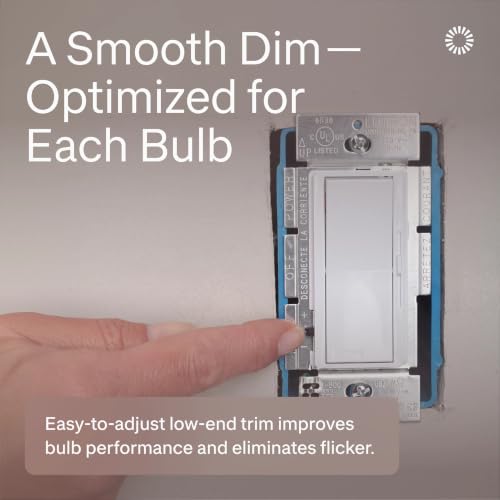
The Diva LED+ is one of the most widely recommended LED dimmers in the US and a safe default for a bedroom, living room or game room. It is designed for dimmable LED and CFL bulbs as well as halogen and incandescent, is commonly rated for 150W of LED and 600W of incandescent load, and works as single-pole or 3-way. A paddle switch handles on and off while a side slider sets brightness, so your chosen level is remembered. An adjustable low-end trim helps remove flicker or dropout at the bottom of the range, and it does not need a neutral wire.
Lutron Caseta Smart Dimmer: Best Smart Dimmer

Lutron Caseta Smart Dimmer Switch (Smart Hub Required), No Neutral Required


As an Amazon Associate we earn from qualifying purchases. Product prices and availability are accurate as of the date/time indicated.
Caseta is the pick if you want schedules, voice control and remotes without changing your bulbs. It replaces a standard switch, does not require a neutral wire, and connects to the Lutron Caseta Smart Hub (sold separately or in kits), which adds app control and integration with Alexa, Google Assistant and Apple Home. Like the Diva LED+, it is rated for 150W of dimmable LED and 600W of incandescent. Adding a Pico remote creates a 3-way style setup without running new wires. It is a smart choice for a streaming room, where you can set a scene that drops the overhead light when you go live.
Litever Inline LED Dimmer: Best for 12V/24V LED Strips

Litever LED Dimmer Switch,PWM Stepless Dimming, DC12/24V 3A, Black


As an Amazon Associate we earn from qualifying purchases. Product prices and availability are accurate as of the date/time indicated.
Single-color LED strips and under-cabinet tape lights usually run on 12V or 24V DC from a plug-in power supply, so a wall dimmer is the wrong tool. A small inline PWM dimmer plugs between the power supply and the strip and gives stepless dimming with a knob. This Litever unit supports DC 12V/24V at up to 3A. Check that the total current of your strip stays below that rating; a 16-foot strip drawing 24W at 12V uses about 2A. It is ideal for desk, shelf and monitor backlight strips.
How to Install an LED Dimmer Switch (Overview)
This outline is for a typical single-pole replacement. Always follow the instructions that come with your dimmer, and hire a licensed electrician if you are not comfortable with household wiring or your local code requires it.
- Turn off the breaker for the circuit, then confirm the power is off with a non-contact voltage tester.
- Remove the wall plate and old switch. Pull the switch out of the box without disconnecting anything yet, and photograph the wiring.
- Identify the wires. Typically there is a line (hot) wire, a load wire to the light, a bare or green ground, and in some boxes a white neutral bundle at the back.
- Connect the dimmer as its diagram shows: ground to green, and the line and load wires to the dimmer leads or terminals. Connect the neutral only if the dimmer requires it.
- Fold the wires in and mount the dimmer. Fit the wall plate.
- Restore power and test across the full range. If the light flickers at the bottom, adjust the low-end trim per the manual.
For 3-way circuits, follow the dimmer’s 3-way diagram carefully. Many LED dimmers require a specific companion switch or remote on the other end.
Fixing LED Flicker and Buzzing
| Symptom | Likely cause | Fix |
|---|---|---|
| Flicker at low brightness | Load below the dimmer’s minimum or low-end set too low | Raise the low-end trim, add a bulb, or use a lower-minimum dimmer |
| Lights will not turn fully off or glow faintly | Leakage through the dimmer on a small LED load | Use an LED-rated dimmer with neutral, or a different bulb |
| Buzzing or humming | Old leading-edge dimmer or incompatible bulbs | Switch to an LED-rated dimmer and listed bulbs |
| Dimming range feels short | Bulb driver and dimmer poorly matched | Adjust trim and check the maker’s compatibility list |
| Random flashing | Non-dimmable bulbs or overloaded dimmer | Replace with dimmable bulbs and confirm total wattage |
Mixing bulb brands on one dimmer is another common cause of uneven dimming, because each driver responds slightly differently. Use identical bulbs on each circuit.
Dimming LED Strip Lights and Smart Bulbs
Not every LED should be dimmed from the wall. Single-color low-voltage strips use an inline PWM dimmer or an RF remote dimmer. RGB and RGBIC strips already include a controller with brightness built in; adding a separate dimmer can confuse the controller. Smart bulbs dim through their app or voice assistant, so leave them on a regular switch that stays on. A wall dimmer feeding a smart bulb causes flicker and can damage it. If you want a physical control for smart bulbs, use the brand’s wireless remote or a smart button instead.
Some LED strip power supplies are themselves “dimmable drivers” designed to sit behind a wall dimmer. Those are common in permanent cabinet or cove lighting. Check the driver label: it must specifically list compatibility with phase-cut (TRIAC or ELV) dimmers.
FAQ
Can I use any dimmer switch with LED lights?
No. Use a dimmer rated for LEDs, and make sure the bulbs are labelled dimmable. Older incandescent dimmers often have minimum loads too high for LEDs, which causes flicker, buzzing or a limited dimming range. An LED-rated model with low-end trim adjustment solves most of these issues.
How many LED bulbs can I put on one dimmer?
Add up the LED wattage and keep it within the dimmer’s LED rating, ideally below about 80% of it. A dimmer rated 150W LED can technically handle about sixteen 9W bulbs, but aiming for around 120W leaves comfortable headroom. Always use the LED rating, not the larger incandescent rating.
Why do my LED lights flicker on a dimmer?
The most common causes are non-dimmable bulbs, an old non-LED dimmer, a total load below the dimmer’s minimum, or a low-end setting that is too low. Confirm the bulbs are dimmable, switch to an LED-rated dimmer, and adjust its low-end trim. Checking the dimmer maker’s compatible bulb list also helps.
Do LED dimmer switches need a neutral wire?
Many standard LED dimmers, including the Lutron Diva LED+ and Caseta smart dimmer, do not need one. Many Wi-Fi smart dimmers do. Open the switch box with the power off and look for a bundle of white wires at the back. If there is none, choose a “no neutral required” model.
Does dimming LED lights save energy?
Yes. Dimming an LED reduces the power it draws, so lower brightness uses less electricity. The savings are smaller in absolute terms than with incandescent bulbs because LEDs are already efficient, but dimming also reduces heat in the driver, which can help bulbs last longer.
Can I dim LED strip lights with a wall switch?
Only if the strip uses a dimmable driver designed for wall dimmers. Most plug-in 12V or 24V strips need an inline PWM dimmer or the remote that came with them. RGB strips should be dimmed through their own controller or app.
Bottom Line
The right dimmer switch for LED lights is LED-rated, matches your single-pole or 3-way circuit, and covers your total LED wattage with room to spare. For most rooms, a Lutron Diva LED+ is the dependable default; a Caseta smart dimmer adds schedules and voice control; and plug-in 12V or 24V strips need an inline PWM dimmer instead of a wall switch. Pair any of them with dimmable bulbs from the maker’s compatibility list and flicker becomes a non-issue.
Sources
- Lutron product specifications for Diva LED+ and Caseta smart dimmers
- Leviton guidance on LED dimming and dimmer selection
- U.S. Department of Energy information on LED lighting and dimming
- National Electrical Code guidance on switch box wiring (consult a licensed electrician)
Last updated: October 10, 2026


