
The SteelSeries QcK XXL is the most frequently named all-round gaming desk mat in 2026 reviews, while the Razer Gigantus V2 XXL suits buyers who want a soft surface on a budget, the Corsair MM700 RGB Extended suits those who want lighting and a USB hub, and the Artisan Hien suits competitive players who want fast, dry glide.
As an Amazon Associate we earn from qualifying purchases at no extra cost to you.

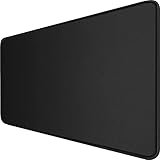
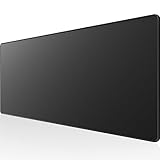
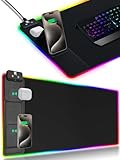
Top 3 picks at a glance
What a desk mat changes
A desk mat is a large pad that covers the area under both the keyboard and mouse. Compared with a small mouse pad it gives a consistent tracking surface, stops the mouse hitting the edge during low-sensitivity play, protects the desk from scuffs and keeps the keyboard from sliding. Choosing one comes down to five things: size, surface texture, base grip, thickness and extras such as lighting or ports.
Size
Measure the desk and the space between the monitor stand and the front edge. Extended mats commonly measure around 900mm by 400mm, which fits many standard desks. The Corsair MM700 RGB Extended, for example, is listed by the maker at 930mm by 400mm. Larger formats sold as 3XL cover wide desks or two-monitor setups. A mat that hangs over the front edge can catch the wrist, so leave a little margin.
Surface
Cloth surfaces are the norm. Softer, thicker cloth gives control and a slower glide; hard or smooth surfaces glide faster. The pad that suits a low-sensitivity arm-aim player may not suit someone who flicks with the wrist, so think about how you play.
Base and thickness
Natural or synthetic rubber bases resist slipping. Maker listings give thickness in millimetres; around 4mm is common for cloth mats, with thinner options for people who prefer less wrist elevation.
Extras
RGB lighting, USB hubs and stitched edges raise the tier. Stitched edges are generally credited with helping prevent fraying on mats that sit under keyboards.
At a glance
| Mat | Best for | Key stated details | Limits |
|---|---|---|---|
| SteelSeries QcK XXL | All-round play, esports | Micro-woven cloth surface, non-slip rubber base, available in several sizes including a 3XL | Plain looks; surface wears with heavy use over time |
| Razer Gigantus V2 XXL | Value, soft feel | Reviewers name it the value pick; soft cloth with a rubber base | Softer surface means slower glide |
| Corsair MM700 RGB Extended | Lighting and tidy cables | 930 x 400 x 4mm, micro-weave cloth, natural rubber base, three-zone RGB, two-port USB hub, detachable USB-C cable | Needs a USB connection to the PC; more parts to fail than a plain pad |
| Artisan Hien (XL, Soft) | Competitive FPS, fast dry glide | Reviewers describe a fast, dry-feeling surface | Premium tier; less forgiving for beginners |
| iCasso XXL | Desk used for work and gaming | DeskRated notes a smooth lycra surface at about 35.4 x 15.7 inches | Smooth surface may suit some sensors less than others |
| Corsair MM350 Pro Extended XL | Spill-prone desks | Budget Loadout cites a spill-resistant coating and stitched edges | Coated surface feels different from raw cloth |
| KTRIO Large | Tightest budgets | Talk of the House names it the budget pick | Basic build quality; may curl at the edges |
Budget tiers
Budget
Basic stitched cloth mats such as the KTRIO Large cover the essentials: a smooth surface and a rubber base. The trade-off is durability and edge quality. Entry-tier options are a fair choice for students and anyone new to large mats.
Mid-range
The QcK XXL, Gigantus V2 XXL and MM350 Pro occupy this tier. They offer better stitching, better rubber bases and well-known surfaces. For most buyers this is the sweet spot between price and longevity.
Premium
The Corsair MM700 RGB Extended and Artisan Hien sit here for different reasons: one adds lighting and USB ports, the other offers a specialist surface. If you rely on a feature such as a USB hub, the extra cost makes sense; otherwise a mid-range pad delivers most of the benefit.
Fit and compatibility notes
- Mouse sensors: modern optical sensors work on cloth, but some very glossy or reflective surfaces can cause tracking issues. Cloth and textured pads are the safest.
- Keyboard fit: a full-size keyboard and mouse need roughly 700mm of width together. Compact keyboards leave more room for the mouse.
- Glass and uneven desks: thick cloth mats smooth out slightly uneven surfaces, while thin mats do not.
- USB-powered mats: lit mats need a free USB port; the MM700 uses a detachable USB-C cable and a pass-through hub.
- Cleaning: most cloth mats can be hand washed with mild soap, but follow the maker instructions, and let rubber bases dry flat. Mats with electronics should not be soaked.
- Standing desks: large mats can shift when a desk moves; rubber bases help, but check that cables do not catch.
Pick X if…
| If you… | Pick | Reason |
|---|---|---|
| Want one dependable choice | SteelSeries QcK XXL | Most outlets name it best overall |
| Want soft comfort for less | Razer Gigantus V2 XXL | Value pick with a softer surface |
| Want lighting and extra ports | Corsair MM700 RGB Extended | Three-zone RGB and a two-port hub |
| Play fast, low-sensitivity FPS | Artisan Hien | Fast glide that competitive players favor |
| Eat and drink at the desk | Corsair MM350 Pro Extended XL | Spill-resistant coating |
| Use the desk for office work too | iCasso XXL or Logitech Studio Series | Smoother, subtler look |
Alternatives
- Leather or felt desk pads: options such as the Grovemade Desk Pad suit offices and look good, but they are not built for fast mouse glide.
- Hard-surface pads: glass or plastic pads offer very fast movement and last long, but are noisy and require a compatible sensor.
- Separate keyboard rest and small mouse pad: a good option for small desks where a full mat will not fit.
Matching the mat to the way you play
Sensitivity and grip style change which mat feels right. Players who use low sensitivity and sweep the whole forearm across the desk need long, uninterrupted surface, so extended and 3XL formats help. Players who use higher sensitivity and small wrist movements can get by with a smaller mat, and might prefer a pad that stays out of the way of a keyboard. Palm-grip users often like softer, thicker surfaces for comfort, while claw and fingertip users who make fast flicks often prefer smoother, faster surfaces.
Weight and feet matter as well. Lightweight mice with smooth feet glide quickly on hard or smooth surfaces and can feel slippery on them, so lighter mice sometimes pair better with a textured or softer cloth that adds control. Heavier mice can feel sluggish on thick soft cloth. If you are unsure, a mid-range cloth mat with a medium texture is the safer first purchase.
Care, wear and lifespan
- Edges: stitched edges slow fraying. Unstitched mats tend to curl or peel at the corners over time, which is why reviewers generally steer buyers toward stitched models.
- Surface wear: cloth fibers flatten where the mouse travels the most. A mat that is washed gently and kept free of dust keeps a consistent surface for longer.
- Unrolling and flattening: mats shipped in tubes may arrive with a curve. Leave them flat under light weight, or follow the maker instructions, before judging them.
- Desk finish: rubber bases can leave marks on some lacquered desks; a clean, dry surface helps. If you are worried, try a small corner first.
- Sweat and oils: palms and forearms leave oils on the surface. Periodic cleaning keeps the glide steady.
Common mistakes
The most common mistake is buying on size alone and ignoring the surface. A very large mat with a surface that does not suit the mouse feels worse than a smaller one that does. The second is overlooking desk thickness and edge shape: curved or beveled desk edges can leave a large mat hanging or lifting. The third is buying a lit mat and then finding the USB port is out of reach. Measure the cable run before buying a model with a USB connection, such as the Corsair MM700, whose maker lists a detachable USB-C cable and a two-port hub. Finally, buyers sometimes ignore the keyboard: a mat that is very soft can make a tall keyboard feel unstable, while a firm mat gives a better typing platform.
Frequently Asked Questions
What size desk mat should I buy?
Measure the free width and depth of your desk and leave a small margin. Extended mats around 900mm wide fit many desks, while 3XL formats fit larger desks and multi-monitor layouts.
Is a cloth or hard surface better for gaming?
Cloth is the common choice because it balances glide and control and is quiet. Hard surfaces are faster but noisier, and they suit players who already know they prefer that feel.
Do RGB desk mats affect mouse tracking?
Reviewers note that on mats such as the MM700 the lighting sits around the edge, so it should not interfere with sensor tracking. Check the sensor of your mouse if you notice jitter.
How do I stop a desk mat from sliding?
Look for a textured rubber base, and keep both the desk and the underside clean. A mat that overhangs the desk edge more than a little may also shift.
How do I clean a desk mat?
Follow the maker guidance. In general, cloth mats are cleaned by hand with mild soap and air-dried flat. Mats with lighting or USB parts should only be wiped, not soaked.
Is a bigger mat always better?
No. A mat bigger than the desk can hang off the edge and lift at the corners. Choose a size that fits the desk and covers keyboard and mouse movement.
Related guides
More from Amazon
Programs that pair well with the guide above. Offers and eligibility are set by Amazon and may change.
Free shipping on eligible items, Prime Video and more. Eligible new members can start with a free trial.
Start a Prime free trialAd-free music streaming. Eligible new subscribers can start with a free trial.
Try Music Unlimited freeA Prime membership for ages 18-24 with a trial period. Eligibility is set by Amazon.
See Prime for Young AdultsAudiobooks and podcasts to listen to on the go. Eligible new members can start with a free trial.
Try Audible freeAs an Amazon Associate we earn from qualifying purchases.


