
For most PS5 players who want a lever-style arcade stick, the officially licensed Hori Fighting Stick Alpha is the usual mid-range answer, the Victrix Pro FS is the premium all-metal choice, the Hori Fighting Stick Mini fits tight budgets and small desks, and leverless (hitbox-style) fans are pointed toward the Victrix Pro KO or the Razer Kitsune. Sony’s own wireless FlexStrike is the option to look at if you travel to locals and want to cut the cable. Rankings vary between outlets, and many online lists are affiliate-style, so treat them as a rough guide and check each maker’s compatibility notes.
As an Amazon Associate we earn from qualifying purchases at no extra cost to you.

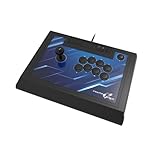


Our Top Picks
Top 3 picks at a glance
Lever or Leverless First
A traditional arcade stick uses a lever, usually a Sanwa or Seimitsu part, with an eight-way gate. A leverless controller replaces the lever with four direction buttons. Reviewers report that leverless layouts give fast directional inputs but need roughly two to four weeks of adjustment if you come from a lever. Lever sticks feel familiar in arcades and have more mod options, while leverless boards are lighter and more compact. Neither is better for every game, so choose by what feels natural in your hands.
Fight Sticks at a Glance
| Stick | Type | Stated features | Best for | Limits |
|---|---|---|---|---|
| Hori Fighting Stick Alpha (PS5) | Lever | Officially licensed by Sony, Hayabusa lever and buttons, tournament lock, swappable artwork, 3.5 mm headphone jack, touchpad, works with PS5, PS4 and PC over USB-A | Most players wanting a tournament-grade mid-range stick | Square gate only, no extra gate included |
| Victrix Pro FS | Lever (leverless version also sold) | Wired, single-piece aluminum, Sanwa Denshi stick and buttons, PS5 and PC, about 3.5 kg | Premium build and long-term use | Heavy, premium tier |
| Victrix Pro KO | Leverless | PCGamesN’s pick for hitbox fans | Players moving to leverless | Premium tier |
| Razer Kitsune | Leverless | Wired, USB-C to USB-A cable, touchpad, Chroma lighting, about 0.82 kg, PS5 and PC only | Low-profile hitbox users | No PS4 support |
| Hori Fighting Stick Mini | Lever | Officially licensed for PS5 as reported | Budget and small spaces | Fewer premium parts |
| Sony FlexStrike | Wireless | PS5 and PC as reported, travel-friendly | Locals and travel | Few details confirmed in sources reviewed |
| Nacon Daija | Lever | PCGamesN names it best overall; TechRadar notes it shares hardware with the Pro FS | Pro FS hardware for less | Confirm PS5 version before buying |
| Qanba Q7 Obsidian 2 | Lever | Eneba’s pick | Alternative to Hori | Less detail available |
Details come from the makers’ listings where named and from reviewer roundups where attributed. PS5 support varies by version and revision, so confirm the exact PS5-labelled model.
Picks by Need
Hori Fighting Stick Alpha for most players
Reviews describe the Alpha as a tournament-grade mid-tier stick, with official Sony licensing, native PS5 support and a tool-less top panel. The listing names Hori Hayabusa parts, a clickable touchpad, slider switches for key lock and for PS5, PS4 or PC mode, a 3.5 mm headphone jack and swappable artwork. Weight is reported inconsistently, from about 2.7 kg to 3.3 kg, so check the maker’s page for the version you pick. Reviewers also note a firm price for its tier. Its limit is the single square gate.
Victrix Pro FS for premium build quality
The Pro FS is wired, made from a single piece of aluminum, and uses Sanwa Denshi parts. TechRadar called it one of the best fight sticks ever made. It weighs about 3.5 kg, which keeps it planted on a desk. It works with PS5 and PC. TechRadar also notes the Nacon Daija has the same hardware inside for less, so compare the two.
Hori Fighting Stick Mini for budgets
A roundup names the Mini as the best budget pick, with official Sony licensing for PS5. It suits players who want to try a stick without a large investment or who have limited space.
Victrix Pro KO and Razer Kitsune for leverless play
PCGamesN picks the Pro KO for hitbox fans, and a guide names the Kitsune as the Pro KO’s main rival. Razer lists the Kitsune as wired over USB-C to USB-A, about 0.82 kg, with a touchpad and Chroma lighting, working with PS5 and PC. It has no PS4 compatibility. One guide calls it the best low-profile hitbox.
Sony FlexStrike for wireless travel
A comparison article describes the FlexStrike as a wireless stick for PS5 and PC, with PC support phased in after launch, and says Sony’s materials do not confirm PS4 support. Few other details are confirmed in the sources reviewed, so read Sony’s own page for battery, buttons and gate information.
Compatibility and Fit Notes
- PS5 licensing: Official licensed sticks work natively on PS5 and usually in PS4 mode too. Unlicensed or older PS4 sticks may need a pass-through adapter for PS5 games, so confirm support.
- PS4 games on PS5: Some sticks support PS4 titles on the PS5 natively, others only PS5 titles. Read the box or manual.
- Connection: Most sticks are wired. Longer cables help in living rooms, and wireless sticks need charging.
- Weight: Heavy sticks stay put on a lap or table, lighter ones travel easily.
- Tournament rules: Check event rules on allowed parts and modes, especially for leverless controllers.
- Mods: Lever sticks usually let you replace the gate, lever and buttons. Check that parts are standard Sanwa or Seimitsu sizes.
Budget Tiers
- Budget: Hori Fighting Stick Mini, other compact sticks.
- Mid-range: Hori Fighting Stick Alpha, Qanba Q7 Obsidian 2, Nacon Daija.
- Premium: Victrix Pro FS, Victrix Pro KO, Razer Kitsune and Sony FlexStrike.
Pick X If…
| Pick this | If you… |
|---|---|
| Hori Fighting Stick Alpha | want an official, tournament-grade lever stick without going premium |
| Victrix Pro FS | want a heavy metal lever stick that lasts for years |
| Hori Fighting Stick Mini | are new to sticks or short on space and money |
| Victrix Pro KO | want a premium leverless board |
| Razer Kitsune | want a low-profile leverless controller for PS5 and PC |
| Sony FlexStrike | want a wireless stick for events and travel |
Alternatives
- Nacon Daija: Same hardware as the Pro FS per TechRadar, for less.
- Qanba Q7 Obsidian 2: Eneba’s pick.
- A standard controller with a lever-free layout setup: Not a stick, but a reasonable way to test before you buy.
Setup and Layout Tips
Before the first session, decide where the stick will live. Many players rest a heavy stick on a desk or table, while others use a lap pad or a dedicated stand. A heavier chassis such as the roughly 3.5 kg Pro FS stays still without help, whereas lighter boards benefit from rubber feet or a non-slip mat. Check the cable length and the console’s USB port position, since some sticks have a fixed-length cable and a short run can restrict where you sit.
Next, look at the button layout. Six-button and eight-button layouts are common, and some games need extra buttons for macros or system functions. Tournament lock switches stop the Home and options buttons from interrupting a match, which is useful in competitive settings. If you use a leverless board, consider a layout that suits your hand size, and give yourself time to adjust: reviewers say two to four weeks is typical. Finally, update firmware if the maker offers it, and confirm that any mode switch is set to PS5 before launching a game, since a wrong platform setting is a common cause of an unrecognized controller.
Care matters too. Keep the lever boot and buttons free of dust and food crumbs, store the stick away from direct sun, and avoid winding the cable tightly around the case. Lever sticks use replaceable springs and microswitches, so a worn part can usually be swapped for a few minutes of work instead of replacing the whole stick, which is a real advantage over sealed designs. If a button begins to double-register, clean around it first and consult the maker’s support page before opening the case, since opening some units can affect warranty coverage.
Frequently Asked Questions
Lever or leverless, which should I buy?
Lever sticks feel familiar and have many replaceable parts. Leverless boards use buttons for directions and are often more compact. Reviewers say leverless players need about two to four weeks to adjust coming from a lever.
Will a PS5 fight stick work on PC?
Many do. The Hori Alpha lists PS5, PS4 and PC, the Victrix Pro FS and Razer Kitsune list PS5 and PC. Check the model’s compatibility list because some features differ by platform.
Do I need an officially licensed stick?
Not required, but licensed sticks like the Hori models are designed for native PS5 support. Unlicensed sticks can have compatibility limits on console.
Is the Victrix Pro FS worth its price over the Hori Alpha?
The Pro FS offers an aluminum body and Sanwa parts. The Alpha is a cheaper licensed stick with solid build and features. If budget is not an issue and you want a heavy, premium stick, the Pro FS fits.
Can I replace parts?
Most lever sticks let you change the gate, lever and buttons. The Alpha includes a tool-less top panel as reported, but only a square gate. Look for standard Sanwa or Seimitsu part sizes.
What about latency?
Wired sticks avoid wireless concerns. Wireless models like the FlexStrike add convenience, so read reviews for latency notes before using one in tournaments.
Related guides
More from Amazon
Programs that pair well with the guide above. Offers and eligibility are set by Amazon and may change.
Free shipping on eligible items, Prime Video and more. Eligible new members can start with a free trial.
Start a Prime free trialAd-free music streaming. Eligible new subscribers can start with a free trial.
Try Music Unlimited freeA Prime membership for ages 18-24 with a trial period. Eligibility is set by Amazon.
See Prime for Young AdultsAudiobooks and podcasts to listen to on the go. Eligible new members can start with a free trial.
Try Audible freeAs an Amazon Associate we earn from qualifying purchases.


