
Our Short List of 3

- Best for: first-time trackball users and small desks
- Control: thumb-operated trackball
- Sensor: Logitech Advanced Optical Tracking, adjustable 400 to 2000 DPI
- Buttons: 5
- Connectivity: Bluetooth Low Energy and USB receiver
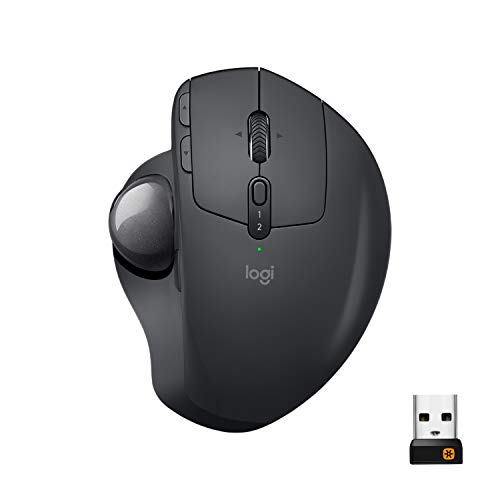
- Best for: long workdays and anyone managing wrist or forearm strain
- Control: thumb-operated trackball
- Tilt: adjustable hinge, 0 or 20 degrees
- Buttons: 8, with a precision scroll wheel that tilts
- Connectivity: Bluetooth and Unifying USB receiver, pairs with 2 computers

- Best for: precision editing, large monitors, and left-handed users
- Control: finger-operated trackball, ambidextrous design
- Ball: 55mm
- Tracking: DiamondEye optical technology
- Scrolling: Scroll Ring around the ball
All 5 Picks at a Glance
| Product | Specs | Action |
|---|---|---|
| Logitech ERGO M575 Wireless Trackball |
| Check price on Amazon |
| Logitech MX Ergo Wireless Trackball |
| Check price on Amazon |
| Kensington Expert Mouse Wireless Trackball |
| Check price on Amazon |
 ELECOM HUGE Trackball Mouse (Wired) |
| Check price on Amazon |
 ELECOM DEFT PRO Trackball Mouse |
| Check price on Amazon |
The real decision with a trackball is which digits do the work, thumb or fingers, because that choice sets your learning curve, your precision ceiling, and how your hand feels after a long session. It also decides how much desk you get back: the device never travels, so a trackball keeps working on a crowded gaming desk, a narrow keyboard tray, or even the arm of a couch where a normal mouse would run out of room.
This guide is for three kinds of buyers: players of strategy, simulation, and MMO titles who want fine cursor control without sweeping arm movements; desk workers whose wrists complain after hours of dragging a conventional mouse; and anyone whose setup leaves no space for a mousepad. Every pick below is a genuine trackball sold on Amazon, selected from the names and specifications printed on its own product page, with both thumb and finger designs covered.
Our Top Picks
Top 3 picks at a glance
Quick Picks
As an Amazon Associate we earn from qualifying purchases
| Product | Best for | Key spec from title |
|---|---|---|
| Logitech ERGO M575 | First-time trackball users on tight desks | Easy thumb control with Bluetooth and USB |
| Logitech MX Ergo | Long workdays with wrist discomfort | Adjustable tilt angle from 0 to 20 degrees |
| Kensington Expert Mouse Wireless | Precision work across large monitors | 55mm ball with DiamondEye optical tracking |
| ELECOM HUGE Trackball | Big hands wanting maximum buttons | 52mm ball, 8-button function, palm rest attached |
| ELECOM DEFT PRO | Switching between desk PC and laptop | Wired, wireless, and Bluetooth connections |
How to Choose
Thumb Ball or Finger Ball
Placement of the ball is the fork in the road. A thumb trackball such as the Logitech M575 keeps the familiar mouse shape, puts the ball under your thumb, and leaves your fingers on the buttons, so most people feel competent within a day or two. A finger trackball like the Kensington Expert Mouse centers a much larger ball under your index and middle fingers, which gives finer control for small movements and suits people whose thumbs tire quickly. Neither style is objectively better; match the ball to the digits you can move for hours without strain.
Ball Size and Bearing Feel
Bigger balls carry more momentum and cover a large screen with less effort, while smaller balls feel quicker to start and stop. The 55mm ball in the Kensington Expert Mouse and the 52mm ball in the ELECOM HUGE sit at the large end, and that mass is what makes slow, deliberate cursor placement feel steady. Bearings matter too: smooth support points under the ball keep it gliding instead of scratching. Whatever size you pick, plan on popping the ball out regularly, because lint on the bearings is the main cause of a trackball feeling gritty.
Connection and Battery Style
Decide how the trackball talks to your PC before falling for a shape. Bluetooth models pair with laptops without taking a port, receiver models tend to wake instantly and suit a fixed gaming desk, and wired models such as the ELECOM HUGE never need charging at all. Battery style follows the same split: the M575 runs for months on a single AA cell, the MX Ergo and DEFT PRO recharge instead, and the DEFT PRO hedges every bet by offering wired, 2.4GHz wireless, and Bluetooth in one body. Multi-device users should look for models that remember more than one host.
Buttons, Scrolling, and Software
Trackballs earn their keep in strategy games and office apps through extra buttons, so count them before buying. Five buttons cover back, forward, and a spare macro for most people; the eight-button ELECOM models go further for MMO keybinds or editing shortcuts. Scrolling differs sharply by design: thumb balls use a normal wheel, the Kensington Expert Mouse wraps a scroll ring around its ball, and the SlimBlade-style twist gesture is absent here. Finally, check the companion software for your operating system, because remapping and pointer acceleration settings live there, and support for newer systems is not guaranteed on older models.
The 5 Best Options
Logitech ERGO M575 Wireless Trackball
- Best for: first-time trackball users and small desks
- Control: thumb-operated trackball
- Sensor: Logitech Advanced Optical Tracking, adjustable 400 to 2000 DPI
- Buttons: 5
- Connectivity: Bluetooth Low Energy and USB receiver
first-time trackball users and small desks
right-handed shape only, and there is no left-side model, so confirm your grip before ordering
The M575 is the trackball most people should try first. Its sculpted shell holds your hand still while your thumb rolls the ball, so it suits players moving over from a standard mouse and anyone whose desk has shrunk under monitors and speakers. It connects by Bluetooth or the included USB receiver, runs for months on one AA battery, and needs no software to start working. For strategy titles, base building, and everyday desktop work, it delivers the trackball benefit with the shallowest learning curve in this roundup.
Logitech MX Ergo Wireless Trackball
- Best for: long workdays and anyone managing wrist or forearm strain
- Control: thumb-operated trackball
- Tilt: adjustable hinge, 0 or 20 degrees
- Buttons: 8, with a precision scroll wheel that tilts
- Connectivity: Bluetooth and Unifying USB receiver, pairs with 2 computers
long workdays and anyone managing wrist or forearm strain
the tilt plate adds real weight, so check the listed dimensions against your keyboard tray
The MX Ergo is the premium thumb ball, built for people who spend whole workdays at the cursor. Its metal hinge plate lets the body sit flat or tilt to 20 degrees, which rotates your forearm toward a handshake position and takes pressure off the wrist. The rechargeable battery lasts up to four months per charge, a precision mode button slows the cursor for detail work, and Logitech Flow lets one trackball drive two computers. Gamers who also edit video or wrangle spreadsheets will feel the upgrade most.
Kensington Expert Mouse Wireless Trackball
- Best for: precision editing, large monitors, and left-handed users
- Control: finger-operated trackball, ambidextrous design
- Ball: 55mm
- Tracking: DiamondEye optical technology
- Scrolling: Scroll Ring around the ball
precision editing, large monitors, and left-handed users
the body is large and flat, so measure your desk space and expect a learning period if you are new to finger balls
The Expert Mouse is the classic finger ball that offices have used for decades, now in a wireless version. A large 55mm ball sits in the center of an ambidextrous body, worked by your index and middle fingers, with a scroll ring around the ball that makes long documents and timelines easy to move through. DiamondEye optical tracking keeps small movements honest, four buttons can be customized in KensingtonWorks, and the detachable wrist rest supports your hand during slow precision work such as photo masking or CAD cleanup.
ELECOM HUGE Trackball Mouse (Wired)
- Best for: big hands, fixed gaming desks, and players who want many buttons
- Control: finger-operated trackball
- Ball: 52mm red ball
- Buttons: 8
- Resolution: 500, 1000, or 1500 DPI, switchable
big hands, fixed gaming desks, and players who want many buttons
it is wired only and genuinely large, so confirm the footprint fits beside your keyboard
The HUGE lives up to its name: a 52mm red ball, an attached palm rest, and a wide body that supports your whole hand while your fingers steer. Eight buttons, including side buttons worked by your ring and pinky fingers, give strategy and MMO players plenty of keybind space without moving the hand. Because it is wired, there is no battery to manage and no wireless dropout to blame, which suits a fixed battlestation. The ball rides on synthetic ruby bearings sized at 2.5mm, a detail ELECOM lists for smooth, low-friction rolling.
ELECOM DEFT PRO Trackball Mouse
- Best for: users who switch between a desktop and a laptop
- Control: finger-operated trackball
- Buttons: 8
- Resolution: 500, 1000, or 1500 DPI, switchable
- Connectivity: wired USB, 2.4GHz wireless, and Bluetooth
users who switch between a desktop and a laptop
full button customization needs ELECOM software, so check current support for your operating system before relying on remapping
The DEFT PRO is the flexible finger ball for people who split time between machines. One body connects three ways, wired USB, 2.4GHz wireless, or Bluetooth, so it can stay cabled at a gaming PC all week and pair with a laptop on the weekend. The shape is smaller than the HUGE, with the ball placed for index-finger control and eight buttons arranged around it, including a tilt scroll wheel. A sensitivity switch steps through three DPI levels, which helps when you jump between a desktop monitor and a laptop screen.
Which One Fits Your Situation
Your wrist aches after long sessions
Start with the Logitech MX Ergo. The tilting hinge is the feature that matters here: raising the body to 20 degrees turns your forearm toward a neutral handshake angle, and the stationary design removes the repeated dragging that aggravates many wrists. The rechargeable battery and two-computer pairing also suit a work desk that doubles for gaming at night.
Your desk has no room for a mousepad
Pick the Logitech ERGO M575. It needs only the space it sits on, works on a couch arm or a crowded desk, and its AA battery lasts so long that charging cables never enter the picture. The thumb layout feels familiar fast, which makes it the easiest recommendation for a first trackball.
You edit, design, or span huge monitors
Choose the Kensington Expert Mouse Wireless. The big 55mm ball and scroll ring were made for slow, exact work and fast travel across wide screens, and the ambidextrous shape lets you swap hands during long projects. The included wrist rest helps when your hand hovers over the ball for hours of masking, trimming, or layout work.
You want macros without giving up your keyboard hand
Look at the ELECOM HUGE if your setup is permanent, or the DEFT PRO if it is not. Both offer eight buttons for game keybinds and editing shortcuts. The HUGE adds a palm rest and the bigger ball for a fixed desk, while the DEFT PRO trades size for three connection modes that follow you between machines.
Common Mistakes
- Expecting FPS aim to transfer instantly: trackballs reward strategy, simulation, and desktop play right away, but flick shots take weeks of retraining, so judge the switch after a fair trial.
- Skipping ball cleaning: a trackball that feels scratchy usually has lint on its bearings, not a failing sensor, and popping the ball out for a wipe takes seconds.
- Leaving pointer acceleration at defaults: trackball control improves a lot once sensitivity and acceleration are tuned in the companion software or your operating system settings.
- Buying the wrong hand shape: most thumb balls are right-handed only, while centered finger balls are ambidextrous, so left-handed buyers should check the listing shape carefully.
- Ignoring footprint: large finger balls such as the ELECOM HUGE occupy more desk than a gaming mouse, and measuring first prevents a return.
Frequently Asked Questions
Can you actually game with a trackball?
Yes, within the right genres. Turn-based strategy, city builders, MMOs, and simulation games play well because they reward precise placement over raw flick speed, and extra buttons help with keybinds. Competitive shooters are the hard case: a trackball can work there, but expect a long adjustment period before your aim feels natural again.
How long does a trackball take to learn?
Most people handle everyday desktop work comfortably within a few days. Fine control, such as selecting small UI elements or editing carefully, usually settles after one to two weeks of daily use. Thumb balls tend to feel familiar sooner because the hand position matches a normal mouse, while big finger balls take longer but offer a higher precision ceiling.
Do trackballs need much maintenance?
Very little. The ball lifts out by hand on these models, and wiping the ball plus the small bearing points inside the socket restores smooth rolling. Doing that every week or two prevents the gritty feeling that builds up from dust and skin oils. There are no pads to replace and no mouse feet to wear down.
Should small hands choose a thumb or finger trackball?
Thumb models such as the M575 keep a compact, mouse-like footprint that smaller hands usually find easier to reach across. Large finger balls spread the controls over a wider body, which can stretch small hands. If you are between sizes, the DEFT PRO is the middle ground: a finger ball in a noticeably smaller shell than the ELECOM HUGE.
Related guides
More from Amazon
Programs that pair well with the guide above. Offers and eligibility are set by Amazon and may change.
Free shipping on eligible items, Prime Video and more. Eligible new members can start with a free trial.
Start a Prime free trialAd-free music streaming. Eligible new subscribers can start with a free trial.
Try Music Unlimited freeA Prime membership for ages 18-24 with a trial period. Eligibility is set by Amazon.
See Prime for Young AdultsAudiobooks and podcasts to listen to on the go. Eligible new members can start with a free trial.
Try Audible freeAs an Amazon Associate we earn from qualifying purchases.


