A 4000 Hz polling rate sounds like a single spec, yet the mice below reach it in three different ways: a high-rate dongle packed in the box, a native 4K receiver, or an add-on booster bought on its own. That difference decides what lands on your desk, how often you charge, and whether the figure works the day the mouse arrives. This guide compares only mice whose listings confirm a 4000 Hz mode, then weighs shell shape, sensor quality and battery ratings so the polling number sits in proper context.
Palm-grip players who want a proven ergonomic shell get the Razer DeathAdder V3 Pro bundle, with the HyperPolling dongle included in the box. Anyone wanting native 4K polling with no extra hardware can pick the HyperX Pulsefire Haste 2 Pro and its bundled 4K receiver. Claw and fingertip players chasing the lightest shell get the 53-gram Pulsar X2V2, while right-handed players who also pair a laptop over Bluetooth get the tri-mode ROG Harpe Ace Aim Lab Edition from ASUS.
Top 3 picks at a glance


Quick Picks
As an Amazon Associate we earn from qualifying purchases.
| Product | Best for | Key spec from title |
|---|---|---|
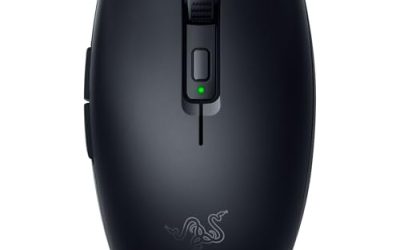
| Razer DeathAdder V3 Pro + HyperPolling Wireless Dongle | Palm-grip players who want 4K polling working out of the box | 4000 Hz wireless via the included HyperPolling dongle |
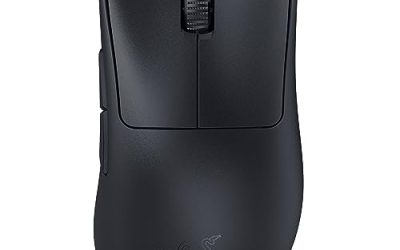
| HyperX Pulsefire Haste 2 Pro | Players who want native 4K polling with Bluetooth as a backup link | Native 4000 Hz wireless polling, 61 g shell |
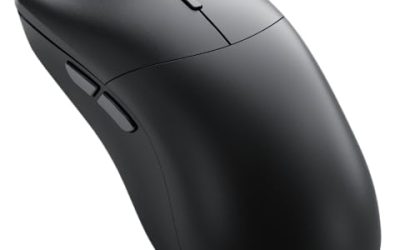
| Pulsar X2V2 | Claw and fingertip players chasing the lightest shell here | 53 g symmetrical shell, 4K polling ready |
| ASUS ROG Harpe Ace Aim Lab Edition | Right-handed players who switch between a PC and a laptop | 54 g tri-mode mouse, 36,000 DPI AimPoint sensor |
How to Choose
How the Mouse Reaches 4000 Hz
The route to 4000 Hz matters more than the number itself. The DeathAdder V3 Pro bundle and the Pulsefire Haste 2 Pro include the hardware that unlocks the rate, so nothing else needs buying. The Pulsar X2V2 is 4K ready, which means its standard receiver polls at 1000 Hz until you add the Pulsar 4K Wireless Dongle. The ROG Harpe Ace follows the same pattern with the ROG Polling Rate Booster. Before ordering any 4K-ready model, confirm whether the high-rate receiver sits in the box or on your shopping list.
Battery Life at High Polling
Raising the polling rate makes the radio report four times as often, and battery ratings shrink fast. HyperX quotes the Pulsefire Haste 2 Pro at up to 90 hours at 1000 Hz and up to 30 hours at 4000 Hz, which shows the scale of the trade. Headline battery figures on most listings describe the gentle 1000 Hz mode, not the mode this guide is about. If you play daily, plan a charging rhythm around the 4K figure, or drop back to 1000 Hz for casual sessions and save 4000 Hz for ranked matches.
Shape, Weight and Grip Fit
Polling rate cannot rescue a shell that fights your hand. The DeathAdder V3 Pro carries a tall right-handed ergonomic shape that suits palm grip, while the Pulsar X2V2 uses a low symmetrical shell at 53 grams that suits claw and fingertip control. The Pulsefire Haste 2 Pro and ROG Harpe Ace sit between those poles, both symmetrical or right-handed shapes near 60 grams. Match the shell to your grip and hand length first, then let polling rate break ties between mice that already fit you well.
Sensor and Switch Quality Beyond the Number
A 4000 Hz link only delivers what the sensor and switches produce. Look for a flagship optical sensor with high tracking speed, such as the Focus Pro 30K in the DeathAdder, the PAW3395 in the Pulsar, or the ROG AimPoint in the Harpe Ace. Optical switches, fitted across this lineup, remove the debounce delay that mechanical contacts need and hold up over long rated click lives. A balanced mouse pairs the fast link with clean tracking and crisp clicks; a weak sensor behind a 4K dongle gains very little.
The 4 Best Options
Razer DeathAdder V3 Pro + HyperPolling Wireless Dongle
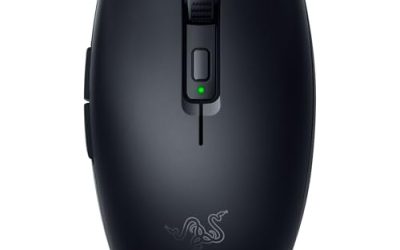
This bundle pairs Razer’s best-known ergonomic shell with the HyperPolling Wireless Dongle in one box, so the 4000 Hz mode works without a second purchase. The right-handed shape fills the palm, the 63-gram build keeps flicks easy, and the Focus Pro 30K sensor tracks at up to 750 IPS. Gen-3 optical switches give crisp, consistent clicks, and the up-to-90-hour battery rating covers long weeks at 1000 Hz. For palm and relaxed claw players who want a premium 4K setup with the fewest parts to track down, this is the simplest route in the guide.
Specs
- Polling rate: up to 4000 Hz wireless with the included HyperPolling Wireless Dongle
- Sensor: Razer Focus Pro 30K optical, up to 30,000 DPI
- Tracking speed: 750 IPS with 70 G acceleration
- Weight: 63 g
- Switches: Razer Optical Mouse Switches Gen-3, rated for 90 million clicks
- Connectivity: HyperSpeed wireless and wired USB-C
- Battery life: up to 90 hours at 1000 Hz
- Buttons: 5 programmable
Best for: palm-grip players who want 4000 Hz polling working out of the box.
Watch out for: the 4000 Hz mode runs only through the bundled HyperPolling dongle, battery life falls sharply at that rate, and Razer Synapse is needed to set the polling rate.
ASIN: B0CQ715H98
HyperX Pulsefire Haste 2 Pro
HyperX built native 4K polling into this mouse, so the included 4K wireless receiver delivers the full rate with no booster and no dongle upgrade. The symmetrical 61-gram shell suits claw and fingertip grips, the HyperX 26K sensor tracks up to 26,000 DPI and 650 IPS, and optical switches keep clicks sharp. Bluetooth pairing and Instant Pair support make it handy beside a gaming laptop, and the battery rating reaches up to 90 hours at 1000 Hz. It is the mid-range pick for players who want true 4K polling plus flexible connections in one package.
Specs
- Polling rate: up to 4000 Hz wireless with the included 4K receiver; 1000 Hz wired
- Sensor: HyperX 26K optical, up to 26,000 DPI
- Tracking speed: 650 IPS with 50 G acceleration
- Weight: 61 g
- Switches: HyperX optical switches
- Connectivity: 2.4 GHz wireless, Bluetooth and wired USB-C
- Battery life: up to 90 hours at 1000 Hz; up to 30 hours at 4000 Hz
- Buttons: 6
Best for: players who want native 4000 Hz polling and a Bluetooth option for a second machine.
Watch out for: wired play caps polling at 1000 Hz, so keep the 4K receiver connected for ranked sessions, and expect roughly 30 hours per charge while running at 4000 Hz.
ASIN: B0DQWJDD1C
Pulsar X2V2
At 53 grams, the X2V2 is the lightest mouse in this guide, and its low symmetrical shell has become a reference shape for claw and fingertip aim. Inside sits a PixArt PAW3395 sensor with 26,000 DPI and 650 IPS tracking, paired with optical switches and a clean, driver-light setup. The mouse is 4K polling ready, so it joins this category once the Pulsar 4K Wireless Dongle is paired. Players who value a featherweight shell and a shape that disappears under the hand will accept the extra dongle step more readily than anyone else here.
Specs
- Polling rate: 1000 Hz with the standard receiver; 4000 Hz with the Pulsar 4K Wireless Dongle
- Sensor: PixArt PAW3395 optical, up to 26,000 DPI
- Tracking speed: 650 IPS with 50 G acceleration
- Weight: 53 g
- Shape: symmetrical, medium size
- Switches: optical
- Connectivity: 2.4 GHz wireless and wired
Best for: claw and fingertip players who put shell weight above everything else.
Watch out for: the 4K Wireless Dongle is a separate purchase, and with the standard receiver in the box the mouse polls at 1000 Hz.
ASIN: B0CH9Z587R
ASUS ROG Harpe Ace Aim Lab Edition

Built with Aim Lab, this 54-gram right-handed mouse aims at esports players who like a compact shape and deep tuning. The ROG AimPoint sensor reaches 36,000 DPI, ROG optical micro switches keep clicks light and fast, and tri-mode connectivity covers 2.4 GHz wireless, Bluetooth and a wired link. The Aim Lab Settings Optimizer suggests sensitivity settings matched to your play. Polling sits at 1000 Hz on its own, and the shell is ready for 4000 Hz once paired with the ROG Polling Rate Booster, which keeps it in this category for buyers planning that upgrade.
Specs
- Polling rate: 1000 Hz native; up to 4000 Hz with the ROG Polling Rate Booster
- Sensor: ROG AimPoint optical, up to 36,000 DPI
- Weight: 54 g
- Switches: ROG optical micro switches
- Connectivity: 2.4 GHz SpeedNova wireless, Bluetooth and wired USB
- Battery life: up to 90 hours in 2.4 GHz mode
- Buttons: 5 programmable
- Extras: Aim Lab Settings Optimizer
Best for: right-handed players who want an esports shape, Bluetooth pairing and a clear upgrade path to 4000 Hz.
Watch out for: the ROG Polling Rate Booster is a separate accessory, and without it this mouse tops out at 1000 Hz polling.
ASIN: B0BSKX9V7C
Which One Fits Your Situation
You Want 4000 Hz Working on Day One
Choose between the DeathAdder V3 Pro bundle and the Pulsefire Haste 2 Pro, because both include the hardware that unlocks the rate. The Razer bundle suits palm grip and an ergonomic shell, while the HyperX suits symmetrical-shape players and adds Bluetooth. Neither asks you to order a second part before the headline polling figure becomes real, which keeps setup to pairing, a software setting, and play.
You Play Long Sessions Between Charges
Every mouse here lasts far longer at 1000 Hz than at 4000 Hz, so treat the high rate as a match mode, not a permanent setting. The Pulsefire Haste 2 Pro makes the trade clearest with ratings of up to 90 hours at 1000 Hz and up to 30 hours at 4000 Hz. The DeathAdder bundle also quotes up to 90 hours at the lower rate, giving heavy players a weekly charging rhythm.
You Aim With Claw or Fingertip Grip
The Pulsar X2V2 fits this situation best: 53 grams, a low symmetrical shell, and a PAW3395 sensor make quick micro-corrections easy to repeat. Budget a little extra for the 4K Wireless Dongle so the polling rate matches the rest of the setup. The Pulsefire Haste 2 Pro is the fallback if you want a similar grip style with native 4K polling and Bluetooth included from the beginning.
One Mouse for a Desktop and a Laptop
The ROG Harpe Ace Aim Lab Edition and the Pulsefire Haste 2 Pro both pair over Bluetooth, so either can live on the desk and travel with a laptop. The Harpe Ace adds the Aim Lab Settings Optimizer for players who tune sensitivity often. Pick the HyperX if native 4000 Hz matters more than the optimizer, since its 4K receiver needs no booster and its Bluetooth link covers the second machine.
Common Mistakes
- Buying a 4K-ready mouse and assuming the standard receiver already polls at 4000 Hz, when a separate dongle or booster is required.
- Leaving the high-rate receiver in a rear port or a crowded hub, where interference can undo the cleaner signal the rate provides.
- Planning charge cycles around battery figures quoted at 1000 Hz while playing every session at 4000 Hz.
- Judging a mouse on polling rate alone and ignoring shell fit, sensor quality and switch feel.
- Plugging in the cable for a wired session and expecting the wireless polling figure to carry over, when some models cap wired polling at 1000 Hz.
Frequently Asked Questions
Is 4000 Hz polling noticeably smoother than 1000 Hz?
The gain is subtle and shows most on high-refresh monitors during fast, steady mouse movement, where cursor updates land four times as often. Many players feel slightly cleaner tracking in flicks and micro-adjustments rather than a dramatic change. It refines an already strong setup; it does not fix poor aim, a weak sensor, or a shell that fits badly.
Do I need a special receiver to use 4000 Hz?
On most models, yes. The DeathAdder V3 Pro bundle and the Pulsefire Haste 2 Pro include the receiver that unlocks the rate. The Pulsar X2V2 needs the Pulsar 4K Wireless Dongle, and the ROG Harpe Ace needs the ROG Polling Rate Booster. Check what sits in the box before assuming the headline figure works on arrival.
How much battery life does 4000 Hz use?
Expect a steep drop against the headline rating. HyperX quotes the Pulsefire Haste 2 Pro at up to 90 hours at 1000 Hz and up to 30 hours at 4000 Hz, and other brands follow the same pattern. A practical routine is to run 1000 Hz for casual play and switch to 4000 Hz for matches that matter.
Does my monitor and PC matter for 4000 Hz polling?
A high-refresh monitor shows the extra updates more clearly, since the screen redraws often enough to display them. High polling also adds a small CPU load, which older processors can feel in demanding games. A modern gaming PC with a 240 Hz or faster display gives 4000 Hz the best chance to feel different.
Related guides
More from Amazon
Programs that pair well with the guide above. Offers and eligibility are set by Amazon and may change.
Free shipping on eligible items, Prime Video and more. Eligible new members can start with a free trial.
Start a Prime free trialAd-free music streaming. Eligible new subscribers can start with a free trial.
Try Music Unlimited freeA Prime membership for ages 18-24 with a trial period. Eligibility is set by Amazon.
See Prime for Young AdultsAudiobooks and podcasts to listen to on the go. Eligible new members can start with a free trial.
Try Audible freeAs an Amazon Associate we earn from qualifying purchases.