The real decision here is not which keys feel nicest. It is how you plan to get a keyboard and mouse working on a console that was never built for them. The Switch accepts a plain USB keyboard in a handful of games, mostly for typing, and it ignores a mouse almost everywhere. So every working setup falls into one of two camps: an all-in-one combo with the conversion hardware built into the keyboard, or a small adapter that translates your existing keyboard and mouse into controller signals the console understands.
This guide is for docked Switch players who want pointer control in shooters and strategy titles, and for households that already own PC peripherals and would rather adapt them than replace them. Every pick below is a single product sold for exactly this job, chosen from its Amazon listing details, and each one carries real limits that are spelled out instead of hidden.
Top 3 picks at a glance


Quick Picks
As an Amazon Associate we earn from qualifying purchases
| Product | Best for | Key spec from title |
|---|---|---|
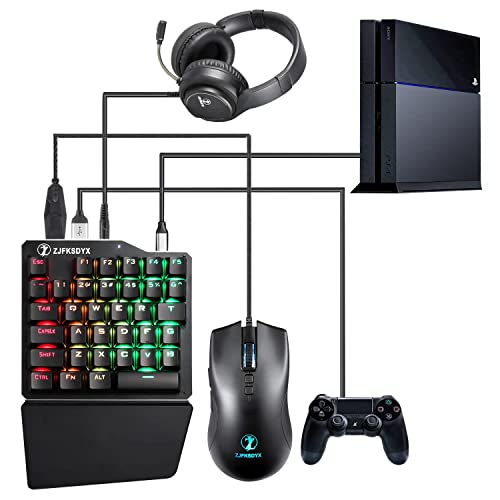
| ZJFKSDYX C91 One-Handed Gaming Keyboard and Mouse Combo | Players who own nothing yet and want one box | One-handed mechanical keyboard, mouse and headset included |
| arVin Keyboard and Mouse Adapter for Nintendo Switch | Multi-console homes with several game profiles | Stores 4 key-mapping profiles, switchable in game |
| HYCARUS Keyboard and Mouse Adapter (HC-30050) | Buyers who refuse extra software | One-to-many keybinds set on the device, no download |
| leadjoy VX2 AimBox Keyboard Mouse Converter | Tinkerers who tune aim feel per game | VLead app adjusts mouse, camera and keybinds |
How to Choose
Combo or adapter: decide what you are actually buying
A combo like the C91 bundles the keyboard, mouse and conversion chip into one purchase, so there is nothing else to shop for and the mouse plugs straight into the keyboard. An adapter is only the translator. It assumes you already have a keyboard and mouse you like, and it turns their input into controller output. Adapters cost less in total when your desk gear is decent, but they add a second failure point, because a keyboard the adapter dislikes will simply never register. Pick the camp first, then compare inside it.
How the Switch connection really works
Forget the idea of plugging a mouse in and playing like a PC. On Switch, these products pose as a controller, which is why setup starts in System Settings with Pro Controller Wired Communication switched on, and why play happens through the dock on most models. A few adapters include an OTG connector for handheld use, but the docked route is the stable one. Because the console sees stick input rather than raw mouse movement, aim quality depends on each game’s own stick sensitivity and dead zone settings as much as on the hardware.
Wired, 2.4G wireless, and the Bluetooth trap
Listings draw sharp lines here, and they matter. Most of these adapters accept wired gear and 2.4G wireless sets that use a USB receiver, while Bluetooth keyboards and mice are flatly unsupported on the arVin and effectively discouraged elsewhere. The leadjoy listing even warns that wireless sets can disconnect and steers buyers toward wired peripherals. Shared-receiver combo sets are another trap: the HYCARUS answers state that a keyboard and mouse sharing one receiver are not supported, while separate receivers work. Check your exact gear against the listing before ordering, not after.
Mapping, sensitivity, and headset support
Since the adapter invents your controls, its mapping tools decide how usable it feels. Useful questions: How many profiles can it store? Can sensitivity change mid-game without a PC? Does remapping need an app, a Windows program, or just key combinations on the device itself? Voice chat is the other quiet divide. Models with a 3.5mm port pass a headset through the adapter, while the arVin route leaves audio to the console and controller. If you play squad games with voice on, that single port can settle the choice.
The 4 Best Options
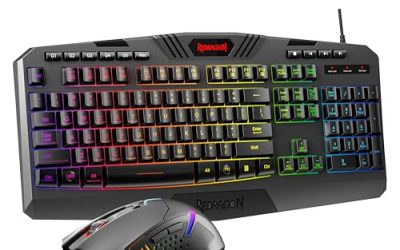
ZJFKSDYX C91 One-Handed Gaming Keyboard and Mouse Combo
This is the only pick that arrives as a complete kit. The one-handed mechanical keyboard carries the converter inside it, the mouse plugs into a port on the keyboard, and a 3.5mm headset is in the box, so a player starting from zero can sit down with one purchase. It suits couch and small-desk setups where a full-size board would sprawl, and the layout keeps movement and ability keys under one hand while the mouse handles aim. Custom mapping is handled on the device itself, with no extra driver install described in the listing materials.
Specs
- One-handed mechanical keyboard with Blue Switch keys
- Gaming mouse with up to 6000 DPI and RGB backlight
- 3.5mm gaming headset included, listed with 48K HD voice support
- Wired USB Type-C connection to the console
- Custom key mapping without additional drivers
- Compatible with Nintendo Switch, PS5, PS4, Xbox Series X/S, Xbox One and PC
- Item weight: 1.59 pounds
Best for: First-time buyers who want keyboard, mouse, conversion and headset in a single box.
Watch out for: The layout is one-handed, so there is no full keyboard for typing or for games that expect keys across the whole board.
ASIN: B07T6DZ3JW
arVin Keyboard and Mouse Adapter for Nintendo Switch
Owners of a good PC keyboard and mouse who also game on other consoles get the widest platform list here. The arVin converter covers the Switch family alongside Xbox and PlayStation hardware, stores four separate mapping profiles you can swap between mid-session, and lets you nudge mouse sensitivity from the keyboard with a Ctrl and scroll-wheel combination. That profile memory is genuinely handy in a shared living room, where one player runs a shooter layout and another prefers a slower strategy setup on the same adapter, each keeping their own stored configuration.
Specs
- Compatible with Nintendo Switch, Switch OLED and Switch Lite, plus Xbox Series, Xbox One, Xbox 360, PS4 and PS3
- Supports wired and 2.4G wireless keyboards and mice; Bluetooth sets are not supported
- Custom key mapping with storage for 4 profiles, switched with Ctrl + 1 to 4
- Mouse sensitivity adjusted with Ctrl + mouse wheel up or down
- Turbo function set with the F4 key
- 3 USB ports and 1 Type-C port, hard ABS housing
- In the box: converter, OTG adapter, Type-C cable and user manual
- Package dimensions: 4.61 x 4.53 x 0.94 inches; weight 2.46 ounces
Best for: Multi-console households that want several stored layouts on one adapter.
Watch out for: Key mapping on Switch requires an original Switch Pro Controller connected to guide the process; third-party controllers are not supported for that step.
ASIN: B0CGN8Z66B
HYCARUS Keyboard and Mouse Adapter (HC-30050)
The HYCARUS pitch is control without companion software. Its one-to-many keybinds are set on the device itself, mouse side buttons are supported, and separate presets can be saved per game, which suits players who bounce between two or three regular titles. The built-in 3.5mm port passes headset audio on Switch, so voice chat does not need a workaround through a second controller. It is a small, plain box with five ports, aimed at people who want to configure once, label their presets, and then leave settings alone for months at a time.
Specs
- Compatible with Nintendo Switch, PS4, PS3, Xbox One and Xbox Series X/S; not for PS5
- One-to-many keybinds with mouse side-key support, no software download needed
- Multiple saved keybind presets for different games
- 3.5mm headset audio passthrough on PS4, Xbox One and Nintendo Switch
- Plug and play with no drivers required
- 5 ports; USB 2.0 connector; input voltage 5 volts, current rating 100 milliamps
- Dimensions: 2.4 x 2.5 x 0.8 inches; weight 2.88 ounces
Best for: Players who want per-game presets and headset audio without installing an app.
Watch out for: A keyboard and mouse that share a single wireless receiver are not supported; the listing states each device needs its own receiver.
ASIN: B07LGSV1VZ
leadjoy VX2 AimBox Keyboard Mouse Converter

Where the HYCARUS avoids software, the AimBox leans into it. The VLead app exposes mouse behaviour, camera movement, joystick response, keybinds and lighting, which gives patient players far more control over how stick emulation feels in a specific shooter. The hardware itself is a compact slab with a 3.5mm audio port that works on Switch, and the listing’s own guidance is refreshingly blunt about using wired peripherals for a stable connection. Choose this one if you enjoy dialling in settings per title and keeping notes on what worked.
Specs
- Compatible with Nintendo Switch, Xbox One, Xbox Series X/S and PlayStation 4
- 3.5mm audio port for headset communication
- VLead app tuning for mouse, camera, joystick, keybinds and lighting
- Works with wired and wireless keyboards and mice that need no extra driver installation
- USB cable included in the box
- Product dimensions: 3.15 x 2.28 x 0.73 inches; weight 6.4 ounces
- Item model number: LEADJOY VX2 Aimbox
Best for: Players who like app-based fine-tuning of aim and camera behaviour per game.
Watch out for: The listing itself recommends wired gear because wireless sets may disconnect, and the Amazon page has shown no featured offer, so check the current seller before ordering.
ASIN: B0BFCL67S6
Which One Fits Your Situation
You own no gaming keyboard or mouse at all
Start with the ZJFKSDYX C91 combo. Buying an adapter first leaves you shopping twice, and the C91’s keyboard, mouse, headset and built-in conversion arrive together with a single setup path through the dock. Accept the one-handed layout as the trade-off: it covers movement-and-aim games comfortably, but it will not double as your everyday typing keyboard.
Your desk gear is good and your home has several consoles
The arVin adapter respects the peripherals you already like. It accepts wired and 2.4G wireless sets, covers Switch, Xbox and PlayStation hardware, and its four stored profiles let different players or different games keep separate layouts. Just confirm you have an original Pro Controller available, because the mapping process on Switch leans on one.
You play two or three Switch shooters and hate settings apps
Take the HYCARUS. Its presets live on the device, the one-to-many keybinds need no download, and the headset port keeps voice chat simple. It fits a routine where the adapter stays plugged into the dock permanently and the only decision each session is which saved preset to load.
You enjoy tuning aim feel game by game
The leadjoy VX2 AimBox rewards patience. The VLead app gives you levers the other adapters keep hidden, including camera and joystick behaviour, so a shooter that feels floaty on default settings can often be coaxed into shape. Budget some setup time per title, and run wired peripherals as the listing advises.
Common Mistakes
- Expecting native PC-style mouse support: the Switch reads these products as a controller, so menu navigation and games without stick aiming gain nothing from a mouse.
- Buying a Bluetooth keyboard and mouse set: Bluetooth peripherals are unsupported on most of these adapters, and shared-receiver wireless sets fail on some models too.
- Skipping the Pro Controller Wired Communication setting: without it enabled in System Settings, a docked adapter setup usually never connects.
- Planning to play in handheld mode by default: the dependable route is docked play, and only some models bundle the OTG connector handheld use requires.
- Ignoring a game’s own rules: some online titles restrict adapter-style input, so check the current policy of the game you care about before buying hardware for it.
Frequently Asked Questions
Can I use any USB keyboard and mouse directly on the Switch without an adapter?
A plain USB keyboard works in a small number of games, mostly for entering text, and a mouse is not recognised as a pointing device by the system. For actual gameplay control you need either a combo with conversion built in or one of the adapters above, connected through the dock.
Will an adapter make aiming feel exactly like playing on PC?
No. The adapter translates mouse movement into analogue stick output, so the result inherits each game’s stick acceleration, dead zones and turn-speed caps. Good mapping and sensitivity settings get you closer to a PC feel in shooters, but fast flicks can still hit the game’s own limits.
Do these products work with the Switch in handheld mode?
Mostly they are designed for docked play, where the adapter connects to a dock USB port. The arVin bundles an OTG adapter in the box, which is the piece handheld connections depend on, while other models assume the dock. Check the listing of the exact model you buy before counting on tabletop or handheld use.
Can I use voice chat while playing through an adapter?
It depends on the model. The C91 combo, the HYCARUS and the leadjoy AimBox each provide a 3.5mm headset path that works on Switch according to their listings. The arVin listing does not offer headset passthrough, so voice chat there means using a controller or the console’s own arrangements instead.
Related guides
More from Amazon
Programs that pair well with the guide above. Offers and eligibility are set by Amazon and may change.
Free shipping on eligible items, Prime Video and more. Eligible new members can start with a free trial.
Start a Prime free trialAd-free music streaming. Eligible new subscribers can start with a free trial.
Try Music Unlimited freeA Prime membership for ages 18-24 with a trial period. Eligibility is set by Amazon.
See Prime for Young AdultsAudiobooks and podcasts to listen to on the go. Eligible new members can start with a free trial.
Try Audible freeAs an Amazon Associate we earn from qualifying purchases.