Disclosure: As an Amazon Associate, this site may earn from qualifying purchases made through links on this page.
Finding the best lightweight gaming mouse for palm grip means solving two problems at once. The shell has to fill your hand and support your palm through long sessions, and the body has to stay light enough that flicks and wide sweeps feel effortless. A mouse that is light but too small leaves your palm unsupported, while a large ergonomic mouse that is heavy drags on every movement. The four mice in this guide all sit under 70 grams and all use a right-handed ergonomic shape built around full palm contact. They differ in connection, sensor, battery life and button count, so the right choice depends on your hand size, your grip habits and whether you want a cable or wireless freedom.
Our Top Picks
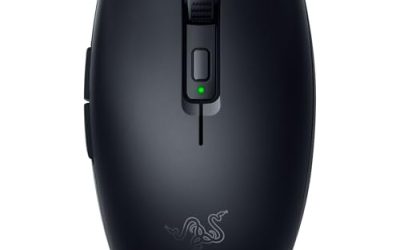
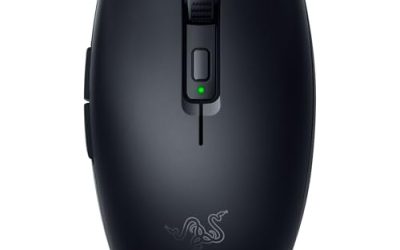
 Razer DeathAdder V3 HyperSpeed Ergonomic Wireless Gaming MouseStandard4.81 x 2.55 x 1.5 inches0.1 poundsCheck on Amazon

Top 3 picks at a glance
At a Glance
| Mouse | Weight | Sensor | Connection | Best for |
|---|---|---|---|---|
| Razer DeathAdder V3 Pro | 63 g | Focus Pro 30K | Wireless | Palm grip players who want a flagship ergonomic shape |
| Razer DeathAdder V3 HyperSpeed | 55 g | Focus X 26K | Wireless | The lowest-weight palm shape in this guide |
| Razer DeathAdder V3 | 59 g | Focus Pro 30K | Wired | Wired play with the highest polling support |
| Glorious Model D 2 Wireless | 66 g | BAMF 2.0 26K | Wireless | Long battery life in an ergonomic shell |
How to Choose a Lightweight Mouse for Palm Grip
Hand size comes first. Palm grip means the whole hand rests on the mouse, with the palm in contact with the rear hump and the fingers lying flat along the buttons. Measure your hand from the wrist crease to the tip of your middle finger. Hands around 18 cm or longer usually fit the mice in this guide well, since all four are between 120 mm and 128 mm long. If your hand is much shorter than that, a long ergonomic shell can feel stretched, and a smaller symmetrical mouse may suit you better even though it is not built for palm grip.
Shell height is the second number to check. A tall rear hump supports the palm and keeps the wrist in a neutral position, which is what makes an ergonomic shape comfortable over long sessions. All four picks here have a raised rear section, but the DeathAdder models are the tallest of the group, while the Model D 2 Wireless is a little lower and flatter. If you rest your palm heavily on the mouse, the taller hump gives more support. If you mix palm and claw grip, a slightly lower hump gives your fingers more room to arch.
Weight is the third factor, and it interacts with shape. Every mouse here is listed under 70 grams. The HyperSpeed is the lowest-weight mouse here at 55 grams, while the Model D 2 Wireless is the heaviest at 66 grams. The difference between 55 grams and 66 grams is easy to feel during fast flicks, but it matters less than shape: a 66 gram mouse that fits your hand beats a 55 gram mouse that does not. Battery weight is already included in the listed figures for the wireless models, so the numbers you see are the numbers you hold.
Sensor quality is close across this group. The two Focus Pro 30K models list the highest sensitivity, while the Focus X 26K and BAMF 2.0 sensors list slightly lower figures, but the difference is hard to notice in a game, since all four track cleanly at the sensitivity levels people actually use. What matters more is the polling rate: the wired DeathAdder V3 lists up to 8000 Hz polling, while the wireless models list 1000 Hz by default and can be raised with a separate dongle.
Switches and buttons round out the choice. All four mice use optical switches, which avoid the double-click faults that older mechanical switches can develop. The DeathAdder models have five or six programmable buttons, while the Model D 2 Wireless has six, and two thumb buttons are usually enough for palm players. Finally, think about the cable or battery: a wired mouse never needs charging, while a wireless mouse needs a charge every few days or weeks depending on use.
The Picks
1. Razer DeathAdder V3 Pro

The DeathAdder V3 Pro is the flagship ergonomic mouse in this guide and the natural first pick for palm grip players with medium to large hands. Razer lists it at 63 grams in black, with a right-handed shell about 128 mm long, 68 mm wide and 44 mm tall. That tall rear hump is the key feature for palm players: it fills the hand and supports the palm through long sessions without forcing the wrist into an awkward angle. The shape is a refined version of the long-running DeathAdder line, slimmed down and lightened with help from esports players, and it keeps the two thumb buttons and the familiar button layout that long-time DeathAdder users know well.
Inside, the mouse uses the Focus Pro 30K optical sensor, which Razer lists with sensitivity up to 30,000 DPI, tracking up to 750 IPS and acceleration up to 70 G. The switches are third-generation optical switches, listed with a 90-million click lifespan and no debounce delay, which removes the double-click faults that can appear in older mechanical designs. The mouse connects over HyperSpeed wireless at 1000 Hz by default, and Razer lists up to 90 hours of battery life at that polling rate.
Five programmable buttons keep the layout simple, which suits palm players who want a clean grip without extra buttons under the thumb. The mouse stores profiles in onboard memory, charges over USB-C, and works on Windows and macOS. Check the listing for the exact bundle, since Razer also sells this mouse with a HyperPolling dongle included under a different listing. For a palm player who wants the most proven ergonomic shape in a light wireless body, this is the pick to measure everything else against.
2. Razer DeathAdder V3 HyperSpeed
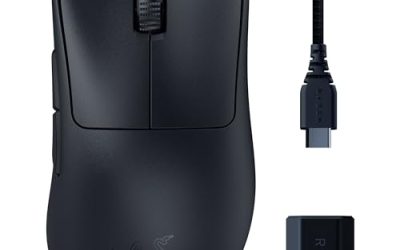
Razer DeathAdder V3 HyperSpeed
The DeathAdder V3 HyperSpeed is the lowest-weight mouse in this guide at 55 grams, and it keeps the same ergonomic DeathAdder shape as the Pro model. That combination is rare: most ultralight mice use small symmetrical shells, while this one gives palm players a full ergonomic shape at a weight that competes with the lowest-weight esports mice on the market. Razer lists the shell at about 122 mm long, a little shorter than the Pro, so it suits medium hands especially well. If the Pro feels slightly long for your hand, this is the model to look at first.
The sensor is the Focus X 26K optical sensor, listed with sensitivity up to 26,000 DPI and 99.6 percent resolution accuracy according to Razer. That is a step below the Focus Pro 30K on paper, but the difference is hard to notice in a game at normal sensitivity levels. The switches are the same third-generation optical design as the Pro, listed with a 90-million click lifespan. Six programmable buttons give you one more binding than the Pro, and the mouse stores settings in onboard memory. Connection is HyperSpeed wireless at 1000 Hz by default, with an upgrade path to 8000 Hz through a separately sold dongle.
Battery life is a strong point here. Razer lists up to 100 hours on HyperSpeed wireless at 1000 Hz, which is longer than the Pro model, so charging is a weekly habit rather than a daily one. The mouse charges over USB-C and also works wired while charging, so a flat battery never ends a session. There is no RGB lighting, which keeps the weight down and the look plain. For palm players who want the lowest-weight ergonomic mouse possible without giving up the DeathAdder shape, the HyperSpeed is the most direct answer in this guide.
3. Razer DeathAdder V3
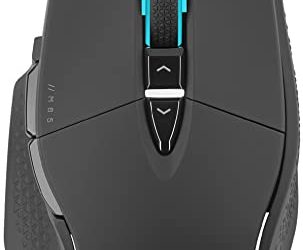
The wired DeathAdder V3 is the pick for palm players who want a cable and the highest polling support in this guide. Razer lists it at 59 grams, with the same ergonomic right-handed shape as the wireless models and a Speedflex cable that is woven for flexibility and designed to stay out of the way. A wired connection removes battery management entirely: there is nothing to charge, no wireless dongle to keep track of, and no battery to lose capacity over the years. For players who sit at one desk and never move the mouse between machines, that simplicity is a genuine advantage, and the cable on this model is light enough that many players forget it is there.
The sensor is the Focus Pro 30K optical sensor, the same unit as in the Pro model, listed with sensitivity up to 30,000 DPI, tracking up to 750 IPS and acceleration up to 70 G. The switches are third-generation optical switches with a 90-million click lifespan. Where this model pulls ahead is polling: it lists HyperPolling up to 8000 Hz over the cable, eight times more often than the 1000 Hz default on the wireless models. Six programmable buttons and five onboard profiles match the rest of the DeathAdder line, and the mouse works on Windows and macOS.
At 59 grams it is lighter than the Pro model, even though it carries a cable, and the ergonomic shell fills the palm in the same way. The wired model is also the simplest of the three DeathAdder picks to live with: plug it in and it works, with no software needed for basic use, though Razer Synapse is required to change DPI stages and button assignments. Check the listing for the exact model number, RZ01-04640100-R3U1, to make sure you are looking at the wired model and not one of the wireless versions, since the names are close. For a palm player who prefers a cable and wants the strongest sensor and polling combination in this guide, this is the pick.
4. Glorious Model D 2 Wireless

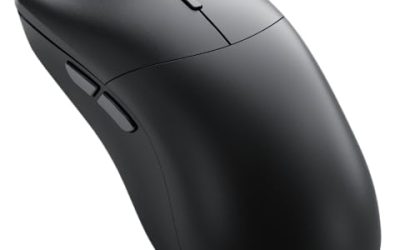
The Glorious Model D 2 Wireless is the pick for palm players who want the longest battery life in this guide. Glorious lists it at 66 grams with an ergonomic right-handed shell, a BAMF 2.0 optical sensor with sensitivity up to 26,000 DPI, and battery life up to 210 hours. That battery figure is more than double the DeathAdder models, so charging becomes a monthly habit. The shell is a solid design rather than a honeycomb shell, which gives it a clean look and a sturdy feel in the hand. At 127 mm long, 67 mm wide and 43 mm tall, it is close in size to the DeathAdder models, with a slightly lower rear hump that suits players who mix palm and claw grip.
The sensor tracks at up to 650 IPS according to Glorious, and the mouse uses optical switches listed with an 80-million click lifespan. Six programmable buttons include two thumb buttons, a DPI button and the standard left, right and middle click, and the mouse stores settings in onboard memory. Connection is 2.4 GHz wireless through a small receiver, with Bluetooth and a wired mode over USB-C as well, so it covers more connection options than any other mouse in this guide. The receiver stores inside the mouse for travel, and an extender adapter is included to bring the receiver closer for a cleaner signal.
RGB lighting runs along the sides of the shell and can be adjusted or switched off through Glorious Core software. The feet are large PTFE pads that glide smoothly on cloth pads, and the mouse includes a USB-C cable for charging and wired use. At 66 grams it is the heaviest mouse in this guide, and players with smaller hands may find the shell a little long, so check the listed dimensions against your hand length before you buy. For a palm player who hates charging and wants the longest battery life, the Model D 2 Wireless is the most practical pick here.
Comparison Table
| Feature | DeathAdder V3 Pro | DeathAdder V3 HyperSpeed | DeathAdder V3 | Model D 2 Wireless |
|---|---|---|---|---|
| Weight | 63 g | 55 g | 59 g | 66 g |
| Sensor | Focus Pro 30K | Focus X 26K | Focus Pro 30K | BAMF 2.0 26K |
| Connection | Wireless | Wireless | Wired | Wireless, Bluetooth, wired |
| Battery life | Up to 90 hours | Up to 100 hours | Not applicable | Up to 210 hours |
| Polling | 1000 Hz, up to 8000 Hz with separate dongle | 1000 Hz, up to 8000 Hz with separate dongle | Up to 8000 Hz | 1000 Hz |
| Buttons | 5 | 6 | 6 | 6 |
| Shape | Ergonomic, right-handed | Ergonomic, right-handed | Ergonomic, right-handed | Ergonomic, right-handed |
Which One Fits Your Situation
If you have a medium to large hand and want the most proven ergonomic shape in a wireless body, the DeathAdder V3 Pro is the natural fit, with its tall rear hump and flagship sensor. If you want the lowest-weight mouse in this guide and your hand is medium sized, the HyperSpeed gives you the same shape at 55 grams with the longest battery life of the DeathAdder models. If you prefer a cable and want the highest polling support, the wired DeathAdder V3 is the pick, with 8000 Hz polling over the cable and no battery to manage. If you hate charging and want the longest battery life, the Model D 2 Wireless is the answer, with up to 210 hours and three connection options. Players who mix palm and claw grip may prefer the slightly lower hump of the Model D 2 Wireless. Measure your hand, compare it with the listed dimensions, and check the listing for the exact model and bundle before you buy.
FAQ
What weight counts as lightweight for a palm grip mouse?
Most ergonomic mice sit above 80 grams, so anything under 70 grams is light for this shape. All four mice in this guide are listed between 55 and 66 grams. Shape matters more than a few grams, so a mouse that fits your hand beats a lighter one that does not.
Is a wireless mouse as fast as a wired one for gaming?
Modern 2.4 GHz wireless connections are designed to match wired performance for practical purposes, and the wireless mice in this guide all use a dedicated dongle rather than Bluetooth for gaming. Bluetooth modes are slower and best saved for non-gaming use. The wired DeathAdder V3 lists the highest polling rate in this guide, but most players will not notice a difference between it and the wireless models in a game.
How do I know if my hand is too small for these mice?
Measure from your wrist crease to the tip of your middle finger. Hands around 18 cm or longer usually fit these shells well, since they run from 120 mm to 128 mm long. If your hand is under 17 cm, the shell may feel long, and a smaller symmetrical mouse may suit you better. Check the listed length and height of each mouse against your own hand before you buy.
Do I need 8000 Hz polling?
Not necessarily. Polling at 1000 Hz is enough for most players and most monitors, and higher polling uses more battery and more CPU. The wired DeathAdder V3 lists 8000 Hz over its cable, while the wireless models need a separately sold dongle to reach that figure. If you have a high refresh-rate monitor and a modern CPU, higher polling is worth trying, but it is not a requirement for good aim.
Can I use these mice on macOS as well as Windows?
Yes, all four mice list macOS compatibility for basic use, with plug-and-play pointing and clicking. The makers’ configuration software is needed to change DPI stages, polling and button assignments, and that software is mainly built for Windows, so check the listing for the exact software support on your system.
Final Take
The best lightweight gaming mouse for palm grip is the one that fills your hand and disappears during play. The DeathAdder V3 Pro is the most proven ergonomic shape, the HyperSpeed is the lowest-weight mouse, the wired DeathAdder V3 has the highest polling support, and the Model D 2 Wireless lasts the longest between charges. Measure your hand, pick the shape that matches it, and check the listing for the exact model before you buy.
Related guides
More from Amazon
Programs that pair well with the guide above. Offers and eligibility are set by Amazon and may change.
Free shipping on eligible items, Prime Video and more. Eligible new members can start with a free trial.
Start a Prime free trialAd-free music streaming. Eligible new subscribers can start with a free trial.
Try Music Unlimited freeA Prime membership for ages 18-24 with a trial period. Eligibility is set by Amazon.
See Prime for Young AdultsAudiobooks and podcasts to listen to on the go. Eligible new members can start with a free trial.
Try Audible freeAs an Amazon Associate we earn from qualifying purchases.