The best budget wired gaming mouse, judging by the listings, is the Redragon M612 for most people, because it pairs a known brand with remappable keys, while the Logitech G502 Hero and Razer Basilisk V3 are the picks if you will stretch to a premium tier. Everything else in this set is a lesser-known brand with more buttons or lights for the money. We compare eight models, merge three Vikye color variants into one entry and finish with a short DPI reality check so the big numbers on the box make sense.
Our Top Picks
Top 3 picks at a glance
Eight models at a glance
As an Amazon Associate we earn from qualifying purchases at no extra cost to you.






| Model | Key point from title | Price tier | Best for |
|---|---|---|---|
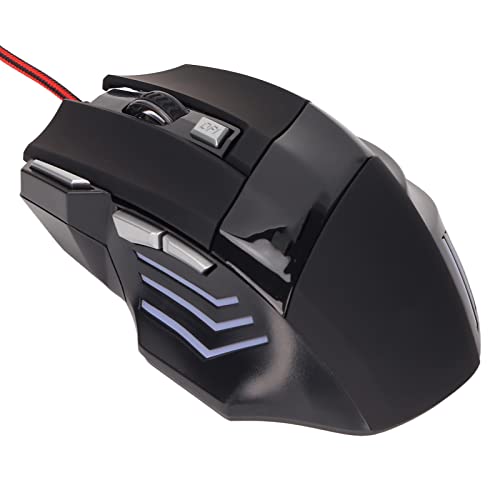
| WEEMSBOX | 7200 DPI, 7 programmable buttons, RGB | Budget | Extra buttons on a budget |
| ASHATA RGB | 3200 DPI, ergonomic, plug and play | Budget | Casual or spare mouse |
| Dpofirs | 6 buttons, portable optical, red | Budget | Low-cost backup |
| Vikye (White, Black, Yellow listings) | 12800 DPI, 10 macro buttons, 13 RGB modes | Mid-range | Macro layouts, color choice |
| Razer Basilisk V3 | 26K DPI optical, 11 buttons, tilt wheel | Premium | Feature-rich ergonomic |
| Redragon M612 | 8000 DPI optical, remappable keys | Mid-range | Known-brand value |
| Logitech G502 Hero | 25,600 DPI, weights, on-board memory | Premium | Tunable feel, profiles |
| BENGOO | Up to 3600 DPI, 6 buttons | Budget | Tightest budget |
The mice one by one
WEEMSBOX Wired Gaming Mouse (7200 DPI, 7 buttons)
The WEEMSBOX lists RGB LED lighting, 7200 adjustable DPI, 7 programmable buttons and an ergonomic shape for gaming and office use. Seven buttons is a fair count for the money. The title does not name the sensor or cable length, so check the listing, and the 7200 figure is a seller claim. With seven buttons, you would likely bind the extras to push-to-talk, a reload key or a sensitivity switch, so the count is useful even in shooters.
Pros
- Seven programmable buttons
- Sensible DPI range for most players
Cons
- Sensor not named
- Cable length not in the title
Who it’s for: Players who want extra buttons and basic RGB without paying a brand premium.
ASHATA RGB USB Wired Gaming Mouse (3200 DPI)
The ASHATA is the most basic of the group: RGB backlight, 3200 DPI, an ergonomic streamlined shape and plug-and-play use. The title does not give a button count, and the word “Designer” is unexplained, so it reads like a general-purpose mouse with gaming styling. The DPI figure is enough for most desktop use. Because the title gives no button count, treat the two side buttons found on many mice as an assumption to verify rather than a given. Look at the product photos for the thumb area before ordering.
Pros
- Plug and play
- Lightweight, simple spec line
Cons
- Button count not stated
- Unclear wording in the title
Who it’s for: A secondary or travel mouse for casual gaming.
Dpofirs Gaming Mouse (6 buttons, red)
The Dpofirs is a portable optical mouse with 6 buttons in red. The title does not state a DPI figure, a sensor or a cable length, so you must check the listing for these. It is clearly aimed at very low-cost use. The red color and the “Gaming Players” wording are the main selling points, and there is nothing in the title about programmable keys or software. Read the listing images to see how many of the six buttons sit under your thumb.
Pros
- Six buttons
- Portable form
Cons
- No DPI figure in the title
- Few details beyond button count
Who it’s for: Buyers who want a spare, low-cost mouse and will check the listing for details.
Vikye Wired Gaming Mouse (12800 DPI, 10 buttons; White, Black and Yellow listings)
These three listings are color variants of one model, so they share one entry. The title claims 6 speed levels, 12800 DPI, 10 programmable macro buttons and 13 RGB lighting modes. The 12800 figure is a headline spec, not a sign of better tracking. The three colors are White, Black and Yellow, so choose by taste, and confirm that all three share the same internals on each listing. Ten buttons mean you will likely need the supplied software to assign macros, so check that it is offered for your operating system before you buy.
Pros
- Ten programmable buttons
- Three color choices
Cons
- High DPI figure is mostly marketing
- Software support not stated
Who it’s for: Players who want a macro-heavy layout and a specific color.
Razer Basilisk V3 Wired Gaming Mouse
The Basilisk V3 is the feature-rich name here: a customizable RGB wired ergonomic mouse with a 26K DPI optical sensor, 11 programmable buttons, a HyperScroll tilt wheel and Chroma RGB, in black. “Fastest Gaming Mouse Switch” is a seller claim. The ergonomic shape suits palm and claw grips, though hand size matters. A larger body with eleven buttons can feel crowded in small hands, and the tilt wheel is a feature you either use for scrolling sideways or never touch. Check the listing for cable details and software terms, since the customization the title promises depends on them.
Pros
- 11 buttons and a tilt wheel
- Named optical sensor and Chroma RGB
Cons
- Top price tier in this group
- 26K DPI is more than most players need
Who it’s for: Players who want the most features and a recognizable brand.
Redragon M612 Wired RGB Optical Gaming Mouse
The M612 offers 8000 DPI, remapping keys, a lag-free connection, an ergonomic grip body and a backlight. It uses an optical sensor and supports key remapping. The title is wordy, with phrases like “Vibing Backlight” that add little information. It reads as a solid value pick on paper. Note that key remapping normally depends on software, so check the listing for download details and supported systems. If you share a PC, remember that profiles stored on the computer will not follow the mouse.
Pros
- Remappable keys
- Brand-name budget option
Cons
- Button count not stated
- Marketing wording is vague
Who it’s for: Budget buyers who want a known brand and remappable buttons.
Logitech G502 Hero Wired Gaming Mouse
The G502 Hero lists 25,600 DPI, RGB, adjustable weights, 11 programmable buttons and on-board memory, for PC and Mac. It is the only listing here that names adjustable weights, so it suits people who want to tune the feel. On-board memory means you can save profiles in the mouse itself, which helps if you move between a desktop and a laptop. Eleven buttons and a body of unspecified shape mean you should compare photos with your hand size, and think about whether you will use the weights or leave the defaults.
Pros
- Adjustable weights and on-board memory
- 11 buttons, PC and Mac
Cons
- Premium tier within the set
- Shape is not described, so hand fit needs checking
Who it’s for: Players who want to tune weight and keep profiles on the mouse.
BENGOO Gaming Mouse Wired (3600 DPI, 6 buttons)
The BENGOO has RGB backlighting, 4 DPI steps up to 3600, 6 programmable buttons and an optical sensor. The title lists Windows 7, 8, 10, XP, Vista and Linux, so it appears to be an older design, and the 3600 figure is enough for most use. It looks like the cheapest in the set. If you are buying for a child or for an older computer, the broad operating system list may be the main reason to choose it, but compare it with the WEEMSBOX, which offers more buttons for a similar tier.
Pros
- Four DPI steps
- Wide operating system support listed
Cons
- Old OS list suggests an older design
- Only 6 buttons
Who it’s for: A tight budget where a functional mouse is enough.
How we picked these
We chose eight wired mice across a range of tiers, from very cheap to brand-name, and read each title for its claims. Our basis is published specifications, manufacturer documentation and buyer reviews. Nobody on the team used or measured these units. The tiers are relative to this set, not to the whole market, and we list no prices because they change. We also treat all DPI, polling and lighting figures as seller statements; none of them come from our own checks.
What to look for in a budget wired gaming mouse
DPI numbers versus real use
DPI is how many counts the sensor reports per inch of hand movement. Take a 1920-pixel-wide screen with default pointer settings and no acceleration (our assumptions). At 800 DPI you cross the screen in about 2.4 inches of hand movement, at 1600 DPI in 1.2 inches, at 3200 DPI in 0.6 inches and at 12800 DPI in about 0.15 inches. Past a few thousand, you are mostly lowering sensitivity in software.
Button count
Five buttons cover most games. Ten or eleven help in MMOs, and extra buttons are useful only if your thumb can reach them without moving the whole hand.
Shape and grip
Palm grip prefers a taller, longer body; claw grip prefers a higher rear hump; fingertip grip prefers something small and light. Titles rarely give dimensions, so compare photos and read buyer reviews for hand size comments. A simple check: take your hand length from the wrist crease to the tip of your middle finger with a ruler, then compare it with any length the listing gives. As a loose assumption, larger hands usually prefer longer bodies, but personal preference decides.
Cable length and software
A cable of around 1.5 to 1.8 metres suits most desks, but the titles above do not state length, so check the listing. Software is optional for plug-and-play mice but needed to remap buttons and set DPI steps. Without a braided cable, a stiff cord can add drag, which you notice most at low sensitivity.
What budget mice skip
Cheaper models often skip on-board memory, a stated sensor, a braided cable and detailed software. That is acceptable if you want a basic pointer, but it matters if you play competitively.
Mistakes buyers make
The first mistake is shopping by the biggest DPI number, because the figure says nothing about tracking quality. The second is buying ten buttons and using three. The third is ignoring grip, a shape that does not fit your hand will tire it faster than a basic mouse that does. The fourth is assuming RGB lighting is harmless; on some mice it adds nothing to performance, so do not pay extra for 13 modes. The fifth is skipping the return policy on lesser-known brands, which matters if the shape disappoints you. Finally, many buyers forget the mousepad; a smooth, sizable pad helps even a modest sensor, as covered in our PC peripherals guide.
Verdict
Go for the Redragon M612 for the best value on paper, the G502 Hero if adjustable weights and on-board memory matter, and the Basilisk V3 if you want the most features. The Vikye is the macro pick, the WEEMSBOX the extra-button bargain, and the ASHATA, Dpofirs and BENGOO suit the tightest budgets. Check each listing for cable length and return terms. If you cannot decide, pick the shape that suits your grip, set DPI between 800 and 1600, and judge the mouse for a week before deciding whether the extra buttons earn their place.
Questions people ask
What is the best budget wired gaming mouse?
From the titles, the Redragon M612 and the Logitech G502 Hero are the best-known names in the set, with the Razer Basilisk V3 as the most feature-rich. Which one is best depends on your grip and budget. Check the listing for current prices, since the three brand-name models sit at the top of this group.
Does higher DPI make a gaming mouse better?
Not by itself. DPI describes how far the cursor moves per inch of hand movement, and most players use a few hundred to a few thousand. Figures like 12800 or 26K matter less than the sensor’s tracking quality, which titles rarely state. Pick a mouse that lets you set a comfortable DPI and keep it there.
How many buttons do I need on a gaming mouse?
Two main buttons, a wheel click and two side buttons cover most games. Six to seven buttons suit general use; ten or eleven help in MMOs and strategy games where you bind abilities. Extra buttons only help if you can reach them without shifting your grip, so shape matters as much as count.
Is a wired mouse better than wireless for gaming?
Wired mice avoid battery charging and are common at budget prices, which is why this roundup uses them. Wireless models have narrowed the gap, but a wired mouse remains the simpler choice. Check the cable length in the listing, and use a mouse bungee or a clip if the cord drags on your desk.
Do I need software for a budget gaming mouse?
Not for basic use, since most mice work plug and play. Software helps if you want to remap buttons, set DPI steps or save profiles. The Logitech and Razer mice here advertise on-board or customizable settings; for the lesser-known brands, check the listing to see whether software is supplied and which operating systems it supports.
Related guides
- When I Turn On Record Game In Background On Gamebar. Gamebar Crashes, What Do I Do?
- How To Reduce Background Noise On A Streaming Microphone
- Poly Computer Accessories Company Streaming Evaluation
Related guides
- Best Rechargeable Wireless Gaming Mice: Twelve Listings Sorted by Battery and Weight: 10 Compared (2026)
- Best MTG Playmats for Card Tables and Gaming Desks: 9 Compared (2026)
- Best Mouse Skates: Twelve Sets Sorted by Mouse Fit, Material and Pad Type: 10 Compared (2026)
- Best Logitech Gaming Mice: Eight G-Series Listings Sorted by Shape and Connection: 8 Compared (2026)