The best Logitech gaming mouse in this set depends on one choice before any spec: do you want the G502 shape or something smaller. The G502 family fills five of the eight listings, the G703 adds a wireless option with rubber side grips, and the G305 and G203 are the small, lower-cost pair. Prices change daily, so we rank by what each title promises and leave current prices to the listings. Three of the eight are G502 X variants, so we flag the overlap plainly instead of padding the list with look-alikes. If you only have a minute, skip to the elimination checklist further down.
Our Top Picks
 Logitech G502 Lightspeed Wireless Gaming MouseWireless5.19 x 2.95 x 1.57 inches0.81 poundsCheck on Amazon
 Logitech G703 Lightspeed Wireless Gaming Mouse4.9" x 2.7" x 1.7"43 x 68 x 124 inches0.2 PoundsCheck on Amazon
Top 3 picks at a glance
All eight listings side by side
As an Amazon Associate we earn from qualifying purchases at no extra cost to you.
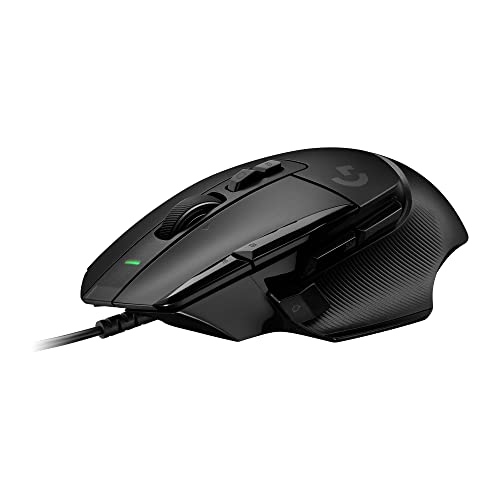


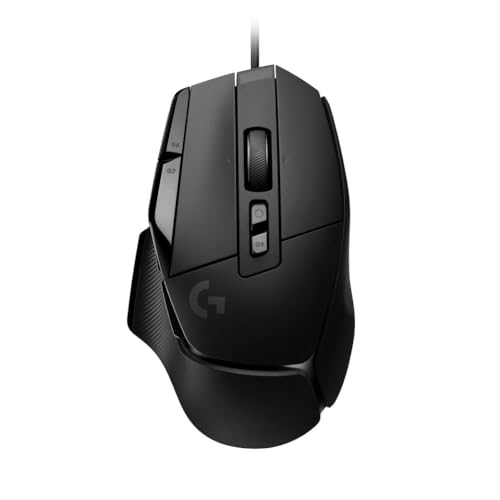
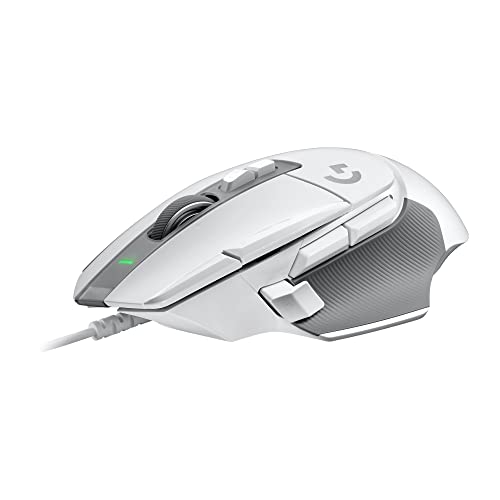
| Model | Key point from title | Price tier | Best for |
|---|---|---|---|
| G502 X Wired (Black) | Optical switches, 13 buttons, infinite scroll | Mid-range | Many bindings, wired |
| G502 Hero Wired | 25,600 DPI, adjustable weights, 11 buttons | Mid-range | Tunable weight, wired |
| G502 Lightspeed Wireless | Wireless, RGB, weights, POWERPLAY compatible | Premium | Wireless G502 layout |
| G703 Lightspeed Wireless | Hero 25K, 10G optional weight, rubber side grips | Premium | Wireless with side grip |
| G305 Lightspeed Wireless | 12,000 DPI, lightweight, 250h battery | Budget | Cheap wireless |
| G203 Wired | 6 buttons, RGB, on-board memory | Budget | Basic wired mouse |
| G502 X Wired (LIGHTFORCE) | Hybrid optical-mechanical switches, Hero 25K | Mid-range | Click-feel preference |
| G502 X Wired (White) | Same wording as the black G502 X | Mid-range | White desk setups |
The eight picks, one at a time
Logitech G502 X Wired (Black)
The title leads with optical switches, 13 buttons and an infinite scroll wheel, and that button count is the highest in the group. Infinite scroll usually means the wheel can spin freely as well as click-step, which helps in long documents and spreadsheets as much as in games. Optical switches are the maker’s pitch for a click that avoids the wear of a traditional metal contact, though we cannot judge durability from a title.
- Pros: 13 buttons for heavy binding; wired, so no charging.
- Cons: no weight or battery detail in the title; check the listing for the weight.
Who it’s for: players who bind many actions and want the newest G502 body.
Logitech G502 Hero Wired
This is the one listing that spells out the classics: 25,600 DPI, adjustable weights, 11 programmable buttons and on-board memory. Adjustable weights let you add or remove small metal pieces, so you can shift the balance by trial rather than accept one fixed feel. Because the title names on-board memory, a saved lighting and DPI profile should travel with the mouse to a friend’s PC or a tournament machine.
- Pros: tunable weight; settings stored on the mouse.
- Cons: wired only; the weights add up to a heavier mouse if you load them all.
Who it’s for: tinkerers who want to adjust weight and keep profiles on the device.
Logitech G502 Lightspeed Wireless
The title packs in RGB, adjustable weights, 11 programmable buttons, POWERPLAY compatibility and on-board memory. POWERPLAY is Logitech’s wireless charging mat system, sold separately, so the mouse can top up while you play. The title gives no battery figure, so check the listing, and remember that adding a heavier body plus a battery makes this the weightiest wireless option in the group on paper.
- Pros: wireless with the G502 layout; works with a charging mat.
- Cons: sits at the premium end of this group; weights plus battery add heft.
Who it’s for: G502 fans who want the cable gone and will budget for it.
Logitech G703 Lightspeed Wireless
Here the headline specs are the Hero 25K sensor, 100-25,600 DPI, LIGHTSYNC RGB, a 10G optional weight and rubber side grips. The grips matter if your palm slips on smooth plastic. It is also POWERPLAY compatible, like the G502 Lightspeed. The mix of a Hero sensor, grips and an optional weight suggests a mouse aimed at players who want a firmer hold than a smooth shell gives, but fit remains personal.
- Pros: rubber grips for hold; broad DPI range.
- Cons: premium price tier; the optional weight is a minor extra, not a full set.
Who it’s for: wireless players who want a grippier body than the G305 offers.
Logitech G305 Lightspeed Wireless
The G305 title promises 12,000 DPI, a lightweight body, six programmable buttons and 250 hours of battery. Six buttons is plenty for most shooters, and the long battery claim means fewer charging reminders. Because it is described as lightweight, it also suits players who find the G502 body tiring over long sessions.
- Pros: cheapest wireless option here; long stated battery life.
- Cons: fewer buttons; the shape is smaller, which large hands may find cramped.
Who it’s for: anyone adding wireless on a budget.
Logitech G203 Wired
Plain and cheap: LIGHTSYNC RGB, on-board memory and six programmable buttons. The title includes a typo (“Compabile”), a small reminder to read the listing itself rather than rely on the title alone. It is the simplest mouse in the set, and the lack of any weight or battery talk keeps the decision easy: you are paying for six buttons, a sensor and a cable. If that already covers your games, there is little reason to climb the range.
- Pros: low entry price; settings stored on the mouse.
- Cons: wired and basic; no weight system.
Who it’s for: first gaming mouse buyers and spare-desk setups.
Logitech G502 X Wired (LIGHTFORCE)
This listing names LIGHTFORCE hybrid optical-mechanical primary switches and a Hero 25K sensor. Hybrid usually means an optical trigger paired with a mechanical-feel click, a design Logitech promotes for crisp response. The naming differs from the black G502 X above, so confirm it is a different version before assuming it is the same mouse. The ASIN and the wording are the two things to compare when you open each page.
- Pros: Hero 25K sensor named; distinctive switch design.
- Cons: overlaps heavily with other G502 X entries; wording is ambiguous.
Who it’s for: buyers who care about switch feel and have read the listing details.
Logitech G502 X Wired (White)
The title matches the black G502 X: optical switches, 13 buttons, infinite scroll, PC and macOS compatible. White is the only stated change. That makes it a near-duplicate listing, and the honest advice is to pick the finish and compare the two prices, not treat it as a separate model. If the black one is cheaper on the day, buy that one.
- Pros: same button count as the black version; suits light desks.
- Cons: duplicate of an earlier entry; white shells show wear sooner.
Who it’s for: anyone who wants a G502 X and prefers white.
How we picked these
We worked from the product titles, published specifications, manufacturer documentation and buyer reviews, then grouped the listings by connection type and shape. Nobody on the team used or measured these units. Where a title is silent on weight or battery, we say so and point you to the listing instead of filling the gap from memory. Spec lines such as DPI, switch type and battery hours are the seller’s claims, and we repeat them as claims. Price tiers are relative within these eight listings only, so a Budget label here is not a statement about the wider market.
Choosing between wired, Lightspeed and the G502 shape
Wired or Lightspeed wireless
Wired models in this set are the G502 X trio, the G502 Hero and the G203. They never need charging and cannot drop a signal. Lightspeed models trade that certainty for a free cable, and the maker positions the link as gaming-grade. Treat latency as a claim from Logitech, since no title gives a figure. If your mouse sits close to the receiver, wireless is a reasonable choice.
Sensor and DPI
Hero and Hero 25K are sensor names; the G305 title simply lists 12,000 DPI. DPI is how far the cursor moves per inch of hand travel. Most players land between 400 and 3,200, so the top figure is headroom, not a goal. Prefer a mouse that stores your DPI steps on board.
Weight and buttons
Adjustable weights appear on the G502 Hero and G502 Lightspeed, and a single 10G optional weight on the G703. The G305 is the lightweight pick. On buttons, the range runs from six on the G305 and G203 to 13 on the G502 X. Count what you will actually bind before paying for more.
Shape and software
The G502 family is widely described as a large, right-hand-shaped mouse, while the G305 and G203 are smaller. That is general knowledge, so check listing photos and dimensions against your hand. Logitech’s G Hub app handles remapping, lighting and profiles, and on-board memory keeps a profile on the mouse itself.
Pre-purchase elimination checklist
Answer these four questions in order and the eight listings shrink to one or two. First, do you refuse a cable? That removes five wired entries and leaves the G502 Lightspeed, G703 and G305. Second, is your budget the lowest tier? Take the G305 or G203. Third, do you need ten or more buttons? Only the G502 family qualifies. Fourth, do your fingers reach the side keys on a larger body? If unsure, check the listing dimensions. If two entries survive, choose the one with the better return policy, because comfort is the one thing a title cannot settle.
A quick battery estimate
Take the G305’s 250h claim. At four hours of play a day that is about 62 days between battery changes, assuming the figure holds at your lighting and polling settings. Real use is usually shorter, so plan on roughly half, around a month. Those are our assumptions, not figures from a bench.
Mistakes buyers make with Logitech mice
Treating near-identical listings as different products is the first: the G502 X black and white share a title. Second, paying for 25,600 DPI when you play at 800. Third, assuming a wireless mouse includes a charging mat; POWERPLAY is a separate system. Fourth, ignoring shape: a 13-button mouse is a poor buy if your fingers cannot reach the side keys. Fifth, skipping the listing check when a title omits weight. One more tip applies to all of them: pair the mouse with a decent surface, and see our guide to PC peripherals for the rest of the desk.
Verdict
For most buyers, the G502 Hero is the dependable all-rounder in this set, the G305 is the budget wireless pick, and the G502 Lightspeed or G703 is the premium route if you want wireless with weights or side grips. Choose the G203 only if price is the whole story. Whatever you pick, keep the box until you have checked the weight, the button reach and the wireless range on your own desk. Confirm which G502 X version you are getting before checkout, and if you are undecided between wired and wireless, the G502 Hero and G502 Lightspeed share a layout, so the choice comes down to the cable and the budget.
Questions people ask before buying a Logitech gaming mouse
Which Logitech gaming mouse is best for most players?
For most people the G502 Hero is the safe middle choice in this set: wired, 11 programmable buttons, adjustable weights and on-board memory. The G305 suits anyone who wants wireless on a small budget, while the G502 Lightspeed adds wireless to the same layout at a higher price. Check the listing photos to confirm the shape suits your grip.
Is Lightspeed wireless good enough for gaming?
Lightspeed is Logitech’s name for its 2.4 GHz wireless link, and the brand pitches it at gamers. We cannot verify latency from titles alone, so treat that as the maker’s claim. In practice a USB receiver placed on the desk, not behind the tower, gives the most stable connection. Wired models remove the question and the battery.
What does Hero 25K mean on a mouse?
Hero 25K is Logitech’s sensor name, and the 25K refers to a maximum DPI of roughly 25,600. Most players run a few hundred to a few thousand DPI, so the ceiling is a spec-sheet figure rather than a daily setting. What matters more is that the sensor tracks consistently and that you can save your preferred DPI steps.
Are the three G502 X listings the same mouse?
Two of them look like the same model in black and white, based on near-identical titles. The third mentions LIGHTFORCE hybrid switches and a Hero 25K sensor in different words, so confirm the exact version on the listing page before ordering. If the colour is the only difference you care about, pick whichever finish suits your desk.
Do I need Logitech G Hub software?
Not to use the mouse, since it works plug and play. G Hub, Logitech’s companion app, is where you remap buttons, set DPI steps, adjust lighting and save profiles. Several titles here mention on-board memory, which stores a profile on the mouse itself so your settings follow it to another PC without the app running.
Related guides
- When I Turn On Record Game In Background On Gamebar. Gamebar Crashes, What Do I Do?
- How To Reduce Background Noise On A Streaming Microphone
- Poly Computer Accessories Company Streaming Evaluation
Related guides
- Best Rechargeable Wireless Gaming Mice: Twelve Listings Sorted by Battery and Weight: 10 Compared (2026)
- Best MTG Playmats for Card Tables and Gaming Desks: 9 Compared (2026)
- Best Mouse Skates: Twelve Sets Sorted by Mouse Fit, Material and Pad Type: 10 Compared (2026)
- Best Ergonomic Gaming Mice: Six Vertical and Contoured Picks for Long Sessions: 6 Compared (2026)