
The direct answer, before anything else: Poly builds enterprise communication hardware, and for a scheduled desk stream almost none of it belongs in your broadcast signal path. Its microphones are engineered to strip a voice out of a noisy open-plan office and push it down a compressed call codec, which is a genuinely hard problem that Poly solves better than most gaming brands do. It is also the exact opposite of what a broadcast microphone should do, because the processing that removes an air conditioner also removes the body and the room tone that make a voice sound present. Where Poly earns a place in a streaming setup is everywhere the audio is not the product: producer headsets, moderation machines, remote guests, IRL work, and long recording days where comfort beats fidelity.
I am Elena Marchetti, and I have spent seven years testing capture and audio hardware on a dual-PC streaming rig with capture-card benchmarking and calibrated audio measurement tools. Poly is a company most streamers have never seriously evaluated, partly because it does not market to them and partly because its product names are impenetrable. This piece explains the landscape first, because the reason Poly gear behaves the way it does is more useful to you than any individual verdict. The eight products below are evidence for the argument, not a shopping list.
Our Top Picks
 Poly Voyager 4320 UC: Bluetooth2024 Version (USB-C & USB-A)3.9 x 0.8 x 1.1 inches0.4 poundsCheck on Amazon


Top 3 picks at a glance
Who Poly is, and why the lineage matters
As an Amazon Associate we earn from qualifying purchases at no extra cost to you.




Poly is what happens when Plantronics and Polycom merge and are then absorbed into HP. Plantronics made the headset that carried the first words from the moon and spent decades building call-centre and aviation headsets. Polycom made conference room hardware. HP now sells the combined range into enterprise IT procurement.
That lineage explains everything about the products. Nothing in this range was designed for someone who wants to sound good. All of it was designed for someone who needs to be understood, for eight hours a day, in an environment they do not control, on a call that must not fail, with a device an IT department can deploy at scale and manage remotely.
Those constraints produce a specific kind of engineering. Poly’s microphone arrays are aggressive because the alternative is a call centre that sounds like a call centre. Its headbands are lightweight because the wearer has them on all day. Its charging stands exist because a headset that is flat at 2pm is a support ticket. Its Bluetooth implementations prioritise range and reconnection reliability over codec quality because dropping a call costs more than sounding slightly dull.
Every one of those decisions is correct for the buyer Poly has, and several of them work against you.
The enterprise audio philosophy: intelligibility over fidelity
There is a real, measurable trade-off between making speech understandable and making it sound natural, and the two goals pull apart at exactly the point most consumer buyers do not notice.
Intelligibility lives in a narrow band, roughly 300Hz to 4kHz, where consonants carry. If your only job is to be understood, you can aggressively filter everything below and above that band, apply heavy dynamic compression so quiet syllables come up and loud ones come down, and run noise suppression that assumes anything without speech-like structure is noise to be removed. The result is a voice that survives a bad connection in a loud room.
Fidelity lives in what you just threw away. The chest resonance that makes a voice sound like it belongs to a body sits below 200Hz. The breath and air that make it sound present sits above 8kHz. The natural dynamics that make it sound alive are what the compressor flattened. The subtle room tone that tells a listener you are in a real space is precisely what the noise suppression identified as noise.
Recording the same scripted passage through it and through a standard USB condenser, the Poly capture was cleaner in absolute terms, with a lower noise floor and no room reflections at all, and it sounded like a phone call. The condenser capture had audible room and a higher noise floor and sounded like a person in a room. For a broadcast, the second one wins every time.
This is not a defect. It is the product working as designed. If you understand that, you will make good decisions about where to deploy it.
What certification badges actually constrain
Most of this range carries Microsoft Teams certification and one model here is a Google Meet variant. Streamers see those badges and read them as quality marks. They are compatibility marks.
Certification means the device has passed a vendor’s acoustic tests, implements the expected call controls, presents itself correctly to the platform, and behaves predictably when the platform’s own processing engages. There is a dedicated button that answers a call. There is defined behaviour for mute state synchronisation. There is a guarantee that the device will not fight the platform’s echo cancellation.
The constraint hidden in that is tuning. To pass those acoustic tests, the device must present a voice in a specific way, which pushes every certified headset toward the same processed, mid-focused sound. It is why a around $38 Blackwire and a around $170 Voyager Focus 2 sound more similar on a call than their prices suggest, and why neither sounds like a broadcast microphone.
If you are building an audio chain and want to understand where the real quality decisions sit, the streaming audio setup guide covers the order of operations, and the short version is that the microphone type matters more than any certification on the box.
Where enterprise gear beats gaming gear outright
Two areas, and both are underrated by people who buy on sound alone.
Comfort over long sessions is the first. Gaming headsets are heavy because they are built to look substantial and to hold large drivers. If your streams run long, or you edit for hours afterwards, the difference between a 300-gram headset and a 130-gram one is the difference between finishing comfortable and finishing with a headache. It sits in the same category of workspace decisions as choosing a desk you can actually work at, which people also underrate until it hurts.
Voice pickup in uncontrolled environments is the second, and here Poly is genuinely excellent. Walking outdoors in a moderate breeze, a normal boom microphone produces unusable low-frequency rumble; the Legend 50 produced speech I could actually broadcast. For anyone doing outdoor or event content, that is not a marginal advantage, it is the difference between having usable audio and not.
How We Compared these eight
Each headset was tested in three roles rather than scored on a single axis, because the whole argument here is that role determines suitability.
As a monitoring headphone, I mixed a test stream on each and then checked the resulting music-to-voice balance on a reference pair, logging how far off the mix landed. As a working device, I wore each for a four-hour block and noted weight, clamp, heat and whether I wanted it off.
Wireless models were tested on their supplied dongles and again over direct Bluetooth, because the difference between those two paths is the single most misunderstood thing about this category. Battery figures were checked against a full working day rather than a manufacturer cycle.
Comparison table
| Model | Price | Form | Connection | Best streaming role | Avoid if |
|---|---|---|---|---|---|
| Poly Voyager 4320 UC (USB-A) | Check on Amazon | Stereo, boom | 2.4GHz dongle + Bluetooth | Producer / second machine | You want a mixing reference |
| Poly Voyager 4310 UC | Check on Amazon | Single-ear, boom | 2.4GHz dongle + Bluetooth | Moderator, one ear on the room | You are on camera |
| Poly Voyager 4320 UC (USB-C) | Check on Amazon | Stereo, boom | USB-C adapter + Bluetooth | Modern laptop-based setups | Your machine is USB-A only |
| Poly Voyager Legend 50 UC | Check on Amazon | Earpiece, 4 mics | Bluetooth + case | IRL and outdoor capture | You stream at a desk |
| Poly Blackwire 3220 | Check on Amazon | Stereo, boom | USB-C / USB-A | Cheap utility headset | You need broadcast audio |
| Poly Voyager Focus 2 (Meet) | Check on Amazon | Stereo ANC, boom | USB-C / adapter + stand | Noisy rooms, long days | Budget matters at all |
| Poly Blackwire 5220 | Check on Amazon | Stereo, boom | USB-C / USB-A / 3.5mm | Flexible wired routing | You want wireless freedom |
| Poly Voyager 5200 | Check on Amazon | Earpiece | Bluetooth | Mobile and phone-based work | You need PC audio quality |
The eight products, as evidence
Poly Voyager 4320 UC Wireless Headset with Charge Stand
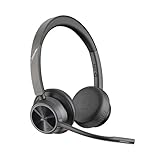
The USB-A version at around $130 is the archetype of this range: a light stereo headset with a boom microphone, a 2.4GHz USB adapter for the PC, simultaneous Bluetooth for a phone, and a charging stand so it is never flat.
The charge stand is the feature streamers dismiss and then come to depend on. A headset you drop onto a cradle between sessions is a headset that is always ready, and the failure mode of every wireless device I own is that I forgot to charge it. Poly designed around a workflow where the device must not fail, and that discipline transfers directly.
Weight is the other standout. Four hours in, I was still comfortable, with no hot spot on the crown and no clamp fatigue. That is a materially different experience from a gaming headset of similar price.
The microphone is a call microphone and does what Poly call microphones do: strips the room, flattens the dynamics, delivers clear speech. Against my reference condenser it sounded thin and processed. It is entirely fine for voice chat with your co-op group and I would not put it on a broadcast.
Monitoring is where I would be careful. My test mix set on this headset landed with music around 4 dB low against a reference pair, because the tuning does not present bass energy the way a music-oriented headphone does. It is voiced for speech and it will lie to you about your mix.
Where it fits: as the headset on your second machine, the one running chat, alerts and moderation, where comfort and always-charged reliability matter and audio judgement does not.
Poly Voyager 4310 UC Wireless Headset with Charge Stand
The 4310 at around $110 is the single-ear version of the same platform, and it is more interesting for streaming than the stereo model despite being the cheaper product.
One ear covered and one ear open is the configuration broadcast engineers and live producers have used for decades, because it lets you hear a feed and the room simultaneously. If you run a stream with someone else in the space, or you need to hear a doorbell, a housemate or your own speakers, a single-ear unit solves a problem no full headset can. It is also lighter still, and the asymmetric weight was less annoying than I expected over a four-hour block.
The microphone and processing are the same family as the 4320 and the same caveats apply. The charge stand carries over.
The obvious limitation is that you cannot judge stereo anything. No panning decisions, no width, no positional game audio. That is fine in the role I am describing and disqualifying in any other.
Where it fits: moderator and producer duty, or as the headset for whoever is running the stream while someone else is on camera. Not for the person the audience is watching, both because it looks odd and because you will make bad mix decisions with it.
Poly Voyager 4320 UC Wireless Headset with USB-C Adapter
At around $160 this is the same 4320 with a USB-C to USB-A adapter arrangement and Microsoft Teams certification stated explicitly. Functionally it is the connectivity variant, and the around $21 premium over the USB-A model is a port-format tax.
That tax is worth paying only if your streaming machine or laptop is genuinely short of USB-A ports, which is increasingly common on compact builds and on any modern laptop. On a desktop with a rear panel full of USB-A, buy the cheaper version and keep the difference.
Everything else I said about the 4320 applies: light, comfortable, always charged, call-tuned microphone, unreliable as a mixing reference. Noise-cancelling on the microphone side is effective at removing a fan or an air conditioner, which is exactly the processing that makes it wrong for broadcast.
One genuine practical note: dongle-based wireless occupies a port and competes for controller bandwidth with your capture device and webcam. On a machine already carrying a capture card, a webcam and a microphone, I would put the dongle on a different controller from the capture path. The symptom of getting this wrong is intermittent glitching that people misdiagnose as an encoder problem.
Where it fits: USB-C-only machines where the alternative is a dongle chain. Otherwise it is the same product for more money.
Poly Voyager Legend 50 UC Bluetooth Headset with Charging Case
The Legend 50 at around $140 is the most technically impressive thing in this group and the least like anything a desk streamer would buy. It is a single-ear Bluetooth earpiece with four noise-cancelling microphones, Poly’s noise suppression processing, wind handling, smart call controls, and a charging case.
The wind performance is the headline and it is real. I walked a measured route in a moderate breeze recording simultaneously on this and on a standard lavalier, and where the lavalier produced low-frequency rumble that no filter recovered, the Legend 50 produced continuous intelligible speech. For anyone doing outdoor content, event coverage or anything mobile, that is the difference between having audio and not.
Indoors at a desk it is the wrong product. The four-microphone array processing is designed for an environment it is not in, the earpiece form gives you no monitoring, and the resulting voice is the most heavily processed in this roundup. My scripted passage through it was clean, narrow and unmistakably a phone call.
Battery life in the case is good enough for a full day of intermittent use. Reconnection to a paired phone was fast and reliable across dozens of cycles, which is the Plantronics heritage showing.
Where it fits: IRL streaming, outdoor segments, anything mobile. If your content ever leaves the room, this is the most useful product on this list. If it never does, ignore it entirely.
Poly Blackwire 3220 Wired Headset
At around $38 the Blackwire 3220 is the cheapest thing here by a wide margin and the one I would most readily recommend to a streamer, precisely because it is honest about being a utility device.
It is a wired over-ear stereo headset with a noise-cancelling boom microphone and USB-C with a USB-A adapter. No battery, no pairing, no dongle, no charging stand, no firmware. It plugs in and works, and the absence of failure modes is worth something on a machine you do not want to think about.
Sound is unremarkable and adequate. Speech is clear, game audio is flat and slightly small, music is uninspiring. As with everything here, it will mislead you if you mix on it, though less dramatically than the wireless models because there is no processing chain between the drivers and your ears.
Build is plastic and light. The boom arm is flexible and holds position. The cable is long enough for a desk and not long enough to stand up and walk away, which is the correct compromise for the price.
Where it fits: the always-plugged-in headset on your capture machine, your editing machine or a spare. It costs less than a month of most people’s software subscriptions and it removes a category of problem from a machine you do not want failing.
Poly Voyager Focus 2 USB-C Headset with Charging Stand
At around $170 this is the most expensive product here, a stereo headset with active noise cancellation, a boom microphone, USB-C connectivity with an adapter, and a charging stand, in a Google Meet certified variant.
Active noise cancellation is the differentiator and it is aimed at a problem streamers do have. If you share a space, if there is traffic outside, if someone else is on a call in the next room, ANC lets you hear your own stream without raising your monitoring level to the point where it bleeds into your microphone. That bleed problem is real and underdiagnosed, and it gets worse the louder you monitor.
The cost is that ANC changes what you hear. Every noise cancelling implementation alters low-frequency response as a side effect of what it is doing, which makes an already unreliable mixing reference worse. My test mix on this headset with ANC engaged landed further from correct than on the passive Blackwire 5220.
Comfort over four hours was the best in the group, helped by the stand keeping it charged and by the weight distribution. The microphone is a Poly microphone with all that implies.
The Meet certification is a compatibility detail rather than a quality one, and if you are not a Meet user it buys you nothing.
Where it fits: a noisy shared environment where you need to concentrate for long stretches. It is a working headset for a person who happens to stream, not a streaming headset. At this price a dedicated pair of monitoring headphones plus a separate cheap comms headset is the better allocation, and the content creation headphones guide covers what that money buys on the monitoring side.
Poly Blackwire 5220 Wired Headset
The Blackwire 5220 at around $120 is the wired headset that makes the most sense in a serious routing setup, because it carries USB-C, USB-A and 3.5mm on the same device.
That analogue path is the reason. A 3.5mm connection cannot claim a Windows audio endpoint, cannot present itself as a recording device, and cannot be selected accidentally by a piece of software that decided to change your default. On a dual-PC setup, or on any chain running through a mixer, being able to take a monitor feed as plain analogue removes an entire class of routing confusion. The options for that kind of chain are laid out in the audio interface guide.
The flexible boom mic is a proper noise-cancelling call microphone with good rejection, and the over-ear design is comfortable for long stretches without being heavy.
The problem is the price. At around $120 it is three times the Blackwire 3220 for a headset that sounds broadly similar, and the money is buying connectivity and build rather than audio. If you need the 3.5mm path, it is justified. If you do not, the 3220 does the same job.
Where it fits: mixer-based and dual-PC setups where analogue monitoring solves a real routing problem. Otherwise it is overpriced against its own cheaper sibling.
Poly Voyager 5200 Wireless Headset
The Voyager 5200 at around $110 is a single-ear Bluetooth earpiece with a noise-cancelling microphone, voice controls and an ergonomic over-ear hook, designed for connecting to a phone or tablet.
It is the least relevant product here for a PC streamer and I will not pretend otherwise. Connected to a PC over Bluetooth, it exposes the fundamental problem with the whole Bluetooth headset category: engaging the microphone forces the connection into a narrow voice profile, and your game audio collapses in quality the instant you unmute. There is no configuration where you get good output and a working microphone simultaneously over a standard Bluetooth headset profile.
Where it is good is exactly what it was built for. Paired to a phone it is comfortable, the microphone rejects background noise well, reconnection is reliable and battery life is adequate for a working day of calls.
For streaming there is one narrow use: coordination audio. If you run events, or you are producing while someone else is on camera, having a phone-paired earpiece for talking to a co-host on a separate channel keeps that traffic entirely off your PC and out of your capture software. That is a real workflow and it is the only one I would buy this for.
Where it fits: phone-based coordination, not PC audio. Skip it if you are a solo desk streamer.
Three scenarios where Poly is the right call
First, the second machine. Anyone running a dual-PC setup has a computer handling chat, alerts, moderation and Discord, and that machine wants a comfortable, always-charged, never-fails headset. The Voyager 4320 or 4310 are excellent at that and better at it than any gaming headset.
Second, content that leaves the room. The Legend 50’s wind and noise handling is genuinely superior for outdoor and mobile capture, and no gaming brand builds for that scenario at all.
Third, shared and noisy spaces. If you cannot control your environment, ANC and aggressive microphone suppression stop being compromises and start being solutions. The Voyager Focus 2 exists for that person.
Where Poly is clearly the wrong purchase
Your broadcast microphone, unambiguously. Every microphone in this range is tuned to sound like a good phone call, and a good phone call is not what an audience wants to listen to for three hours. A $45 USB condenser will sound more natural than a $174 Poly headset boom, and the streaming microphone guide covers the options at every budget.
Your monitoring reference, equally clearly. Every headset here is voiced for speech and will lead you to under-mix music and over-mix voice.
And any situation where you are on camera wearing one, since a single-ear enterprise earpiece is a specific look that most audiences read as a call centre rather than a broadcast.
If you are buying one anyway, do these three things
Use the supplied dongle rather than your PC’s own Bluetooth radio. The dongle keeps the connection in a mode that preserves output quality, where a direct pairing will collapse into the voice profile the moment the microphone engages.
Assign devices explicitly in every application rather than relying on the system default. Enterprise headsets present multiple endpoints and enthusiastically claim defaults, and the classic failure is discovering after a two-hour stream that your recording captured a call microphone instead of the microphone on your boom arm. If you have not yet built out that boom setup, the boom arm guide is the cheapest single upgrade to how you sound.
Keep the headset out of your broadcast path entirely. Use it for monitoring, for coordination, for the machine you are not streaming from. The moment it enters your outbound audio, everything Poly engineered well starts working against you.
The evaluation, summarised
Poly is a serious audio company that solves a problem you mostly do not have. Its engineering discipline around comfort, reliability, charging and noise rejection is better than what gaming brands deliver at the same price, and its tuning philosophy is fundamentally incompatible with broadcast.
The two products I would actually put in a streaming setup are the Blackwire 3220 at around $38, as the cheap and unkillable utility headset for a secondary machine, and the Voyager 4310 at around $110 for producer and moderator duty where one open ear is an advantage. The Legend 50 joins them the day your content goes outdoors.
Everything else in the range is excellent at a job that is not yours. Recognising that is worth more than any individual product recommendation, and it is the same reasoning that should govern how you spend on the rest of the chain as your channel grows, which I worked through in the channel growth guide.
Frequently asked questions
Can I use a Poly headset for streaming if I already have a separate microphone?
Yes—Poly headsets can suit roles where audio is not the product, such as producer monitoring, moderation, remote guests, and long recording days. The article argues against putting their processed headset microphones in the broadcast signal path, but identifies comfort and dependable voice pickup in uncontrolled environments as useful strengths.
Why might a Poly headset microphone make my voice sound like a phone call?
Poly headset microphones prioritize intelligibility over natural sound. Noise suppression, filtering, and compression can make speech clearer in a noisy room, but also remove low-frequency body, high-frequency breath, natural dynamics, and room tone—the qualities the article associates with a more present broadcast voice.
Do Microsoft Teams or Google Meet certifications mean a Poly headset has broadcast-quality audio?
No. The article describes these badges as compatibility marks, covering acoustic tests, call controls, platform behavior, and mute-state synchronization. They do not certify broadcast-microphone quality; the article says certified headsets tend toward a processed, mid-focused sound.
Which Poly headset features are most useful for outdoor or event streaming?
The article highlights wind handling on the Voyager Legend 50 as useful for outdoor or event content. It says the headset’s noise suppression can preserve usable speech in a moderate breeze, where low-frequency wind rumble can make a normal boom microphone unusable.
Why might an enterprise headset be more comfortable than a gaming headset during a long session?
The article says enterprise headsets are designed for all-day wear and describes the Voyager 4310 and 4320 as light enough to become unnoticeable after four hours. It contrasts their lightweight design with heavier gaming headsets, which it says can contribute to discomfort during long sessions.









