The best capture card for a PS5 Pro and Xbox Series X is the Elgato 4K S if you want one USB-C box that captures 4K60 and passes 1440p120 or 1080p240 through to your display, and the AVerMedia Live Gamer Ultra 2.1 if you want the highest passthrough numbers plus VRR and HDR10 in a USB unit. For a modest budget, the NearStream CCD10 lists similar passthrough figures at a much lower tier, and the Elgato HD60 X is the safer pick if you mostly record at 1080p60.
Capture cards are described with a jumble of numbers, and most buying mistakes come from mixing up two of them. One number says what the card records, and another says what it sends through to your screen. A console player who wants to keep a 120Hz picture on their monitor while streaming at 1080p60 needs the second number to be high and the first to be modest. Read both on every listing before comparing prices.
This page begins with a three-question decision flow, then compares all seven cards, then works through the storage and upload math that streamers should do before choosing. A note on the consoles: most titles name PS5 and Xbox Series X/S rather than the PS5 Pro specifically, so treat the PS5 Pro as a PS5 for compatibility and check each listing. For related setups, see our best capture cards for PS5 streaming and the walkthrough on capture card settings for PS5 4K 60 HDR passthrough.
Our Top Picks
Three questions that choose the card

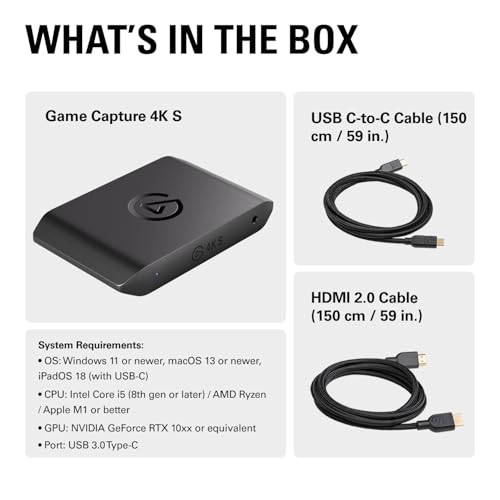
Elgato 4K S Capture Card for PS5, Xbox Series X/S, Switch 2 | 4K60 capture, 1440p120 or 1080p240 passthrough, HDR10 support, Near-zero latency, USB-C, Analog audio input


As an Amazon Associate we earn from qualifying purchases. Product prices and availability are accurate as of the date/time indicated.

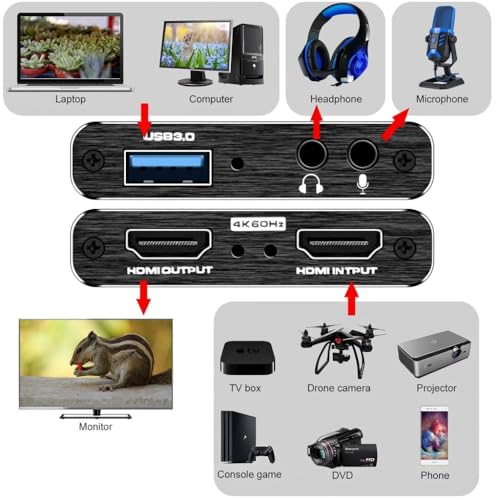
Capture Card, 4K HDMI Video Capture Card, Game Capture Card, 1080P 60FPS Video Capture Device, HDMI to USB 3.0 Capture Card for Streaming, Work with Camera/Xbox/PS4/PS5/PC/OBS




As an Amazon Associate we earn from qualifying purchases. Product prices and availability are accurate as of the date/time indicated.

Elgato HD60 X Capture Card for PS5, Xbox Series X/S, Switch 2 | 1080p60 HDR10 or 4K30 capture, Ultra-low latency, Driverless plug and play, Works with OBS and more, PC/Mac compatible


As an Amazon Associate we earn from qualifying purchases. Product prices and availability are accurate as of the date/time indicated.

Elgato HD60 S, External Capture Card, Stream and Record in 1080p60 with ultra-low latency on PS5, PS4/Pro, Xbox Series X/S, Xbox One X/S, in OBS, Twitch, YouTube, works with PC/Mac


As an Amazon Associate we earn from qualifying purchases. Product prices and availability are accurate as of the date/time indicated.

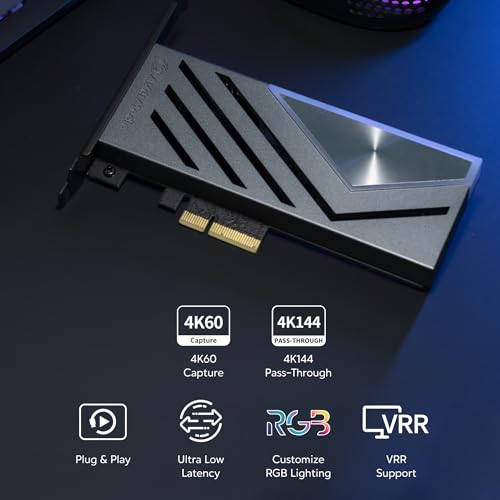
AVerMedia HDMI 2.1 Internal PCIe Capture Card for Streaming and Recording 4K60 with Ultra-Low Latency on PS5, PS4 Pro, Xbox Series X/S, Xbox One X, Switch Games - GC575 Live Gamer 4K 2.1


As an Amazon Associate we earn from qualifying purchases. Product prices and availability are accurate as of the date/time indicated.

NearStream CCD10 HDMI Capture Card for PS5, PS4, Xbox, Switch, DSLR Camera | 1080p60 USB-C 3.0 Capture, 4K60, 1440p120 or 1080p240 Passthrough, Dual 3.5mm Audio Ports, Windows/Mac/Linux Support


As an Amazon Associate we earn from qualifying purchases. Product prices and availability are accurate as of the date/time indicated.

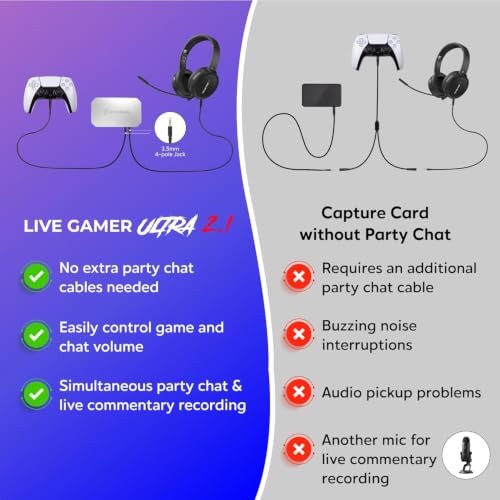
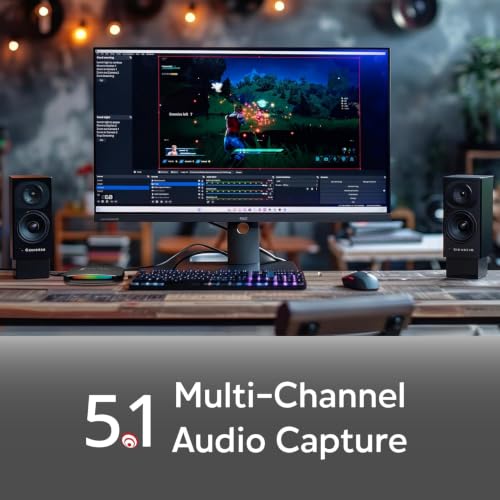
AVerMedia Live Gamer Ultra 2.1 4K144 HDMI 2.1 USB Capture Card, GC553G2 | HDR10 and VRR, 1440p240/1080p360 passthrough, party chat, 5.1 audio and RGB for PS5, Xbox Series X/S, Switch 2, PC and Mac





As an Amazon Associate we earn from qualifying purchases. Product prices and availability are accurate as of the date/time indicated.
1. What do you want to play at?
If you play at 4K120 or 1440p120 and want to keep that on your display, you need passthrough that matches. The Elgato 4K S, NearStream CCD10 and AVerMedia Live Gamer Ultra 2.1 list 1440p120 or higher passthrough in their titles. The Elgato HD60 X, HD60 S and VIXLW listings do not state their passthrough figures, so check the listing before assuming.
2. What do you want to capture?
Streaming at 1080p60 is the most common choice. If you also want 4K60 recordings, the AVerMedia GC575 and Elgato 4K S list it. The HD60 X lists 1080p60 HDR10 or 4K30. Every extra pixel costs storage and editing time, so capture only what you will publish.
3. What is your computer?
USB cards work on laptops and desktops. The GC575 is internal PCIe and needs a desktop with a free slot. If you stream from a laptop, an internal card is simply not an option.
All seven cards at a glance
| Card | Capture (from title) | Passthrough (from title) | Interface | Price tier |
|---|---|---|---|---|
| VIXLW 4K HDMI Capture Card | 1080P 60FPS | Not stated; check listing | USB 3.0 | Budget |
| NearStream CCD10 | 1080p60 | 4K60, 1440p120 or 1080p240 | USB-C 3.0 | Budget |
| Elgato HD60 S | 1080p60 | Not stated; check listing | External USB | Mid-range |
| Elgato 4K S | 4K60, HDR10 support | 1440p120 or 1080p240 | USB-C | Mid-range |
| Elgato HD60 X | 1080p60 HDR10 or 4K30 | Not stated; check listing | USB, driverless | Mid-range |
| AVerMedia GC575 Live Gamer 4K 2.1 | 4K60 | Not stated; HDMI 2.1 per title | Internal PCIe | Premium |
| AVerMedia Live Gamer Ultra 2.1 (GC553G2) | 4K144 per title | 1440p240 or 1080p360, HDR10 and VRR | USB | Premium |
Price tiers compare these seven cards only. Check each listing for the current price and which cables are included.
Budget USB cards
VIXLW 4K HDMI Video Capture Card
The VIXLW is the least expensive listing in the set, and its title needs careful reading. It calls itself a 4K HDMI video capture card, then describes a 1080P 60FPS video capture device, HDMI to USB 3.0, working with a camera, Xbox, PS4, PS5, PC and OBS. In practice, “4K” in a title at this price often refers to the input signal the box accepts, not to the video it records, but the title does not settle it, so look at the listing for the exact capture and passthrough specifications.
For a PS5 Pro or Series X owner, two details matter most: whether the card has an HDMI output for passthrough, and whether that output can carry 120Hz. The title does not say. If it has no passthrough, you would need a separate splitter to see your game on a display, which adds latency and cost. If it has passthrough only up to 60Hz, your console will drop to 60Hz while the card is in the chain.
It may suit someone who wants to record or stream 1080p60 from a console and does not mind lowering the display output. We have a dedicated look at a related listing in our VIXLW USB-C HDMI capture card review. As with any low-cost unit, check warranty terms and buyer comments about driver behavior and software compatibility.
Pros
- Lowest price tier in the set; works with OBS per the title.
- Lists Xbox, PS4, PS5, PC and camera use.
- USB 3.0 interface for laptops and desktops.
Cons
- Capture is 1080P 60FPS despite the 4K label.
- Passthrough support and refresh rate are not stated.
- PS5 Pro and Series X are not named specifically.
Who it’s for: casual recording at 1080p60 where the lowest cost matters more than keeping 120Hz on your display.
NearStream CCD10 HDMI Capture Card
The NearStream CCD10 lists a long set of numbers: 1080p60 USB-C 3.0 capture, 4K60 passthrough, and 1440p120 or 1080p240 passthrough, with dual 3.5mm audio ports and support for Windows, Mac and Linux. It is marked for PS5, PS4, Xbox, Switch and DSLR cameras. At its tier, it is the cheapest card whose title explicitly states a 120Hz-class passthrough.
The wording in the title is dense, so read it twice. The 4K60 figure appears alongside the passthrough numbers, and the capture figure is 1080p60. The most natural reading is that it records at 1080p60 and passes up to the higher figures through, but the title does not use the word passthrough next to every number, so confirm on the listing. Note also that 4K120 is not mentioned; a PS5 Pro running at 4K120 would have to step down to one of the listed modes.
The dual 3.5mm audio ports are a practical extra: one for a headset or microphone input, one for monitoring, though the title does not say which is which. Linux support is unusual at this tier and matters if you stream from a Linux PC. As with every card here, check warranty and driver details, and see whether buyer comments mention stable operation during long streams. Because this is a lower-cost brand than the Elgato and AVerMedia models, the support and software ecosystem are worth a look too: check whether recording works in OBS without extra drivers, and whether the maker publishes firmware or setup notes for your operating system.
Pros
- Lists 1440p120 and 1080p240 passthrough at a Budget tier.
- Windows, Mac and Linux support.
- Dual 3.5mm audio ports.
Cons
- Capture tops out at 1080p60 in the title.
- 4K120 passthrough is not listed.
- Specification wording is hard to parse; verify on the listing.
Who it’s for: budget-conscious streamers who want to keep a high-refresh picture while recording 1080p60.
Mid-range Elgato cards
Elgato HD60 S External Capture Card
The HD60 S is an older external card, listed here for capture of 1080p60 with ultra-low latency, for PS5, PS4 and PS4 Pro, Xbox Series X/S and Xbox One X/S, working with OBS, Twitch and YouTube on PC and Mac. The title gives no HDR or passthrough figures, which is the main thing to check.
That silence matters because a console set to 4K120 or HDR must be dropped to a signal the card accepts, and the title does not tell you which. Older cards in this family are commonly described as passing through up to 1080p60; we cannot confirm that from the title, so read the listing. If your display is 120Hz or 4K, using this card means you either lose those modes while capturing or you add a splitter.
It sits in the Mid-range tier, in the same band as the newer Elgato cards. That makes the HD60 S hard to justify unless the listing shows a clear price advantage, or you already own the software and workflow around it. For a PS5 Pro owner who plays at high refresh rates, it is the least future-proof listing here. For a Series X owner who streams at 1080p60 on a 60Hz display, it may still do the job. Whatever you decide, look at current listing photos for the port layout, because older cards place the HDMI input and output differently from newer ones and you will want to check that your cable lengths and connector angles fit your desk.
Pros
- Works with a wide list of consoles named in the title.
- 1080p60 capture with ultra-low latency claim.
- Established brand with mainstream software support.
Cons
- No HDR or high-refresh passthrough stated.
- Older design in the same tier as newer cards.
- No PS5 Pro mention; check compatibility.
Who it’s for: 1080p60 streamers on a 60Hz setup, or someone who finds this card at a clear discount.
Elgato HD60 X Capture Card
The HD60 X lists 1080p60 HDR10 or 4K30 capture, ultra-low latency, driverless plug and play, and compatibility with OBS and other software on PC and Mac, for PS5, Xbox Series X/S and Switch 2. The “or” in the title is important: it describes capture modes, not both at once. You get either 1080p60 with HDR10 or 4K at 30 frames per second.
The title does not list passthrough figures. A newer model name does not guarantee a passthrough spec, so check the listing for the exact refresh rates and resolutions it passes. That uncertainty is the main difference from the Elgato 4K S, whose title states 4K60 capture and 1440p120 or 1080p240 passthrough. The pricing is similar, which makes the 4K S the clearer buy if you want those numbers; the HD60 X makes more sense if you value its HDR10 1080p60 capture mode and find it at a better price.
The driverless design means the card appears as a standard video device, which simplifies setup and works with a lot of software. HDR10 capture matters if you record HDR gameplay, though you will need to handle the tone mapping for SDR delivery. Check the listing for details on how it handles those. If you record HDR gameplay and publish in SDR, expect to spend a little time setting up your editing or streaming software so highlights do not look washed out; test a short clip before committing to a long session.
Pros
- 1080p60 HDR10 capture or 4K30, driverless.
- Works with OBS on PC and Mac.
- Names PS5, Xbox Series X/S and Switch 2.
Cons
- Passthrough figures not stated in the title.
- 4K capture is limited to 30 frames per second.
- Similar price tier to the 4K S, which lists more.
Who it’s for: streamers who want HDR10 1080p60 capture with simple setup and who will confirm passthrough on the listing.
Elgato 4K S Capture Card
The 4K S is the best fit in the set for a PS5 Pro and Series X pair on paper. The title lists 4K60 capture, 1440p120 or 1080p240 passthrough, HDR10 support, near-zero latency, USB-C and an analog audio input, for PS5, Xbox Series X/S and Switch 2. It is a mid-tier price in this set, below the two AVerMedia models.
What stands out is the combination of 4K60 capture and 120Hz-class passthrough. You can play at 1440p120 on a capable monitor and still record or stream at up to 4K60. The title does not list 4K120 passthrough, so a PS5 Pro or Series X outputting 4K120 would have to use a lower mode while the card is in the chain. Plenty of 4K120 displays have 1440p120 modes, but check what yours supports.
The analog audio input is useful for mixing in a microphone or chat audio at the card, though the title does not describe the input type. As ever, check the listing for software support and the cables included, and remember that 4K60 capture creates large files and needs a computer able to handle them. The worked example below puts numbers on that. It is also worth noting how many consoles the title covers: PS5, Xbox Series X/S and Switch 2 are named, so a household with several systems can share one card, with the single-input limit described in the setup section.
Pros
- 4K60 capture and 1440p120 or 1080p240 passthrough in the title.
- HDR10 support, USB-C and an analog audio input.
- Mid-range tier for the set.
Cons
- No 4K120 passthrough listed.
- 4K60 recording needs a strong computer and a lot of storage.
- PS5 Pro not named; check compatibility.
Who it’s for: players who want one box that records at up to 4K60 and keeps a 120Hz-class picture on screen.
Premium AVerMedia cards
AVerMedia HDMI 2.1 Internal PCIe Capture Card GC575 Live Gamer 4K 2.1
The GC575 is the only internal card in the set. The title lists HDMI 2.1, 4K60 streaming and recording with ultra-low latency, and compatibility with PS5, PS4 Pro, Xbox Series X/S, Xbox One X and Switch. It lives in a PCIe slot inside a desktop PC, which means there is no extra box on the desk and no USB bandwidth to share with other devices.
That design suits a permanent streaming PC. It is not an option for laptops, and moving it between computers means opening a case, which is a job to do with the machine unplugged and following the manufacturer’s instructions; ask a qualified person if you are not confident. The title does not list passthrough numbers, so check them on the listing, particularly whether 120Hz and variable refresh survive the trip through the card.
It is among the two most expensive cards in the set. The extra cost buys the PCIe interface, and the HDMI 2.1 label points to support for newer signals, but the title gives few specifics, so the AVerMedia documentation is worth reading. Make sure your PC has a free PCIe slot of the right size and enough airflow. Check the maker’s documentation for the slot type it expects, because a card that wants more lanes than a small slot provides can run slower than the title implies. A capture card sitting right below a hot graphics card can also run warm, so look at spacing in your case.
Pros
- Internal PCIe, no extra desk box; 4K60 stated in the title.
- HDMI 2.1 listed.
- Names PS5 and Xbox Series X/S.
Cons
- Desktop-only; needs a free PCIe slot.
- Passthrough figures are not in the title.
- Premium tier.
Who it’s for: desktop streamers with a dedicated setup who prefer an internal card.
AVerMedia Live Gamer Ultra 2.1 (GC553G2)
The Live Gamer Ultra 2.1 is the most specification-heavy listing. The title lists a 4K144 HDMI 2.1 USB capture card with HDR10 and VRR, 1440p240 and 1080p360 passthrough, party chat, 5.1 audio and RGB, for PS5, Xbox Series X/S, Switch 2, PC and Mac. No other card in the set lists variable refresh rate support or passthrough this high.
Read the 4K144 figure carefully. In a title like this it normally describes the maximum signal the card can pass or handle, not necessarily what it records, so check the listing for the actual capture resolution and frame rate. For console players, the consoles themselves are limited to 120Hz, so the 240 and 360 numbers are headroom for a PC rather than something a PS5 Pro or Series X will use. If you also game on a PC with a very fast monitor, that headroom becomes useful, and it may be the reason to choose this card over a cheaper console-focused one.
VRR support is the standout for console owners whose displays support it, because it lets the display and console stay in sync through the card. Party chat support is a convenience for streamers who want chat audio in the mix. The Premium tier price reflects all of this; if you do not need VRR, HDR10 passthrough and top-end refresh rates, the Elgato 4K S is the cheaper route to similar console-relevant numbers.
Pros
- HDMI 2.1, HDR10 and VRR named in the title.
- 1440p240 and 1080p360 passthrough listed.
- Party chat, 5.1 audio and compatibility with PC and Mac.
Cons
- Premium tier; consoles cannot use the highest refresh rates.
- 4K144 may describe signal support, not capture; confirm on the listing.
- RGB lighting is cosmetic.
Who it’s for: players with a VRR display who want the most flexible USB card and may also connect a gaming PC.
How we picked these
The Editorial team wrote this guide using published specifications, manufacturer documentation and buyer reviews as the testbench. Nobody on the team used or measured these units. We quote what each listing title states, flag everything else as a point to check, and label our calculations as estimates with stated assumptions.
The seven cards were supplied for this keyword. We sorted them by the numbers that matter to console players: what the title says about capture resolution and frame rate, what it says about passthrough, whether HDR10 or VRR are mentioned, the interface and the named consoles. When a title was silent on passthrough, we said so rather than relying on the brand’s reputation.
We did not rank on image quality or latency, because titles carry only marketing claims such as near-zero latency or ultra-low latency, and we have no measurements of our own. If you want a walkthrough without a card at all, see how to stream console games without a capture card.
Storage and upload math before you buy
Recording and streaming costs depend on bitrate, and the bitrate depends on your encoder settings, not the capture card. These figures use assumed bitrates and are estimates.
| Scenario (assumed bitrate) | Per hour | Per 3-hour session |
|---|---|---|
| 1080p60 recording at 20 Mbps | 9 GB | 27 GB |
| 4K60 recording at 50 Mbps | 22.5 GB | 67.5 GB |
| Stream at 8 Mbps | 3.6 GB uploaded | 10.8 GB uploaded |
The arithmetic is simple: megabits per second times 3,600 seconds, divided by 8 bits per byte, divided by 1,000 for gigabytes. At 20 Mbps that is 72,000 megabits, or 9,000 megabytes, an hour. A 1 terabyte drive holds around 110 hours of the 1080p60 example, but only around 44 hours of the 4K60 one.
For streaming, leave headroom. If you plan an 8 Mbps stream, an upload connection of at least 12 Mbps gives you a 50 percent cushion for spikes and other devices on the network. If your upload speed is lower, drop the stream bitrate before you blame the capture card. These bitrates are examples, so check the platform’s own recommended ranges.
The takeaway: 4K60 capture, as on the Elgato 4K S and AVerMedia GC575, is a storage and computing commitment. Most players will be happier capturing at 1080p60 and spending the savings on a faster drive.
Setting up two consoles through one card
Connect the console you want to capture to the card’s HDMI input, and the card’s HDMI output to your display. Use a certified high-speed cable rated for the mode you want, since a cable that cannot carry the signal is a common cause of dropouts at 120Hz. Our guide to capture card settings for PS5 4K 60 HDR passthrough covers console menu choices.
With a PS5 Pro and a Series X, there are two practical options. Swap the cable when you change consoles, or use an HDMI switch placed before the card. If you choose a switch, make sure it supports the signal you care about, such as 4K120 or VRR, because a switch that cannot will silently limit the whole chain. Power the devices on in the same order each time to reduce handshake problems.
Finally, set the console’s video output to a mode the card accepts. If you see a black screen in a particular app, copy protection is the usual cause, and the card maker’s documentation explains the console setting involved.
Mistakes buyers make
Reading one number as both. Capture and passthrough are different. Read both before you buy.
Paying for 4K60 capture you will not use. It fills drives and needs a strong PC.
Assuming the PS5 Pro is named. Most titles say PS5; check the listing.
Buying an internal card for a laptop. The GC575 needs a desktop PCIe slot.
Ignoring the cable. A cable that cannot carry the mode is a common cause of flicker and dropouts.
Using a splitter instead of passthrough. It adds cost and can limit the signal.
Verdict
The Elgato 4K S is the best all-round fit for a PS5 Pro and Series X owner on paper, thanks to 4K60 capture and 1440p120 passthrough in the title at a mid-tier price. The NearStream CCD10 is the savings pick if you can accept 1080p60 capture, and the AVerMedia Live Gamer Ultra 2.1 is the premium pick for VRR and the highest passthrough figures. Choose the GC575 only if you have a desktop and a permanent streaming PC. Before you buy, read the capture and passthrough lines separately on every listing.
Frequently asked questions
What is the difference between capture and passthrough on a capture card?
Capture is the resolution and frame rate the card records or streams to your computer, while passthrough is the signal it sends on to your monitor or TV. A card may capture 1080p60 but pass 4K120 through, so you play at full quality while recording at a lower one. Always read both numbers on a listing, because titles often combine them in one line.
Can one capture card handle both a PS5 Pro and an Xbox Series X?
Yes, but only one console can be captured at a time through a single input. You can swap the HDMI cable between consoles, or use an HDMI switch that supports the signal you need. If you want 4K120 or variable refresh to survive, confirm the switch supports it. Most listings here name PS5 and Xbox Series X/S, though the PS5 Pro is rarely named in the titles.
Do I need a card that captures 4K60?
Not for most streams. Streaming platforms and many viewers watch at 1080p, and recording 4K60 produces very large files that need strong hardware to edit. A card that captures 1080p60 while passing 4K120 through to your display is enough for most players. Choose 4K60 capture if you plan to publish 4K video or crop footage for social clips, and budget for the extra storage and a computer that can handle the files.
Is an internal PCIe capture card better than a USB one?
An internal card such as the AVerMedia GC575 avoids a USB bandwidth bottleneck and saves desk space, but it needs a desktop PC with a free PCIe slot and cannot move to a laptop. USB cards are portable and work on laptops and desktops, so they suit most people. Choose internal only if you have a desktop and a permanent setup.
Why does my capture card show a black screen for some apps?
Copy protection is the usual reason. Some console apps, such as streaming video services, and some system screens block capture, so the card shows black. Gameplay normally captures fine. Check the console’s video output settings, including any HDCP option, and consult the console maker’s and the card maker’s documentation, since the correct setting can differ between models and system software versions.