Our Short List of 3

- Best for: Series X players who want 4K 120Hz on a compact desk.
- 28-inch 3840 x 2160 SS IPS display
- 144Hz refresh rate, 1ms GTG response time
- 2x HDMI 2.1, DisplayPort 1.4, USB-C
- wide DCI-P3 colour, VESA DisplayHDR 400

- Best for: Players who want rich colour and 4K 120Hz at 27 inches.
- 27-inch UHD 3840 x 2160 Nano IPS display
- 144Hz refresh rate, 1ms response time
- HDMI 2.1, DisplayPort, USB ports
- wide DCI-P3 colour coverage
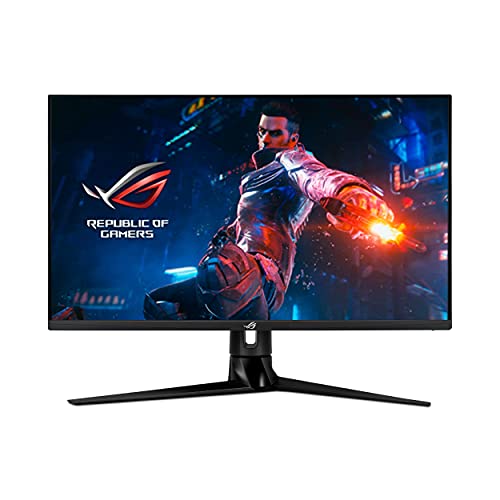
- Best for: Cinematic single-player games on a large 4K screen.
- 32-inch UHD 3840 x 2160 IPS display
- 144Hz refresh rate with DSC, 1ms response time
- HDMI 2.1, DisplayPort 1.4, USB
- Quantum-dot technology, wide DCI-P3 colour
All 5 Picks at a Glance
| Product | Specs | Action |
|---|---|---|
| Gigabyte M28U |
| Check price on Amazon |
| LG UltraGear 27GP950-B |
| Check price on Amazon |
| ASUS ROG Swift PG32UQ |
| Check price on Amazon |
 Samsung Odyssey Neo G7 |
| Check price on Amazon |
 Acer Predator XB273K V5 |
| Check price on Amazon |
Choosing a monitor for an Xbox is a decision about the HDMI port first and the panel second. The Xbox Series X can output 4K at 120Hz with variable refresh rate, but only over an HDMI 2.1 connection with enough bandwidth. A screen without that port caps the console at 60Hz, no matter how fast the panel claims to be, and the extra frames the console can render never reach your eyes.
This guide is for Series X owners chasing 4K 120Hz, Series S owners who want a sharp screen that still handles 120Hz modes, and players who share one desk between a console and a PC. Every pick below comes from Amazon listing titles and specifications, checked for HDMI 2.1, 4K resolution, VRR support, panel type and screen size.
Our Top Picks
- Acer Predator 27" 4K 3840x2160 IPS 160Hz DFR27-inch 320Hz9.69 x 24.19 x 19.5 inches9.92 poundsCheck on Amazon
Top 3 picks at a glance
Quick Picks
As an Amazon Associate we earn from qualifying purchases
| Product | Best for | Key spec from title |
|---|---|---|
| Gigabyte M28U | 4K 120Hz on a smaller screen | 28-inch 4K 144Hz SS IPS, 2x HDMI 2.1 |
| LG UltraGear 27GP950-B | Colour-rich 27-inch play | 27-inch UHD Nano IPS, 144Hz, DisplayHDR 600 |
| ASUS ROG Swift PG32UQ | Big-screen 4K with strong HDR | 32-inch 4K HDR 144Hz, HDMI 2.1, DisplayHDR 600 |
| Samsung Odyssey Neo G7 | Curved Mini-LED immersion | 32-inch 4K 165Hz, 1000R curve, Quantum HDR2000 |
| Acer Predator XB273K V5 | High refresh at 27 inches | 27-inch UHD 4K, 160Hz, 2x HDMI 2.1 |
How to Choose
Start with HDMI 2.1 bandwidth
The single most important check is whether the monitor has a full-bandwidth HDMI 2.1 port. Xbox Series X needs that link for 4K at 120Hz without chroma subsampling, and a port labelled HDMI 2.1 with reduced bandwidth can quietly fall back to a lower-quality signal. Count the ports too: two HDMI 2.1 inputs let you connect the console and a second device without swapping cables. Read the listing for the words HDMI 2.1 and 4K 120Hz together, because a monitor can carry one without the other. If the listing only mentions HDMI 2.0, the console will top out at 4K 60Hz.
Match resolution to the console you own
Series X targets native 4K, so a 3840 x 2160 panel shows its output pixel for pixel. Series S renders most games below 4K and upscales, so the same panel still looks sharp but the console never fills it natively. A 1440p screen is a fair compromise for Series S, since the console can drive 120Hz modes at that resolution with less upscaling work. Avoid a 1080p panel for either console unless the desk is tiny, because the image will look soft at normal viewing distance. Pick the resolution for the console you play on most, not the one you might own later.
Check VRR and ALLM support
Variable refresh rate smooths the frame pacing when a game dips below its target, which matters more on console than on PC because console frame rates move around more. Xbox supports VRR over HDMI, so look for FreeSync Premium Pro or a listing that names HDMI Forum VRR. Auto Low Latency Mode is the second feature to confirm: it switches the monitor into its fastest mode when the console wakes, so you never play a fast game with a slow processing preset. A monitor can have a 144Hz panel and still lack VRR, so treat the refresh number and the VRR line as two separate checks.
Weigh panel type, size and HDR
IPS panels give wide viewing angles and clean colours, which suits a living room where two people watch one screen. VA panels, especially curved Mini-LED ones, give deeper blacks and stronger contrast for dark games, but can smear in fast motion. At 27 inches, 4K looks extremely sharp; at 32 inches the same resolution feels more cinematic but needs a deeper desk. HDR is worth checking by certification rather than by marketing: DisplayHDR 400 is a modest step, while DisplayHDR 600 and HDR2000-class backlights show a bigger difference in bright highlights and dark shadows.
The 5 Best Options
Gigabyte M28U
- Best for: Series X players who want 4K 120Hz on a compact desk.
- 28-inch 3840 x 2160 SS IPS display
- 144Hz refresh rate, 1ms GTG response time
- 2x HDMI 2.1, DisplayPort 1.4, USB-C
- wide DCI-P3 colour, VESA DisplayHDR 400
Series X players who want 4K 120Hz on a compact desk.
HDR400 is entry-level HDR, so bright highlights will not pop the way they do on stronger backlights.
The M28U is the straightforward pick for an Xbox desk where space is limited but 4K 120Hz is not negotiable. Its 28-inch panel keeps pixel density high, so text and distant detail in open-world games stay crisp, while the two HDMI 2.1 ports mean the console and a second device can stay connected at once. The KVM switch is a genuine bonus for players who share the desk with a laptop, letting one keyboard and mouse serve both machines through the monitor.
LG UltraGear 27GP950-B
- Best for: Players who want rich colour and 4K 120Hz at 27 inches.
- 27-inch UHD 3840 x 2160 Nano IPS display
- 144Hz refresh rate, 1ms response time
- HDMI 2.1, DisplayPort, USB ports
- wide DCI-P3 colour coverage
Players who want rich colour and 4K 120Hz at 27 inches.
The stand takes up real desk depth, so measure before assuming a keyboard and console controller fit in front of it.
The 27GP950-B suits players who care about colour as much as speed. Its Nano IPS panel covers a wide colour gamut, which makes fantasy worlds and racing games look vivid without pushing saturation into cartoon territory. The 27-inch size fits a normal desk and keeps 4K wonderfully dense, and the HDMI 2.1 port carries the full 4K 120Hz signal from a Series X. G-SYNC compatibility and FreeSync Premium Pro cover VRR from both console and PC, so the same screen works well wherever you plug it in.
ASUS ROG Swift PG32UQ
- Best for: Cinematic single-player games on a large 4K screen.
- 32-inch UHD 3840 x 2160 IPS display
- 144Hz refresh rate with DSC, 1ms response time
- HDMI 2.1, DisplayPort 1.4, USB
- Quantum-dot technology, wide DCI-P3 colour
Cinematic single-player games on a large 4K screen.
A 32-inch panel needs a deep desk and a sensible viewing distance, or the edges of the screen sit too close to your eyes.
The PG32UQ is the big-screen choice for players who want their Xbox games to feel cinematic. At 32 inches, 4K fills more of your view, and the quantum-dot IPS panel pairs wide colour with DisplayHDR 600, so HDR scenes carry more punch than on entry-level HDR screens. Two HDMI 2.1 ports handle 4K 120Hz from the console with full chroma, and the 144Hz panel leaves headroom for PC play too. It is a heavy, premium-feeling screen that anchors a dedicated gaming corner rather than disappearing onto a crowded desk.
Samsung Odyssey Neo G7
- Best for: Dark, atmospheric games where contrast and immersion matter most.
- 32-inch 4K UHD 3840 x 2160 curved VA display, 1000R
- 165Hz refresh rate, 1ms response time
- 2x HDMI 2.1, DisplayPort 1.4, 2x USB 3.0
- Quantum Mini-LED, Quantum HDR2000, 1,196 dimming zones
Dark, atmospheric games where contrast and immersion matter most.
The aggressive curve is a taste matter, and flat-screen fans should see one in person before committing.
The Neo G7 is for players who want immersion above all else. Its 1000R curve wraps the image around your field of view, and the Quantum Mini-LED backlight with 1,196 dimming zones gives dark scenes real depth while keeping bright highlights strong. At 165Hz it has more headroom than the console needs, which keeps motion smooth, and the two HDMI 2.1 ports carry 4K 120Hz from a Series X. The curved VA panel trades a little viewing angle for contrast, a fair swap when one person sits directly in front of it.
Acer Predator XB273K V5
- Best for: Fast multiplayer on Xbox plus high-refresh PC play from the same desk.
- 27-inch UHD 3840 x 2160 IPS display
- 160Hz refresh rate, up to 320Hz with DFR, up to 0.5ms response
- 2x HDMI 2.1, DisplayPort 1.4, USB Type-C
- wide DCI-P3 colour, VESA DisplayHDR 400
Fast multiplayer on Xbox plus high-refresh PC play from the same desk.
The 320Hz mode only applies at reduced resolution on PC, so do not expect it from the console.
The XB273K V5 is the high-refresh option at 27 inches, running 4K at 160Hz with a dual frame rate mode that reaches 320Hz at lower resolution for PC play. For Xbox duty, the two HDMI 2.1 ports deliver 4K 120Hz with VRR, and the fast IPS panel keeps motion clean in shooters and racing games. The ergonomic stand adjusts in height, tilt, swivel and pivot, which helps when the same desk serves a console session in the evening and laptop work during the day. It is the most versatile screen here for a mixed-use setup.
Which One Fits Your Situation
You play competitive shooters on Series X
Pick the Acer Predator XB273K V5. Its 160Hz panel and fast response keep motion sharp when you flick between targets, and the two HDMI 2.1 ports carry 4K 120Hz with VRR from the console. The 27-inch size keeps the whole frame inside your view, so you spot movement at the edges without turning your head.
You want cinematic single-player games on a big screen
Pick the ASUS ROG Swift PG32UQ or the Samsung Odyssey Neo G7. The PG32UQ gives a flat 32-inch 4K image with strong HDR, while the Neo G7 adds a deep curve and Mini-LED contrast that makes night scenes and neon cities glow. Choose the PG32UQ for a shared room and the Neo G7 for a solo seat directly in front of the screen.
Your desk is small and the console shares it with a laptop
Pick the Gigabyte M28U. Its 28-inch footprint fits a compact desk, the two HDMI 2.1 ports keep the console connected, and the built-in KVM switch lets one keyboard and mouse serve the laptop and the console setup. The LG UltraGear 27GP950-B is the alternative if colour accuracy matters more to you than the KVM feature.
You split time between Xbox and a gaming PC
Pick the LG UltraGear 27GP950-B or the Acer Predator XB273K V5. Both carry 4K 120Hz from the console over HDMI 2.1 and fast refresh from a PC over DisplayPort, with VRR support on both sides. The LG leans toward colour quality, while the Acer leans toward raw refresh speed in practice.
Common Mistakes
- Buying a monitor with only HDMI 2.0 and expecting 4K 120Hz from a Series X, which the port cannot carry.
- Trusting the headline refresh rate without checking whether VRR is actually supported over HDMI.
- Choosing a 32-inch screen for a shallow desk, then sitting so close that the edges fall outside comfortable view.
- Assuming every DisplayHDR label means strong HDR, when entry-level certifications deliver only a modest lift.
- Forgetting to enable 4K 120Hz and VRR in the Xbox display settings after connecting a capable monitor.
Frequently Asked Questions
Do I need HDMI 2.1 for Xbox Series X?
Yes, for the console’s headline modes. HDMI 2.1 carries 4K at 120Hz with VRR, while older HDMI versions cap the signal at 4K 60Hz. Every monitor in this guide has at least one HDMI 2.1 port, so the console can use its fastest output modes without compromise.
Can Xbox Series S use a 4K 120Hz monitor?
Yes. The Series S supports 120Hz output and VRR, and it works well with these screens, though most of its games render below native 4K and upscale. A 27-inch 4K panel still looks sharp, and the 120Hz modes make motion noticeably smoother than a standard 60Hz display.
Does VRR work on all of these monitors?
Each pick in this guide supports variable refresh rate, either through FreeSync Premium Pro, G-SYNC compatibility, or HDMI Forum VRR. Enable VRR in the Xbox display settings after connecting, and confirm the monitor’s own menu shows the feature active before judging smoothness.
Is 27 or 32 inches better for Xbox?
It depends on desk depth and viewing distance. A 27-inch screen suits a normal desk and keeps 4K pixel density high, while a 32-inch screen feels more cinematic but needs a deeper desk to avoid sitting too close. Measure your seating distance first, then choose the size that fills your view without forcing head turns.
Related guides
More from Amazon
Programs that pair well with the guide above. Offers and eligibility are set by Amazon and may change.
Free shipping on eligible items, Prime Video and more. Eligible new members can start with a free trial.
Start a Prime free trialAd-free music streaming. Eligible new subscribers can start with a free trial.
Try Music Unlimited freeA Prime membership for ages 18-24 with a trial period. Eligibility is set by Amazon.
See Prime for Young AdultsAudiobooks and podcasts to listen to on the go. Eligible new members can start with a free trial.
Try Audible freeAs an Amazon Associate we earn from qualifying purchases.