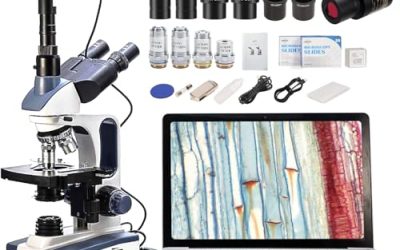
Streaming a microscope feed live takes one specific feature: a trinocular head. Alongside the two eyepieces you look through, a trinocular microscope has a third port that carries a camera, so your audience sees the specimen at the same time you do. Binocular microscopes cannot do this without giving up an eyepiece, so “trinocular” is a hard requirement here and every pick meets it with a camera included in the listing. That third port is the entire ballgame for streaming, and it is why binocular bargains do not appear here.


Both picks are compound microscopes from AmScope, the brand that dominates this niche, and both ship with a camera in the box. They take different routes to your stream. The T490-HC2 uses a 1080p camera with HDMI output, which can feed a capture card or monitor directly. The T690C-5MA uses a 5MP USB camera, which suits software-based streaming through a computer. Choose by how your stream is wired.
Quick Picks
As an Amazon Associate we earn from qualifying purchases.
| Product | Best for | Key spec from title |
|---|---|---|
| AmScope T490-HC2 Trinocular Microscope | HDMI streaming setups | 1080p camera with HDMI output, 40X to 1000X |
| AmScope T690C-5MA Trinocular Microscope | USB streaming to a PC | 5MP USB camera, 40X to 2500X infinity optics |
How to Choose
The camera connection decides your streaming chain
An HDMI camera, like the T490-HC2’s, outputs a clean video signal you can send to a monitor for a classroom or into a capture card for streaming software. A USB camera, like the T690C-5MA’s 5MP unit, plugs straight into the computer and appears in your streaming or recording software as a video source. HDMI gives flexibility and direct monitoring; USB gives simplicity and higher still-photo resolution. Match the camera to the chain you already own. Also check what the camera does without a computer: the HDMI model records to MicroSD on its own, which is a genuine backup when a stream setup fails mid-session.
Frame rate matters more than megapixels live
A live audience watches motion: paramecia swimming, crystals forming, a dissection in progress. The T490-HC2’s camera lists 30fps at its full 1920 x 1080 resolution, which is smooth video. USB cameras often trade frame rate for resolution at their top setting, so a 5MP still camera may run far slower at full size. For streaming, a steady 1080p30 feed beats a choppy higher-resolution one; for photographing specimens, the balance flips. Check the frame rate at the resolution you will actually broadcast, not the headline resolution, before choosing, because motion is information in live microscopy.
Compound optics and magnification range
Both picks are compound microscopes for slides: the T490-HC2 covers 40X to 1000X, the standard range for cells, pond life and prepared slides, while the T690C-5MA spans 40X to 2500X with infinity optics. The top figures come from high-power eyepiece and objective combinations; the useful everyday range for live work is roughly 40X to 400X, where the image stays bright. Infinity systems also accept accessories more gracefully if the setup grows. Both heads here are Siedentopf designs, which hold their interpupillary setting when the head rotates, a small mercy during shared sessions.
Stage, condenser and light are the working parts
Streaming sessions are long, so the mechanics matter: both picks use a double-layer mechanical stage for controlled slide movement, which keeps the specimen framed while you talk. The T490-HC2 lists an Abbe NA 1.25 condenser with iris diaphragm and 20W halogen transmitted illumination. Good condenser control is what gives a live image contrast instead of a washed-out glow, and it is worth more on camera than in person. Focus that stays smooth under a camera’s added weight matters too, because focus drift shows on stream as a slow blur your audience notices before you do.
The 2 Best Options
1. AmScope T490-HC2 Trinocular Compound Microscope with 1080p Camera
This is the streaming-first build. The Siedentopf trinocular head inclines 30 degrees and rotates 360, and the included camera delivers 1920 x 1080 at 30fps over HDMI, with mini-USB 2.0 as a second connection and recording of photos and video to MicroSD. That means the feed can go to a monitor without a computer, or into a capture card for a full streaming setup. Magnification runs 40X to 1000X, illumination is 20W halogen transmitted light, and the double-layer mechanical stage is 140 x 140mm with an Abbe NA 1.25 condenser and iris diaphragm.
Specs
- Brand: AmScope
- Model: T490-HC2
- Head: Siedentopf trinocular, 30-degree incline, 360-degree rotatable
- Magnification: 40X to 1000X
- Camera: 1080p CMOS, 1920 x 1080
- Camera frame rate: 30fps at 1920 x 1080
- Camera connections: HDMI and mini-USB 2.0, C-mount
- Recording: photo and video to MicroSD
- Illumination: 20W halogen, transmitted
- Stage: double-layer mechanical, 140 x 140mm
- Condenser: Abbe NA 1.25 with iris diaphragm
Best for: Streamers who want an HDMI feed for a capture card or direct monitor.
Watch out for: Halogen illumination runs warm and bulbs are consumables; the camera is 1080p, so still-photo detail is lower than the 5MP USB model below.
ASIN: B077M3RG9Z
2. AmScope T690C-5MA Trinocular Compound Microscope with 5MP Camera
The T690C-5MA is the computer-centered option: an infinity compound microscope spanning 40X to 2500X, with a 5MP CMOS camera on USB 2.0 included. USB keeps the streaming chain simple, since the camera appears directly in your capture and streaming software, and 5MP stills give you detailed photos for thumbnails, posts and documentation between live sessions. The Siedentopf trinocular head, double-layer mechanical stage and halogen brightfield illumination follow the same lab pattern as the T490. Pick it when the stream runs through a PC and still-image quality matters alongside the live feed.
Specs
- Brand: AmScope
- Model: T690C-5MA
- Head: Siedentopf trinocular
- Optical system: infinity compound
- Magnification: 40X to 2500X
- Camera: 5MP CMOS
- Camera connection: USB 2.0
- Illumination: halogen brightfield
- Stage: double-layer mechanical stage
Best for: PC-based streaming with high-resolution still capture between sessions.
Watch out for: USB cameras typically drop frame rate at full resolution, so stream at a reduced resolution for smooth motion; confirm the current listing’s software compatibility with your operating system before ordering.
ASIN: B008ZH77MO
Which One Fits Your Situation
You stream through a capture card or to a classroom screen
Choose the T490-HC2. Its HDMI output is the direct route to a capture card, a TV or a projector, and it records to MicroSD even without a computer attached. The 1080p30 feed is the right shape for live video, and the camera is included rather than an accessory to research separately. That independence also makes it the safer pick for venues with unreliable Wi-Fi or locked-down networks.
You stream from a laptop with software
Choose the T690C-5MA. A USB camera is the simplest source for streaming software, with no capture card to buy or configure, and the 5MP sensor doubles as a strong stills camera for documenting specimens. It is the cleaner desk setup when a computer is already at the center of your stream. Fewer boxes between specimen and audience means fewer things to troubleshoot live, and the included camera removes the adapter-matching guesswork that comes with buying a camera separately.
You mostly show pond life and prepared slides
Both cover the 40X to 1000X working range where that material lives. The T490-HC2’s halogen transmitted light and Abbe condenser give you contrast control for transparent specimens, which is most of pond microscopy. Contrast technique, more than raw magnification, is what separates a readable stream image from a bright fog. The T690C’s higher top magnification is rarely the deciding factor for this material.
You also teach in person while streaming
Either head works, since a trinocular design keeps both eyepieces free while the camera runs. The T490-HC2’s rotating Siedentopf head helps when two people share the bench, letting each viewer adjust the eyepieces without moving the microscope or disturbing the camera’s framing. That shared-bench reality is common in classrooms and maker spaces, where the microscope rarely has a single owner.
Common Mistakes
- Buying a binocular microscope and a separate eyepiece camera, then discovering you must give up an eyepiece to stream.
- Choosing a camera on megapixels alone, when live frame rate decides how the stream actually looks.
- Forgetting the capture chain: an HDMI camera still needs a capture card to enter most streaming software.
- Streaming at the camera’s maximum resolution when a lower setting would hold a smooth frame rate.
- Neglecting condenser adjustment on camera, where flat, low-contrast images look far worse than they do through the eyepieces.
Frequently Asked Questions
What makes a microscope trinocular?
A trinocular head has three tubes: two eyepieces for your eyes and a third vertical port dedicated to a camera. That port is what lets you look through the microscope and stream or record at the same time. Both picks here are trinocular with a camera included, which is the complete setup the keyword calls for. Binocular heads have only the two eyepiece tubes, which is why they cannot run a camera and both eyes at the same time.
Can I stream directly from these microscopes?
Yes, with the right chain. The T490-HC2’s camera outputs HDMI, which feeds a capture card or monitor and records to MicroSD on its own. The T690C-5MA’s USB camera connects straight to a computer and appears in streaming software as a video source. Neither streams to the internet by itself; your computer or capture setup does that part. A test recording before the first public session is worth the ten minutes it takes.
Is 1080p enough for microscopy streaming?
For live video, yes. Streaming platforms compress feeds anyway, and a smooth 1080p30 image of a moving specimen looks better than a higher-resolution feed at a low frame rate. The 5MP USB model earns its place for still photography and documentation, where the extra resolution survives. Viewers on phones, which is most of a live audience, see even less of the extra resolution.
Why are both picks compound microscopes?
The keyword centers on live microscopy and science streaming, which usually means slides: cells, microorganisms and prepared specimens at 40X and up. Compound microscopes are built for that. Stereo microscopes serve lower-magnification work on solid objects; a stereo model was considered for this list but set aside when its listing identifiers could not be verified consistently. The compound choice also keeps both picks on standard slides and cover slips, so consumables stay cheap and shared. Slides and cover slips are also the easiest materials for a new streamer to source consistently, and a broken slide costs cents rather than a ruined specimen.
Related guides
More from Amazon
Programs that pair well with the guide above. Offers and eligibility are set by Amazon and may change.
Free shipping on eligible items, Prime Video and more. Eligible new members can start with a free trial.
Start a Prime free trialAd-free music streaming. Eligible new subscribers can start with a free trial.
Try Music Unlimited freeA Prime membership for ages 18-24 with a trial period. Eligibility is set by Amazon.
See Prime for Young AdultsAudiobooks and podcasts to listen to on the go. Eligible new members can start with a free trial.
Try Audible freeAs an Amazon Associate we earn from qualifying purchases.