Our Short List of 3

- Best for: travellers who pair with several devices and want gaming speed on demand.
- Sensor: 5G Advanced optical, 18K DPI
- Connections: HyperSpeed 2.4 GHz and Bluetooth
- Weight: under 60 g, excluding battery
- Battery: up to 950 hours in Bluetooth mode, single AA or AAA
- Best for: MMO players and two-computer desks that need many commands on one mouse.
- Sensor: HERO 25K, 100-25,600 DPI, 400+ IPS
- Connections: LIGHTSPEED and Bluetooth, toggle between two machines
- Controls: 15 programmable, including 6 thumb buttons
- Scroll wheel: hyper-fast, ratchet and free-spin modes

- Best for: players who want a top-tier sensor and three connection modes in one mouse.
- Sensor: PixArt PAW3395, 100-26,000 DPI, 650 IPS
- Connections: Bluetooth 5.1, 2.4 GHz and wired Type-C
- Polling: 1000 Hz
- Weight: 79 g ergonomic design
All 3 Picks at a Glance
| Product | Specs | Action |
|---|---|---|
| Razer Orochi V2 |
| Check price on Amazon |
| Logitech G604 LIGHTSPEED |
| Check price on Amazon |
| Keychron M3 |
| Check price on Amazon |
A Bluetooth gaming mouse solves a cabling problem that a dongle cannot: many laptops and tablets have no spare USB port at all, yet you still want a proper gaming sensor and switches when you sit down to play. The catch is that Bluetooth and fast wireless are different tools. The real decision is which mice pair cleanly over Bluetooth for everyday use, then switch to a low-delay 2.4 GHz link when a match actually matters, without forcing you to own two separate mice.
The four mice below cover different kinds of dual-mode players: travellers who pair with whatever screen is nearby, desk workers who run two computers from one mouse, and MMO players who need a full thumb grid without a cable. Every pick has Bluetooth confirmed in its Amazon listing, and the specifications quoted here come from those listings, including the battery figures for each connection mode where the maker publishes them separately.
Top 3 picks at a glance
Quick Picks
As an Amazon Associate we earn from qualifying purchases
| Product | Best for | Key spec from title |
|---|---|---|
| Razer Orochi V2 | Travel pairing with any device | 2 wireless modes, 18K DPI optical sensor |
| SteelSeries Rival 3 Wireless | Months of battery on Bluetooth | Bluetooth 5.0 and 2.4 GHz dual wireless |
| Logitech G604 LIGHTSPEED | Two machines and many commands | 15 programmable controls |
| Keychron M3 | High-end sensor with three modes | PAW3395 sensor, 26,000 DPI |
How to Choose
Understand What Bluetooth Changes
Bluetooth trades a little responsiveness for total freedom from dongles. For strategy games, RPGs, everyday desktop work and casual shooters, a good Bluetooth link feels perfectly direct. For ranked FPS play, the 2.4 GHz mode on these same mice gives the firmer connection, which is why every pick here is dual-mode rather than Bluetooth-only. Judge a Bluetooth gaming mouse by how gracefully it covers both roles: instant pairing for the laptop bag, and a proper gaming link waiting when you sit down at your main machine.
Read Battery Figures Per Connection Mode
Battery claims only make sense when you know which mode produced them. The G604 illustrates the split clearly: up to 240 hours over LIGHTSPEED, stretching to 5.5 months when you stay on Bluetooth. The Orochi V2 quotes up to 950 hours in Bluetooth mode, and the Rival 3 Wireless passes 400 hours across its modes on AAA cells. If you plan to live on Bluetooth, compare the Bluetooth figures, not the headline maximum, and favour mice whose makers publish both numbers honestly on the listing.
Count the Buttons Your Games Actually Use
Bluetooth mice span two extremes. The Orochi V2 and Rival 3 Wireless keep a clean six-button layout that suits shooters and general play, while the G604 carries 15 programmable controls with six thumb buttons, built for MMO rotations and productivity macros alike. The Keychron M3 sits between them with a macro button alongside the standard set. List the commands you bind today, including push-to-talk and DPI shift, and buy the smallest layout that covers them; extra buttons you never press only add weight and accidental clicks.
Check Polling and Sensor Ceilings
A sensor ceiling tells you little on its own, but the spread here is wide: 18K DPI on the Orochi V2, 18,000 CPI on the Rival 3 Wireless, the HERO 25K in the G604 and the PAW3395 at 26,000 DPI in the Keychron M3. Polling matters more for feel. The M3 polls at 1000 Hz over its wired and 2.4 GHz links, the practical ceiling for this class. Over Bluetooth every mouse reports less often, which is the honest trade behind the convenience, so keep the fast mode for fast games.
The 4 Best Options
Razer Orochi V2
- Best for: travellers who pair with several devices and want gaming speed on demand.
- Sensor: 5G Advanced optical, 18K DPI
- Connections: HyperSpeed 2.4 GHz and Bluetooth
- Weight: under 60 g, excluding battery
- Battery: up to 950 hours in Bluetooth mode, single AA or AAA
travellers who pair with several devices and want gaming speed on demand.
the small shell suits fingertip and claw grips better than a relaxed palm grip.
The Orochi V2 is the travel specialist of this group. It weighs under 60 g before its battery, pairs over Bluetooth with laptops and tablets, and switches to HyperSpeed 2.4 GHz when you want the firmer link for a shooter. It runs on a single AA or AAA cell, your choice, and the listing quotes up to 950 hours of battery life in Bluetooth mode. The 5G Advanced optical sensor reaches 18K DPI, the 2nd-gen mechanical switches feel crisp, and six programmable buttons cover the essentials without crowding a small shell. For one mouse that lives in a bag, this is the benchmark.
SteelSeries Rival 3 Wireless
The Rival 3 Wireless is the endurance option. Its Quantum 2.0 dual wireless pairs a 2.4 GHz dongle link with Bluetooth 5.0, and battery life passes 400 hours on two AAA cells, with the option to run on a single cell at a lighter 95 g instead of 106 g. The TrueMove Air sensor tracks at 18,000 CPI and 400 IPS, and the mechanical switches are rated for 60 million clicks, which suits a mouse expected to serve for years. The dongle stores inside the body for travel. If your priority is pairing over Bluetooth and then forgetting about batteries for a season, this is the pick.
Specs
- Sensor: TrueMove Air optical, 18,000 CPI, 400 IPS, 40G acceleration
- Connections: Quantum 2.0 dual wireless, 2.4 GHz and Bluetooth 5.0
- Battery: 400+ hours on two AAA cells, can run on a single AAA
- Weight: 106 g with two AAA, 95 g with one
- Switches: mechanical, rated 60 million clicks
- Extras: USB dongle stores inside the mouse
Best for: players who want Bluetooth pairing plus the longest runtime in this group.
Watch out for: AAA cells are bulkier to stock than AA, and the shell is a plain, no-frills design.
ASIN: B08GB2PF71
Logitech G604 LIGHTSPEED
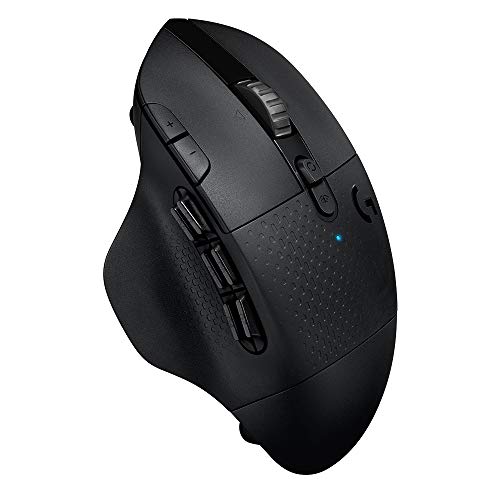
- Best for: MMO players and two-computer desks that need many commands on one mouse.
- Sensor: HERO 25K, 100-25,600 DPI, 400+ IPS
- Connections: LIGHTSPEED and Bluetooth, toggle between two machines
- Controls: 15 programmable, including 6 thumb buttons
- Scroll wheel: hyper-fast, ratchet and free-spin modes
MMO players and two-computer desks that need many commands on one mouse.
the tall, button-heavy body is the largest here and will not suit small hands or fingertip grips.
The G604 is the command centre. Fifteen programmable controls, including six thumb buttons, make it the natural choice for MMO players and anyone who binds media, macros and shortcuts to the mouse. Its dual connectivity is the clever part: a toggle switches between LIGHTSPEED for gaming and Bluetooth for a second machine, so one mouse can drive a desktop and a laptop in turn. The HERO 25K sensor spans 100 to 25,600 DPI, the metal scroll wheel flips between ratchet and free-spin, and a single AA battery delivers up to 240 hours on LIGHTSPEED or up to 5.5 months on Bluetooth.
Keychron M3
- Best for: players who want a top-tier sensor and three connection modes in one mouse.
- Sensor: PixArt PAW3395, 100-26,000 DPI, 650 IPS
- Connections: Bluetooth 5.1, 2.4 GHz and wired Type-C
- Polling: 1000 Hz
- Weight: 79 g ergonomic design
players who want a top-tier sensor and three connection modes in one mouse.
the 70-hour battery is the shortest here, so heavy users will charge or swap power often.
The Keychron M3 brings a flagship sensor to the Bluetooth category. Its PixArt PAW3395 reaches 26,000 DPI with 650 IPS tracking and 1000 Hz polling, numbers that match dedicated esports mice, and it connects three ways: Bluetooth 5.1, 2.4 GHz and wired Type-C. The ergonomic shell weighs 79 g and the battery runs up to 70 hours. A programmable macro button adds one extra command beyond the standard layout. For players who refused to consider Bluetooth mice because the sensors lagged a generation behind, the M3 is the model that closes that argument while keeping the pairing convenience intact.
Which One Fits Your Situation
If One Mouse Must Serve Two Computers
Choose the G604. Its toggle between LIGHTSPEED and Bluetooth was designed for exactly this, letting you game on the desktop and then flick to the laptop without re-pairing. The 15 controls also mean your shortcuts and macros travel with the mouse rather than living in one machine’s software. That arrangement suits hybrid workers and students with a desktop at home and a laptop everywhere else.
If You Play Mostly Away From Home
Take the Orochi V2. Bluetooth pairing handles hotel laptops and tablets, the HyperSpeed link is there when a match matters, and the tiny shell with its AA or AAA flexibility disappears into any bag. Battery life in Bluetooth mode is measured in months, not weekends. It also asks the least of your wallet in spare cells, since a single AA or AAA keeps it running.
If You Hate Thinking About Batteries
The Rival 3 Wireless passes 400 hours and sips power over Bluetooth, so a pair of AAA cells can carry a whole season of play. It is the set-and-forget option: pair it once, and power simply stops being a topic until the cells finally fade. It is the pick for players who charge nothing, plan nothing and simply expect the mouse to work every morning.
If Sensor Performance Comes First
Pick the Keychron M3. The PAW3395 sensor, 650 IPS tracking and 1000 Hz polling put it level with wired esports mice on specification, while Bluetooth 5.1 keeps the cable-free pairing that brought you to this category. Just budget for its shorter 70-hour battery. It suits players upgrading from basic Bluetooth mice who found the sensors, not the pairing, to be the weak point.
Common Mistakes
- Assuming Bluetooth and 2.4 GHz feel identical, then blaming the mouse during ranked matches.
- Comparing battery headlines without checking which connection mode the figure belongs to.
- Buying a 15-button mouse for shooters, where a clean six-button layout is easier to command.
- Forgetting that Bluetooth pairing depends on the host device, so very old laptops may need a dongle anyway.
- Leaving a dual-mode mouse on its gaming link all day and draining the battery five times faster.
Frequently Asked Questions
Is Bluetooth fast enough for gaming?
For most genres, yes. Strategy, RPG, simulation and casual shooter play all feel fine over a modern Bluetooth link. The gap shows in high-level competitive FPS play, where the 2.4 GHz mode fitted to every mouse here gives the firmer, lower-delay connection. Dual-mode mice exist so you never have to choose permanently.
Can one Bluetooth mouse work with two computers?
The G604 can, switching between a LIGHTSPEED connection on one machine and Bluetooth on another with a toggle. The other mice here pair over Bluetooth with one device at a time, though re-pairing takes seconds. If two machines share your desk daily, the G604’s arrangement is the smoothest.
Does Bluetooth drain a mouse battery faster than a dongle link?
Usually the opposite. Bluetooth is the low-power mode on these mice, which is why the G604 stretches from 240 hours on LIGHTSPEED to 5.5 months on Bluetooth, and why the Orochi V2 quotes its longest runtime over Bluetooth. The fast gaming link is the thirsty one.
Do Bluetooth gaming mice need brand software to work?
No. Every mouse here pairs and plays with standard drivers, and core buttons work immediately. Brand software adds button remapping, DPI steps and macros, and on-board memory on models like the Orochi V2 stores those choices on the mouse itself, so they survive on machines without the software installed.
Related guides
- Bayern Munich vs Barcelona Live Stream Champions League 22 23: Full Recap of Both Group Games
- Leicester vs Leeds Live Stream: Premier League Guide
- Wolves vs Nottm Forest Live Stream Premier League 22 23: Full Recap of Both 2022-23 Meetings
- Wolves vs Leicester Live Stream Premier League 22 23 — Recap, Scores and Where to Watch
More from Amazon
Programs that pair well with the guide above. Offers and eligibility are set by Amazon and may change.
Free shipping on eligible items, Prime Video and more. Eligible new members can start with a free trial.
Start a Prime free trialAd-free music streaming. Eligible new subscribers can start with a free trial.
Try Music Unlimited freeA Prime membership for ages 18-24 with a trial period. Eligibility is set by Amazon.
See Prime for Young AdultsAudiobooks and podcasts to listen to on the go. Eligible new members can start with a free trial.
Try Audible freeAs an Amazon Associate we earn from qualifying purchases.