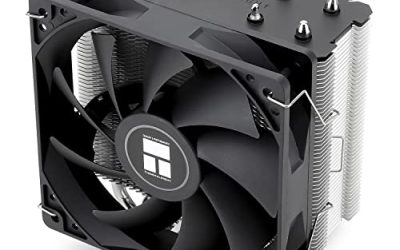
The best CPU cooler for a Ryzen 3 2200G is a single-tower air cooler with a 120 mm PWM fan, such as the Thermalright Assassin X120 Refined SE for value or the be quiet! Pure Rock Pro 3 for quiet builds. The 2200G is a 4-core, 4-thread, 65 W AM4 chip, so almost any AM4-compatible cooler beats the slim stock fan; spend on noise and future upgrades, not on raw capacity.
Quick answer: which cooler for the AMD Ryzen 3 2200G?
- Stock clocks, tight budget: a Wraith Stealth style slim cooler is enough.
- Best value: a 120 mm single tower with 4 heat pipes.
- Quiet or upgrade-ready: a double-tower or premium tower with a 120 mm fan.
- Do not buy: a 360 mm liquid cooler just for this chip unless you will replace the CPU soon.
Ryzen 3 2200G specs that matter for cooling
Cooling choice starts with the heat the chip makes. Based on the Wikipedia list of AMD Ryzen processors, the 2200G has these characteristics:
| Spec | Ryzen 3 2200G |
|---|---|
| Cores / threads | 4 / 4 |
| Base / boost clock | 3.5 GHz / 3.7 GHz |
| TDP | 65 W (configurable 46 to 65 W) |
| Integrated graphics | Radeon Vega 8, 8 compute units, about 1.1 GHz |
| Socket | AM4 |
| Memory | DDR4, dual channel, up to DDR4-2933 officially |
| Release | February 2018 |
Two things stand out. First, 65 W is a low heat load. Second, the heat comes from the CPU cores and the integrated graphics on one die, so the chip heats up faster than a pure CPU of the same wattage when you game without a discrete graphics card. That is why a slim stock fan gets loud in games even though the chip is not demanding on paper.
Not confirmed in the sources checked for this article: L3 cache size and whether the multiplier is unlocked on your sample. If you plan to overclock, confirm both on the AMD product page for the exact part number you buy.
Ryzen 2200G, 2200G and Ryzen 3 PRO 2200G: same chip?
Searches use many names: “AMD Ryzen 3 2200G”, “ryzen 2200g”, “2200g”, “r3 2200g” and “Ryzen 3 PRO 2200G”. The first four are the same consumer processor. The PRO version is the business-oriented counterpart on the same architecture and socket, so every cooler on this page fits it as well. Use the same buying logic for both.
How we chose these coolers
We did not use these products ourselves. The picks come from reading product listings, manufacturer specifications and published editorial material on cooler design, then filtering for four criteria: AM4 support, a TDP margin well above 65 W, a 120 mm or larger fan for lower noise, and current availability as a regular product. We kept the list to coolers that fit the 2200G’s real use case: a budget or compact gaming PC, often with no discrete graphics card.
Quick comparison table
| Pick | Type | Best for | Cost tier |
|---|---|---|---|
| AMD Wraith Stealth | Slim top-flow | Stock clocks, small cases | Lowest |
| Thermalright Assassin X120 Refined SE | Single tower, 4 heat pipes | Best value | Low |
| Thermalright Peerless Assassin 120 SE | Twin tower, 6 heat pipes, 2 fans | Quiet with CPU upgrade path | Low to mid |
| be quiet! Pure Rock Pro 3 | Compact double tower, 250 W rating | Silent builds | Mid |
| Noctua NH-U12S SE-AM4 | Single tower | Long-lived AM4 build | Mid to high |
| Noctua NH-U12A chromax.Black | Single tower, 158 mm | Premium air, black look | High |
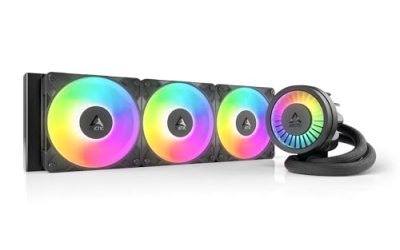
| ARCTIC Liquid Freezer III Pro 360 | 360 mm AIO | Planned CPU upgrade | High |
The 7 best CPU coolers for the Ryzen 3 2200G
Best stock-style fallback: AMD Wraith Stealth (AM4)
The Wraith Stealth is the baseline every other pick on this page is measured against. A 4-core, 65 W chip like the 2200G was designed around it, so it works. The reason to move on is noise, not safety: the small fan has to spin fast to move enough air through a slim heatsink once the Vega 8 graphics and the four cores both load up. If you only need a spare or a stopgap, it is a sensible buy; if you want a quiet gaming desktop, spend a little more.
- Slim aluminium heatsink with a 3.93-inch (about 100 mm) 4-pin fan, per the listing
- Plugs into the CPU fan header, so the motherboard can control the speed
- Same slim design AMD bundled with many boxed AM4 chips
Best for: A build that lost its box cooler, or a Ryzen 3 2200G run at stock clocks in a small case.
Skip if: You plan to overclock, want a quiet-first build, or run the chip near 65 W for long sessions.
Pros: Very low cost and tiny footprint; Fits almost any case and clears tall RAM.
Cons: Fan gets audible under load; Little thermal headroom for overclocking.
Best budget single tower: Thermalright Assassin X120 Refined SE
This is the sweet spot for a 65 W APU. A 120 mm fan moves the same air at lower rpm than a small stock fan, so the same heat leaves the case with less noise. With four heat pipes you get plenty of headroom for a mild overclock on the cores or the Vega 8 graphics, and the cooler is cheap enough that it will not unbalance a budget build.
- Four heat pipes with an aluminium cover and one TL-C12C 120 mm PWM fan, per the listing
- Single-tower layout with AM4 mounting
- Light enough that board flex is not a concern in transport
Best for: Most 2200G owners who want a real step up from the stock cooler without spending much.
Skip if: You need a very low profile for a small form factor case, or you want RGB lighting.
Pros: Large cooling gain per unit of cost; Easy installation on AM4 backplates; A 120 mm fan is quieter than a 90 mm fan at the same airflow.
Cons: Plain look, no lighting; Check RAM clearance on the fan side.
Best twin tower value: Thermalright Peerless Assassin 120 SE
A twin-tower cooler is overkill for a 2200G in pure thermal terms, but that is the point: the fans barely need to ramp up, and the same cooler will handle a future swap to a Ryzen 5 5600 or a 5700X. If your plan is to ride the 2200G for a year and then upgrade the CPU on the same board, buying once makes sense.
- Six heat pipes with dual towers and two 120 mm PWM fans, per the listing
- Fan speed listed as up to 1550 rpm
- Supports AM4 and recent Intel sockets
Best for: Builders who want the lowest temperatures and quietest fan curve and who have a mid tower case.
Skip if: Your case is narrow, the RAM is tall, or the cooler would block the top PCIe slot.
Pros: Far more capacity than a 4-core APU needs; Low noise at idle and light loads; Ready for a later upgrade to an 8-core AM4 chip.
Cons: Large and heavy for a 65 W chip; May interfere with tall memory.
Best quiet tower: be quiet! Pure Rock Pro 3
be quiet! is the brand to look at if acoustics decide your purchase. The 250 W rating is a manufacturer figure, not a promise of silence, but with a 65 W APU the fans will stay near the bottom of their range. Because the 2200G has a modest heat output, this cooler is mostly about long-term flexibility and low noise rather than raw capacity.
- Rated for 250 W TDP, per the listing
- Double-tower compact design with two silent 120 mm PWM fans
- Black finish, fits AMD and Intel sockets
Best for: A silence-focused build in a case with side panel clearance.
Skip if: You want the smallest and cheapest option, or you have restricted height.
Pros: Strong low-noise reputation for the brand; High rated TDP gives ample margin; Neat black styling.
Cons: Costs more than the Thermalright options; Bigger than a 65 W chip requires.
Best AM4-specific premium: Noctua NH-U12S SE-AM4
Noctua coolers are the choice when you want to mount once and forget. The brown finish divides opinion, but the listing is clearly AM4-specific, which removes any doubt about mounting hardware. For a 2200G alone it is more cooler than you need; for a build that will move up to a 5000-series chip later, it is a long-term piece of kit.
- Single-tower design built specifically for AMD AM4, per the listing title
- Premium cooler from a brand known for long mounting support
- Brown fan finish, 120 mm class fan
Best for: A long-lived, quiet AM4 build where the cooler should outlast two or three CPU upgrades.
Skip if: You want black or white colours, or you are on a tight budget.
Pros: Excellent build quality and mounting; Quiet fan; Clear AM4 compatibility.
Cons: Colour does not suit every build; Costs more than comparable Thermalright coolers.
Best high-end air cooler: Noctua NH-U12A chromax.Black
This is the luxury pick. The 2200G does not need it, and the money would usually do more good on a faster graphics card or faster RAM. We include it because some builders pair a modest APU with a premium cooler for acoustic reasons, and because the cooler moves cleanly to the next CPU. Check the maker’s compatibility list for your exact socket before ordering.
- 158 mm height, per the listing title
- High-end low-noise tower cooler in black finish
- Premium single-tower footprint
Best for: Enthusiasts who want maximum air cooling in a single-tower footprint with a black look.
Skip if: You are on a strict budget or a small chassis under 158 mm cooler height.
Pros: Top-tier air cooling for its size; Black finish matches most builds; Very quiet at moderate loads.
Cons: Premium cost; Pointless for stock 2200G use.
Best liquid option: ARCTIC Liquid Freezer III Pro 360
A 360 mm all-in-one on a 4-core 65 W chip is excess by any measure. It only makes sense if you intend to move this case and cooler to a much faster processor soon. For the 2200G itself, the air coolers above give the same real-world result with less complexity and fewer failure points.
- Three 120 mm radiator fans, AIO water cooling, per the listing
- Listed for AM4, AM5, LGA1700 and LGA1851
- Non-RGB variant of the Pro 360 range
Best for: An upgrade-path build where a high-end CPU will replace the 2200G.
Skip if: You just want to cool a 2200G; this is far more cooling than it needs.
Pros: Huge thermal capacity; Quiet at low rpm; Covers most current sockets.
Cons: Radiator needs a case that supports 360 mm; Cost is out of proportion to the CPU.
Worked example: how much cooler do you actually need?
Use a simple budget. The 2200G has a 65 W TDP. Real sustained power in games is often below that, but to size a cooler you use the rating, then add a margin of 30 to 50 percent for dust, warm rooms and a mild overclock:
- 65 W x 1.3 = about 85 W minimum cooler capacity
- 65 W x 1.5 = about 98 W comfortable capacity
- Overclocked to roughly 90 W of heat: 90 x 1.3 = about 117 W
Manufacturer TDP ratings are marketing numbers, but comparing them is still useful. The Pure Rock Pro 3 is listed at 250 W, over twice what even a hard overclock needs. Almost any 120 mm tower on the list clears the threshold, so the deciding factor is noise and clearance, not capacity.
Decision matrix: match your situation to a cooler
| Your situation | Buy | Why |
|---|---|---|
| Spare cooler for a build in progress | Wraith Stealth style | Cheap, 65 W is within its design |
| Everyday 1080p low-setting APU gaming | Assassin X120 Refined SE | Quiet gain at a low cost |
| Planning a Ryzen 5 5600 or 5700X next year | Peerless Assassin 120 SE | Capacity for more cores |
| Desk next to your ears | Pure Rock Pro 3 or Noctua | Lowest acoustics |
| Micro ATX case under 150 mm cooler height | Check height spec first | Most towers exceed it |
| Later move to a flagship AM4 or AM5 chip | Noctua NH-U12A or 360 mm AIO | Future proof |
Buying guide: what to check before you buy
Socket support
The 2200G uses AM4. Any cooler that lists AM4 in its mounting kit will fit. Check older Intel-only coolers carefully; they will not mount without an AM4 bracket.
Cooler height and case width
Find your case’s maximum CPU cooler height in its specifications. A 158 mm tower will not fit a slim case that allows 130 mm. Also check that the cooler does not hang over the first RAM slot.
Fan size and noise
A 120 mm fan moves the same air as a 92 mm fan at a lower speed, which reduces noise. Prefer PWM fans so the motherboard can slow them at idle.
RAM clearance
Tall heat-spreader memory can collide with a tower fan. Raise the fan on its clips or choose low-profile memory. The 2200G officially supports up to DDR4-2933, so there is no need for tall, fast kits anyway.
TDP margin
Aim for at least double the chip’s TDP in the cooler’s rating if you want silence. For a 65 W chip, 130 W or higher is plenty.
Thermal paste and mounting
Most aftermarket coolers ship with paste pre-applied or in a tube. Remove old paste with isopropyl alcohol, apply a pea-sized dot, and tighten the screws in a cross pattern to even the pressure.
Installation notes for AM4 and the 2200G
- Update the motherboard BIOS first if the board is an older 300-series model; the 2200G needs support listed on the board’s CPU compatibility page, and the update is usually possible only with another compatible chip or a flashback feature.
- Install the CPU, keeping the triangle marker aligned with the socket corner.
- Use the AM4 backplate that came with the motherboard, and screw the cooler brackets to it.
- Plug the fan into the CPU_FAN header, not a chassis header, so the BIOS reads RPM properly.
- In BIOS, set a fan curve that keeps idle fans low and ramps from about 60 degrees Celsius.
Noise and temperature expectations
No manufacturer publishes a guaranteed temperature for a given chip in your room, so treat the table below as general expectations, labelled as approximate ranges that vary with case airflow and ambient temperature.
| Cooler class | Typical load temperature range (approx.) | Noise character |
|---|---|---|
| Slim stock-style | Low 70s to 80s Celsius | Audible whine when loaded |
| 120 mm single tower | Mid 50s to mid 60s Celsius | Soft, steady airflow |
| Twin tower or premium tower | Low 50s to low 60s Celsius | Near silent at gaming loads |
| 360 mm AIO | Similar to twin tower for this chip | Pump hum plus slow fans |
Notice how little the tower and AIO rows differ. For a 65 W processor the last bit of cooler capacity gives diminishing returns; the first jump from the stock fan to any tower is the one you will notice.
Common mistakes with a 2200G cooler
- Buying by TDP alone. The rating says little about noise or clearance.
- Ignoring case height. Always compare the cooler’s height to your case limit.
- Plugging the fan into the wrong header. The BIOS may then fail to detect a stopped fan.
- Skipping the BIOS update. A 300-series board without the right BIOS will not boot the 2200G at all, which has nothing to do with the cooler.
- Overspending on cooling instead of RAM. The Vega 8 graphics share system memory, so dual-channel RAM matters more to frame rates than the last few degrees of temperature.
Do you need a better cooler for gaming on the 2200G graphics?
Usually yes, if you use the Vega 8 graphics, since the same die heats up from both CPU and GPU work. Games at 720p or 1080p low settings keep the chip busy for hours, so fan noise becomes the main complaint. A 120 mm tower cooler lowers the sound noticeably and helps maintain steady boost clocks.
Upgrade thinking: when the 2200G is the limit, not the cooler
The 2200G is a 2018 processor with four threads. Many current games prefer six cores or more, and the Vega 8 graphics are far behind modern discrete cards. If you are choosing a cooler for a long-term build, buy one good enough for a 5000-series replacement. AM4 boards generally accept a BIOS update to run a Ryzen 5 5600 or a Ryzen 7 5700X, subject to board vendor support, and the coolers above carry over unchanged.
Frequently Asked Questions
Does the Ryzen 3 2200G need an aftermarket cooler?
No, the boxed cooler is enough at stock clocks. An aftermarket tower mostly buys lower noise and room for overclocking.
Can I use an AM3 cooler on the 2200G?
Often yes if the cooler lists AM4 compatible brackets, but check the manufacturer’s page, because the mounting hole spacing differs between sockets for some models.
How hot does a Ryzen 3 2200G run?
With a decent tower cooler, temperatures in the 50s to 60s Celsius under load are typical. Results depend on room temperature, case airflow and workload.
Is liquid cooling worth it for a 2200G?
No. The chip’s 65 W heat output is well within an air cooler’s range, so an AIO adds cost and complexity without much benefit.
What is the difference between Ryzen 3 2200G and Ryzen 3 PRO 2200G?
The PRO version targets business systems and adds management features. The socket and cooler needs are the same, so these picks fit both.
Which cooler is quietest for the 2200G?
A large tower with a 120 mm PWM fan, such as the be quiet! Pure Rock Pro 3 or a Noctua tower, runs quietest because its fan can stay at low speed.
Can the 2200G be overclocked?
Overclocking support depends on the specific part and BIOS, which is not confirmed here. Check the AMD page for your part number and expect less headroom than on a larger-core chip.
Sources
Wikipedia, List of AMD Ryzen processors (2200G specifications). Wikipedia, Raven Ridge and Zen+ architecture pages. Manufacturer product listings for Thermalright, be quiet!, Noctua, ARCTIC and the AMD Wraith Stealth. AMD Ryzen AM4 platform pages.
Last updated: October 2026