A keyboard throttle works until the first time you try to hold a steady climb or feather an engine on final approach. Incremental key presses jump in steps, and steps are exactly what power management is not. A dedicated throttle quadrant replaces those jumps with physical levers you can nudge and read by touch, which is why it is usually the second control a flight sim pilot adds after a stick or yoke.
The five picks below cover the main shapes the category takes: a straightforward three-lever quadrant, a yoke system that bundles a quadrant in the box, a replica military throttle with its own control panel, a wide six-lever unit for pilots who switch between aircraft types, and a single slide throttle for compact desks. Match the lever count and layout to the aircraft you actually fly, and confirm compatibility with your sim and desk setup against the maker’s documentation before ordering.
As an Amazon Associate, we earn from qualifying purchases.
Quick Answer
The right quadrant depends on the flying you do. The Logitech G Saitek quadrant covers basic three-lever control, the Honeycomb Bravo suits pilots who switch between GA and airliner setups, and the Viper TQS Mission Pack serves military-jet fans. The TWCS is a compact single throttle, while the PRO Flight Yoke System bundles yoke and quadrant together.
Logitech G Saitek PRO Flight Throttle Quadrant
This is the default starting point for a first quadrant. Three axis levers sit side by side, ready to map as throttle, propeller, and mixture on a single-engine piston aircraft, or as three engine throttles on a multi-engine setup. Below the levers, three two-way rocker switches add nine programmable commands in total, usually assigned to functions like gear, flaps, or parking brake so the keyboard stays out of the way in busy phases of flight.
The unit connects over USB and ships with an adjustable mounting bracket and clamps, so it can sit beside a yoke or under a desk edge rather than demanding a dedicated cockpit frame. The three levers are identical and unmarked by role, so most users add their own labels at first. For mostly single-engine GA or light-twin flying, this is the quadrant the rest of the category gets compared against.
| Brand | Product | ASIN | Key specs |
|---|---|---|---|
| Logitech G | Saitek PRO Flight Throttle Quadrant | B01M00UHE3 | 3 axis levers; 3 two-way rocker switches; 9 programmable commands total; adjustable mounting bracket and clamps included; USB; PC |
Logitech G PRO Flight Yoke System
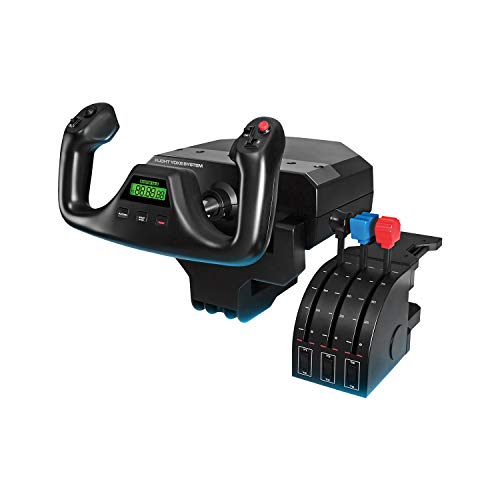
This pick needs its framing stated plainly: it is a yoke system that includes a throttle quadrant in the box, not a standalone quadrant. It belongs here as the all-in-one option for buyers who want a yoke and a quadrant together in a single purchase.
The yoke offers 180-degree rotation on a stainless steel shaft, with 75 programmable controls across 3 modes and an LCD timer display in the hub. The included quadrant module carries the same 3-lever layout as the standalone unit above, so throttle, propeller, and mixture each get a lever. The system connects over USB, and up to 5 extra switch panels can be added later. If you already own a yoke you like, this bundle duplicates it; if you are starting from a keyboard and want the yoke-and-lever pairing settled in one box, this is the pick built for that.
| Brand | Product | ASIN | Key specs |
|---|---|---|---|
| Logitech G | PRO Flight Yoke System | B07QXMTNPB | Yoke with 180-degree rotation; stainless steel shaft; 75 programmable controls; 3 modes; LCD timer display; includes 3-lever throttle quadrant module; supports 5 extra switch panels; USB; PC |
Thrustmaster Viper TQS Mission Pack
The Viper TQS Mission Pack is the military-jet entry in this list, built as a 1:1 scale replica of the Viper (F-16) throttle in metal rather than as a generic lever box. The throttle handle uses Hall Effect sensors and carries 21 action buttons and 5 axes. The Mission Pack adds the Viper Panel alongside it, bringing the combined total to 64 action buttons and 6 axes.
Two details define the experience. The idle and afterburner detents are disengageable, so travel can be configured with or without the physical stops marking those power ranges. The panel also includes a CHAFF/FLARE slap switch, placed for fast access in a dogfight. The pack is PC only and connects over USB-C. It is a single-engine military throttle at heart, so GA and airliner pilots should look elsewhere; for DCS and Falcon BMS pilots who fly the Viper, nothing else here matches its shape.
| Brand | Product | ASIN | Key specs |
|---|---|---|---|
| Thrustmaster | Viper TQS Mission Pack | B0C3FHWDK4 | 1:1 scale Viper replica metal throttle handle; Hall Effect sensors; 21 action buttons and 5 axes on the throttle; 64 action buttons and 6 axes total with Viper Panel; disengageable idle and afterburner detents; CHAFF/FLARE slap switch; PC only; USB-C |
Honeycomb Bravo Throttle Quadrant
The Bravo is the wide-body option, built around a configurable 6-lever setup. The box includes 6 general-aviation handles and 6 commercial handles, so the same unit can work as a piston setup or an airliner-style bank of engine throttles. Above the levers sit an autopilot panel with backlit buttons and an annunciator panel with 14 warning lights.
A landing gear lever with indicator lights, a GA flap lever, and a trim wheel sit on the same unit. Mounting is dual-purpose, with 2 steel clamps and a 3M micro-suction pad included, and it connects directly on PC and Mac. On Xbox it works only through the Honeycomb Xbox Hub paired with the Alpha XPC, and the annunciator lights do not function there. Pilots who split time between GA singles and airliners will get the most from the Bravo.
| Brand | Product | ASIN | Key specs |
|---|---|---|---|
| Honeycomb Aeronautical | Bravo Throttle Quadrant | B07SK43CJ6 | Configurable 6-lever setup; 6 GA and 6 commercial handles included; autopilot panel with backlit buttons; annunciator panel with 14 warning lights; landing gear lever with indicator lights; GA flap lever; trim wheel; 2 steel clamps plus 3M micro-suction pad mounting; PC and Mac |
Thrustmaster TWCS Throttle
The TWCS takes the opposite approach to a quadrant: one throttle, moved on rails. Its S.M.A.R.T (Sliding Motion Advanced Rail Tracks) mechanism slides the throttle through 80 mm of travel, and a tension dial lets you set how firmly it moves, so fine power adjustments stay put. For HOTAS-style flying in jets and space sims, that single long-throw axis is often the point.
Around the grip, the TWCS packs 5 axes and 14 buttons plus an 8-way PoV hat, for 30 programmable action buttons in total per the maker. An RJ12 connector accepts the optional TFRP rudder pedals and adds 3 more axes through the same device, and an ecosystem port supports the T.A.R.G.E.T software for building control profiles. It connects over USB and is PC only. What it does not do is give you separate levers: there is no independent propeller or mixture control. As a compact single-axis throttle paired with a stick, though, it covers the HOTAS role a multi-lever quadrant handles awkwardly.
| Brand | Product | ASIN | Key specs |
|---|---|---|---|
| Thrustmaster | TWCS Throttle | B01L28LVUG | S.M.A.R.T slide-rail throttle; 80 mm travel; tension dial; 5 axes; 14 buttons plus 8-way PoV hat; 30 programmable action buttons total (maker figure); RJ12 connector for optional TFRP rudder pedals; T.A.R.G.E.T software support; PC; USB |
How to Choose
Start with the aircraft you fly most. Single-engine piston flying needs three levers at most, and the standalone Logitech quadrant or the yoke system bundle covers it. Pilots who alternate between GA and airliner profiles should look at lever count and swappable handles first, which is the Bravo’s territory. Military-jet pilots should prioritize grip-mounted controls and detents, pushing toward the Viper pack or the TWCS.
Next, count what else the unit replaces. A quadrant with an autopilot panel, gear lever, and annunciator lights can retire a separate switch panel from your shopping list, while a bare three-lever unit assumes your other controls already exist. Then check the desk reality: clamp depth, the width the unit occupies, and whether it stays mounted or gets stowed between sessions. Finally, treat every axis, detent, and button figure here as maker-stated, and confirm platform and simulator compatibility against the maker’s documentation before ordering, because support differs sharply between picks, especially anywhere consoles are involved.
Who Should Skip
Skip this category for now if you fly exclusively with a full HOTAS setup you already like; a separate quadrant would duplicate your throttle rather than extend it. Skip the yoke system bundle if you already own a yoke, and skip the multi-lever panels if your flying is a single aircraft type that will never use the extra levers. Console-first pilots should also pause: most of these units are PC only, and the one partial exception needs extra hub hardware with reduced features. And if your desk cannot take a clamped unit or a wide panel, solve the mounting problem first.
FAQ
Do these quadrants work with Microsoft Flight Simulator and X-Plane?
All five picks are USB PC peripherals, assigned inside each simulator’s own control menus, lever by lever and button by button. Exact support and any required software differ by product and simulator version, so confirm your specific pairing against the maker’s documentation before ordering.
Can I use one of these throttle quadrants on Xbox?
Mostly no. The Viper pack, the TWCS, and both Logitech units are PC products. The Honeycomb Bravo is the partial exception: it can work on Xbox only through the Honeycomb Xbox Hub used with the Alpha XPC, and its annunciator lights do not work on Xbox. Plan on PC as the primary platform here.
What is the difference between a throttle quadrant and the TWCS throttle?
A quadrant gives you several independent levers, so throttle, propeller, mixture, or multiple engines can each be moved separately. The TWCS is a single throttle on a slide rail with a long travel and many grip controls. Choose levers for piston and multi-engine flying, and the single sliding throttle for HOTAS-style jet and space sim setups.
Do I need rudder pedals to use a throttle quadrant?
No. A quadrant works on its own as a USB device, and pedals are a separate upgrade whenever you are ready. The TWCS even includes an RJ12 connector that lets the optional TFRP rudder pedals run through the throttle unit, adding their axes without another controller on the desk.
Final Verdict
For a first set of levers, the standalone Logitech G Saitek quadrant is the straightforward answer. Buyers starting a yoke setup from scratch should look at the PRO Flight Yoke System as the bundled route. The Honeycomb Bravo is the pick for pilots who move between GA and airliner flying and want the panel built in, while the Viper TQS Mission Pack serves military-jet pilots who want the replica grip and detents. The TWCS rounds out the list as the compact single throttle for HOTAS desks. Whichever shape fits your flying, confirm the compatibility details with the maker first.
Related guides
More from Amazon
Programs that pair well with the guide above. Offers and eligibility are set by Amazon and may change.
Free shipping on eligible items, Prime Video and more. Eligible new members can start with a free trial.
Start a Prime free trialAd-free music streaming. Eligible new subscribers can start with a free trial.
Try Music Unlimited freeA Prime membership for ages 18-24 with a trial period. Eligibility is set by Amazon.
See Prime for Young AdultsAudiobooks and podcasts to listen to on the go. Eligible new members can start with a free trial.
Try Audible freeAs an Amazon Associate we earn from qualifying purchases.