- Top Pick: Mount-It! Triple Monitor Stand MI-2789
- Runner-up: ECHOGEAR Triple Monitor Desk Mount ECHO-GM3C
- Also consider: TechOrbits SmartSWIVEL Triple Monitor Mount OF-MAA-0336
Triple monitors change sim racing. A single screen shows the road ahead; three screens wrap the cockpit around you, put the side mirrors and apexes in your peripheral vision, and make it easier to judge where other cars sit beside you. The mount is what makes that setup work, because three screens only feel like one continuous window when they sit level, stay put under force feedback vibration, and hold their alignment.
Choosing the wrong mount is easy, because the headline claims all sound similar. What actually decides the fit is less glamorous: the weight each position can carry, the VESA pattern on the back of your screens, and whether your desk or wheel stand can take a clamp, a grommet bolt, or only a freestanding base. This guide runs through those checks, then compares five mounts covering the main styles.
As an Amazon Associate, we earn from qualifying purchases.
Top 3 picks at a glance
Quick Answer
Start with weight and VESA, not screen size. Weigh each monitor, match its VESA pattern, and confirm your desk or rig can take a clamp or grommet before choosing a style. Freestanding stands suit smaller triples, clamp mounts hold mid-size screens steady, and an extra-tall pole mount fits an ultrawide center with two side screens.
Mount-It! Triple Monitor Stand MI-2789
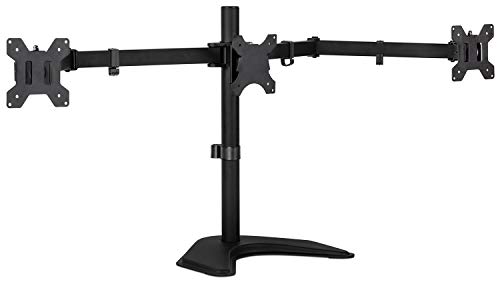
The Mount-It! MI-2789 is the freestanding option in this group, the natural pick when clamping is off the table. A glass desk, a rented room, or a wheel stand with nowhere for a clamp to bite all point toward a stand that simply sits on the surface, and this one adds a grommet base option if you later move to a desk you can bolt through. Its full-motion arms tilt, swivel and rotate each screen, so you can angle the side monitors inward and line the bezels up.
The trade-off is screen size. This stand is built for three monitors from 19 to 24 inches, with a limit of 15.4 lb per screen, so it suits the smaller triple setups run on compact rigs. Check your screens against both figures before ordering, and follow the maker’s weight limit exactly: a freestanding stand has no clamp to fall back on, so staying inside the per-screen rating is what keeps the arrangement stable.
| Brand | Product | ASIN | Key specs |
|---|---|---|---|
| Mount-It! | Triple Monitor Stand MI-2789 | B01HSJX1FG | Freestanding triple stand with grommet base option; fits three 19-24 inch monitors; up to 15.4 lb per screen; VESA 75×75 and 100×100; full-motion arms with tilt, swivel and rotate |
ECHOGEAR Triple Monitor Desk Mount ECHO-GM3C

The ECHOGEAR ECHO-GM3C takes the opposite approach: it clamps to the desk, and its lock-down clamp reduces the wobble that a strong wheel base can feed through a desk into the screens. For sim racing that matters, because a mount that creeps or shakes under force feedback breaks the illusion of a fixed cockpit window. The mount carries three screens up to 27 inches, which covers the most common triple size in sim racing.
Each monitor adjusts independently for tilt, swivel and orientation, and the adjustments can be made without tools, so fine-tuning the wrap angle of the side screens is a quick job. Before ordering, confirm the maker’s stated weight limit for your exact screens and follow it exactly, and check that your desk edge is solid enough and thick enough for the clamp, following the maker’s guidance on desk material.
| Brand | Product | ASIN | Key specs |
|---|---|---|---|
| ECHOGEAR | Triple Monitor Desk Mount ECHO-GM3C | B079NNC2YQ | Clamp-down triple desk mount; fits screens up to 27 inches; lock-down clamp to reduce wobble; per-monitor tilt, swivel and orientation adjustment without tools |
UPGRAVITY Triple Monitor Desk Mount
The UPGRAVITY triple mount is the flexible middle option. It fits three screens up to 27 inches and is rated at 17.6 lb per arm, a figure that covers most 27 inch gaming monitors with room to spare. Just as useful, it offers both clamp and grommet mounting, so it can follow you from a clamped desk setup to a bolt-through rig without being replaced.
The fully adjustable arms let you pull the side screens forward, angle them into the wrapped position a racing cockpit needs, and level all three panels against each other. The ratings only protect you if you respect them: confirm each screen’s weight against the per-arm limit, confirm the VESA pattern matches, and install the mount exactly as the maker directs before the monitors go on.
| Brand | Product | ASIN | Key specs |
|---|---|---|---|
| UPGRAVITY | Triple Monitor Desk Mount | Fits three screens up to 27 inches; 17.6 lb load per arm; fully adjustable arms; clamp and grommet mounting; VESA 75×75 and 100×100 |
TechOrbits SmartSWIVEL Triple Monitor Mount OF-MAA-0336

The TechOrbits SmartSWIVEL OF-MAA-0336 stands out for its size range: it is a universal desk mount for three monitors from 13 to 30 inches. That spread makes it the easiest fit in this group for mixed setups, where the center screen is larger than the sides, or for racers who may change screen sizes later without changing the mount. Its swivel arms handle the angled side-screen positions that a triple racing layout depends on.
It mounts by clamp, so it needs a suitable desk edge, and it is VESA compatible with common monitor patterns. Because screen weight varies a great deal across that 13 to 30 inch range, check the maker’s stated capacity against the actual weight of your three screens before ordering rather than assuming the size range tells the whole story, and follow the maker’s installation directions exactly.
| Brand | Product | ASIN | Key specs |
|---|---|---|---|
| TechOrbits | SmartSWIVEL Triple Monitor Mount OF-MAA-0336 | B075SRGSK1 | Universal desk mount for three 13-30 inch monitors; swivel arms; clamp mounting; VESA compatible |
VIVO Triple Monitor Extra Tall Desk Mount STAND-V103T

The VIVO STAND-V103T is built around a different layout: an extra-tall pole mount whose center bracket is sized for a single ultrawide up to 49 inches, flanked by two side screens. That is the arrangement many racers now prefer, a wide center view with angled side panels, and the tall pole gives big screens their vertical adjustment room. The center and side positions are rated differently: the maker rates the center bracket at up to 44 lb for a flat ultrawide or 33 lb for a curved ultrawide, while each side bracket fits a screen up to 27 inches at 17.6 lb.
Never carry the center rating over to the side brackets; a side screen has to fit the side limit, not the headline figure. Weigh each of your three screens, match each one to the position it will occupy, and confirm the VESA pattern, 75×75 or 100×100, on every panel. Installed per the maker’s directions, this is the mount in the group aimed squarely at ultrawide-center triples.
| Brand | Product | ASIN | Key specs |
|---|---|---|---|
| VIVO | Triple Monitor Extra Tall Desk Mount STAND-V103T | B0DG391L1L | Extra-tall pole mount; center bracket fits an ultrawide up to 49 inches, rated up to 44 lb flat or 33 lb curved; side brackets fit screens up to 27 inches at 17.6 lb each; VESA 75×75 and 100×100 |
How to Choose
Weigh every screen first. The weight that matters is the panel without its own stand, and it has to be checked against the rating for the exact position it will occupy, center or side, with some headroom left over. A mount run at its limit is a mount that sags and drifts out of alignment.
Next, confirm the VESA pattern on the back of each monitor. All five mounts here work with the common 75×75 and 100×100 patterns, but check your screens rather than assuming. Then decide how the mount attaches. A clamp needs a solid desk edge of suitable thickness and material; makers caution against weak surfaces such as glass or hollow particleboard unless their instructions allow it. A grommet mount needs a desk you can bolt through. A freestanding stand avoids both questions but takes desk space and suits smaller screens.
Finally, think about alignment and installation. Sim racing triples live or die on bezel alignment, so look for independent tilt, swivel and height adjustment at each position, and enough arm reach to angle the side screens inward. Whatever you choose, install it exactly per the maker’s directions into a suitable desk or rig, with weight and VESA confirmed first. No mount is a safety guarantee: an overloaded or badly clamped mount can drop a screen, so the ratings and the instructions are the whole protection.
Who Should Skip
Skip this category if you race on a single ultrawide, which needs a different mount, or on one large screen. Skip these five mounts if your three screens exceed their size or per-position weight ceilings, as many triple 32 inch setups with heavy panels will; that rig belongs on a dedicated sim-rig profile mount instead. And skip clamp mounts if your desk cannot take one and you have no room for a freestanding base, because forcing an unsuitable mounting method risks damaging a screen.
FAQ
Can a triple monitor mount hold three 32 inch screens?
Most desk mounts top out at 27 to 30 inches per side screen, and weight matters more than the diagonal figure. A light 32 inch panel can still exceed a per-arm limit, so check the rating for each position and look at dedicated rig mounts if your screens are too big or too heavy.
Is a clamp mount or a freestanding stand better for sim racing?
A clamp mount resists force feedback vibration better and frees desk space, which is why most racers prefer one. A freestanding stand is the better choice when the desk cannot take a clamp, provided your screens fit its smaller size and weight limits.
What VESA pattern do I need for a triple monitor mount?
The mounts compared here use the two common patterns, 75×75 and 100×100. Measure the mounting holes on the back of each monitor and match all three before ordering, since a mismatched pattern will not attach without an adapter.
Can one mount hold an ultrawide in the middle and two smaller screens at the sides?
Yes. The VIVO extra-tall mount in this guide is designed for exactly that layout, with a center bracket for an ultrawide up to 49 inches and side brackets for screens up to 27 inches. Keep the separate center and side weight ratings distinct when checking your screens.
Final Verdict
For smaller triples on a desk that cannot be clamped, the Mount-It! stand is the straightforward answer. For the classic three times 27 inch racing setup, the ECHOGEAR and UPGRAVITY clamp mounts are the core choices, with UPGRAVITY adding a grommet option. The TechOrbits mount covers the widest range of screen sizes, and the VIVO extra-tall mount is the one built for an ultrawide center with two side screens. Whichever direction you go, let the per-position weight ratings, the VESA pattern and your desk decide, in that order.
Related guides
More from Amazon
Programs that pair well with the guide above. Offers and eligibility are set by Amazon and may change.
Free shipping on eligible items, Prime Video and more. Eligible new members can start with a free trial.
Start a Prime free trialAd-free music streaming. Eligible new subscribers can start with a free trial.
Try Music Unlimited freeA Prime membership for ages 18-24 with a trial period. Eligibility is set by Amazon.
See Prime for Young AdultsAudiobooks and podcasts to listen to on the go. Eligible new members can start with a free trial.
Try Audible freeAs an Amazon Associate we earn from qualifying purchases.