Our Short List of 3

- Best for: PS4 shooters with an adapter, where many buttons and a strong sensor matter most.
- HERO 25K sensor with up to 25,600 DPI
- 11 programmable buttons
- Adjustable weights
- LIGHTSYNC RGB lighting

- Best for: Players who want a plug-and-play mouse with no setup at all.
- 6,400 DPI optical sensor
- 5 programmable buttons
- Mechanical switches
- Rubber side grips

- Best for: Small hands and players who want a compact mouse with on-board memory.
- 8,000 DPI sensor
- LIGHTSYNC RGB lighting
- 6 programmable buttons
- On-board memory
All 4 Picks at a Glance
| Product | Specs | Action |
|---|---|---|
| Logitech G502 HERO |
| Check price on Amazon |
| Razer DeathAdder Essential |
| Check price on Amazon |
| Logitech G203 Lightsync |
| Check price on Amazon |
 Razer Basilisk Essential |
| Check price on Amazon |
A mouse on PS4 is not the same purchase as a mouse on PC. Only a small number of PS4 games accept mouse input directly, and the rest need an adapter or a keyboard-and-mouse converter to translate your movements into controller signals. That changes what matters: plug-and-play reliability beats deep software, on-board memory beats cloud profiles, and a wired connection beats a wireless one that needs a dongle your console may not recognize. The wrong mouse on PS4 is not just uncomfortable, it is a mouse that does nothing at all in the game you bought it for.
This guide is for PS4 players who play the games that support mouse input, players who use an adapter to bring mouse aim to console shooters, and anyone who splits time between a PS4 and a PC. Every pick below is drawn from the product title and listed specifications on its Amazon page, so you can check sensor, buttons, and connection before you buy.
Top 3 picks at a glance
Quick Picks
As an Amazon Associate we earn from qualifying purchases
| Product | Best for | Key spec from title |
|---|---|---|
| Logitech G502 HERO | PS4 shooters with an adapter | HERO 25K sensor, up to 25,600 DPI |
| Razer DeathAdder Essential | Simple plug-and-play setup | 6,400 DPI optical sensor, 5 programmable buttons |
| Logitech G203 Lightsync | Small hands and a small budget | 8,000 DPI sensor, LIGHTSYNC RGB |
| SteelSeries Rival 3 | Comfortable grip with RGB lighting | 8,500 CPI TrueMove Core sensor, 6 programmable buttons |
| Razer Basilisk Essential | Ergonomic shape with a thumb rest | 6,400 DPI optical sensor, Chroma RGB lighting |
How to Choose
Check which games support a mouse
Before you buy anything, confirm that your game accepts mouse input on PS4. Titles such as Fortnite and Warframe support a mouse directly through a USB port, while most console shooters do not and need a keyboard-and-mouse adapter to work at all. An adapter adds cost and a small amount of input delay, and some games detect it. If your main game has no native support and you do not want an adapter, a mouse will not help you, and no sensor specification changes that. Start with the game list, then pick the mouse.
Wired beats wireless on console
A wired mouse is the safer choice on PS4 because the console reads it as a standard USB device with no pairing step. Wireless mice that rely on a 2.4 GHz dongle usually work too, but Bluetooth-only mice often do not connect to the console at all. A wired mouse also never runs out of battery mid-match, which matters when the console sits across the room from your seat. All five mice in this guide are wired, so you can plug any of them into the PS4 USB port and start playing without charging or pairing.
Sensor and DPI for console play
Console shooters run at lower frame rates than PC games, so extreme sensor ceilings matter less here than tracking stability. A sensor that reaches 6,400 or 8,000 DPI is more than enough, since most players set their sensitivity far below the maximum. What matters is that the sensor tracks cleanly at your speed without acceleration or angle snapping, and that the mouse keeps working when you flick fast. The HERO 25K sensor in the G502 HERO is the strongest in this guide, but the simpler sensors in the cheaper mice are still accurate enough for console play.
Shape, buttons, and on-board memory
Your grip decides comfort, and your buttons decide how much you can do without reaching for the keyboard. A mouse with eleven programmable buttons suits players who map abilities and items to the thumb, while a five-button mouse suits players who keep it simple. On-board memory is worth looking for: it stores your DPI stages and button assignments inside the mouse, so your settings survive when you move the mouse from a PC to the PS4. Without it, you need to set everything up again on a computer before each console session.
The 5 Best Options
Logitech G502 HERO
- Best for: PS4 shooters with an adapter, where many buttons and a strong sensor matter most.
- HERO 25K sensor with up to 25,600 DPI
- 11 programmable buttons
- Adjustable weights
- LIGHTSYNC RGB lighting
PS4 shooters with an adapter, where many buttons and a strong sensor matter most.
The large, heavy shape can feel bulky for small hands, and the weight system adds complexity you may never use.
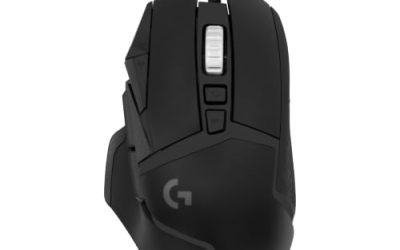
The G502 HERO is the most capable mouse in this guide, and it suits PS4 players who want every option available. The HERO 25K sensor reaches 25,600 DPI and tracks cleanly at high speeds, while eleven programmable buttons cover abilities, items, and weapon swaps without touching the keyboard. Adjustable weights let you tune the feel from light to heavy, and on-board memory stores your settings inside the mouse so they carry over to the console. LIGHTSYNC RGB lighting adds a clean glow to the desk. It is a large mouse, so it suits medium and large hands best.
Watch out for: The large, heavy shape can feel bulky for small hands, and the weight system adds complexity you may never use.
Razer DeathAdder Essential
- Best for: Players who want a plug-and-play mouse with no setup at all.
- 6,400 DPI optical sensor
- 5 programmable buttons
- Mechanical switches
- Rubber side grips
Players who want a plug-and-play mouse with no setup at all.
Five buttons leave little room for ability binds, and there is no on-board memory for storing profiles.
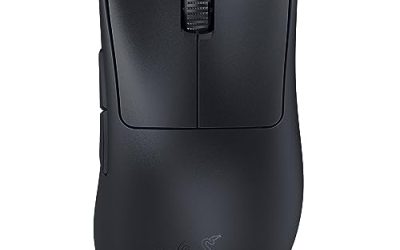
The DeathAdder Essential is the simplest mouse here, and that is why it works so well on PS4. It plugs in over USB and starts working immediately, with no software to install and no pairing to manage. The 6,400 DPI optical sensor is accurate enough for console shooters, and five programmable buttons cover the basics. Mechanical switches are rated for long use, and rubber side grips keep the mouse steady during fast movements. Its classic ergonomic shape has been comfortable for right-handed players for years, and there is nothing to configure before your first match.
Watch out for: Five buttons leave little room for ability binds, and there is no on-board memory for storing profiles.
Logitech G203 Lightsync
- Best for: Small hands and players who want a compact mouse with on-board memory.
- 8,000 DPI sensor
- LIGHTSYNC RGB lighting
- 6 programmable buttons
- On-board memory
Small hands and players who want a compact mouse with on-board memory.
The small shell can feel cramped for large hands, and palm grippers may want a longer mouse.
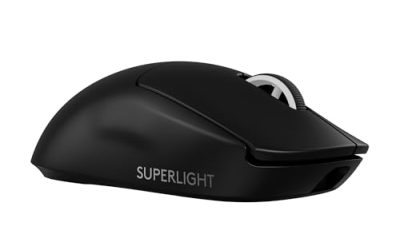
The G203 Lightsync is the smallest and lightest mouse in this guide, and it suits players with small hands or a claw grip. Its 8,000 DPI sensor tracks cleanly, six programmable buttons cover the essentials, and on-board memory stores your settings inside the mouse for console use. LIGHTSYNC RGB lighting runs a color wave along the side, which looks sharp next to a PS4. The compact shape keeps your fingers close to the buttons, and the light weight makes fast flicks easy. It is a strong choice when you want a capable mouse without a large shell.
Watch out for: The small shell can feel cramped for large hands, and palm grippers may want a longer mouse.
SteelSeries Rival 3
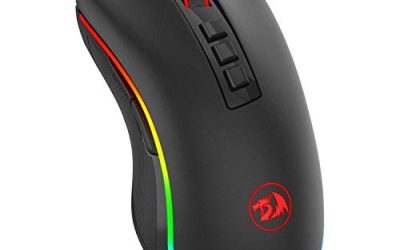
The Rival 3 is the comfortable middle ground in this guide: a clean ergonomic shape, a reliable sensor, and RGB lighting without a complicated setup. The TrueMove Core optical sensor reaches 8,500 CPI and tracks steadily, while six programmable buttons include split trigger buttons that feel distinct under your index finger. Brilliant Prism RGB lighting syncs with other SteelSeries gear, and the 77-gram body is light for an ergonomic mouse. It is a good fit for players who want a mouse that feels good for hours and does not demand configuration.
Specs
- TrueMove Core optical sensor with 8,500 CPI
- 6 programmable buttons
- Split trigger buttons
- Brilliant Prism RGB lighting
- Ergonomic right-handed shape
Best for: Players who want a comfortable ergonomic mouse with a reliable sensor.
Watch out for: There is no weight tuning or extra side buttons, so players who want many binds should look at the G502 HERO.
Razer Basilisk Essential
- Best for: Players who want a thumb rest and a solid ergonomic shape for long console sessions.
- 6,400 DPI optical sensor
- Chroma RGB lighting
- 7 programmable buttons
- Mechanical switches
Players who want a thumb rest and a solid ergonomic shape for long console sessions.
At 95 grams it is the heaviest mouse here, so fast flicking takes more effort than with the lighter picks.
The Basilisk Essential brings a thumb rest and an ergonomic shape to PS4 play, which suits players who rest their thumb during long sessions. Its 6,400 DPI optical sensor is accurate for console shooters, seven programmable buttons give a little more room than the DeathAdder Essential, and Chroma RGB lighting adds a clean glow. Mechanical switches keep clicks consistent, and the 95-gram body has a solid, planted feel that some players prefer over ultralight mice. It is a comfortable, straightforward mouse for console players who like a full grip.
Watch out for: At 95 grams it is the heaviest mouse here, so fast flicking takes more effort than with the lighter picks.
Which One Fits Your Situation
You play Fortnite or Warframe on PS4
Pick the Logitech G502 HERO or the Razer DeathAdder Essential. Both work directly through the PS4 USB port in games with native mouse support, and both track cleanly. The G502 HERO gives you eleven buttons for building and editing, while the DeathAdder Essential keeps it simple and comfortable. Either one plugs in and works without software, so you start playing immediately.
You use a keyboard-and-mouse adapter
Pick the Logitech G502 HERO. Its on-board memory stores your DPI stages and button assignments inside the mouse, so the adapter reads your settings without a PC nearby. The adjustable weights also let you tune the feel to match the adapter’s sensitivity curve. No other mouse here gives you that many buttons and on-board storage in one package.
You have small hands
Pick the Logitech G203 Lightsync. Its compact shell keeps your fingers near the buttons, the 8,000 DPI sensor is accurate, and on-board memory carries your settings to the console. It is the smallest mouse in this guide and the easiest to control with a claw grip. The light weight also makes fast flicks easier on a small desk.
You want the simplest setup possible
Pick the Razer DeathAdder Essential. Plug it into the USB port and play: no software, no pairing, no profiles to manage. Its classic ergonomic shape suits right-handed players, and the rubber side grips keep it steady during fast movements. It is the most forgiving choice if you have never used a gaming mouse before.
Common Mistakes
- Buying a mouse before checking whether your PS4 game supports mouse input at all.
- Choosing a Bluetooth-only mouse that the PS4 cannot pair with.
- Picking a wireless mouse and running out of battery in the middle of a match.
- Copying a PC sensitivity setting onto a console, where aim assist and frame rate change how it feels.
- Ignoring on-board memory and losing your DPI settings every time you move the mouse to the console.
Frequently Asked Questions
Do all PS4 games support a mouse?
No. Only a small number of PS4 games accept mouse input directly, and most console shooters need a keyboard-and-mouse adapter. Check your game’s support list before you buy, since a mouse does nothing in a game that does not accept it.
Can I use a wireless mouse on PS4?
A wireless mouse with a 2.4 GHz USB dongle usually works, since the console reads the dongle as a USB device. A Bluetooth-only mouse often does not connect, so a wired mouse is the safer choice for console play. When in doubt, pick a wired mouse and skip the pairing question entirely.
Is the G502 HERO too heavy for console play?
It depends on your hands. The G502 HERO is large and its adjustable weights let you tune the feel, but small-handed players may find it bulky. If you have small hands, the G203 Lightsync is a better fit. Try removing weights first before deciding the mouse is too heavy for you.
Do I need software to set up these mice on PS4?
No, all five work as plug-and-play mice on PS4. Software on a PC is only needed to change DPI stages or remap buttons, and mice with on-board memory store those changes so they carry over to the console. Set them up once on a PC, then move the mouse to the console.
Related guides
More from Amazon
Programs that pair well with the guide above. Offers and eligibility are set by Amazon and may change.
Free shipping on eligible items, Prime Video and more. Eligible new members can start with a free trial.
Start a Prime free trialAd-free music streaming. Eligible new subscribers can start with a free trial.
Try Music Unlimited freeA Prime membership for ages 18-24 with a trial period. Eligibility is set by Amazon.
See Prime for Young AdultsAudiobooks and podcasts to listen to on the go. Eligible new members can start with a free trial.
Try Audible freeAs an Amazon Associate we earn from qualifying purchases.