Extra buttons only help when you can reach them without looking down, so the real decision is not who lists the highest button count. It is whether a 12-button thumb grid matches your games, whether those buttons sit where your thumb naturally rests, and whether the software lets you save the layout you build. A grid that feels brilliant in an MMO can feel crowded in a shooter.
This guide serves MMO and MOBA players, hybrid players who also work at the same desk, and anyone moving up from a standard mouse. Every pick was chosen from the names and specifications printed on its Amazon product page, with button counts taken from that page rather than from roundups or manufacturer summaries written for other regions.
Top 3 picks at a glance


Quick Picks
As an Amazon Associate we earn from qualifying purchases
| Product | Best for | Key spec from title |
|---|---|---|
| Logitech G600 MMO Gaming Mouse | MMO players who want the most commands under the thumb | 20 programmable buttons |
| Razer Naga Trinity | Players who switch between MMO, MOBA and shooter layouts | Interchangeable side plates with 2, 7 and 12-button configurations |
| Corsair Scimitar RGB Elite | MMO players whose thumb misses fixed side grids | 17 programmable buttons and 18,000 DPI |
| Redragon M908 Impact | A first 12-button side grid with adjustable weight | 18 programmable buttons and 12,400 DPI |
| Logitech G604 LIGHTSPEED | Wireless play and work from one mouse | 15 programmable controls |
How to Choose
Count Usable Buttons, Not Just Total Buttons
Start with the abilities you actually press every few seconds, then match them to the layout. A 12-button thumb grid suits rotations with many spells, consumables and target markers, while six thumb buttons fit a smaller set of MOBA or shooter commands. Totals also include the main clicks, wheel actions and DPI controls, so compare the side layout first. The Logitech G600 reaches 20 buttons with a 12-button thumb panel, whereas the Logitech G604 spreads 15 controls across six thumb buttons and the top of the mouse.
Decide Between a Fixed Grid and a Flexible Layout
A fixed grid rewards muscle memory because every button stays in the same place, and shaped or textured keys help your thumb learn positions without looking. Flexible designs trade some of that consistency for range. The Razer Naga Trinity swaps between 2, 7 and 12-button side plates, so one mouse can serve different genres. Corsair takes another route on the Scimitar RGB Elite: its Key Slider system lets the 12 side buttons slide forward or back, adjusting a fixed grid to your thumb instead of swapping plates.
Choose Wired Simplicity or Wireless Freedom
Wired models such as the G600, Naga Trinity, Scimitar RGB Elite and M908 Impact never need charging or a battery swap, and the cable is the only connection to manage. That suits a stationary gaming desk. Wireless changes the routine: the G604 uses LIGHTSPEED wireless for gaming and Bluetooth for a second device, powered by a single AA battery with up to 240 hours of battery life listed on its page. Pick wireless if you move between computers or dislike cable drag, and wired if you want a mouse that is always ready.
Check the Sensor, Software and Your Grip Together
DPI figures differ widely here, from 8,200 DPI on the G600 to 18,000 DPI on the Scimitar RGB Elite, yet most players settle far below the maximum, so treat the number as headroom rather than a ranking. More important is whether the software saves profiles the way you play. Look for onboard memory if you change computers, and check the shape before ordering: every mouse in this guide is right-handed, and a wide MMO body with a full thumb grid can feel bulky under a fingertip grip or a smaller hand.
The 5 Best Options
Logitech G600 MMO Gaming Mouse

The G600 remains the clearest answer for players whose action bars overflow a keyboard. Its 12-button thumb panel uses a dual-dish design, splitting the grid into two sets of six so your thumb can learn positions by feel, and the G-Shift ring-finger button doubles the actions assigned to every other button. Three onboard profiles store button, tracking and lighting settings without software on the host computer. It is a wired, laser-sensor design built squarely for long MMO sessions rather than lightweight shooter play.
Specs
- Buttons: 20 programmable, including a 12-button thumb panel
- Sensor: gaming-grade laser, 50 to 8,200 DPI
- G-Shift button doubles the actions on every other button
- Onboard memory: three profiles
- Primary buttons rated to 20 million clicks
- Cable: braided USB, 6.5 feet
- Weight: 133 grams without cable
- Model number: 910-002864
Best for: MMO players who want the largest thumb command set in this guide.
Watch out for: it is wired and right-handed only, and the wide body may suit palm and claw grips better than fingertip grips.
ASIN: B0086UK7IQ
Razer Naga Trinity
Genre switchers get the most from the Naga Trinity because its side plate is not fixed. Three interchangeable plates provide 2, 7 or 12-button configurations, giving up to 19 programmable buttons with the grid fitted, so the same mouse can run a full MMO bar one evening and a leaner MOBA layout the next. The page lists a 16,000 DPI optical sensor, mechanical switches and Chroma RGB lighting, with configuration handled through Razer Synapse. Choose it when one desk hosts several game types.
Specs
- Buttons: up to 19 programmable, depending on the side plate fitted
- Side plates: interchangeable 2, 7 and 12-button configurations
- Sensor: 5G optical, 16,000 DPI
- Polling: 1,000 Hz Ultrapolling listed in the product description
- Switches: mechanical
- Lighting: Razer Chroma RGB
- Connection: wired USB
- Model number: RZ01-02410100-R3U1
Best for: players who move between MMO, MOBA and shooter games and want one mouse to cover all three.
Watch out for: the total button count changes with the plate fitted, so confirm which configuration you will actually use most.
ASIN: B0788MCRGC
Corsair Scimitar RGB Elite
The Scimitar RGB Elite solves a specific frustration: a 12-button grid that sits slightly too far forward or back for your thumb. Its patented Key Slider control system repositions the 12 mechanical side buttons, so the grid adjusts to your hand instead of the other way round. The page lists 17 fully programmable buttons, a custom PixArt PMW3391 optical sensor adjustable in single DPI steps, and iCUE software for macro programming and four-zone RGB lighting. Onboard profile storage keeps your layout saved on the mouse itself.
Specs
- Buttons: 17 fully programmable, including 12 mechanical side buttons
- Side panel: Key Slider system repositions the side buttons
- Sensor: PixArt PMW3391 optical, native 18,000 DPI, adjustable in 1 DPI steps
- Switches: Omron, rated to 50 million clicks
- Software: CORSAIR iCUE for macros, lighting and surface calibration
- Lighting: four-zone RGB backlighting
- Weight: 122 grams
- Model number: CH-9304211-NA
Best for: MMO and MOBA players who like a full grid but need it positioned to match their thumb.
Watch out for: it is a wired, right-handed mouse, and its macro features depend on iCUE, so check your operating system support first.
ASIN: B082LRMY53
Redragon M908 Impact

The M908 Impact brings the classic MMO layout to players who want a full grid plus control over how heavy the mouse feels. Its page lists 18 programmable buttons with 12 MMO side buttons, five memory profiles each identified by a dedicated light colour, and an eight-piece weight tuning set so the balance can be adjusted in small steps. The optical sensor reaches 12,400 DPI across five adjustable levels. For a first button-heavy mouse, that combination of grid, profiles and tuning covers the essentials without extra connection modes to manage.
Specs
- Buttons: 18 programmable, including 12 MMO side buttons
- Sensor: optical, up to 12,400 DPI with five adjustable levels (500, 1,000, 2,000, 3,000 and 6,200 DPI listed)
- Profiles: five memory profiles, each with a dedicated light colour
- Weight tuning: eight-piece set, 2.4 grams per weight
- Lighting: RGB with 16.8 million colour options, can be disabled
- Connection: wired
Best for: new MMO players who want a 12-button grid and adjustable weight in one wired mouse.
Watch out for: full programming support is listed for Windows, with Mac OS noted for normal use only, so Mac players should check the listing carefully.
ASIN: B07FK9PKSM
Logitech G604 LIGHTSPEED
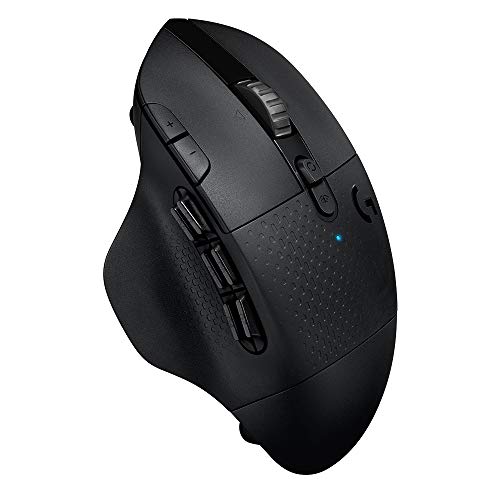
The G604 is the moderate-grid, wireless option in this line-up. Six thumb buttons sit in two rows as part of 15 programmable controls, enough for a solid set of MMO, MOBA or battle royale commands without a full 12-button panel. Its page highlights dual connectivity, toggling between LIGHTSPEED wireless and Bluetooth, a hyper-fast scroll wheel that also shifts into ratcheted mode, and up to 240 hours of gaming on one AA battery. Everything is programmed through Logitech G Hub, making it the natural pick for a shared gaming and work desk.
Specs
- Controls: 15 programmable, including six thumb buttons
- Connectivity: LIGHTSPEED wireless and Bluetooth, toggle between modes
- Sensor: HERO, listed up to 25,600 DPI on the product page
- Battery: one AA battery, up to 240 hours in LIGHTSPEED mode
- Scroll wheel: dual-mode hyper-fast wheel with tilt and middle click
- Software: fully programmable with Logitech G Hub
- Model number: 910-005622
Best for: players who want wireless freedom and a moderate set of extra buttons for games and everyday work.
Watch out for: it runs on AA batteries rather than a rechargeable cell, and six thumb buttons may feel limited for very large MMO rotations.
ASIN: B07QN369XX
Which One Fits Your Situation
You Raid in an MMO Several Nights a Week
Pick the Logitech G600. Its 12-button thumb panel, dual-dish shaping and G-Shift layer were built around long rotations and large action bars, and three onboard profiles keep separate layouts for different characters or roles. The Corsair Scimitar RGB Elite is the alternative if your thumb struggles to reach the far row of a fixed grid, because its side buttons slide into position.
You Split Your Time Between Several Genres
Choose the Razer Naga Trinity. Swapping between its 2, 7 and 12-button side plates lets one wired mouse feel lean for a shooter session and fully loaded for an MMO night, instead of forcing one layout onto every game. That flexibility matters most when your weekly rotation genuinely changes, rather than when one genre dominates your library.
Your Mouse Doubles as Your Work Mouse
Take the Logitech G604 LIGHTSPEED. Six thumb buttons handle game commands and everyday shortcuts, Bluetooth connects a second computer without moving a receiver, and the long AA battery life means charging rarely interrupts anything. Its grid is smaller than the dedicated MMO models here, which is exactly why it feels more natural across spreadsheets, browsers and chat apps during the day.
You Are Buying Your First Grid Mouse
Start with the Redragon M908 Impact. It offers the full 12-button side layout, five memory profiles and a weight tuning set, so you can learn whether a grid suits your thumb and how heavy you like a mouse to feel. Give yourself a settling-in period before judging it, because reaching the back rows accurately is a skill that builds over the first weeks of play.
Common Mistakes
- Counting the headline total instead of the side buttons, then discovering that wheel clicks and DPI controls make up much of the number.
- Mapping every grid button on day one, which overloads your thumb memory; start with your most-used abilities and add the rest gradually.
- Ignoring hand orientation and grip, even though every mouse here is right-handed and grid bodies run wider than standard gaming mice.
- Assuming a higher maximum DPI means better aim, when your in-game sensitivity setting matters far more than the ceiling on the box.
- Forgetting to check software support for your operating system, especially where full macro programming is listed for one system only.
Frequently Asked Questions
How many extra buttons do I actually need for an MMO?
Map your most frequent abilities first. Many players cover a comfortable rotation with six thumb buttons, while healers and players with large action bars use all twelve on a full grid. Models such as the G600 add a shift layer that doubles assignments, so layout and layers often matter more than the raw total printed in the product title.
Are 12-button side grids hard to learn?
Expect an adjustment period. Shaped layouts such as the G600 dual-dish panel and the Scimitar sliding grid exist to make positions easier to find by touch. Learn the grid in rows, bind a few abilities at a time, and keep rarely used commands on the far rows until your thumb reaches them reliably without looking down at the mouse.
Is wired or wireless better for a button-heavy mouse?
Both work well for this category. Wired models such as the Naga Trinity and M908 Impact are always ready and need no battery management. The wireless G604 counters with LIGHTSPEED and Bluetooth modes plus up to 240 hours from one AA battery. Choose based on whether you value an untethered desk or never thinking about power at all.
Can I use these extra buttons outside games?
Usually, yes. The same software that assigns game commands can map shortcuts, media controls or productivity macros, and the G604 is designed with that dual role in mind. Check each product page for its software and operating system notes, because the depth of programming support can differ between Windows and Mac even when basic mouse functions work on both.
Related guides
More from Amazon
Programs that pair well with the guide above. Offers and eligibility are set by Amazon and may change.
Free shipping on eligible items, Prime Video and more. Eligible new members can start with a free trial.
Start a Prime free trialAd-free music streaming. Eligible new subscribers can start with a free trial.
Try Music Unlimited freeA Prime membership for ages 18-24 with a trial period. Eligibility is set by Amazon.
See Prime for Young AdultsAudiobooks and podcasts to listen to on the go. Eligible new members can start with a free trial.
Try Audible freeAs an Amazon Associate we earn from qualifying purchases.