A student shopping for a drawing tablet is rarely buying for the same reason as a professional illustrator. The goals are narrower and more practical: sketch for an art or design class, annotate lecture slides, practice digital painting between assignments, or try animation without committing to an expensive pen display. The first real decision is whether to buy a pen tablet that has no screen and connects to a computer, a pen display with a built-in screen, or a standalone tablet that works without any computer at all.
This 2026 guide compares eight options from the listings, ranging from a compact 6.5-inch pen tablet to an 11.9-inch pen display and a standalone Android-style drawing tablet. It is written for high school and college students, hobbyists learning digital art, and parents shopping for a first tablet. The advice stays grounded in what the titles state about size, pressure levels, shortcut keys, and compatibility, because those details decide how comfortable a tablet feels in a dorm room or on a library desk.
Our Top Picks
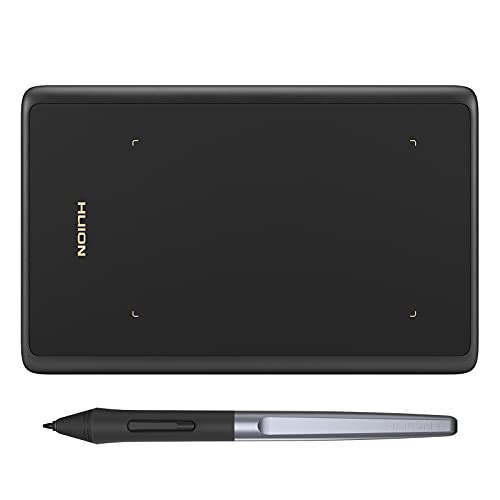 HUION Drawing Tablet H420X Graphics Tablet with 8192Small6.77 x 4.3 x 0 inches0.2 poundsCheck on Amazon


Top 3 picks at a glance
Quick Picks
As an Amazon Associate we earn from qualifying purchases at no extra cost to you.



| Product | Best for | Key spec from the title |
|---|---|---|
| PicassoTab 10 inch Standalone | Drawing without a computer | 10 inch, no computer needed, 4096 level pen |
| GAOMON S620 | First tablet on a tight desk | 6.5×4 inch, 8192 pressure, 4 hot keys |
| XOPPOX 10×6 | Large active area on a budget | 10×6 inch, 8192 levels, 12 hot keys |
| HUION H420X | Smallest and simplest | 4.17×2.6 inch, 8192 pressure, battery-free |
| XPPen Artist 12 3rd | Premium drawing feel with a screen | 11.9 inch, 16K pen, etched glass, dial wheel |
| GAOMON PD1161 | First screen to draw on directly | 11.6 inch FHD, tilt, 8 shortcut keys |
| Wacom Intuos Small | Trusted brand with included software | Wired, battery-free pen, 4 ExpressKeys |
| UGEE M708 V2 | Computer or Android phone use | 10×6 inch, 8 hot keys, PC and Android |
How to Choose
Pen tablet, pen display, or standalone
A pen tablet has no screen, so you look at the monitor while your hand moves on a separate surface. It is the cheapest route and the easiest to carry, but the hand-eye split takes a few days to learn. A pen display like the XPPen Artist 12 or GAOMON PD1161 lets you draw directly on the image. A standalone tablet like the PicassoTab runs its own apps and needs no computer, which suits a student without a laptop.
Active area and portability
Active area is the part of the surface that senses the pen. A 6.5×4 inch pad fits a backpack and a cramped desk, while a 10×6 inch pad gives a wider sweep for full-page sketches. Pick the size that matches your monitor and your wrist movement. Many beginners feel that a very small surface is fine for note-taking but restrictive for figure drawing. As a rule of thumb, match the pad’s proportions to your monitor so the cursor moves naturally across the whole screen.
Pressure levels and pen type
8192 levels is the figure on most pen tablets here, and some listings advertise 16K or 16384. Beyond a point, the number is a spec-sheet comparison that students rarely notice in practice. The detail to prioritize is a battery-free pen, which removes charging and avoids a dead stylus before a deadline.
Shortcut keys and compatibility
Hot keys can map undo, brush size, or eraser to a button so you stay in the drawing flow. Four is enough for a beginner, twelve suits heavy users. Check the operating system line carefully: some listings name Windows, Mac, Chrome, and Android, and others only mention a PC. Budget models cut corners on drivers and software bundles, so read the compatibility text before buying. It also helps to confirm that the maker offers drivers for your exact operating system version, because a tablet that connects but misbehaves in class software is more frustrating than one that costs a little more.
The 8 Best Options
PicassoTab 10 inch Standalone
The PicassoTab is a 10-inch standalone drawing tablet, meaning no computer is needed to use it. The title lists a paper-like laminated screen, a 4096 level pen, an octa-core processor, and six bonus items. It fits a student who has no laptop or wants to sketch on the couch and on the bus without cables.
- Strength: works on its own, with no computer required.
- Strength: paper-like screen texture and bonus accessories included.
- Trade-off: 4096 pen pressure levels are lower than the 8192 levels on most pen tablets.
Skip it if you plan to use professional desktop art software on a computer. It also makes less sense for a student who already owns a capable laptop and simply wants a cheaper pad to draw on, since a pen tablet costs less for the same job.
GAOMON S620
The GAOMON S620 is a 6.5×4 inch graphics tablet with 8192 pressure levels, four hot keys, and a battery-free stylus. Its title pitches it at beginners, students, and creators, and the ultra-slim, portable body fits a backpack. It is a sensible first tablet for a small desk or a shared dorm room.
- Strength: compact and slim for carrying around campus.
- Strength: battery-free stylus with 8192 pressure levels.
- Trade-off: a small active area limits large arm-sweep strokes.
Skip it if you like drawing large with your whole arm. Students working on poster-size concept art will outgrow a surface this size within a few weeks, and the pad is better treated as a note-taking and sketch companion.
XOPPOX 10×6
XOPPOX offers a large 10×6 inch active area, a battery-free stylus, 8192 pressure levels, and 12 hot keys. That spacious surface supports longer strokes and more natural arm movement, and the many shortcut keys suit people who work in illustration or editing software. The title notes compatibility with PC and other systems.
- Strength: large active area and 12 customizable keys.
- Strength: battery-free stylus.
- Trade-off: it needs more desk space than the small pads.
Skip it if your desk or bag is compact. A pad with a 10×6 inch surface also asks for a bit of cable management, so it suits a student with a fixed workspace more than one who studies in cafes.
HUION H420X
The H420X is the smallest tablet here at 4.17×2.6 inches, with a battery-free stylus and 8192 pressure levels. Its title mentions osu! games, design, and drawing, which makes it popular for students who also play rhythm games. It is ideal for a first experiment or for signing documents and quick annotations.
- Strength: very small and light.
- Strength: battery-free pen and 8192 pressure levels.
- Trade-off: tiny surface that is tight for detailed art.
Skip it if you want to draw full illustrations. Think of it as a very small mouse replacement that happens to understand pressure, ideal for signing, annotating, and the occasional doodle.
XPPen Artist 12 3rd
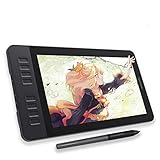
The XPPen Artist 12 3rd Generation is an 11.9-inch pen display with a 16K pressure pen, etched anti-glare glass, a dial wheel, and eight keys. It targets digital art and animation and works with Mac and PC. The etched glass offers a more paper-like glide than smooth glass.
- Strength: etched glass, dial wheel, and 16K pen.
- Strength: suited to digital art and animation work.
- Trade-off: it sits at the top of this group in cost tier and needs a computer.
Skip it if you are only trying digital drawing for the first time. The higher tier is easier to justify once you know you will draw most days and want a feel closer to paper.
GAOMON PD1161
The PD1161 is an 11.6-inch FHD pen display with tilt support, eight shortcut keys, an anti-glare screen, a battery-free stylus, and 8192 pressure levels. Drawing directly on the display removes the hand-eye split that trips up beginners. It makes sense for a student building a portfolio for art school.
- Strength: direct drawing on an FHD screen with anti-glare treatment.
- Strength: tilt support and eight shortcut keys.
- Trade-off: it needs a computer and cables, so it is bulkier than a pen pad.
Skip it if you want the lightest possible setup. A pen display adds a screen, a video cable, and a power connection to your desk, which is a lot to manage in a shared study space.
Wacom Intuos Small
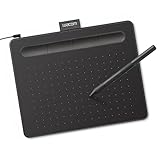
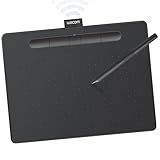
The Wacom Intuos Small is a wired graphic drawing tablet with a battery-free pen, software, and four ExpressKeys. It works with Mac, Windows, and Chrome, which suits classrooms that use Chromebooks. Wacom’s name carries weight with schools and teachers, so it is a safe pick for a first tablet.
- Strength: Chrome, Mac, and Windows compatibility.
- Strength: pen with no battery and bundled software.
- Trade-off: small surface and a wired connection.
Skip it if you want a bigger drawing area or a screen. The small size and the wired lead keep it simple, but advanced users will want more surface for detailed work.
UGEE M708 V2
The UGEE M708 V2 is a 10×6 inch ultra-thin tablet with eight hot keys and an upgraded pressure level of 16384, working with PC and Android devices. The Android mention is helpful for students who want to sketch on a phone or tablet, not just a computer. It is a roomy, low-profile tablet for a student on a budget.
- Strength: PC and Android compatibility.
- Strength: eight hot keys and a large surface.
- Trade-off: the title is truncated, so confirm the full compatibility before buying.
Skip it if you only want a pocket-size pad. Students who commute with a small bag may prefer the GAOMON S620, which gives up area for portability.
Which One Fits Your Situation
A student with no laptop
The PicassoTab runs by itself, so the same tablet handles sketching and notes.
A design student on a small dorm desk
The GAOMON S620 balances portability and enough pressure levels, and the XOPPOX is the step up when the desk allows.
A Chromebook classroom
The Wacom Intuos Small is the one that names Chrome among its supported systems.
An art student building a portfolio
The GAOMON PD1161 is the practical entry to pen displays, and the XPPen Artist 12 3rd is the upgrade for animation and longer sessions.
Common Mistakes
- Buying a pen display before checking whether the laptop supports the required video output.
- Choosing the smallest pad and then feeling cramped when assignments get bigger.
- Chasing 16K pressure numbers rather than comfort and a battery-free pen.
- Ignoring the operating system line for Chromebooks, Mac, or Android.
- Skipping the free driver and software step, then assuming the tablet is broken.
Related guides
- When I Turn On Record Game In Background On Gamebar. Gamebar Crashes, What Do I Do?
- How To Reduce Background Noise On A Streaming Microphone
- Poly Computer Accessories Company Streaming Evaluation
Frequently Asked Questions
Is a pen display better than a pen tablet for beginners?
Drawing directly on a screen is more intuitive, but it costs more. A pen tablet needs a few days of practice and is a reasonable first step.
Do students need 8192 pressure levels?
Most coursework works fine at 4096 or 8192. Higher numbers add little for a beginner.
Can these tablets work with a phone?
Some listings, such as the UGEE M708 V2, mention Android. Check the full compatibility line before buying.
What is a battery-free pen?
It is a stylus powered by the tablet itself, so you never charge it or replace a cell.
Related guides
More from Amazon
Programs that pair well with the guide above. Offers and eligibility are set by Amazon and may change.
Free shipping on eligible items, Prime Video and more. Eligible new members can start with a free trial.
Start a Prime free trialAd-free music streaming. Eligible new subscribers can start with a free trial.
Try Music Unlimited freeA Prime membership for ages 18-24 with a trial period. Eligibility is set by Amazon.
See Prime for Young AdultsAudiobooks and podcasts to listen to on the go. Eligible new members can start with a free trial.
Try Audible freeAs an Amazon Associate we earn from qualifying purchases.