The 2022 NBA playoffs produced one of the most talked-about first-round series in recent memory when the Brooklyn Nets met the Boston Celtics. Fans searching for a Nets vs Celtics live stream during that series were looking for a way to watch Kevin Durant and Kyrie Irving take on Jayson Tatum and Jaylen Brown, and the matchup delivered drama from the opening tip. This guide looks back at that series, explains how it was shown, and covers the streaming devices that make watching NBA basketball on a television straightforward. The series itself is finished, so there is no live stream of these games to catch today. What remains is the recap, the replays, and the setup that lets you watch the next playoff run without scrambling for a screen. The three devices below are streaming players that plug into a television and run the major sports and entertainment apps, so they are a practical starting point for any basketball fan building a living-room setup.

As an Amazon Associate, we earn from qualifying purchases.
Our Top Picks
- Roku Streaming Stick 4K with Voice Remote1 Count (Pack of 1)3.7 x 0.8 x 0.45 inches0.1 poundsCheck on Amazon
Top 3 picks at a glance
Quick Picks
Our Short List of 3
- Best for: Fans who want the fastest Fire TV stick experience with hands-free Alexa control.
- Best for: Viewers who want the simplest interface and a big library of free live channels.

- Best for: Google TV households and viewers who want a wired Ethernet option.
All 3 Picks at a Glance
| Product | Specs | Action |
|---|---|---|
| 1. Amazon Fire TV Stick 4K Max (2nd Gen) |
| Check price on Amazon |
| 2. Roku Streaming Stick 4K |
| Check price on Amazon |
| 3. Google TV Streamer 4K |
| Check price on Amazon |
The Series: A Quick Recap
The Nets vs Celtics series was a first-round matchup in the 2022 NBA playoffs, played in April 2022. Boston entered the series as the second seed in the Eastern Conference after a strong finish to the regular season, while Brooklyn arrived as the seventh seed after winning its play-in games. On paper it looked like a heavyweight meeting between two rosters full of star power, and the opening game lived up to that billing.
Game 1, played in Boston on April 17, 2022, ended with one of the most memorable finishes of the entire postseason. Jayson Tatum took a pass under the basket and laid the ball in as time expired, giving the Celtics a 115-114 win. The play capped a frantic final sequence and set the tone for a series that felt closer than the final result suggests. Boston won Game 2 at home 114-107, then took both games in Brooklyn, 109-103 and 116-112, to complete a four-game sweep on April 25, 2022.
The sweep surprised many observers because Brooklyn featured Kevin Durant and Kyrie Irving, two of the most gifted scorers in the league. Boston’s defense, however, made life difficult for Durant throughout the series, and the Celtics got balanced scoring from Tatum and Jaylen Brown. Boston went on to reach the NBA Finals that season, while Brooklyn headed into an offseason of questions about its roster. For fans, the series is remembered as the moment Boston’s young core announced itself as a genuine championship contender and as a reminder that playoff basketball often turns on defense and late-game execution rather than star power alone.
How Fans Watched the Series
During the 2022 playoffs, games in this series were carried on national television, with coverage spread across ABC, ESPN, TNT, and NBA TV, as is standard for the NBA postseason. Viewers could watch through a cable or satellite subscription, through a live TV streaming service that carried those channels, or through the networks’ own apps with a qualifying TV provider sign-in. The league also made highlights and replays available through its official platforms after each game.
That matters for anyone searching for a stream today. Because the series ended in April 2022, no live broadcast of these games exists anymore. The legitimate ways to revisit the matchup now are replays, condensed games, and highlight packages on official league and broadcaster platforms. Unofficial streams that promise a live feed of a finished series are not worth your time or your security, and this guide does not link to any live-stream sites. The better plan is to set up a proper streaming device once, so that the next playoff series, regular-season game, or marquee matchup is ready to watch on the biggest screen in the house the moment it tips off.
How We Chose These Streaming Devices
Every device in this guide is a streaming player, the same product type throughout. Each one plugs into a television’s HDMI port, connects to home Wi-Fi, and runs the apps that carry live sports, including the major sports networks, league apps, and live TV services. We checked that each listing was still selling on Amazon before including it.
We looked for four things. First, picture quality: all three support 4K resolution with HDR, so games look sharp on a modern television. Second, connection reliability: strong Wi-Fi support matters because a dropped connection during a close fourth quarter is the worst kind of interruption. Third, ease of use: a clear home screen and a voice remote make it simple to jump straight to the game. Fourth, app coverage: each platform carries the mainstream sports and entertainment apps, so you are not locked out of the services that show NBA games. Storage and extra features, such as Ethernet ports and smart home controls, were tiebreakers rather than requirements.
1. Amazon Fire TV Stick 4K Max (2nd Gen)
- Best for: Fans who want the fastest Fire TV stick experience with hands-free Alexa control.
Fans who want the fastest Fire TV stick experience with hands-free Alexa control.
The Fire TV Stick 4K Max is Amazon’s most powerful streaming stick, and the second-generation model is built around a quad-core 2.0 GHz processor. It supports Wi-Fi 6E, which helps keep the stream steady when several devices share the same home network, and it includes 16 GB of storage, double the storage of the standard Fire TV Stick 4K, so there is room for more apps and downloads. Video output reaches up to 2160p at 60 frames per second, with support for Dolby Vision, HDR10+, and Dolby Atmos audio. The included Alexa Voice Remote Enhanced handles voice search and television power and volume, and the stick connects over HDMI 2.1 with ARC support and Bluetooth 5.2. Amazon’s listing notes access to more than 1.8 million movies and TV episodes across services, with subscription fees applying where relevant, and a one-year limited warranty is included.
Pros:
– Wi-Fi 6E support helps maintain a smooth stream on busy home networks
– 16 GB of storage leaves room for sports, news, and entertainment apps
– Dolby Vision and Dolby Atmos support for a strong picture and sound
Cons:
– Wi-Fi 6E benefits require a compatible Wi-Fi 6E router
– The Fire TV home screen leans heavily on Amazon content and promotions
Why it fits: For a basketball fan, the appeal is speed and stability. The faster processor opens apps quickly, the Wi-Fi 6E radio reduces buffering risk during live games, and Alexa voice search gets you to the game without scrolling through menus. It turns almost any television with an HDMI port into a capable sports-watching setup.
2. Roku Streaming Stick 4K
- Best for: Viewers who want the simplest interface and a big library of free live channels.
Viewers who want the simplest interface and a big library of free live channels.
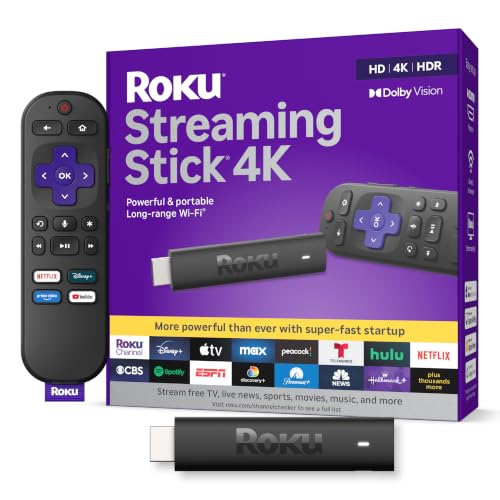
The Roku Streaming Stick 4K is a compact stick that hides behind the television and plugs directly into an HDMI port. It streams in up to 4K resolution at 60 frames per second, with support for Dolby Vision, HDR10 and HDR10+, and HLG on compatible televisions. A redesigned long-range Wi-Fi receiver is built into the power cable, which Roku says delivers up to twice the speed of the previous generation for smoother streaming. The included Roku Voice Remote controls television power and volume and supports voice search. The stick carries 1 GB of RAM and 16 GB of storage, measures 3.7 by 0.8 by 0.45 inches, and weighs 0.9 ounces. Roku’s platform includes more than 500 free live television channels with live news, weather, and sports coverage, alongside the major paid streaming apps.
Pros:
– Straightforward home screen that is easy for any household member to use
– Long-range Wi-Fi receiver helps the stick hold a steady connection
– More than 500 free live channels add value beyond paid subscriptions
Cons:
– No Ethernet port, so a wired connection is not an option
– The stick depends on the included power cable and Wi-Fi receiver for best performance
Why it fits: Roku’s platform is a good match for sports viewing because it stays out of the way. The interface lists live channels and apps plainly, the voice remote finds games quickly, and the free live channels give you something to watch before tip-off or during halftime. For a second television or a first streaming stick, it is a dependable choice.
3. Google TV Streamer 4K
- Best for: Google TV households and viewers who want a wired Ethernet option.
Google TV households and viewers who want a wired Ethernet option.
The Google TV Streamer 4K is Google’s current streaming box, replacing the earlier Chromecast with Google TV. It delivers up to 4K HDR with Dolby Vision and Dolby Atmos sound, and Google lists a processor that is 22 percent faster with twice the memory of the previous generation. The box includes 32 GB of storage for apps and 4 GB of RAM, and it connects over both Wi-Fi and Ethernet, which is useful when the television sits near the router and you want the most stable connection possible for live sports. An HDMI 2.1 cable is required and sold separately. The included voice remote runs Google TV, which gathers shows, movies, and live television from your services into one home screen, and the device also works as a smart home hub for compatible devices. The box measures 6.4 by 3 by 1 inches and weighs 5.7 ounces.
Pros:
– Ethernet port plus Wi-Fi gives the most reliable connection choice for live games
– 32 GB of storage and 4 GB of RAM leave plenty of room for apps
– Google TV home screen pulls live TV and recommendations into one place
Cons:
– An HDMI 2.1 cable is required and is not included in the box
– The box form factor takes up shelf space, unlike a stick that hides behind the TV
Why it fits: Live sports punish weak connections, and the Ethernet port is the standout feature here. If your television is near your router, a wired connection removes Wi-Fi congestion from the equation entirely. Combined with the large storage and the Google TV interface, it is a strong pick for a main living-room television that hosts every big game.
Frequently Asked Questions
Can I still watch the 2022 Nets vs Celtics series?
Yes, but only as replays and highlights. The series ended in April 2022, so no live broadcast exists. Official league and broadcaster platforms carry highlight packages, condensed games, and classic replays from that postseason, which is the reliable way to revisit the Tatum buzzer-beater and the rest of the sweep.
Do I need a cable subscription to watch NBA games on a streaming device?
Not necessarily. A streaming device runs apps, and how you watch depends on the app. Options include live TV streaming services that carry the sports channels, network apps with a TV provider sign-in, and the league’s own app for replays and selected live coverage. Check which services carry the channels that show the games you want before subscribing.
Which streaming device is best for watching live sports?
The one with the most reliable connection to your network. All three devices here support 4K HDR, so picture quality is comparable. If your television is near your router, the Google TV Streamer 4K with its Ethernet port is a strong option. On Wi-Fi, the Fire TV Stick 4K Max with Wi-Fi 6E and the Roku Streaming Stick 4K with its long-range receiver are both built to hold a steady stream.
Will these devices work on any television?
They need a television with an available HDMI port and a home Wi-Fi network. For full 4K HDR quality, the television must support 4K resolution and HDCP 2.2. Older high-definition televisions will still work, with the picture shown at the television’s own resolution.
Are there free ways to watch NBA games?
Some games air on broadcast television, which can be received with an antenna in many areas, and free live channels on platforms like Roku carry sports coverage and highlights. Full live coverage of most playoff games, however, sits on national sports channels that require a paid subscription or a live TV streaming service.
Conclusion
The 2022 Nets vs Celtics series is over, and Boston’s four-game sweep, sealed by Jayson Tatum’s buzzer-beater in Game 1, remains one of the defining stories of that postseason. There is no live stream left to find, but the games live on in replays and highlights, and the next great series is always around the corner. A capable streaming device, set up before tip-off, is the simplest way to make sure you watch it on the big screen with a steady connection and a clear picture. Any of the three players above will do that job, so pick the platform you like best and get it plugged in before the next playoff run begins.
Verified: Nov 27, 2026 — ASINs checked on Amazon.
Related guides
- Manchester City vs Watford Live Stream Premier League 21-22
- Southampton vs Liverpool Live Stream Premier League 21 22: Full Recap of Both 2021-22 Meetings
- Aston Villa vs Norwich Live Stream Premier League 21 22: Full Recap of Both 2021-22 Meetings
- Bayern Munich vs Barcelona Live Stream Champions League 22 23: Full Recap of Both Group Games
More from Amazon
Programs that pair well with the guide above. Offers and eligibility are set by Amazon and may change.
Free shipping on eligible items, Prime Video and more. Eligible new members can start with a free trial.
Start a Prime free trialAd-free music streaming. Eligible new subscribers can start with a free trial.
Try Music Unlimited freeA Prime membership for ages 18-24 with a trial period. Eligibility is set by Amazon.
See Prime for Young AdultsAudiobooks and podcasts to listen to on the go. Eligible new members can start with a free trial.
Try Audible freeAs an Amazon Associate we earn from qualifying purchases.