
Two monitors on their stock stands eat your entire desk and leave no room for a keyboard, mic arm, or Stream Deck. A monitor arm reclaims that space, lets you position each screen exactly where you want it, and makes room underneath for the gear a streamer actually needs. For a dual-monitor stream, the arm you choose determines whether your screens sit rock-steady or sag and drift mid-broadcast.
As an Amazon Associate we earn from qualifying purchases at no extra cost to you.
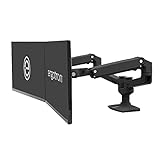



Top 3 picks at a glance
Match the arm to your monitors
The two numbers that matter are weight capacity and VESA pattern. Each arm segment has a load range, often 2 to 9 kg; your monitor must fall inside it, ideally not at the very top. Confirm your monitors have VESA mounting holes (commonly 75×75 or 100×100 mm); some thin or curved panels do not, and need an adapter. Getting these wrong means a droopy arm that will not hold position.
Gas spring vs mechanical spring
Gas-spring arms adjust smoothly and hold any position, best for streamers who reposition often. Mechanical-spring arms are cheaper and reliable but stiffer to adjust. For a set-and-forget dual setup, either works; if you tilt screens to show viewers something or switch between sitting and standing, spend up for gas spring.
Single vs dual-mount styles
| Style | Pros | Cons | Best for |
|---|---|---|---|
| Two single arms | Max flexibility, independent | Two clamps, more desk edge used | Different-size monitors |
| Dual arm (one base) | One clamp, tidy | Shared base can sag if overloaded | Matched monitors |
| Crossbar/rail dual | Aligned heights, sturdy | Less independent angling | Side-by-side symmetry |
Ultrawide and heavy panels
A single large ultrawide plus a vertical chat monitor is a popular streamer combo. Two independent single arms handle mismatched sizes best, and let you put the ultrawide dead center with the chat screen angled toward you. Verify each arm’s capacity against the heavier panel individually.
Desk and mounting considerations
Most arms clamp to the desk edge (fast, no holes) or grommet-mount through a hole (cleaner, very secure). Check your desk thickness against the clamp range and, critically, that the desktop is solid enough, thin particleboard can flex or crack under two clamped arms with heavy monitors. A rear crossbar or a desk with a metal frame helps.
Cable management and reach
Good arms route cables through the tube, which keeps your dual-monitor setup clean on camera. Check the arm’s reach and height range: for streaming you often want screens slightly higher and angled so your webcam sits between or below them at eye level without a monitor blocking it.
FAQ
Will one dual arm hold two 27-inch monitors?
Usually yes, if the combined weight is within the base’s rating and each monitor is within the per-arm limit. Two 27-inch panels are often 4 to 6 kg each; confirm the total does not exceed the shared base capacity, or use two single arms for headroom.
Do I need a grommet mount or is a clamp fine?
A clamp is fine for most desks and requires no drilling. Choose a grommet mount only if your desk edge is awkward, you want the cleanest look, or you are loading heavy monitors and want the most secure attachment.
Bottom line
Confirm VESA pattern and per-arm weight capacity first, pick gas-spring arms if you reposition often, and use two independent single arms for mismatched ultrawide-plus-chat combos or a dual base for matched panels. Make sure your desk can take the clamp load, then enjoy the reclaimed space for your mic arm, Stream Deck, and keyboard.


