
Your streaming PC needs a stable wired connection, but your router is in another room and you cannot run a cable through the walls. Two options remain: a powerline adapter that sends network data over your home’s electrical wiring, or biting the bullet and running a real Ethernet cable. This guide compares their reliability for live streaming, where dropped frames are unforgiving.
As an Amazon Associate we earn from qualifying purchases at no extra cost to you.



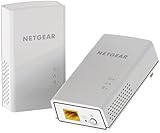
Top 3 picks at a glance
How each option works
A direct Ethernet run is a physical cable from your router to your PC, delivering the full, consistent speed of the cable with virtually no interference. A powerline adapter plugs into a wall outlet, injects network data onto your home’s power lines, and a second adapter near your router pulls it back out. It is convenient, but the electrical wiring was never designed for data.
Why streaming punishes instability
Streaming uploads a continuous, time-sensitive flow. A brief dropout that you would never notice while browsing shows up as dropped frames on your stream. That makes consistency, not peak speed, the metric that matters, and it is exactly where the two options differ most.
| Factor | Powerline adapter | Direct Ethernet run |
|---|---|---|
| Setup effort | Plug and play | Route a cable |
| Real-world speed | Variable | Full, consistent |
| Latency stability | Fair to good | Excellent |
| Affected by wiring/appliances | Yes | No |
| Typical cost | $40–90 (pair) | $10–30 (cable) |
Powerline’s real-world weaknesses
Powerline speed depends heavily on your home’s wiring age, circuit layout, and other devices. Adapters on different circuits or breakers can slow drastically. Large appliances like microwaves and vacuums can inject noise that causes brief dropouts. Advertised speeds (say 1,000 or 2,000 Mbps) are lab maximums; real throughput is often a fraction of that. For streaming, the risk is intermittent instability that is maddening to diagnose.
When powerline is good enough
If running a cable is truly impossible and your wiring is modern, a quality powerline pair can be reliable enough for 1080p streaming. Plug adapters directly into wall outlets, never into a power strip, and keep them on the same circuit if you can. Test it under real streaming load before trusting it for a big broadcast.
The case for just running the cable
A flat or thin Ethernet cable can be run along baseboards, under carpet edges, or through a door gap for well under $30, and it eliminates the entire class of network-instability problems. It is more effort once, but it is the most reliable connection you can have and never degrades from a neighbor’s appliance. For serious streaming, a real cable is almost always the better long-term choice.
How to route a cable without drilling walls
Many people assume a wired run means construction, but flat Ethernet cables are designed to hide. You can tuck them under baseboard edges, along door frames with adhesive clips, beneath carpet edges, or through the small gap under a door. A single cable run this way costs under $30 and takes an afternoon, and it permanently removes the entire class of wireless and powerline instability problems.
If powerline is your only option, optimize it
Plug the adapters directly into wall outlets, never a power strip, which filters out the data signal. Keep both adapters on the same electrical circuit if you can, and test throughput at your normal streaming time under real load rather than trusting the box’s headline speed. A well-placed powerline pair can be reliable enough for 1080p, but verify it before you depend on it for an important broadcast.
FAQ
Is powerline better than Wi-Fi for streaming?
Often yes. A decent powerline connection is usually more stable than Wi-Fi for a fixed PC, because it avoids wireless congestion and interference. But it still falls short of a direct cable. The reliability order is generally: direct Ethernet, then powerline, then Wi-Fi.
Do both powerline adapters need to be on the same electrical phase?
They work best when on the same circuit or phase. In larger homes with split electrical phases, adapters on opposite phases can be much slower or unreliable. If your speeds are poor, try different outlets before concluding the adapters are faulty.
Bottom line
If you can run a real Ethernet cable, do it; it is cheaper and rock-solid, which is exactly what live streaming needs. Use a powerline adapter only when a cable run is genuinely impossible, buy a quality modern pair, plug directly into wall outlets, and test it under load first. Powerline beats Wi-Fi, but a direct cable beats everything.


