
Once your stream audio grows past a single mic, you want control: separate volume for game, chat, music, and voice, plus effects and clean routing. Two popular paths are an all-in-one broadcast mixer (GoXLR style) and a streamlined single-channel interface with software mixing (Wave XLR style). They target very different streamers. Here is how to choose.
As an Amazon Associate we earn from qualifying purchases at no extra cost to you.



Top 3 picks at a glance
The core difference: hardware faders vs software
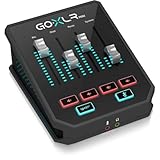
A GoXLR-style unit is a physical broadcast mixer with motorized-feel faders, mute buttons, and onboard effects, giving you tactile, real-time control over multiple audio sources. A Wave XLR-style unit is a compact single-mic interface that does its mixing in companion software, using virtual channels rather than physical sliders. One is a control desk; the other is a clean input plus an app.
How many sources do you juggle?
If you constantly balance game, Discord, music, alerts, and your voice live, physical faders make that effortless. If you mostly just need a great-sounding mic with a bit of routing, a single-channel interface with software control is simpler and cheaper. Count your live sources before deciding.
| Factor | Broadcast mixer (GoXLR) | Single interface (Wave XLR) |
|---|---|---|
| Physical faders | Yes, multiple | No |
| Mic inputs | One XLR + more sources | One XLR |
| Onboard effects | Yes (voice FX) | Basic / software |
| Desk footprint | Large | Small |
| Typical price | $250–500 | $150–200 |
What the mixer gives you
The broadcast mixer’s appeal is instant, physical control. Sliding a fader to duck game audio when you talk, hitting a hardware mute, or firing a voice effect live is faster and more reliable than clicking in software mid-game. It also cleanly separates audio for your stream versus your own headphones, so you can mute music for viewers while still hearing it. For busy multi-source streams, that tactile control is the whole point.
What the simple interface gives you
The single-channel interface focuses on one job: making your XLR mic sound great with clean gain, often with a clip guard that prevents distortion during loud moments. Its software adds a couple of virtual outputs so you can separate mic and system audio. It costs less, takes almost no desk space, and is far simpler to learn.
Which should you buy?
Choose the broadcast mixer if you run many live audio sources, want physical faders and voice effects, and have the desk space and budget. Choose the single interface if you mainly want one excellent mic channel with light routing, a small footprint, and a lower price. Do not pay for a full mixer you will never fully use.
Think about your headphone mix, not just the stream
A key reason to move beyond a plain interface is separating what viewers hear from what you hear. A broadcast mixer makes this physical: you can pump music into your own headphones while keeping it low or muted for the stream to avoid copyright issues. A single interface can do a version of this in software with virtual outputs, but the mixer’s dedicated headphone bus and faders make live balancing far more intuitive.
Match the tool to your growth
Be honest about your trajectory. If you are a solo streamer with one mic who occasionally plays a sound effect, the simpler interface will serve you for years. If you are building toward guest audio, multiple sources, live effects, and heavy scene-based audio control, the mixer’s investment pays off as your production grows. Buying the mixer too early means paying for faders that gather dust.
FAQ
Do I need a mixer to separate mic and game audio?
No. Even a simple interface with virtual outputs, or free routing software, can split mic and system audio for your stream. A hardware mixer just makes it physical and instant. If separation is your only goal, the cheaper interface plus software handles it.
Can either power a demanding dynamic mic?
Both provide phantom power and reasonable gain, but a very hungry dynamic mic may still want more clean gain. Single-channel interfaces built for streamers often include extra gain or a clip guard specifically for popular broadcast dynamics. Check the gain spec against your mic’s needs.
Bottom line
A broadcast mixer is for streamers who juggle multiple live audio sources and want hands-on faders and effects, at $250–500 and a big footprint. A single-channel interface is for those who want one great mic with simple routing, for $150–200 and minimal space. Match the tool to how many sources you truly control live, not to the fanciest option.


