
Top 3 picks at a glance
Best TV Wall Mounts for Every Screen Size and Room
The best TV wall mounts are fixed models for a low-profile screen that needs no angle adjustment, tilting models for TVs mounted above eye level, and full-motion models when you need to swivel the screen or reach behind it. Choose by the TV’s VESA pattern and weight first, then account for wall construction, viewing position, and how far the mount must extend.
Fixed vs. tilting vs. full-motion
| Mount type | Best fit | Typical projection from wall | Main trade-off |
|---|---|---|---|
| Fixed | TV centered at seated eye level; minimal movement needed | About 1–2 inches | Hardest access to cables and ports after installation |
| Tilting | TV above a fireplace or high on a bedroom wall | About 2–4 inches | Changes vertical angle, but usually cannot turn toward another seat |
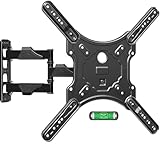
| Full-motion | Corner installations, open-plan rooms, or multiple viewing positions | About 2–4 inches retracted; often 15–30 inches extended | Costs more, needs careful anchoring, and can look bulky when extended |
These are common ranges, not guarantees: check the mount’s listed dimensions. A full-motion arm’s advertised extension is its maximum reach, not the distance it holds the TV from the wall at all times.
As an Amazon Associate we earn from qualifying purchases at no extra cost to you.


Match the mount to your room and TV
| Your situation | Good starting choice | Check before buying |
|---|---|---|
| 55-inch TV, straight-on seating, solid stud wall | Fixed | TV weight, VESA pattern, and rear cable clearance |
| 65-inch TV mounted higher than eye level | Tilting | Tilt range and whether ports remain accessible |
| 75-inch TV viewed from a sofa and dining area | Full-motion | Rated screen size and weight, arm extension, and stud spacing |
| TV near a corner or beside a doorway | Full-motion | Whether the arm can swing without hitting trim or furniture |
| Plaster or masonry wall | Any type rated for that wall material | Approved fasteners and installation instructions for the exact substrate |
Screen size is only a starting point
Mount listings often give a supported TV-size range, but size alone does not establish compatibility. Two TVs of the same diagonal size can have different weights, VESA patterns, and rear-panel shapes. Check the TV’s manual or manufacturer specifications for its weight without the stand and its VESA mounting dimensions. The mount must support both the TV’s weight and its VESA pattern.
VESA dimensions are the horizontal and vertical distances between the four mounting holes on the back of the TV, in millimeters. A listing such as 400 × 300 mm means the holes are 400 mm apart horizontally and 300 mm vertically. Some mounts accommodate several patterns; others have a narrower range. If the TV has an uneven or recessed back, confirm that the supplied spacers and screws suit it. Never force a screw that is too long or use one that bottoms out before the bracket is secure.
Account for extension before choosing full-motion
Measure from the proposed wall position to the farthest viewing position. Then check that the mount’s arm can reach and swivel far enough without the TV striking a wall, cabinet, or doorway. On a wide TV, the screen’s corners sweep a large arc as the arm turns; a mount can have enough extension on paper and still collide with nearby trim. Also consider how much of the screen will be angled away from the room when fully turned.
How to choose the right mount
-
Find the TV’s mounting details. Record its VESA pattern and weight without the stand. Confirm the mount supports both, with the TV within its stated size range.
-
Decide whether the viewing angle changes. If everyone watches from one seat and the screen can sit at a comfortable height, choose fixed. If it will sit high, look for tilt. If viewers sit in different parts of the room, consider full-motion.
-
Identify the wall material and framing. Locate studs in drywall, or confirm the specific anchors and fasteners approved for brick or concrete. Do not assume ordinary drywall anchors can carry a TV mount.
-
Plan the screen position and cable route. Mark the screen’s intended center, check its height from the main seat, and make sure power and signal cables can reach without being pinched when a mount moves.
-
Check installation requirements. Look for the mount’s required stud spacing, minimum number of attachment points, tool needs, and whether a second person is needed to lift and hang the TV safely.
Wall type and installation details that matter
Drywall over wood studs
For most drywall installations, fasten the wall plate into the studs using the hardware specified by the mount maker. Use a stud finder, then confirm the stud locations before drilling. A small pilot hole can help verify the center of a stud, but follow the mount instructions for the correct hole size and depth. A wide or heavy TV may require a mount designed for the actual spacing between the available studs; do not shift a lag screw to the edge of a stud just to make the holes line up.
Concrete, brick, and other masonry
Use fasteners rated for the particular wall material and load, and follow both the mount and fastener manufacturers’ instructions. Brick, mortar, hollow block, and poured concrete are not interchangeable substrates. If the wall is uncertain, damaged, or covered by a finish layer, get advice from a qualified installer rather than relying on generic anchors.
Position, tilt, and clearance
For a main sofa, a useful starting point is to place the screen center near seated eye level, then adjust for furniture and viewing distance. If the TV must be higher, tilt can reduce the need to look upward, but excessive tilt may make the image less comfortable to view. Check the TV’s connections before hanging it: a tight fixed mount can block ports that face straight backward, while side-facing ports are usually easier to reach. Leave enough cable slack for a full-motion arm to extend and turn without pulling on connectors.
Common mistakes to avoid
- Choosing by screen size alone: Verify the exact VESA pattern and TV weight.
- Assuming a mount fits every wall: Confirm the intended wall material and use its approved hardware.
- Buying a full-motion mount with too little reach: Account for furniture, trim, and the TV’s corner-to-corner sweep.
- Ignoring cable access: Check port direction and plan cable length before the TV is on the wall.
- Mounting too high without a reason: A downward tilt helps with a high position but does not make every height comfortable.
For a simple, centered setup, fixed mounts are usually the least expensive and least bulky. Tilting mounts are a practical middle ground for higher placements. Full-motion mounts make the most sense when the room genuinely needs repositioning; their extra movement is useful only if the wall, reach, and installation all support it.
Frequently asked questions
Can I use the same mount if I replace my TV with another model?
Not necessarily; you must recheck the replacement TV’s weight, VESA pattern, rear-panel shape, and mounting hardware. TVs with the same screen size can differ in all of these details. Confirm that the mount supports the new TV’s weight and VESA dimensions, and verify that the supplied screws and spacers fit without bottoming out or being too long.
How can I tell whether my cables will still reach after mounting the TV?
Check the cable route and connection locations before hanging the TV. A fixed mount may make rear-facing ports difficult to access, while a full-motion mount requires enough slack for the arm to extend and turn. Make sure power and signal cables can reach without being pinched or pulling on the connectors as the screen moves.
What should I do if my wall studs do not line up with the mount?
Do not move a lag screw toward the edge of a stud just to align the holes. A wide or heavy TV may need a mount designed for the actual spacing between the available studs. Locate and confirm the stud centers, then follow the mount maker’s instructions for hole size, depth, and the required attachment points.
Is a full-motion mount always better than a fixed or tilting mount?
No; full-motion is most useful when viewers sit in different parts of the room or the TV needs to swivel. Fixed mounts are usually the least bulky choice for a simple, centered setup, while tilting mounts suit higher placements. Full-motion models cost more, need careful anchoring, and can look bulky when extended.
How do I know whether a full-motion TV will clear nearby furniture or trim?
Measure from the proposed wall position to the farthest viewing position, then check the mount’s reach and swivel range. Consider the TV’s entire width, because its corners sweep a large arc as the arm turns. The screen must be able to move without striking a wall, cabinet, doorway, trim, or furniture.


