
The best streaming media player for fast, easy viewing is the Roku Ultra for households that want the simplest all-round 4K streaming experience, while the NEUMI Atom 4K Lite is the better fit for local USB or SD-card playback and the Roku HD Streaming Player is the sensible budget choice for an older 1080p television. The products in this roundup fall into two different categories: full streaming platforms that use internet apps, and compact media players that play files from USB drives or memory cards. Choosing between those categories matters more than choosing between two similar-looking boxes.
For Netflix, Disney+, YouTube, live services, voice search, automatic updates, and a polished interface, start with Roku Ultra. For digital signage, offline video loops, hotel displays, classrooms, or a TV without reliable internet, look at the Micca, NEUMI, COSOWELL, fnetic, FxyxGyc, BYDIFFER, or voxeqero models. For basic 1080p file playback at the lowest cost, the AGPTEK or MYPIN mini players are more appropriate than paying for 4K output you will not use.
Top 3 picks at a glance

Quick Comparison
| Product | Best for | Key specs and capabilities | Price tier |
|---|---|---|---|
| Roku Ultra | Best overall internet streaming | 4K streaming device for TV; Roku app platform; designed for modern 4K televisions | Premium |
| Micca 4K Ultra-HD USB and microSD Media Player | 4K local playback and signage | 4K HDMI output; USB and microSD media; digital-signage use | Premium |
| Micca G3 2K Quad-HD USB and microSD Media Player | Higher-than-1080p local playback on a budget | 2K Quad-HD media playback; 4K HDMI output; USB and microSD; signage use | Mid-range |
| Roku HD Streaming Player (Old Model) | Basic streaming on 1080p televisions | HD streaming player; intended for older HD displays | Budget |
| 4K Media Player for TV, USB SD Playback | Offline 4K playback with resume | 4K media player; USB and SD playback; HDMI and AV output; auto resume | Premium |
| AGPTEK HDMI Media Player | Simple 1080p USB playback | Mini HDMI player; 1080p Full HD; HDMI and AV output; MP4-oriented playback | Budget |
| NEUMI Atom 4K Lite | Compact 4K USB and SD playback | 4K media player; USB drives and SD cards; digital-trigger category | Mid-range |
| BYDIFFER 4K@60Hz Media Player | Affordable 4K local playback | 4K output class; stated 60Hz capability; USB drive and microSD playback | Budget |
| MYPIN Blue Mini 1080p Media Player | Low-cost Full HD playback | Mini HDMI player; 1080p Full HD; HDMI and AV output; MP4-oriented playback | Budget |
| COSOWELL 4K HD USB and TF Media Player | 4K signage and removable-media playback | 4K HDMI; USB and TF-card media; digital-signage category | Mid-range |
| FxyxGyc 4K Ultra HD Media Player | 4K playback with common codec support | 4K output; USB and SD expansion; stated 4K@30Hz; H.265, H.264, and AVC decoding class | Mid-range |
| fnetic 4K Ultra-HD Media Player | General 4K USB/SD playback and signage | 4K Ultra-HD class; USB drives and SD cards; digital-signage use | Mid-range |
How We Chose
This roundup separates internet streaming from local-file playback instead of treating every HDMI box as interchangeable. The main criteria are the advertised output class, input media, codec category, display compatibility, resume or signage features, and the likely upgrade path. A 4K streaming platform needs a usable app ecosystem and straightforward setup; a signage player needs dependable removable-media playback and predictable looping; a basic bedroom player may only need 1080p HDMI and a simple remote.
We also considered the practical cost of the complete setup. A device that outputs 4K is not automatically the best choice if the television is 1080p, the source files are low resolution, or the user needs subscription apps rather than offline files. Product descriptions sometimes use “4K” to describe output while separately limiting refresh rate or file compatibility, so exact codec, frame-rate, and container support should be checked before purchase. Where a listing does not establish a precise specification, this guide describes the product by its broader category rather than inventing a number.
1. Roku Ultra – Best for Overall Internet Streaming
As an Amazon Associate we earn from qualifying purchases at no extra cost to you.
Roku Ultra is the strongest all-purpose recommendation in this group for a living-room television connected to the internet. Its role is different from the USB media players below: it is built around Roku’s streaming platform rather than acting primarily as a file browser for a flash drive or SD card. That makes it the natural choice for people who want to open mainstream streaming apps, search across content, and use one dedicated device instead of relying on a television’s built-in software.
The best match is a household with a 4K television, a stable home network, and several streaming subscriptions. It is also a good upgrade when a television still works well but its software has become slow, confusing, or no longer receives the apps the household uses. Roku’s interface is generally organized around services and content discovery, so it requires less technical preparation than creating correctly formatted files for a local media player.
- Device class: dedicated Roku internet-streaming player.
- Display class: designed for 4K television streaming.
- Primary source: internet applications and streaming services.
- Best connection: a reliable broadband connection and a modern HDMI-equipped display.
- Ideal use: films, episodic television, music, free ad-supported services, and general living-room viewing.
Its biggest strength is convenience. The setup is app-led rather than file-led: connect the player, select a network, sign into services, and use the supplied interface. That is much easier for mixed households than explaining which USB folder contains a film, which codec a television accepts, or why a file plays without sound. A dedicated player can also remain useful when the television’s own operating system feels dated.
Pros
- Best fit here for internet-based streaming rather than offline files.
- Designed for modern 4K television viewing.
- More approachable for households that want apps instead of media-file management.
- Better long-term platform fit than an old HD streaming model.
Cons
- Requires internet access for its main purpose.
- Not the first choice for a USB-drive or SD-card signage loop.
- Streaming-service availability and features can change by region.
- Premium pricing is harder to justify for a spare 1080p bedroom television.
Compared with the Roku HD Streaming Player, Roku Ultra is the better purchase for a 4K television or a household planning to keep the device for several years. The older HD Roku makes sense only when the screen is 1080p and the lowest upfront cost matters. Compared with the NEUMI Atom 4K Lite, Roku Ultra wins for online apps, while NEUMI wins when the content is already stored on removable media and internet access is unnecessary.
2. Micca 4K Ultra-HD USB and microSD Media Player – Best for 4K Local Signage

The Micca 4K Ultra-HD USB and microSD Media Player is aimed at a different problem from Roku Ultra: displaying locally stored media through USB or microSD. Its advertised combination of 4K HDMI output, removable-media playback, and digital-signage positioning makes it suitable for a television, information screen, menu board, classroom display, or small business installation where the content is prepared in advance.
This is the more appropriate category when the screen must show a video without depending on a streaming account. Offline playback can reduce interruptions caused by Wi-Fi congestion, account sign-outs, browser changes, or an internet outage. It also lets an operator update a drive or card, insert it into the player, and maintain a repeatable display workflow.
- Device class: 4K local media player.
- Inputs: USB and microSD media according to the product name.
- Output: 4K HDMI class.
- Use category: television playback and digital signage.
- Best content: prepared video, image, or presentation assets stored on removable media.
Before buying, match the source file to the player rather than assuming that every “4K” file is equivalent. Resolution is only one part of playback: container, codec, audio format, frame rate, and bitrate also affect compatibility. A practical signage workflow is to export one short test clip, copy it to the intended USB drive or microSD card, and verify the complete loop—including audio, aspect ratio, and resume behavior—before preparing hours of content.
For a 4K display, this model is more sensible than a 1080p mini player when the source material is genuinely 4K or when fine text and detailed signage graphics matter. However, a 4K output label does not turn a low-resolution video into native 4K. Upscaling may make the image fill the screen, but it cannot recreate detail lost during recording or export.
Pros
- Direct fit for 4K local playback.
- Supports both USB and microSD media categories.
- Useful for signage where internet access is optional or undesirable.
- More suitable than HD-only players for detailed 4K displays.
Cons
- Not a replacement for a full streaming-app platform.
- Exact file and audio compatibility must be confirmed before deployment.
- Premium pricing may be excessive for simple 1080p playback.
- Removable-media workflows require file organization and testing.
The nearest alternatives are the Micca G3 2K model and the NEUMI Atom 4K Lite. The Micca 4K model is the stronger choice when 4K local output is central; Micca G3 is a value-oriented option for 2K or HD material; NEUMI is attractive when a smaller, simpler removable-media player is preferred.
3. Micca G3 2K Quad-HD Media Player – Best for Affordable Higher-Than-1080p Playback

The Micca G3 2K Quad-HD USB and microSD Media Player occupies a useful middle position. It is built for local media playback and digital signage, but its name emphasizes 2K Quad-HD rather than native 4K media playback. That makes it a good candidate for users whose content is sharper than Full HD but who do not need a full premium 4K local-playback setup.
It can suit a monitor, television, information display, or small signage installation that receives content on USB or microSD. The advertised 4K HDMI output should be interpreted as output connectivity, not proof that every source file is decoded at native 4K. If your source library is mostly 1080p or 2K, the model’s category may be a better fit than paying extra for a device selected only because its product title says “4K.”
- Device class: 2K Quad-HD local media player.
- Inputs: USB and microSD.
- Output: 4K HDMI connection class.
- Use category: local playback and digital signage.
- Best fit: prepared media that does not require a full internet-streaming interface.
Its value depends on the relationship between the screen and the files. On a 1080p television, it can be more capability than necessary. On a 2K or compatible higher-resolution display, it offers a more logical match, particularly when the operator wants removable storage rather than subscriptions. For signage, create a consistent export preset and keep file names short and descriptive. A folder such as “Lobby-Loop-2026-06” is easier to maintain than a camera’s default filenames.
The key limitation is not necessarily image quality but category fit. Someone who expects Netflix, live channels, or voice-based content search should choose Roku Ultra instead. Someone who only needs a 1080p MP4 on an older television can spend less with AGPTEK or MYPIN. Micca G3 makes the most sense between those extremes.
Pros
- Useful middle ground for 2K or Quad-HD local content.
- USB and microSD support suits offline playback.
- Digital-signage positioning fits repeatable display installations.
- 4K HDMI output class provides connection flexibility.
Cons
- Not the clearest choice for native 4K libraries.
- Not an internet streaming-platform replacement.
- Exact codec and container support should be checked for important projects.
- May be unnecessary for a basic 1080p television.
Against the Micca 4K Ultra-HD model, Micca G3 is the value choice for 2K and HD content, while the 4K model is more appropriate for native 4K priorities. Against the budget AGPTEK and MYPIN players, it offers a higher-resolution and more signage-oriented category, but those cheaper models may be enough for a simple Full HD bedroom setup.
4. Roku HD Streaming Player – Best for Older 1080p Televisions

The Roku HD Streaming Player is the budget choice for an older television that is limited to HD or Full HD. Its purpose is straightforward: add a Roku streaming interface to a display that does not need 4K output. Because it is identified as an old model, buyers should pay particular attention to software support, app availability, connection requirements, and the condition of the specific unit being offered.
This player can be appropriate for a guest room, office monitor, or secondary television where the household wants basic streaming without buying a premium 4K device. It is less compelling for a main living-room television, especially if the screen is 4K or the buyer wants a longer upgrade path. Older streaming hardware can also have less responsive menus than current platforms, even when the underlying television remains perfectly usable.
- Device class: older Roku HD streaming player.
- Display target: HD and 1080p televisions.
- Primary source: internet streaming applications.
- Best use: inexpensive secondary-room streaming.
- Important check: current software and service compatibility.
The decision is simple when resolution is the only concern: 1080p content does not require a 4K player. But “cheap” should include the cost of inconvenience. If the device takes noticeably longer to open apps, lacks a service you use, or needs an adapter for the television’s available input, a newer budget solution may be better value.
Pros
- Budget-friendly category for an HD television.
- Provides a familiar streaming-platform approach.
- More appropriate than a 4K player for a screen that cannot display 4K.
- Useful for secondary rooms and occasional viewing.
Cons
- Old-model status limits upgrade confidence.
- Not intended for native 4K viewing.
- Potential software, app, or accessory compatibility must be checked.
- Does not replace a USB/SD signage player.
Compared with Roku Ultra, this model saves money only when the television is HD and the user accepts an older platform. Compared with AGPTEK or MYPIN, it is the better category for internet apps, while the mini players are better suited to local MP4 playback without a streaming account.
5. 4K Media Player for TV – Best for Auto-Resume Offline Playback

This 4K Media Player for TV is aimed at viewers and operators who want local USB or SD playback with HDMI and AV output. Its most distinctive stated feature is auto resume. That matters when a display is powered off between sessions or when a long video should continue from its previous position rather than restart at the beginning.
The combination of 4K media playback and AV output gives it a broad connection category. HDMI is the normal choice for modern televisions because it carries digital video and audio in one cable. AV output can be useful with older equipment, but users should verify the required connector arrangement and remember that analogue output may be limited to lower-resolution display modes.
- Device class: local 4K media player.
- Storage sources: USB and SD playback.
- Connections: HDMI and AV output categories.
- Notable feature: auto resume.
- Best use: offline video where remembering playback position is important.
Auto resume is particularly practical for exercise videos, training material, language lessons, long presentations, and displays that are used in several daily sessions. It is less important for a short looping advertisement, where a predictable restart is usually preferred. Test the behavior with the exact file and power routine: pausing and using the remote may not produce the same result as unplugging the player or switching off a power strip.
Pros
- Combines 4K local playback with USB and SD sources.
- Auto resume helps with long-form offline content.
- HDMI and AV output categories support newer and older display setups.
- Useful where internet streaming is not required.
Cons
- Not a full streaming-app device.
- AV connection details require careful checking.
- 4K capability does not guarantee every 4K codec or audio format will play.
- Auto-resume behavior should be verified for the intended power cycle.
Compared with the Micca 4K player, this model stands out for auto resume and AV connectivity, while Micca has a clearer digital-signage identity. Compared with NEUMI Atom 4K Lite, the decision depends on whether resume and legacy display connections matter more than compact simplicity.
6. AGPTEK HDMI Media Player – Best for Basic 1080p USB Playback

The AGPTEK HDMI Media Player is a compact, budget-oriented choice for Full HD local playback. Its product description identifies it as a mini 1080p player with HDMI and AV output, so it is best understood as a simple file player rather than an online streaming box. That makes it useful for an older television, a small office display, or a user who already has video files on a USB drive.
It is a sensible choice when the requirements are narrow: play supported files, show them at 1080p, and avoid subscriptions. It is not the right purchase for someone asking for Netflix, a current app store, 4K detail, or a sophisticated signage-management system. Lower cost is valuable here because the device is not being asked to perform tasks outside its design category.
- Device class: mini 1080p HDMI media player.
- Output: HDMI and AV categories.
- Content focus: MP4-oriented local playback.
- Best display: HD or Full HD television.
- Best user: someone comfortable preparing files on removable storage.
For reliable results, use a common file format and test audio as well as video. A video can appear compatible while using an audio track the player cannot decode. If the screen is 16:9, export the video in that shape where possible; otherwise, black bars or stretching may occur. Keep the folder structure simple so the remote control is not forced to navigate a large archive.
Pros
- Low-cost category for basic 1080p playback.
- Compact design is suitable for tight spaces.
- HDMI and AV outputs cover common display situations.
- More appropriate than 4K hardware for an older Full HD screen.
Cons
- Not intended for internet streaming apps.
- Local file compatibility needs checking.
- Not the best match for native 4K media.
- Simple interfaces may be inconvenient for large libraries.
The closest alternative is the MYPIN Blue Mini 1080p player. They occupy nearly the same use case, so choose based on current listing details, included accessories, connection needs, and return policy rather than expecting a major image-quality difference. Roku HD is preferable if the priority is online apps instead of files.
7. NEUMI Atom 4K Lite – Best for Compact 4K USB and SD Playback

The NEUMI Atom 4K Lite is a compact local media player for USB drives and SD cards. Its “4K Lite” positioning makes it a useful middle-ground recommendation: it offers a 4K-oriented playback category without being presented as a complete internet television platform. The digital-trigger description also makes it relevant to installations where a stored file is launched or displayed through a physical media workflow.
Choose it when the content is already owned, the display is 4K-capable, and the user values a small device over a subscription interface. It can be a good fit for rotating presentations, offline demonstrations, personal video libraries, and simple signage. As with all compact file players, compatibility should be validated with representative files rather than inferred from resolution alone.
- Device class: compact 4K local media player.
- Storage: USB drives and SD cards.
- Feature category: digital trigger media playback.
- Best connection: HDMI-equipped modern display.
- Best content: prepared offline media requiring easy physical updates.
A useful operating plan is to keep one known-good “fallback” file on every card or drive. If a new export fails, the fallback helps distinguish a bad file from a connection or display problem. Use a card with enough capacity for the intended material, but do not fill removable storage to its limit; leaving free space makes replacement and troubleshooting easier.
Pros
- 4K-oriented category in a compact form.
- Supports both USB drives and SD cards.
- Good fit for offline playback and signage workflows.
- More flexible than a 1080p-only player for a 4K display.
Cons
- Not designed around mainstream streaming applications.
- “4K” does not specify every codec, audio format, or frame rate.
- Digital-trigger features may require a particular content workflow.
- Less suitable for users who do not want to manage files.
Against Micca’s 4K Ultra-HD player, NEUMI is the compact middle-range alternative; Micca is the stronger signage-focused choice when its advertised feature set better matches the installation. Against BYDIFFER, NEUMI is the safer category choice when a named compact 4K local player is preferred, while BYDIFFER may appeal to buyers prioritizing stated 60Hz output at budget pricing.
8. BYDIFFER 4K@60Hz Media Player – Best for Budget 4K Local Playback
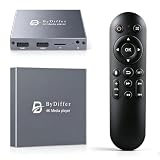
The BYDIFFER 4K@60Hz HD Digital Media Player targets affordable USB-drive and microSD playback for a 4K television. Its product name specifically states 4K@60Hz output, which is useful for buyers who care about smooth menus, motion, or matching a 60Hz television mode. Output refresh rate should still be distinguished from the frame rate and codec of the stored video.
For example, a player can output a 60Hz display signal while playing a film encoded at a lower cinematic frame rate. That is normal and does not mean the film contains 60 unique frames per second. Conversely, a high-frame-rate source may require codec and bitrate support beyond what the title alone establishes.
- Device class: budget 4K local media player.
- Storage: USB drive and microSD.
- Stated output: 4K at 60Hz category.
- Best use: affordable offline playback on a 4K screen.
- Not primarily: an internet app streaming platform.
This is a strong value candidate when the screen is 4K and the source library is stored locally. It is less compelling for a 1080p television, because the extra output capability will not create additional visible resolution. It is also not automatically better than a lower-priced 1080p player if all the content is standard-definition or Full HD.
Pros
- Budget positioning with a stated 4K@60Hz output class.
- USB and microSD support suits portable media libraries.
- Useful for offline playback without recurring service costs.
- Good match for a 4K television where cost is important.
Cons
- Codec and audio compatibility still need confirmation.
- Not a replacement for Roku’s internet-based app experience.
- Product-title specifications may not describe every supported file combination.
- Limited value on a display that is only 1080p.
Compared with NEUMI Atom 4K Lite, BYDIFFER is the budget-oriented choice with a stated 60Hz output emphasis. Compared with the FxyxGyc player, FxyxGyc has a clearer stated 4K@30Hz and H.265/H.264/AVC decoding description, which may be more useful when codec expectations are known.
9. MYPIN Blue Mini 1080p Media Player – Best for Low-Cost Full HD Playback

The MYPIN Blue Mini 1080p Full-HD Media Player is another straightforward local-file option. Its compact form, HDMI and AV output categories, and 1080p focus make it appropriate for a spare television, office display, classroom screen, or simple home media setup where the files are prepared in advance.
The blue mini enclosure may matter when the player is visible, but connection requirements matter more. Confirm that the television has the necessary input and that the included cable arrangement suits the installation. AV output can help with older displays, but HDMI should generally be preferred when available because it avoids analogue conversion and usually provides the cleaner connection.
- Device class: mini 1080p Full HD media player.
- Output category: HDMI and AV.
- Content category: MP4-oriented local playback.
- Best display: 720p or 1080p television.
- Best use: inexpensive offline video playback.
Organize content into a small number of folders and use a standard aspect ratio. For a 1920-by-1080 display, a 16:9 source avoids unnecessary cropping. If an old television is 4:3, preserve the source aspect ratio instead of stretching faces and text across the screen.
Pros
- Budget-friendly Full HD category.
- Small form factor fits behind or beside a television.
- HDMI and AV connections cover common displays.
- Suitable for users who do not need 4K.
Cons
- Not an internet streaming device.
- Not appropriate for native 4K libraries.
- File and audio compatibility should be checked before buying in quantity.
- Basic interfaces are less convenient for large collections.
Its closest competitor is AGPTEK’s black mini 1080p player. These products serve essentially the same category, so the practical choice should be based on the required color, included accessories, current listing information, and support terms. Roku HD is the better alternative when apps matter more than local files.
10. COSOWELL 4K HD USB and TF Media Player – Best for 4K Signage on Removable Media

The COSOWELL 4K HD USB and TF Media Player is positioned for 4K HDMI playback from USB and TF cards, with digital signage included in its product description. “TF” is commonly used for a microSD-format card, but buyers should still confirm the physical slot and supported card arrangement in the current listing.
This model is suited to a signage operator who wants to update media physically rather than administer a networked content system. It can also serve a home user with a 4K screen and a locally stored library. The strongest reason to choose it is not simply the 4K label; it is the combination of 4K output, removable storage, and a signage-oriented use case.
- Device class: 4K local media and signage player.
- Storage: USB and TF-card categories.
- Output: 4K HDMI.
- Best use: offline signage and prepared 4K content.
- Workflow: export, copy, insert, verify, and display.
For a business installation, standardize the content before copying it. Keep the same canvas dimensions, audio policy, file naming system, and folder structure across updates. If the display is silent, export without an audio track where appropriate; that reduces the chance of an unsupported audio stream becoming the reason a video fails.
Pros
- 4K HDMI category suited to modern displays.
- USB and TF removable-media support.
- Digital-signage positioning matches offline display work.
- Practical for installations without a permanent network connection.
Cons
- Not a mainstream app-streaming platform.
- TF terminology should be confirmed against the physical hardware.
- Exact file compatibility is not established by resolution alone.
- Manual media updates are less convenient than network management.
Compared with the Micca 4K player, COSOWELL occupies a similar signage space; compare the required card format, accessories, and operational features. Compared with the 1080p AGPTEK and MYPIN players, COSOWELL is the better fit for a 4K display and detailed signage, but not the economical choice for simple Full HD files.
11. FxyxGyc 4K Ultra HD Media Player – Best for Stated Codec Coverage

The FxyxGyc 4K Ultra HD Digital Media Player stands out because its product name identifies both a 4K@30Hz output class and H.265, H.264, and AVC decoding categories. That information is useful for buyers who have already inventoried their files and know that codec compatibility matters more than a generic “4K” claim.
Its USB and SD expansion makes it a local player rather than a subscription-based streaming box. The stated 30Hz output class may be perfectly adequate for many films, slideshows, presentations, and signage assets. It is less attractive for buyers specifically seeking a 60Hz 4K desktop-like experience, fast gaming-related motion, or a device selected around 4K@60Hz output.
- Device class: 4K local media player.
- Storage: USB and SD expansion.
- Stated output: 4K at 30Hz category.
- Decoding categories: H.265, H.264, and AVC.
- Best use: prepared local video with known common codec requirements.
The codec names are helpful but incomplete on their own. H.264 or H.265 can be paired with different profiles, levels, bitrates, frame rates, and audio formats. Before purchasing several units, test a short clip encoded like the final content. This is especially important for signage, where a failed file may remain on screen unnoticed until an event or business opening.
Pros
- Product description gives more useful codec information than a generic 4K label.
- USB and SD expansion support offline libraries.
- 4K output suits compatible modern televisions.
- 30Hz output can suit films, presentations, and signage.
Cons
- 4K@30Hz is not the same as 4K@60Hz.
- Codec names do not guarantee every profile or audio combination.
- Not designed as a full internet streaming platform.
- Manual file testing remains necessary for important deployments.
Compared with BYDIFFER, FxyxGyc offers clearer stated codec categories but a 30Hz rather than 60Hz output emphasis. Compared with fnetic, it is the better candidate when H.264/H.265/AVC compatibility is the deciding question; fnetic is more general-purpose when the listing’s broader 4K signage category is enough.
12. fnetic 4K Ultra-HD Media Player – Best for General 4K Signage

The fnetic 4K Ultra-HD Digital Media Player is a general-purpose removable-media player for USB drives and SD cards, with digital signage included in its stated use category. It is a reasonable shortlist candidate when the installation needs 4K local playback but does not require the internet-app ecosystem of Roku or the more specifically described codec profile of FxyxGyc.
It can fit a home television, retail display, reception screen, classroom, or event setup where prepared files are updated periodically. The appeal is operational simplicity: keep media on a drive or card, connect the player to the display, and avoid making the display itself responsible for file playback or app support.
- Device class: 4K Ultra-HD local media player.
- Storage: USB drives and SD cards.
- Use category: television playback and digital signage.
- Best content: locally prepared video and image material.
- Important check: exact container, codec, audio, and refresh-rate support.
For a professional display, build a small acceptance test: verify cold boot, card recognition, aspect ratio, audio, looping, recovery after power loss, and the longest intended file. These checks reveal practical problems that a short specification list cannot. If the player will be placed somewhere inaccessible, also test whether the remote is needed after every restart.
Pros
- 4K Ultra-HD category for modern displays.
- USB and SD storage sources are convenient for offline updates.
- Digital-signage positioning suits business and institutional displays.
- More focused than a streaming platform for prepared content.
Cons
- Does not replace a Roku-style internet app platform.
- Specific file compatibility should be verified.
- Manual media replacement may be inconvenient at multiple locations.
- 4K capability adds little value to a 1080p-only display.
Compared with COSOWELL, fnetic serves a similar 4K signage role, so storage format, accessories, and current support information should decide between them. Compared with FxyxGyc, fnetic is the broader choice; FxyxGyc is more attractive when its named codec categories and 30Hz output match the file library.
How to Choose
First decide whether you need streaming or playback
This is the most important decision. Internet streaming means selecting apps and services through the player. Local playback means selecting files from a USB drive, SD card, microSD card, or TF-format card. Roku Ultra and the older Roku HD model belong to the first category. The Micca, NEUMI, BYDIFFER, AGPTEK, MYPIN, COSOWELL, FxyxGyc, fnetic, and voxeqero products belong primarily to the second.
Choose Roku when the question is “What can I watch online tonight?” Choose a local player when the question is “How can this screen repeatedly show the files I prepared?” A local player will not automatically supply a streaming service, and a streaming player may not be the right tool for a carefully controlled signage loop from removable storage.
Match output resolution to the screen
For a 1080p television, an HD or Full HD player is sufficient for a 1920-by-1080 source. AGPTEK, MYPIN, and the older Roku HD player are the logical budget categories. Buying 4K hardware for that screen can still work, but it does not create 4K detail. The visible result is limited by the panel, source material, connection, and scaling quality.
For a 4K television, a 4K player is appropriate when your files are also 4K or when you want the player to remain useful after a display upgrade. Keep the terms separate:
- 4K output: the signal the player sends to the display.
- 4K decoding: the player’s ability to process a 4K file.
- 4K source: the original video or image contains 4K-level detail.
- 4K panel: the television can show approximately 3840 by 2160 pixels.
A 1080p file upscaled to 4K is still a 1080p source. Upscaling can make it fit the display, but it cannot restore detail removed during recording or compression.
Understand refresh rate with a simple calculation
A 4K display signal at 3840 by 2160 and 60Hz contains approximately 3840 × 2160 × 60 = 497,664,000 pixel positions per second, or about 498 million pixel positions before considering color depth, blanking, compression, and overhead. At 30Hz, the corresponding figure is about 249 million pixel positions per second. That is why 4K@60Hz is a more demanding output class than 4K@30Hz.
For films, slides, and many signage loops, 30Hz may be adequate. For smooth desktop movement, fast camera pans, sports, or a television commonly configured at 60Hz, a stated 4K@60Hz output is more reassuring. Do not confuse the output refresh rate with the encoded frame rate: a 24-frame-per-second film can be displayed through a 60Hz output mode, using frame cadence to fit the display timing.
Check the file before checking the box
Resolution is only one compatibility variable. Record or identify the following before choosing a local media player:
- Container, such as MP4 or another file wrapper.
- Video codec, such as H.264 or H.265.
- Audio codec and number of audio channels.
- Frame rate and whether it is constant or variable.
- Bitrate, especially for high-resolution footage.
- Subtitle format, if subtitles are required.
- Storage format and capacity of the USB or card.
FxyxGyc is notable in this list because its name explicitly mentions H.265, H.264, and AVC decoding. That is useful information, but it still does not guarantee every profile, level, bitrate, audio stream, or container. A practical check is to export a 30-second sample using the same settings as the final content and test it on the actual display before buying a batch of players.
Use the right device for signage
Signage has different requirements from casual home viewing. A good signage workflow must survive repeated power cycles, play the intended aspect ratio, recover from a disconnected drive, and make updates easy for the person responsible for the display. Auto resume is valuable for long training or presentation material, but a lobby advertisement may need a clean loop from the beginning after every restart.
For one screen in a quiet office, a USB or SD player can be enough. For many screens across different buildings, manual card replacement becomes a labor cost. In that situation, consider whether a network-managed solution—not necessarily one of the products in this list—would be more appropriate. These compact players are strongest when the number of displays is small and the content changes periodically rather than every few minutes.
Use a consistent export canvas. If the display is 16:9, prepare 16:9 content. If a portrait display is involved, verify that the player and screen can rotate the image; do not assume a standard landscape player will handle portrait signage correctly. Keep a test file, a fallback image, and a written update procedure with the device.
Choose HDMI or AV based on the television
HDMI is the preferred connection for most modern televisions because it carries digital video and audio in one cable. AV output can be valuable for legacy televisions or equipment with analogue inputs, but it may support lower resolution and require the correct cable arrangement. A product that lists AV output is not necessarily capable of sending 4K through that analogue connection.
Measure the space behind the television and check power access. Mini players are easy to hide, but a short HDMI cable, a crowded power strip, or a remote sensor blocked by the screen can make installation frustrating. For a wall-mounted television, test remote visibility before fixing the player permanently.
Budget by the whole system
Device price is only one part of the budget. Add the cost of a suitable HDMI cable if one is not included, removable storage, a replacement remote if the player will be used in a public area, and time spent converting incompatible files. A cheap player that requires repeated troubleshooting can cost more than a slightly better-matched mid-range model.
For a simple 1080p bedroom setup, a budget AGPTEK or MYPIN player may be enough. For a 4K local library, a mid-range NEUMI, COSOWELL, FxyxGyc, fnetic, or Micca G3 product may be more sensible. For an internet-connected main television, Roku Ultra is the premium pick. The older Roku HD is appropriate only when the screen and expectations are both modest.
Use this decision matrix
| Your situation | Best starting choice | Why | What to verify |
|---|---|---|---|
| 4K television, streaming apps, easiest setup | Roku Ultra | Internet-streaming platform rather than file management | Network quality and service availability |
| 1080p television, online streaming, lowest cost | Roku HD Streaming Player | Matches an older HD display | Old-model software and app support |
| 4K USB/microSD signage | Micca 4K or COSOWELL | 4K local and signage categories | Codec, looping, and card format |
| Compact 4K offline playback | NEUMI Atom 4K Lite | USB and SD support in a compact class | Exact trigger and file behavior |
| Budget 4K local playback | BYDIFFER | Stated 4K@60Hz category | Actual file codec and audio support |
| Known H.264/H.265/AVC library | FxyxGyc | Product name states those decoding categories | Profile, bitrate, container, and 30Hz limitation |
| Basic 1080p MP4 files | AGPTEK or MYPIN | Budget mini Full HD category | Audio format and required cable |
| Long offline video needing position memory | 4K Media Player with auto resume | Auto-resume feature is directly relevant | Behavior after the intended power cycle |
Frequently Asked Questions
Which is the best streaming media player overall?
Roku Ultra is the best overall choice in this list for internet streaming on a modern 4K television. It is more suitable for apps and online services than the USB and SD media players.
Are these media players the same as Roku devices?
No. Roku devices are primarily internet-streaming platforms, while most of the other products here are local media players. Local players generally expect files on USB drives or memory cards rather than subscriptions and streaming apps.
Do I need a 4K player for a 1080p television?
No. A 1080p player is sufficient when the television is Full HD and the source files are 1080p. A 4K player may offer future flexibility, but it will not make a 1080p panel display native 4K detail.
Does 4K@60Hz mean every video will play at 60 frames per second?
No. It describes the output signal category, not necessarily the frame rate of every stored file. A film may remain encoded at a lower frame rate while the player sends a 60Hz display signal.
Which player is best for USB movie playback without internet?
NEUMI Atom 4K Lite, the Micca 4K player, COSOWELL, fnetic, and similar local players are better suited than Roku when the movies are stored on USB or SD media. Choose based on the source resolution, codec, storage format, and any resume or signage requirement.
Can these players play every MP4 file?
No. MP4 is a container, not a guarantee of one video and audio format. Two MP4 files can use different codecs, profiles, frame rates, bitrates, and audio tracks, so test a representative file before committing to an installation.
Is auto resume useful for digital signage?
It is useful for long presentations, lessons, and training videos that should continue from a previous position. For advertisements or welcome screens, a predictable loop from the beginning may be more useful than resume behavior.
What should I do if a video has sound but no picture, or picture but no sound?
Check the video and audio codecs first, then test a short file exported with common H.264 video and a widely supported audio format. Also verify the HDMI input, television audio settings, and whether the file’s resolution or bitrate exceeds the player’s supported class.
Final recommendations: choose Roku Ultra for the easiest 4K internet streaming, the older Roku HD for a modest 1080p secondary television, and Micca’s 4K player or NEUMI Atom 4K Lite for local 4K playback. Select AGPTEK or MYPIN for basic Full HD files, BYDIFFER when stated 4K@60Hz matters on a budget, FxyxGyc when its named codec categories match your library, and the signage-oriented Micca, COSOWELL, fnetic, or auto-resume player when the display must run prepared content reliably.


