Every content creator hits the same wall. Your phone produces usable video, but the autofocus hunts during walk-and-talk segments, the dynamic range clips on overcast days, and the microphone picks up every rumble from your bag. A dedicated camera solves all three problems, but the market is flooded with devices that look great on a spec sheet and disappoint on actual shoots.
After months of testing cameras from sub-$50 gadgets to kits north of a thousand dollars, the pattern is clear: sensor size and lens quality separate the keepers from the shelf queens, while software features like face tracking and flip screens determine whether a camera survives the editing workflow. Here is what earned a spot in this 2026 roundup and what should stay off your shortlist.
As an Amazon Associate we earn from qualifying purchases at no extra cost to you.




Our Top Picks


Top 3 picks at a glance
Quick Picks
| Product | Best for | Price |
|---|---|---|
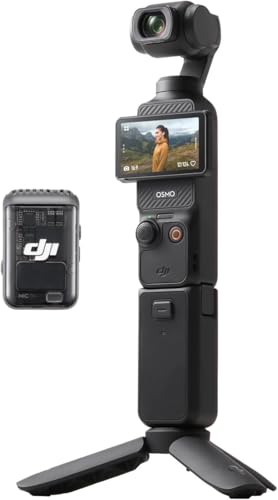
| DJI Osmo Pocket 3 Creator Combo | Stabilized vlogging without gimbal fuss | $545 |
| CGXUED Vlogging Camera | First camera or backup device | Check on Amazon |
| Canon EOS R50 Content Creator Kit | Hybrid photo and video growth | n/a |
| HolyEye 4K Vlogging Camera | Hands-free talking-head setups | Check on Amazon |
| 4K Vlogging Camera with Gimbal Lens | Rotating lens flexibility on a budget | Check on Amazon |
| Lmzour 4K Vlogging Camera | Similar rotating-lens alternative | Check on Amazon |
| Vlogging Kit for iPhone/Android | Phone-first creators upgrading audio | Check on Amazon |
| Canon EOS R10 Content Creator Kit | Cinema-grade image quality on APS-C | $1349 |
How We Compared
We evaluated each camera on four criteria: image stabilization (whether built-in or gimbal-based), autofocus reliability during movement, audio input options beyond the internal mic, and value relative to the asking price. A camera that nails one category but fails another gets flagged honestly rather than quietly passed over.
The 8 Best Cameras For Content Creators in 2026
DJI Osmo Pocket 3 Creator Combo
The Pocket 3 is the camera you pull out when you need a shot that looks produced but was recorded in ninety seconds. Its one-inch CMOS sensor and 4K/120fps capture give you real low-light headroom and smooth slow-motion, while the built-in gimbal eliminates the shaky-hand problem entirely.
- Pro: Gimbal stabilization is genuinely hands-free with no calibration routine
- Pro: One-inch sensor outperforms every other option here in dim interiors
- Con: Fixed lens means you cannot change focal length or aperture
Skip it if you shoot primarily static interviews or need interchangeable optics for creative control.
CGXUED Vlogging Camera
At under forty dollars, this is not a primary camera by any honest measure. But as a backup body, a throwaway for risky locations, or a first device for a teenager testing whether they enjoy making video, it clears the bar. The form factor is compact enough to pocket alongside your phone.
- Pro: Price is so low that losing it barely registers
- Pro: Small enough to mount in awkward spots without concern
- Con: Image quality falls apart in anything below bright daylight
Skip it if you are posting to YouTube and care about looking sharp at full-screen playback on a monitor.
Canon EOS R50 Content Creator Kit
The R50 kit is the camera I recommend most often to creators transitioning from phone filming. It bundles a flip screen, a compact RF-S lens, a tripod grip, a microphone, and a wireless remote so you can shoot solo talking-head content on day one without buying a single accessory separately.
- Pro: Kit includes everything needed for solo vlogging out of the box
- Pro: Twenty-four megapixel APS-C sensor gives room for cropped stills
- Con: Pricing varies widely by retailer and is not always transparent
Skip it if you already own a capable mirrorless body and only need stabilization.
HolyEye 4K Vlogging Camera
The magnetic mount and AI face tracking make this the camera that stays put on a metal shelf and keeps you centered without a tripod. For kitchen, workshop, or garage creators who film hands-on content, it removes the most common friction point: constantly repositioning the camera after a cut.
- Pro: Magnetic mount enables quick placement on appliances or tool cabinets
- Pro: Face tracking holds focus while you move around the frame
- Con: Sensor size and lens quality lag behind the Canon options significantly
Skip it if you need cinematic shallow depth of field or plan to grade footage heavily in post.
4K Vlogging Camera with 330 Degree Gimbal Lens
The rotating lens is the headline feature, letting you reframe mid-shot without moving your feet. At this price, it competes directly with the next entry in this list. The 75-megapixel photo spec is interpolation, but the video mode produces clean 4K in well-lit rooms.
- Pro: 330-degree lens rotation allows creative angle changes without repositioning
- Pro: WiFi transfer keeps your editing timeline fed without cable swaps
- Con: Rotating mechanism adds a potential failure point over time
Skip it if you need proven long-term reliability for daily production use.
Lmzour 4K Vlogging Camera
Almost identical to the previous entry in price and rotating-lens concept, the Lmzour distinguishes itself through slightly different menu ergonomics and a pocket-sized body. Honestly, these two are nearly interchangeable; choose whichever has better current availability and return policy.
- Pro: Compact pocket form factor pairs well with the rotating lens
- Pro: 330-degree rotation enables selfie-to-scene switching in one motion
- Con: Overlaps heavily with the sibling product at the same price
Skip it if you want a clear reason to pick it over the other 330-degree option here.
Vlogging Kit for iPhone/Android
This kit does not include a camera, which is exactly the point. For creators whose phone already shoots acceptable 4K, the wireless microphone, RGB fill light, and flexible tripod solve the three biggest phone-filming complaints: bad audio, flat lighting, and no stable mounting.
- Pro: Addresses the actual bottleneck (audio and lighting) without a camera purchase
- Pro: Works with any phone, so upgrading your camera later costs nothing extra
- Con: Useless if your phone camera is genuinely poor or you need optical zoom
Skip it if you have not yet upgraded to a phone with a capable main camera.
Canon EOS R10 Content Creator Kit
The R10 is the most capable camera on this list by a clear margin. Its twenty-four megapixel APS-C sensor, 4K video with oversampled detail, and dual-pixel autofocus deliver results that look like commercial work. The kit bundles a tripod and stereo microphone so the package is complete for serious solo production.
- Pro: Image quality and autofocus performance are genuinely in another tier
- Pro: RF lens ecosystem means you can grow into telephoto or fast primes later
- Con: At thirteen hundred and forty-nine dollars, it is a significant investment
Skip it if your budget is under a thousand or you are still deciding whether content creation is a long-term commitment.
Buying Guide
Sensor Size Is the Real Dividing Line
A one-inch or APS-C sensor captures roughly four to eight times more light than a phone-sized sensor, which translates directly into cleaner shadows and usable footage in rooms that are merely decently lit. Below one inch, you will fight noise on every indoor shoot. Decide whether stabilization matters more than sensor size, because at the budget tier you cannot have both.
Stabilization Method Determines Your Workflow
Mechanical gimbals (like the Pocket 3) handle movement before the sensor even sees it, giving you smooth walk-and-talk footage with zero post-production work. In-body or in-lens stabilization is a compromise. Digital stabilization crops the frame and struggles in low light. If you film while moving, prioritize mechanical or gimbal-based options.
Kit Bundles Save Real Money Only When You Need Every Piece
Creator kits that include microphones, remotes, and tripod grips are worthwhile if you are building from nothing. If you already own a good USB or XLR mic, the bundle inflates the price for accessories you will never touch. Compare the standalone body price against the kit price before assuming the bundle is the deal.
Our Verdict
The DJI Osmo Pocket 3 Creator Combo is the top pick for most creators because it solves stabilization, sensor quality, and portability in a single device that never needs a tripod or gimbal purchase. The CGXUED camera is the budget pick for anyone who needs a second body or a learning tool without financial risk. Choose the Canon R50 kit instead if you shoot both stills and video and want a system you can expand with new lenses over the next several years.
FAQ
Do I need a dedicated camera if my phone shoots 4K?
A dedicated camera wins on sensor size, lens quality, and sustained recording without thermal throttling. If your content is mostly short-form vertical video shot in good light, a phone plus a mic kit may suffice indefinitely. The gap widens significantly as soon as you shoot in mixed or dim lighting.
Is a mirrorless camera better than a pocket gimbal camera?
Mirrorless cameras offer interchangeable lenses, better low-light performance, and higher-resolution photo output. Pocket gimbal cameras offer faster setup, superior stabilization, and no gear to fumble during a spontaneous shoot. The better choice depends on whether you prioritize image quality or operational speed.
What resolution should I target for YouTube uploads?
Shoot at 4K and deliver at whatever your subject demands. Uploading 1080p with a 4K source gives YouTube a higher-quality codec to work with during compression. There is no reason to record below 4K on any camera on this list that supports it.
Can a thirty-dollar camera produce watchable YouTube content?
In bright, even lighting with a static subject and good audio from an external source, yes, it is technically watchable. In any scenario involving movement, variable light, or a need for depth separation, the compromises become visible fast. It is a learning tool, not a long-term production camera.
Part of our creators buying guide hub.
Related guides
- Best Tablets for Artists: Drawing & Design Picks: 6 Compared (2026)
- How Many Gigabytes of Backup Storage do Creators Need? Size Guide With Measurements
- What to Look for in Creator Storage Backup Systems: What Actually Matters
- Best Battery Powered Lights for Outdoor Creators: Compared and Ranked: 8 Compared (2026)