A dorm room printer has to solve a problem that a home-office printer never faces: it lives on a desk the size of a cafeteria tray, shares a Wi-Fi network with a few hundred other devices, and gets used in bursts the night before a paper is due. The right choice for a college dorm is rarely the fastest or the cheapest. It is the one that fits beside a laptop, connects from a phone without fuss, and does not punish you with ink costs when you print a syllabus once a week.
This guide is for first-year students packing a car, parents helping them shop, and upperclassmen replacing a printer that died in the middle of finals. Every model below is a wireless inkjet, and the titles split into two types: compact all-in-one machines that scan and copy, and portable units built to slide into a backpack. For 2026 move-in season, the main question is how much space you can spare and whether you need a scanner at all.
Our Top Picks
Top 3 picks at a glance
Quick Picks
As an Amazon Associate we earn from qualifying purchases at no extra cost to you.

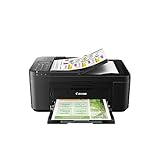

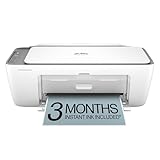


| Product | Best for | Key spec from the title |
|---|---|---|
| HP Envy 6155 | Students who print assignments on both sides | Wireless all-in-one with duplex printing, 3-month Instant Ink trial |
| Canon PIXMA TR4720 | Scanning paperwork and forms | Auto document feeder, mobile printing, built-in fax |
| Canon PIXMA TR160 | Tight desks and moving between rooms | Portable, 50-sheet paper tray, 1.44-inch display |
| HP DeskJet 2855e | Basic printing at a modest tier | Wireless all-in-one: print, scan, copy |
| HP Envy 6555 | Heavier weekly printing with duplex | Wireless all-in-one with duplex, 3-month Instant Ink trial |
| HP OfficeJet 250 | Printing away from an outlet | Mobile all-in-one, wireless, battery included |
How to Choose
Footprint and Where It Will Sit
Measure the shelf or desk corner before you shop. A standard all-in-one with a flatbed scanner and a rear paper tray usually needs a footprint close to a large pizza box plus clearance for paper to feed. A portable model trades the scanner for a smaller body. If your room shares a loft bed or a lofted desk, consider whether the printer has to sit on a floor, a bookcase, or a closet shelf, and check that the lid and output tray can open in that spot.
Connectivity That Works on Campus Networks
Dorm Wi-Fi often uses login portals or isolates devices from each other, which can block a printer from a laptop. Look for models that can print from a phone app or by connecting directly, and keep a USB cable on hand as a fallback. Dual-band support helps, but a wired USB connection is the reliable backup when the network misbehaves. Mobile printing support, as named in several titles, lets you send a document from a phone when the laptop is unavailable.
Ink Costs and Print Volume
Students print in unpredictable bursts. Subscription ink plans, such as the trial in the HP Envy titles, can lower the cost for steady printers but become a nuisance if you print only a few pages a month. Cartridge refills for compact inkjets get expensive per page, so a light printer user should avoid high-volume plans and consider whether pages are needed in color at all. For black text assignments, a cheaper tier is usually enough.
Features Worth Having and Features to Ignore
Duplex printing saves paper and is useful for long readings. An automatic document feeder helps when you scan multi-page forms. A fax modem, such as the one in the Canon PIXMA TR4720, is rarely used by students, but it does no harm. Voice assistant or AI print features are easy to ignore if you only print PDFs. Budget models cut corners on paper tray capacity, which means refilling after a long thesis chapter, and on display quality, which can make setup tedious.
One more consideration is the move-out. Students who live in a different room or apartment each year benefit from a printer that survives being packed in a trunk, so box it with its original packaging when possible. Also check that the model supports the cartridges you can find locally, as some are stocked more widely than others.
The 6 Best Options
HP Envy 6155
The HP Envy 6155 is a wireless all-in-one color inkjet that prints, scans, copies, and prints on both sides of the page. Its title also notes a 3-month trial of an ink subscription. It fits a student who prints weekly readings and lab reports and wants duplex to cut paper use.
- Strength: automatic two-sided printing helps with long readings.
- Strength: print, scan, and copy functions cover most dorm tasks.
- Trade-off: it is a full-size all-in-one, so desk space must be set aside for it.
Because the title lists a built-in scanner and copier, it can also stand in for a campus copy center when a professor hands out a one-page form. Its wireless setup means a laptop on the bed can send a job to a desk across the room. Skip it if your desk is tiny or you print only a few pages a month.
Canon PIXMA TR4720
The Canon PIXMA TR4720 is a wireless all-in-one with an auto document feeder, mobile printing, and built-in fax. That feeder makes scanning stacks of pages easier than lifting the lid every time. It is a good match for students who handle housing forms, financial aid paperwork, and signed documents. Some listings bundle ink cartridges, so check what is included.
- Strength: the document feeder speeds up multi-page scanning.
- Strength: mobile printing supports phone-based jobs.
- Trade-off: the feeder and fax hardware add size to a small desk.
Think of it as the paperwork machine: orientation packets, lease addenda, and scholarship letters all pass through a room like yours at some point. Skip it if you never scan more than a page at a time.
Canon PIXMA TR160
The Canon PIXMA TR160 is a color wireless portable printer with a 50-sheet paper tray and a 1.44-inch display. It is lightweight and compact, which suits a student with limited space or one who moves between a dorm and a library. The small paper tray means refilling more often than a larger model.
- Strength: compact and light enough to store in a closet or bag.
- Strength: the small display makes setup and status checks easier.
- Trade-off: the title lists no scanner or copier, so it only prints.
For a student who prints readings and posters and uses a phone app to scan, this keeps the desk clear. Buyers should keep spare paper handy, since a 50-sheet tray empties fast during finals week. Skip it if you need to scan or copy documents.
HP DeskJet 2855e
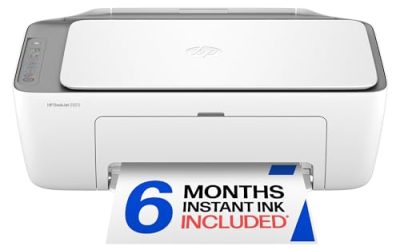
The HP DeskJet 2855e is a wireless color inkjet all-in-one for printing, scanning, and copying, with mobile compatibility. It sits at the simpler end of this group and fits a student who wants one machine for occasional assignments and a scan now and then. It skips duplex in the title, so two-sided pages mean flipping paper by hand.
- Strength: print, scan, and copy in one simple, modest machine.
- Strength: mobile compatibility makes phone printing possible.
- Trade-off: no duplex printing is listed in the title.
It also makes sense as a shared machine for roommates who each print a little, since the scan and copy functions cover odds and ends. Skip it if you print long documents and want automatic double-sided pages.
HP Envy 6555
The HP Envy 6555 follows the same formula as the 6155: a wireless color all-in-one with duplex printing and a 3-month ink plan trial. The two models are close in what their titles state, so the choice often comes down to which listing offers the better terms. It suits a heavier printer who wants duplex built in.
- Strength: duplex printing and all-in-one functions in one body.
- Strength: the ink plan trial can ease early costs for frequent printers.
- Trade-off: the subscription plan continues after the trial unless you cancel it.
Compare the exact bundle, seller terms, and included ink before choosing between this and its sibling, because the listed functions line up closely. Skip it if you want a smaller printer or have no use for a scanner.
HP OfficeJet 250
The HP OfficeJet 250 is a mobile all-in-one inkjet with wireless printing and a battery included. The battery lets you print without a power outlet nearby, which suits a student who works in a study lounge or on a shared table. It also scans and copies, which is unusual for a portable machine.
- Strength: built-in battery means printing without an outlet.
- Strength: it keeps scanning and copying in a portable body.
- Trade-off: the title does not mention duplex or a large paper tray.
It also helps off campus, such as printing a poster at a group project meeting or a boarding pass during a trip home. Skip it if you want a fixed desktop printer for long jobs.
Which One Fits Your Situation
You Share a Small Double Room
Go with the Canon PIXMA TR160. It stores easily, and the 50-sheet tray is enough for a week of assignments. You give up scanning, so use a phone app for that.
You Print Long Readings Every Week
The HP Envy 6155 or HP Envy 6555 fits here because duplex printing cuts page count in half. Pick whichever listing has better terms and watch the ink plan after the trial ends.
You Scan Forms and Signed Paperwork
The Canon PIXMA TR4720 has the document feeder, which handles multi-page files faster than a flatbed alone. It also helps when you copy tax or housing documents.
You Move Between a Dorm and Study Spaces
The HP OfficeJet 250 includes a battery, so you can print without hunting for an outlet. For a plainer setup at a modest tier, the HP DeskJet 2855e is the simple stay-at-home option, and it suits a first-year student who expects to print a few essays per term. Pair it with plain paper and print in black when color is not needed to stretch the ink.
Whichever you choose, keep a spare set of cartridges before midterms and finals, because running dry at midnight is the most common dorm printing failure.
Common Mistakes
- Buying a large all-in-one without measuring the desk or shelf first.
- Assuming campus Wi-Fi will accept a printer without a USB backup cable.
- Forgetting that a subscription ink trial turns into a monthly charge.
- Skipping a document feeder, then scanning twenty pages one at a time.
- Buying a portable printer and expecting scan and copy features it does not list.
Related guides
- When I Turn On Record Game In Background On Gamebar. Gamebar Crashes, What Do I Do?
- How To Reduce Background Noise On A Streaming Microphone
- Poly Computer Accessories Company Streaming Evaluation
Frequently Asked Questions
Do I need a scanner in a dorm printer?
Many students scan forms, receipts, and lab notes, so an all-in-one is useful. If your phone’s camera app covers scanning, a print-only model saves space.
Is a portable printer enough for coursework?
For occasional papers, yes. Small paper trays mean more refills, so heavy printers are better served by a standard desktop model.
Are ink subscription trials worth it?
They help if you print steadily. Light users should cancel before the trial ends or avoid enrolling, since the plan keeps billing.
What if my dorm Wi-Fi blocks the printer?
Use a USB cable or the printer’s direct connection mode when available. That bypasses the campus network entirely, and it keeps working even when the residence hall network drops out during a busy evening.