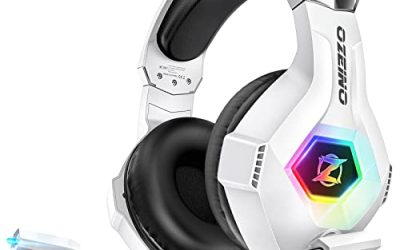
The best gaming headset microphone quality comes from a headset with a dedicated boom or detachable mic, noise cancellation, and a closed or lift-to-mute design, such as the Logitech G Astro A50 X, HyperX Cloud III or EPOS H6Pro. Business-style UC headsets can beat gaming models for pure voice clarity. Mic quality is subjective, so this guide leans on listed features rather than claims of studio sound.
Our Top Picks
 HyperX Cloud III Wired Gaming Headset for PCRegular3.41 x 6.1 x 7.48 inches0.7 poundsCheck on Amazon


Top 3 picks at a glance
Picks at a Glance
| Pick | Type | Mic feature from listing | Best for |
|---|---|---|---|
| Logitech G Astro A50 X | Wireless, base station | Multi-platform with PLAYSYNC switcher | Console and PC players who want a premium wireless headset |
| HyperX Cloud III Wired | Wired | Ultra-clear 10 mm mic | Comfort-first buyers on PC and console |
| HyperX Cloud Alpha | Wired | Detachable microphone | Players who want a removable boom mic |
| EPOS H6Pro Open | Wired, open back | Mic with lift-to-mute on the family | Natural sound and airy comfort |
| EPOS Impact 860 ANC | Wired, UC | Double-sided with active noise cancellation | Calls, streaming chat and office work |
| Poly Blackwire 5220 | Wired, UC | Flexible boom mic, noise cancelling | Voice-first work and gaming |
| Yealink UH37 | Wired, UC | Noise cancelling mic, USB-C and USB-A | Budget call-quality focus |
Also considered: the original Logitech G Astro A50, the Jabra Evolve 10 and the Logitech H570e. They are covered after the main picks.
Why Mic Quality Is Hard to Judge From a Listing
There is no single number that tells you how a microphone sounds. Two headsets can list the same features and sound different, because voice depends on capsule quality, boom position, tuning, noise gate behavior and your room. So this guide does what any research-based buying guide can: it compares features that affect real calls, such as boom design, noise cancellation, mute controls and connection type.
That means a few honest limits. Where a listing does not state a microphone spec, we write “not listed” and suggest you check the maker’s page. We did not use these products ourselves, and our picks come from published specifications and listing details.
1. Logitech G Astro A50 X: Best Premium Wireless Pick
As an Amazon Associate we earn from qualifying purchases at no extra cost to you.

The Logitech G Astro A50 X is listed as a multi-platform wireless gaming headset with a base station for PS5, Xbox and PC. The listing highlights a PLAYSYNC audio and video switcher, HDMI 2.1 with 4K120 and VRR passthrough, 24-bit/48 kHz audio, 2.4 GHz wireless and Bluetooth. The microphone details are not spelled out in the listing, so check the maker for specifics such as pickup pattern.
- PLAYSYNC switcher on the base station for changing sources.
- 2.4 GHz connection plus Bluetooth for a phone.
- HDMI 2.1 pass-through keeps 4K120 and VRR on supported setups.
- Works across PS5, Xbox and PC.
Pros: flexible across platforms, base station keeps the headset charged, premium build, simple source switching.
Cons: higher price tier, needs desk space for the base, microphone specs not listed.
Best for: players who share one headset between a console and a PC. Skip if: you want a lightweight wired headset or a tight budget.
2. HyperX Cloud III Wired: Best Comfort With a Clear Boom Mic

The HyperX Cloud III Wired is listed for PC, PS5, PS4 and Xbox Series X|S with USB-C, USB-A and 3.5 mm connectivity. It has memory foam, a durable frame and an ultra-clear 10 mm mic. That makes it a flexible choice because one headset covers PC plug-in and console cable connections.
- 10 mm microphone described as ultra-clear.
- USB-C, USB-A and 3.5 mm connections.
- Memory foam ear cushions and a durable frame.
- Compatible across PC, PlayStation and Xbox.
Pros: one headset for several platforms, comfortable memory foam, clear boom mic claim, simple wired setup.
Cons: wired only, the boom is part of the design so it is less pocketable.
Best for: long sessions where comfort and a straightforward mic both matter. Skip if: you want wireless freedom or a base station.
3. HyperX Cloud Alpha: Best for a Detachable Microphone

The HyperX Cloud Alpha is a wired gaming headset with dual chamber drivers, an aluminum frame and a detachable microphone. It works on PC, PS4, PS5, Xbox One, Xbox Series X|S, Nintendo Switch and mobile. The detachable mic is the point here: take it off when you want to use the headset for music, and clip it back for chat.
- Detachable boom microphone.
- Dual chamber drivers, as named in the listing.
- Aluminum frame for durability.
- Multi-platform, including Switch and mobile.
Pros: removable mic, tough build, works on many devices, familiar comfort.
Cons: a long-running design, wired only, a detachable connector is another part that can wear over time.
Best for: players who want both a gaming boom mic and a music headset. Skip if: you want newer connectivity like USB-C wired audio or wireless.
4. EPOS H6Pro Open: Best for Natural Sound and Airy Comfort

The EPOS H6Pro Open Acoustic is a wired gaming headset with mic for Xbox, PS4/PS5 and PC/Windows, listed with immersive sound, lightweight comfort and a durable design. The open-back layout lets sound out, so it gives a wider feel than closed cups. It is a better fit for quiet rooms than noisy ones, since the open ear cups let outside sound in.
- Open acoustic design for a wide soundstage.
- Lightweight headband.
- Works with Xbox, PS4/PS5 and PC.
- Lift-to-mute microphone is part of the H6Pro family.
Pros: lightweight, comfortable, natural presentation, good for quiet rooms.
Cons: open back leaks sound and lets room noise in, not ideal for noisy homes.
Best for: quiet-room players who value comfort and a natural sound. Skip if: you share a room or need isolation, in which case look at the closed H6Pro.
5. EPOS Impact 860 ANC: Best UC Headset With Gaming Crossover

The EPOS Impact 860 ANC is a double-sided wired headset with active noise cancellation, USB-C and USB-A, a lightweight comfortable fit and Microsoft Teams and Zoom compatibility. It is built for office calls, but its focus on voice makes it a strong answer to the best epos headset and best UC headset searches. Players who spend as much time on voice calls as in games may prefer it.
- Active noise cancellation.
- USB-C and USB-A connection options.
- Double-sided, which means two ear cups.
- Microsoft Teams and Zoom compatible.
Pros: call-focused design, ANC, simple plug and play, lightweight.
Cons: not tuned for gaming audio, fewer console connection options, gaming-style extras are missing.
Best for: remote workers who also play. Skip if: you play on a console that needs a 3.5 mm headset connection.
6. Poly Blackwire 5220: Best Flexible Boom Mic for Voice

The Poly Blackwire 5220 is a wired headset with a flexible boom mic, noise cancelling and an ergonomic over-ear design. It connects through USB-C, USB-A and 3.5 mm and works with Microsoft Teams and Zoom. The flexible boom lets you place the mic close to your mouth, which is one of the biggest factors in a clear voice.
- Flexible boom microphone.
- USB-C, USB-A and 3.5 mm connections.
- Ergonomic over-ear design.
- Works with Teams, Zoom and other UC apps.
Pros: adjustable mic placement, several connections, comfortable for long calls, built for voice.
Cons: not made for immersive game sound, plain styling, limited console features.
Best for: players who want clear voice above all else. Skip if: you want RGB, surround sound or gaming extras.
7. Yealink UH37: Best Budget UC Headset

The Yealink UH37 is a wired USB headset with a noise cancelling mic and stereo sound. It supports USB-C and USB-A, is Teams certified, and works with Zoom and other UC platforms, according to the listing. It aims at office and call-center use, which means it concentrates on clear speech, not on game audio.
- Noise cancelling microphone.
- USB-C and USB-A connections.
- Teams certified and works with Zoom.
- Stereo sound for calls and media.
Pros: call-focused, certified for Teams, simple setup, modest price tier.
Cons: no gaming features, build and sound are office-oriented, not for console play.
Best for: inexpensive voice-first setup on a PC. Skip if: you want a gaming headset that also sounds big.
Also Consider
Logitech G Astro A50
The Logitech G Astro A50 is the other A50 model in this lineup. It is listed for PS5, Xbox and PC with a PLAYSYNC audio switcher, up to 24-bit/48 kHz on PC and 16-bit/48 kHz on console, a 24-hour battery, 2.4 GHz and Bluetooth. If you searched for astro a50 mic quality, note that microphone specs are not stated in the listing, so check the maker page and compare the A50 and A50 X before buying.
Jabra Evolve 10

The Jabra Evolve 10 is a wired USB headset with a noise-cancelling mic, in-line call and volume controls, a lightweight design and TCO certification, listed for PC and laptop use and online meetings. It is a basic, lower-cost option for people who want a mic that works on calls first.
Logitech H570e

The Logitech H570e is a wired stereo headset with a noise cancelling microphone, listed for clear calls. It is a practical choice when you want a dependable call headset that also works for casual play.
Microphone Specs Explained
Spec sheets use terms that sound technical but are easy to decode. Here is what the common ones mean for your voice on a call or in a match.
| Spec | What it means | How much to care |
|---|---|---|
| Pickup pattern | Which direction the mic hears best (cardioid and unidirectional favor your mouth) | High: it decides how much room noise gets in |
| Frequency response | The range of pitches the mic can capture | Medium: voice sits in a narrow range, so wide numbers matter less |
| Sample rate and bit depth | Detail of the digital signal, such as 16-bit or 24-bit at 48 kHz | Low to medium: voice chat rarely needs more than the basics |
| Noise cancellation | Processing that reduces background sound | High: helps with fans, keyboards and shared rooms |
| Boom length and flexibility | How close you can place the mic to your mouth | High: placement is the biggest practical factor |
| Sidetone | Lets you hear your own voice in the earcups | Medium: stops you from shouting by accident |
Many listings, including several in this guide, do not state pickup pattern or frequency response. In that case, treat feature claims such as “ultra-clear” or “AI noise cancellation” as marketing descriptions, and check the maker’s page for the full data sheet before you decide.
Which Headset Type Suits Which Use?
| Use | Best type | Pick from this guide |
|---|---|---|
| Competitive team chat on PC | Wired headset with a boom mic | HyperX Cloud III Wired, HyperX Cloud Alpha |
| Console play with party chat | Multi-platform wireless or 3.5 mm wired | Logitech G Astro A50 X, EPOS H6Pro |
| Streaming with live commentary | Boom mic with good isolation | Closed-back EPOS H6Pro, Poly Blackwire 5220 |
| Remote work and gaming on one PC | UC headset with USB | EPOS Impact 860 ANC, Yealink UH37 |
| Shared room | Closed back with noise-cancelling mic | Closed-back headsets and UC models |
| Quiet room, music and games | Open back for a wide feel | EPOS H6Pro Open |
How to Make Any Headset Mic Sound Better
Even a modest headset can sound clearer with a few adjustments. These apply whether you own one of the picks above or a different model.
- Position the boom correctly. Place the mic about a thumb’s width from the corner of your mouth, not directly in front, to reduce breath pops.
- Lower the input gain. A mic that is too hot clips and distorts. Aim for peaks around the middle of the meter in your audio settings.
- Turn on noise suppression carefully. It helps with fans and keyboards, but heavy settings can clip the start of words.
- Use sidetone if available. Hearing yourself keeps your volume natural.
- Reduce room noise at the source. Close windows, move the PC fan away from the mic or switch to quiet keyboard switches.
- Use the right connection. Pick the USB option over a shared motherboard jack if the headset supports it, since onboard audio can add noise.
- Check the platform’s chat settings. On consoles and apps, make sure the correct input device is selected and the chat volume is balanced.
Troubleshooting a Poor-Sounding Headset Mic
| Symptom | Likely cause | Fix |
|---|---|---|
| Voice is quiet | Input volume low or boom too far away | Raise input level, move the mic closer |
| Voice distorts or crackles | Gain too high or a loose connector | Lower gain, reseat the cable or the detachable mic |
| Friends hear background noise | No noise cancellation or a fan nearby | Enable suppression, reposition the headset |
| Mic cuts out | Wrong input device or a mute switch engaged | Check mute, then pick the headset as input |
| Echo of game audio in chat | Speakers and mic both active | Use closed-back headphones and mute speakers |
| Hiss on the line | Onboard audio noise or a worn cable | Use USB audio or replace the cable |
Wired vs Wireless: What It Means for Mic Quality
Wired headsets avoid battery and interference issues, and a USB wired headset often has a cleaner signal than a 3.5 mm connection on a noisy motherboard. Wireless headsets add freedom of movement and, with a 2.4 GHz base or dongle, can still deliver solid voice quality. Bluetooth is the one to watch: many Bluetooth headsets drop to a narrower voice profile when the mic is active, which can sound thinner than a wired or dongle-based mic.
If your priority is the cleanest voice for the least money, a wired USB headset with a flexible boom is hard to beat. If you want a console and PC headset without cables, a dongle or base-station model like the A50 X is the safer route than plain Bluetooth.
How We Chose
This guide is research-based. We did not use any of these headsets ourselves. Picks come from published specifications, manufacturer listings and the features that most affect how a voice sounds to teammates.
- Mic design: boom or detachable mics, flexible boom position and noise cancellation.
- Mute and control: in-line controls, lift-to-mute and clear mute indicators.
- Connection: USB, 3.5 mm, wireless and base-station support for different platforms.
- Comfort: weight, padding and fit for long sessions.
- Platform support: PC, PlayStation, Xbox and Switch compatibility from listings.
- Brand variety: no more than two picks from one brand.
Rankings are not a claim of measured results. Where a specification is missing, we say so.
Buying Guide: How to Choose a Headset With a Good Mic
Boom, detachable or built-in?
A boom mic sits near your mouth, so it captures more voice and less room. A detachable boom gives the same benefit with flexibility. Built-in mics in earcups are less common on gaming headsets and usually depend on noise reduction to cope with distance.
Noise cancellation
Microphone noise cancellation reduces keyboard clicks, fans and background talk. It cannot fully remove loud sound, so a quiet room and a well-placed boom still matter. Active noise cancellation in the earcups, as on the EPOS Impact 860, is a separate feature that quiets what you hear.
Mute and monitoring
Look for a clear, quick way to mute. Lift-to-mute and in-line switches are easier than software toggles. Sidetone, which feeds your voice back to you, helps stop you from talking too loudly, if the headset supports it.
Connection type
| Connection | Good for | Watch out for |
|---|---|---|
| USB | PC and PS5 with built-in sound card | Check platform support on the listing |
| 3.5 mm | Consoles and phones | Needs a 4-pole plug for mic |
| 2.4 GHz wireless | Cable-free play | Needs charging, dongle or base |
| Bluetooth | Phones and casual use | Higher delay, mic quality drops on some devices |
Gaming headset or UC headset?
| Factor | Gaming headset | UC / business headset |
|---|---|---|
| Game sound tuning | Yes | Usually no |
| Voice focus | Varies | High |
| Console connections | Often 3.5 mm or console mode | Often USB only |
| Looks | Gaming styling | Plain, office style |
| Best for | Play first, chat second | Calls first, play second |
Budget thresholds
- Entry tier: simple wired headsets with a basic noise-cancelling mic are enough for casual chat.
- Mid tier: branded wired gaming headsets with memory foam and detachable or boom mics.
- Premium tier: wireless headsets with base stations and multi-platform support.
Platform notes before you buy
- PC: USB headsets are the most flexible, and 3.5 mm headsets work if your motherboard or sound card has a combined headset jack or a splitter.
- PlayStation: Look for a headset that lists PS5 or PS4 support, either through USB, a dongle or the controller jack.
- Xbox: Wired 3.5 mm headsets work on the controller. Wireless models need an Xbox-compatible dongle, so confirm support on the listing.
- Nintendo Switch and mobile: A 3.5 mm wired headset is the simplest option; the Cloud Alpha lists both.
- Work apps: UC headsets list Teams and Zoom compatibility. Gaming headsets generally work with these apps too, but their certification is not listed.
Things that affect how you sound that a headset cannot fix
Room acoustics, a loud fan, a hard desk that reflects sound and a mouth too far from the boom all change how you sound. Soft furnishings, a rug or a curtain reduce echo, and the position of the boom is the simplest improvement. If you stream, consider whether a dedicated desk mic would be better than any headset boom, since a standalone mic handles a wider voice range but also picks up more of your room.
Frequently Asked Questions
What gaming headset has the best microphone quality?
No headset is the best for everyone. Headsets with boom or detachable mics, noise cancellation and a clear mute control, such as the A50 X, Cloud III and EPOS models, are strong candidates.
Is the Astro A50 mic quality good?
Mic specs are not listed in the product listing, so check the maker’s page. The A50 line is premium and aimed at console and PC players who want wireless and base-station convenience.
What is the best UC headset for gaming?
Poly Blackwire 5220 and EPOS Impact 860 are strong voice-first options, but they are tuned for calls, so choose a gaming headset if game audio matters more.
What is the best EPOS headset for gaming?
The EPOS H6Pro family is the gaming line. Choose open back for airy sound in quiet rooms or the closed version for isolation. The Impact line suits calls.
Are wireless headset mics worse than wired?
Not necessarily. Good wireless headsets use 2.4 GHz connections with solid voice quality, while Bluetooth often reduces mic quality. Check the connection type.
Does a detachable mic sound different from a fixed one?
It can, but boom position matters more than whether the mic detaches. A mic placed an inch or two from the corner of your mouth sounds clearer.
Do I need a separate microphone instead?
A standalone USB mic can sound fuller than any headset boom, but it picks up more room noise. For quick chat and shared rooms, a headset mic is simpler.
Is a UC headset really better for voice than a gaming headset?
Often for plain speech, yes, because UC headsets are built around call clarity and noise cancelling mics. Gaming headsets usually win on game sound, comfort and platform support.
Can I use a UC headset on a console?
Only if it offers a connection the console accepts, such as 3.5 mm or a supported USB mode. Many UC headsets are USB-only, so check the listing before buying.
Which One Should You Buy?
- Premium wireless and multi-platform: Logitech G Astro A50 X.
- Comfort with a clear wired mic: HyperX Cloud III Wired.
- Removable boom mic: HyperX Cloud Alpha.
- Natural, airy sound in a quiet room: EPOS H6Pro Open.
- Calls and gaming in one: EPOS Impact 860 ANC.
- Voice-first, flexible boom: Poly Blackwire 5220.
- Budget voice clarity on PC: Yealink UH37.
Sources
- Logitech G and Astro product specifications (manufacturer)
- HyperX product specifications (manufacturer)
- EPOS product specifications (manufacturer)
- Poly and Yealink product specifications (manufacturer)
Last updated: November 2026
Related guides
More from Amazon
Programs that pair well with the guide above. Offers and eligibility are set by Amazon and may change.
Free shipping on eligible items, Prime Video and more. Eligible new members can start with a free trial.
Start a Prime free trialAd-free music streaming. Eligible new subscribers can start with a free trial.
Try Music Unlimited freeA Prime membership for ages 18-24 with a trial period. Eligibility is set by Amazon.
See Prime for Young AdultsAudiobooks and podcasts to listen to on the go. Eligible new members can start with a free trial.
Try Audible freeAs an Amazon Associate we earn from qualifying purchases.