The best USB microphone for streaming is a cardioid model that sits close to your mouth, mutes with one tap and ignores your keyboard, and seven listings here meet that brief in different ways. Our editorial team compared their titles and published specifications only, so all claims below come from sellers, not from anyone’s ears. The mic matters less than where it sits, so read the distance guide before you read the picks. We note near-duplicate listings and unclear kit contents plainly so you can compare like with like.
Our Top Picks
 FIFINE AmpliGame AM8 USB/XLR Dynamic Microphone for Gaming3.35 x 4.96 x 9.65 inches1.7 poundsCheck on Amazon
 FIFINE AmpliGame AM6 USB Gaming Microphone272.57 cubic inches10.31 x 6.06 x 4.41 Inches1.3 poundsCheck on Amazon
 Logitech Creators Blue Yeti USB Microphone for PC1 Count (Pack of 1)4.92 x 4.72 x 11.61 Inches3.51 PoundsCheck on Amazon
Top 3 picks at a glance
The lineup in one table
As an Amazon Associate we earn from qualifying purchases at no extra cost to you.


| Model | Key point from title | Price tier | Best for |
|---|---|---|---|
| FIFINE AmpliGame AM8 | USB/XLR dynamic, RGB, mute button, headphone jack, stand | Mid-range | Noisy rooms and future upgrades |
| FIFINE AmpliGame AM6 | USB condenser, ChatMix dial, tap mute, gain knob, headphone jack | Mid-range | Discord and game chat balance |
| MAONO AU-A04H | 192kHz/24bit claim, condenser, cardioid, headphone kit | Budget | Recording and streaming on a budget |
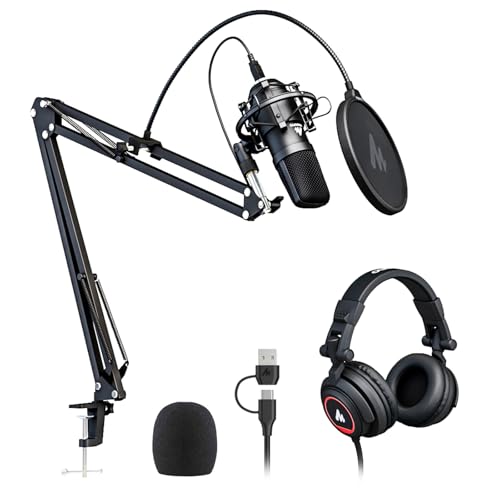
| FIFINE A6TW | RGB, mute, gain knob, boom arm and pop filter, PS5/Mac/Windows | Budget | Starter kits that include an arm |
| FIFINE AmpliGame A6T | Boom arm, pop filter, shock mount, gain control, PC and PS4/5 | Mid-range | Kit buyers who want a shock mount |
| Logitech Blue Yeti | Four pickup patterns, Blue VO!CE effects, plug and play | Premium | Multi-voice and flexible setups |
| Logitech Blue Yeti Nano | Compact USB mic for PC and Mac | Mid-range | Small desks |
Tiers are relative to this set, based on feature lists and brands in each title; no current prices were supplied.
Mic distance guide: where should the mic sit?
Distance changes your sound more than the model does. As a general acoustic rule, halving the mouth-to-mic distance raises your voice by about 6 dB relative to the background in ideal conditions, which is why a close mic reduces room noise without any software. These are estimates, not measurements, and they assume a cardioid mic pointed at your mouth.
| Distance from mouth | Likely effect | Best for |
|---|---|---|
| About 5 cm (2 in) | Strong voice and plosives, needs a pop filter | Loud rooms with a dynamic mic |
| About 10 to 15 cm (4 to 6 in) | Good balance of voice and room | Most streamers with a boom arm |
| About 30 cm (12 in) | Room echo and keyboard noise rise | Desk stands in treated rooms |
Mic by mic
FIFINE AmpliGame AM8
The title describes a USB/XLR dynamic mic with an RGB light, a mute button, a headphone jack and a desktop stand. Dynamic capsules are typically less sensitive to distant noise, which helps if your keyboard or fan is close, though they need to be near your mouth. The dual USB/XLR connection leaves room to grow into an interface later, so you can begin on USB and keep the mic when you add an audio interface. Treat the RGB as decoration that you can switch off.
Pros
- USB and XLR connections
- Dynamic capsule can suit noisy rooms
Cons
- Must be close to the mouth
- Desk stand only per the title
Who it’s for: Streamers who want an upgrade path and a less sensitive mic.
FIFINE AmpliGame AM6
A USB condenser with a ChatMix dial, tap-to-mute, RGB control, a gain knob, a headphone jack and cardioid pickup. The ChatMix dial balances game and chat audio on the mic itself, which saves digging through settings. The noise cancellation wording is a seller claim, so expect modest help rather than a silent background. Because it is a condenser, a boom arm and a quiet room will do more for you than the noise features.
Pros
- ChatMix dial
- Tap mute and gain knob
Cons
- Condenser picks up room sound
- Title says nothing about a boom arm
Who it’s for: Discord and Twitch players who want hardware controls.
MAONO AU-A04H USB Microphone Kit
The title lists a 192kHz/24bit condenser cardioid mic for recording, YouTube and streaming, with headphone support and Mac and Windows compatibility. The words “kit with headphone” are ambiguous, so check whether headphones are included or whether it just has a headphone jack. The 192kHz figure is a spec, not a promise of better sound, since streaming platforms compress voice heavily anyway. Treat it as a budget all-rounder and check reviews for the stand and the headphone output.
Pros
- Compatible with Mac and Windows
- Cardioid pickup
Cons
- Ambiguous kit contents in the title
- No mute button mentioned
Who it’s for: Beginners who want a recording and streaming mic in one.
FIFINE A6TW Gaming USB Microphone Kit
A kit with RGB lighting, a mute button, a gain knob, cardioid pickup, plug and play use on PS5, Mac and Windows, and a boom arm and pop filter. It is close in spirit to the A6T below, so the two are near-duplicates. Having an arm in the kit is a real saving, since a separate arm is a common extra purchase. The gain knob and mute button sit on the mic, which keeps adjustments off your screen.
Pros
- Boom arm and pop filter included
- PS5, Mac and Windows named
Cons
- Near-duplicate of the A6T listing
- RGB adds nothing to voice quality
Who it’s for: First-time streamers who want everything in one box.
FIFINE AmpliGame A6T USB Gaming Microphone Kit
This kit includes a mute button, an RGB indicator, a boom arm, gain control, a pop filter and a shock mount, with PC and PS4/5 named. The shock mount helps isolate the mic from desk vibration. Decide between this and the A6TW by checking which accessories each listing really includes, because kit contents can differ even when names look alike. Also check the clamp size of the arm against the thickness of your desk.
Pros
- Shock mount included
- Boom arm and pop filter
Cons
- Overlaps with the A6TW
- Title gives no detail on sample rate
Who it’s for: Buyers who want a shock mount in the box.
Logitech Blue Yeti USB Microphone
A USB condenser with four pickup patterns, Blue VO!CE effects, plug-and-play use on PC and Mac, and a Blackout finish. Four patterns let you change from solo cardioid to a bidirectional or omni setting for guests. It sits on its own stand, so a boom arm is a separate buy. Switching patterns is done with a dial on the mic, so keep it on cardioid for solo play and try the others only when you need them.
Pros
- Four pickup patterns
- Plug and play
Cons
- Sensitive to desk noise
- Stand takes up desk space
Who it’s for: Streamers who sometimes have a guest or want flexibility.
Logitech Blue Yeti Nano
The title describes a compact USB mic for gaming, streaming, podcasting and recording on PC and Mac. It has fewer features in the title than the full Yeti. Its smaller footprint suits crowded desks, but you should check whether pickup patterns are limited on this version. Treat it as the compact option for anyone short on desk depth who still wants a familiar name.
Pros
- Compact size
- Plug and play
Cons
- Fewer features listed
- No boom arm in the kit
Who it’s for: Small desks and simple streaming setups.
How we picked these
We are an editorial team working from published specifications, manufacturer documentation and buyer reviews. Nobody on the team used or measured these units. We kept only listings that are clearly USB microphones and noted two near-duplicate kits. Spec words in titles are treated as seller claims.
What to look for in a streaming mic
Pickup pattern and noise rejection
Cardioid is the default for solo streaming because it focuses on the front and rejects the sides and rear. Multi-pattern mics such as the Yeti add bidirectional and omnidirectional modes for guests. Dynamic mics are less sensitive to distant sounds, while condensers capture more detail and need a quieter room. If you stream next to a mechanical keyboard, a dynamic or a closely placed cardioid condenser is usually the sensible direction.
USB or XLR
USB mics include their own converter and are the simplest start. XLR mics need an interface, but they allow you to upgrade parts later. The AM8 lists both, which is rare at this tier. If your USB ports act up, our guide to powered USB hubs versus motherboard ports explains why devices drop out.
Controls: mute, gain and monitoring
A physical mute button is the most useful feature on a stream because it works without a window. A gain knob lets you set levels without software. Headphone monitoring on the mic lets you hear yourself with no delay, which avoids the echo of software monitoring. If you also game with a headset, check how your PC treats two audio devices before you buy.
Stand, boom arm and shock mount
The desk stand that comes with most USB mics picks up keyboard thumps. A boom arm and shock mount lift the mic away and isolate vibration. If you need a headset instead, see our headsets for streaming on PC list.
RGB and price
Lighting does not change your voice. A mic with fewer gimmicks and a better arm often sounds better in practice. Compare what is in the box, not the number of features in the title. Price is best judged by what you would otherwise have to buy separately, such as an arm, a pop filter or a shock mount, which together can add a noticeable amount to a bare mic.
Mistakes buyers make
- Placing the mic at arm’s length: distance dominates sound quality, so move it closer, ideally with a boom arm so it stays out of your line of sight.
- Turning the gain up to fix a quiet voice: it also raises keyboard and fan noise, so move the mic first.
- Ignoring the stand: a mic on a bare desk transmits every tap and bump.
- Buying for pickup patterns you never use: cardioid is enough for most solo streams, so extra patterns are only worth paying for if you host guests.
- Skipping the pop filter: plosives are harsh when speaking close to a condenser, and a cheap foam or mesh screen softens them without changing the tone.
Verdict
For a simple, complete start, the FIFINE A6TW or A6T kits give you an arm, a pop filter and a mute button in one box. The AM6 is the choice for ChatMix lovers, and the AM8 is best for noisy rooms and future XLR use. The Blue Yeti suits flexible setups, and the Nano suits small desks. For a closer look at premium options, see Elgato Wave 3 vs Shure MV7.
Streaming mic questions answered
Is a dynamic or condenser USB mic better for streaming?
Condenser mics are generally more sensitive and pick up more detail, which suits a quiet room, while dynamic mics are usually less sensitive to background noise and fit noisy desks. In this set the AM8 is the dynamic option, and the rest are condensers. Your room, not the mic type alone, should drive the choice.
Do I need a boom arm for a USB streaming mic?
A boom arm gets the mic close to your mouth and off your desk, which cuts keyboard thump and lets you point the capsule correctly. Two listings here include an arm in the kit, while others come with a desktop stand. If your listing has only a stand, a separate arm is a common upgrade.
What does a mic pickup pattern mean?
It describes the directions from which the mic picks up sound. Cardioid favours the front and rejects the sides and rear, which suits solo streaming. The Blue Yeti listing mentions four patterns, useful for interviews or shared mics. Most gaming mics in the set are cardioid, which keeps the voice forward and reduces room noise from the sides and rear, so aim the front of the capsule at your mouth.
Can I use these mics on a PS5 or just a PC?
Some titles name PS4, PS5, Mac and Windows, while others list only PC and Mac. USB mics usually work as plug-and-play devices, but console support depends on the platform. Confirm your exact platform in the listing, and check whether features like RGB or ChatMix need software on a PC, so read the listing before you buy.
Is USB or XLR better for a stream setup?
USB is simpler, since the mic plugs straight into the computer and includes its own converter. XLR needs an interface or mixer but allows upgrades later. The AM8 title lists both USB and XLR, so you can start with USB and change later. For most beginners, plain USB is enough, and you can move to XLR later if you outgrow it or want to add a mixer or audio interface.
Related guides
- When I Turn On Record Game In Background On Gamebar. Gamebar Crashes, What Do I Do?
- How To Reduce Background Noise On A Streaming Microphone
- Poly Computer Accessories Company Streaming Evaluation