
For most gamers, the onboard Wi-Fi that ships with a modern motherboard is good enough, because many boards now carry the same class of Wi-Fi 6E or Wi-Fi 7 chips that are sold as add-in cards. A separate Wi-Fi card makes sense when your board has no wireless at all, when the built-in module is an older standard, or when you want better antenna placement. For competitive play, though, a wired Ethernet connection beats both.
As an Amazon Associate we earn from qualifying purchases at no extra cost to you.
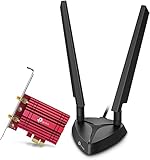

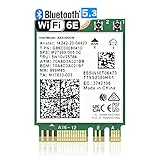

Top 3 picks at a glance
What “Onboard” and “Card” Really Mean
Onboard Wi-Fi usually means a small wireless module, most often in the M.2 E-key format, soldered or slotted onto the motherboard, with antenna connectors on the rear I/O panel. A Wi-Fi card is an add-in device that either sits in a PCIe slot with its own antennas or uses the same M.2 E-key slot as a replaceable module. Intel’s wireless lineup, which appears on both boards and cards, spans Wi-Fi 6E and Wi-Fi 7 products, and Intel also lists Killer-branded variants aimed at gamers. In other words, the silicon can be identical; the differences lie in the standard supported, the antennas and the driver.
Quick Comparison
| Factor | Onboard Wi-Fi | Wi-Fi card (PCIe or M.2 module) |
|---|---|---|
| Installation | Nothing to install; attach the supplied antenna | Install the card, connect antennas, add internal USB header for Bluetooth if the card needs it |
| Wi-Fi standard | Fixed by the board generation unless the module is swappable | Choose the standard you want, as long as the PC supports it |
| Antennas | Basic pair, attached at the rear panel | Often larger or magnetic base antennas that can sit higher on the desk |
| Upgradability | Sometimes an M.2 E-key module you can swap, sometimes soldered | Easy to replace later |
| Slot use | None | A PCIe slot, or the M.2 E-key socket if one is free |
| Cost to you | Included with the board | Extra purchase |
| Cable clutter | Minimal | One more card, antenna cables and sometimes a USB lead |
Does a Card Give Lower Ping?
Not by itself. Latency depends on signal quality, interference, the Wi-Fi standard in use, and the router. A card with the same chip as the onboard module performs the same if the antennas and signal conditions are the same. Where a card can help is practical: antennas that you can move to a better spot, a newer standard, or a replacement for a flaky or outdated built-in module. Reviewers regularly point out that antenna position and router distance affect results more than the brand name on the adapter, so treat claims of dramatically lower ping from a particular card with caution.
Wi-Fi Standard Matters More Than Form Factor
| Standard | Notable feature | Practical note for gamers |
|---|---|---|
| Wi-Fi 5 (802.11ac) | 5 GHz only for the faster modes | Fine for light use, increasingly dated |
| Wi-Fi 6 (802.11ax) | Better handling of many devices | Good baseline for crowded homes |
| Wi-Fi 6E | Adds the 6 GHz band | Needs a 6E router to benefit; the extra band is often less crowded |
| Wi-Fi 7 (802.11be) | Wider channels and multi-link operation | Needs a Wi-Fi 7 router and a compatible adapter; benefits depend on the router and environment |
The adapter and router both have to support a standard before you see any benefit. Buying a Wi-Fi 7 card and pairing it with an older router means the link will use the older router’s capabilities.
Antennas, Placement and Case Effects
A PC case is a metal box. Antennas screwed onto the rear panel sit behind the case and next to cables, which can weaken the signal. Many add-in cards ship with antennas on an extension base that can sit on top of the desk or case. Some motherboards also ship with a detachable antenna, and cables can be extended with an accessory if the maker supports it. Keep antennas upright, away from the back of a monitor, and not coiled around power cables.
Bluetooth and Other Extras
Most combined Wi-Fi and Bluetooth modules use an internal USB connection for Bluetooth. Onboard solutions handle that wiring for you. With a PCIe card you often have to connect a small cable to a motherboard USB header, and if you skip it, Wi-Fi may work while Bluetooth does not. Check the card’s installation guide for the exact connector.
Driver and Software Considerations
Whichever route you take, install the driver from the board or adapter maker. Intel’s support pages direct users to its own driver and support assistant tool for its wireless products, and note that some older adapters require unpairing Bluetooth devices before a driver update. After a fresh Windows install, the Wi-Fi driver is sometimes missing, so keep a driver copy on a USB stick or use a wired connection to download it.
When Onboard Is Enough
- Your motherboard lists Wi-Fi 6E or Wi-Fi 7 and your router matches.
- The PC sits in the same room as the router or within a short distance.
- You mostly play casual or single-player games, and short ping spikes are acceptable.
- You want to avoid more parts and cables.
When a Card Is Worth It
- The motherboard has no wireless or only an older standard.
- The onboard module is faulty, disabled or soldered and cannot be replaced.
- You want the antenna on top of the desk for a better signal.
- You are upgrading to a newer router standard and want to match it.
Pick-X-If Table
| Pick this | If |
|---|---|
| Onboard Wi-Fi | Your board already has a current standard and the signal is steady |
| PCIe Wi-Fi card | Your board lacks wireless or you want repositionable antennas |
| M.2 E-key replacement module | Your board has a free socket and you want a newer standard without using a PCIe slot |
| USB Wi-Fi adapter | You need a temporary fix or a laptop-style solution; reviewers generally regard these as less ideal for a desktop than internal options |
| Ethernet cable | You can run one; it avoids interference altogether |
Compatibility Notes Before Buying a Card
- Check the motherboard manual for a free M.2 E-key socket or PCIe x1 slot.
- Confirm the operating system supports the adapter. Wi-Fi 7 support depends on a recent Windows version and driver, so check the adapter maker’s page.
- Check that the router supports the same Wi-Fi standard and band.
- If the card includes Bluetooth, locate an internal USB header.
- Power the PC off and unplug it before opening the case.
Common Mistakes
- Leaving the antennas unplugged or screwed on loosely, which can cause very poor reception.
- Buying a Wi-Fi 7 card for a router that supports only Wi-Fi 5.
- Assuming a more expensive card guarantees lower ping.
- Forgetting the Bluetooth USB lead.
- Not removing or disabling the old onboard adapter when two adapters conflict. Disabling in Device Manager or the BIOS is usually enough, though menu names vary by board.
Frequently Asked Questions
Is onboard Wi-Fi worse than a card?
Not inherently. Many boards carry the same class of module as add-in cards. The difference lies in the supported standard and antenna placement, so a modern board with a decent antenna can match a card.
Can I upgrade my motherboard’s Wi-Fi?
If the Wi-Fi module sits in a removable M.2 E-key socket, it can sometimes be replaced. Some boards have it soldered, so check the manual or the board maker’s specification page.
Do I need a Wi-Fi card if I use Ethernet?
No. A wired connection avoids wireless interference entirely, and a Wi-Fi adapter then serves only as a backup or for Bluetooth.
Will a Wi-Fi 7 card improve my games?
Only when the router supports Wi-Fi 7 and signal conditions allow it. Game traffic needs little bandwidth, so the benefit is mainly better handling of congestion rather than higher speeds.
Why does my Wi-Fi drop out on a desktop?
Common causes include antennas hidden behind the case, interference, a missing or outdated driver and adapter power saving. Microsoft’s Wi-Fi troubleshooting guidance includes updating or reinstalling the driver and disabling power saving.
Related guides
More from Amazon
Programs that pair well with the guide above. Offers and eligibility are set by Amazon and may change.
Free shipping on eligible items, Prime Video and more. Eligible new members can start with a free trial.
Start a Prime free trialAd-free music streaming. Eligible new subscribers can start with a free trial.
Try Music Unlimited freeA Prime membership for ages 18-24 with a trial period. Eligibility is set by Amazon.
See Prime for Young AdultsAudiobooks and podcasts to listen to on the go. Eligible new members can start with a free trial.
Try Audible freeAs an Amazon Associate we earn from qualifying purchases.


