- Top Pick: Logitech G Pro Flight Rudder Pedals
- Runner-up: Thrustmaster TFRP Flight Rudder Pedals
- Also consider: CH Products Pro Pedals USB Flight Simulator Pedals (300-111)
Rudder pedals are the control that separates a desk with a joystick from a cockpit that behaves like an aircraft. Your feet take over the jobs your hands cannot spare attention for: holding the nose aligned in a crosswind, coordinating turns, steering on the ground, and squeezing differential toe brakes to pivot on a taxiway. If you fly general aviation aircraft, warbirds, taildraggers, or helicopters in a simulator, pedals become the missing half of the control set.
The five sets in this guide differ in mechanism — sliding rails, self-centering pedals with adjustable damping, and a suspended pendular design — and in how finely their axes are sensed. All five give you a rudder axis plus independent left and right toe brakes, three axes in total, and all connect to a PC over USB. One honest warning: pedals never plug straight into a console, and four of these five are PC-only, so platform fit is the first filter.
As an Amazon Associate, we earn from qualifying purchases.
Top 3 picks at a glance
Quick answer
Every pick here gives you a rudder axis plus independent left and right toe brakes over USB on PC. The Logitech G Pro Flight is the straightforward default, the CH Pro Pedals suit PC and Mac loyalists, the TFRP is the sliding-rail value pick, the TPR is the Hall-effect flagship, and the legacy Saitek listing covers the same design family under its older branding.
Logitech G Pro Flight Rudder Pedals
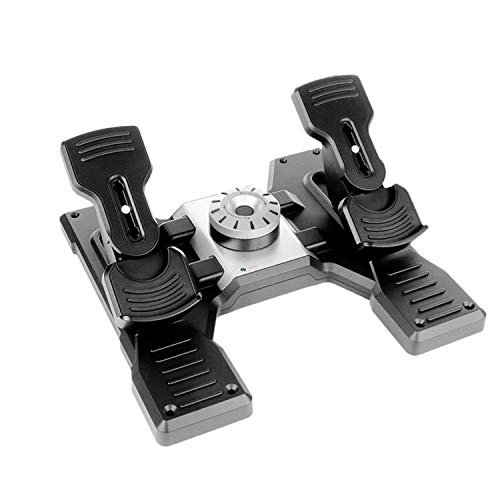
This is the current Logitech G listing, model 945-000068, and the set most home simmers should look at first. The pedals are self-centering with adjustable damping, so you can set how firmly they return to center and how much resistance you feel through the travel. A light return suits helicopters and small corrections; a firmer setting helps hold a steady deflection on a crosswind final.
The listing’s description specifies a 9-bit rudder axis and 7-bit toe-brake axes, with differential braking from the independent toe brakes. The foot rests adjust for size and use a non-slip material. Compatibility is listed as Windows 10, Windows 8.1, and Windows 7 over USB. Be clear about the limits: this is a PC-only set with no console path, and the listing makes no Hall-effect claim, so judge it on mechanism and damping, not sensor marketing.
| Spec | Detail |
|---|---|
| Brand | Logitech G |
| Product | Pro Flight Rudder Pedals (model 945-000068) |
| ASIN | B07R21FJD8 |
| Key specs | Self-centering, adjustable damping; 9-bit rudder, 7-bit toe brakes; adjustable non-slip foot rests; USB; PC only |

CH Products Pro Pedals
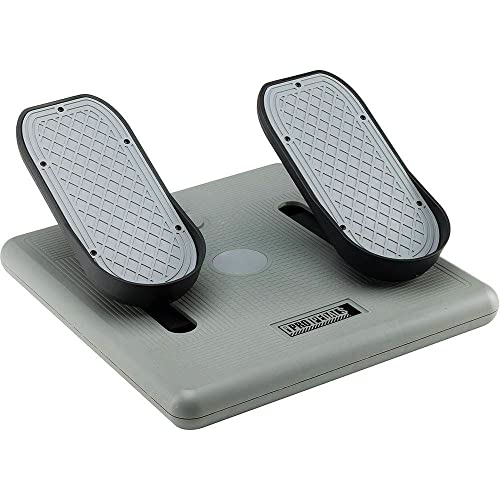
The CH Pro Pedals, model 300-111, are the long-running veteran of this roundup and the only pick here that also speaks to Mac users. You get three axes of control: X and Y for the left and right toe brakes, and a Z axis for the self-centering sliding rudder. The design supports realistic heel-toe differential brake control, which taildragger and warbird pilots use constantly when taxiing in a crosswind.
A large, sturdy base keeps the unit planted, and the 7-foot USB cable gives routing freedom from a cockpit frame or desk. A distinctive extra is the locking rudder axis, which lets the pedals emulate gas and brake inputs for driving titles; the listing ties that feature to CH USB devices. The listing’s operating-system list is a legacy one, so treat this as plug-and-play USB for PC and Mac and do not expect Windows 11 promised by name. The listing states no sensor type, so buy this set for its mechanism, base, and track record.
| Spec | Detail |
|---|---|
| Brand | CH Products |
| Product | Pro Pedals USB Flight Simulator Pedals (300-111) |
| ASIN | B0000512IE |
| Key specs | 3 axes (toe brakes plus sliding rudder); heel-toe differential braking; large base; 7-foot USB cable; locking rudder axis; PC/Mac USB |
Thrustmaster TFRP Rudder Pedals
The TFRP, from the 2960764 model family, is the sliding-rail value pick. Its S.M.A.R.T (Sliding Motion Advanced Rail Track) system runs the pedals on four industrial-grade aluminum slide rails, giving a long, linear travel many simmers prefer for smooth rudder inputs. The self-centering rudder axis is listed at 1024 values, and the two differential brake pedals are large — 10 inches (25 cm), sized for a size 12/45 shoe — with 15 degrees of brake pivot travel and removable heel rests.
Connection is by USB and/or the proprietary RJ12 link, and on PC the pedals work with all joysticks via Thrustmaster drivers, with T.A.R.G.E.T software available. The current listing title names PS5, Xbox Series X|S, and PC, but read that carefully: on console the TFRP works only through a Thrustmaster stick or yoke, never directly into the console itself. Two honest limits: rail tension is fixed, and Thrustmaster states no sensor type for this set, so do not buy it expecting Hall-effect hardware.
| Spec | Detail |
|---|---|
| Brand | Thrustmaster |
| Product | TFRP Flight Rudder Pedals |
| ASIN | B015PII6YI |
| Key specs | S.M.A.R.T sliding rails; rudder axis at 1024 values; large 10-inch pedals; removable heel rests; USB/RJ12; console via Thrustmaster stick/yoke only |
Thrustmaster TPR Pendular Rudder
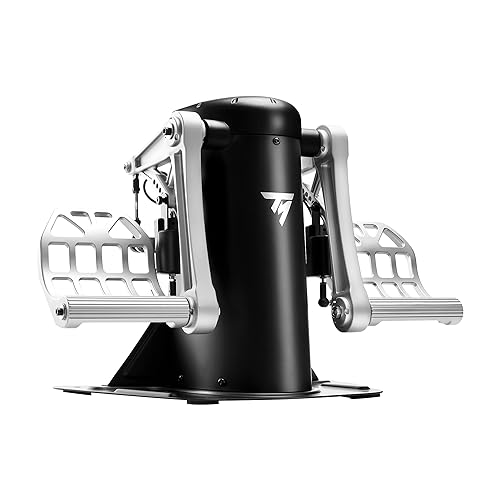
The TPR, model 2960809, is the flagship of this roundup and the only pendular design here. Its PENDUL_R mechanism suspends the pedals so they swing like the rudder pedals in many real aircraft, instead of sliding or pivoting from the floor. H.E.A.R.T HallEffect AccuRate Technology uses 3D Hall-effect magnetic sensors listed at 16-bit resolution — 65,536 values — on each of the three axes. That is the finest sensing in this guide by a wide margin, showing up as smoother small corrections around center.
The two metal differential brake pedals are user-attached, spring positions are adjustable with two springs included, and the pedals adjust into five positions at angles between 35 and 75 degrees. The metal base carries four M6 mounting holes, making the TPR the natural choice for a fixed cockpit frame. T.A.R.G.E.T software is supported on PC. The trade-off is simple: a PC-only set with no console path, built for simmers who know pedals are central to how they fly.
| Spec | Detail |
|---|---|
| Brand | Thrustmaster |
| Product | TPR Pendular Rudder (model 2960809) |
| ASIN | B07DK8N8JG |
| Key specs | PENDUL_R pendular mechanism; 3D Hall-effect, 16-bit on all 3 axes; metal brake pedals; adjustable springs/angles; M6 holes; PC only |
Saitek Pro Flight Rudder Pedals (legacy listing)

This pick needs an honest label: it is the older Mad Catz/Saitek-branded listing of the same pedal design family that Logitech now sells as the first pick in this guide. It is not a different design. It offers the earlier branding of a proven layout, described in its own listing as letting you control rudder and toe brakes with your feet, with an adjustable, smooth action.
Compatibility, as listed, is Windows on PC over USB — nothing more is claimed, and nothing more should be assumed. Its description is thinner than the current Logitech listing, and none of the newer listing’s figures carry over to it. Choose this set only if you knowingly want the Saitek-branded version, for example to match a Saitek-era cockpit. If you want this design in its current form, buy the Logitech G listing above.
| Spec | Detail |
|---|---|
| Brand | Saitek (Mad Catz) |
| Product | Pro Flight Rudder Pedals (legacy listing) |
| ASIN | B000H67DDY |
| Key specs | Rudder and toe-brake control per the listing; adjustable, smooth action; USB; Windows PC; legacy predecessor of the Logitech G design family |
How to Choose
Start with your platform, because it eliminates most of the field. All five sets connect to a PC over USB, and the CH Pro Pedals add Mac support. Console simmers have exactly one route: the TFRP, only when connected through a Thrustmaster stick or yoke. No rudder pedal set plugs directly into an Xbox or PlayStation.
Next, pick a mechanism you will enjoy using for years. Sliding rails, on the TFRP and the CH rudder axis, give linear, predictable travel. Self-centering pedals with adjustable damping, the Logitech design, let you tune return strength to the aircraft you fly most. The pendular TPR hangs its pedals and swings them, which many pilots find closest to real aircraft feel, especially for helicopters and warbirds.
Then check resolution. For sensing finesse, the TPR’s 16-bit Hall-effect axes are the ceiling, the TFRP lists 1024 values on its rudder axis, and the Logitech lists 9-bit rudder and 7-bit toe-brake resolution. Finally, plan the fit: pedals get pushed hard and walk across smooth floors, so favor a large base, non-slip contact, or the TPR’s mounting holes.
Who should skip
Console-only simmers should skip this entire category unless they already own, or plan to buy, a Thrustmaster stick or yoke for the TFRP route; there is no direct-to-console pedal option here. Airliner-focused simmers who rarely fly crosswinds or taildraggers will get the least from any pedal set. Buyers set on boutique direct-store pedal brands will not find them in this Amazon-based roundup. And if you are tempted by the legacy Saitek listing because it looks like a second design alongside the Logitech, skip it — same design family, older branding; the current Logitech listing is the cleaner buy.
FAQ
Do rudder pedals work on Xbox or PS5?
Not directly. Pedals never plug straight into a console. Only the Thrustmaster TFRP has a console route, and it works on console only through a Thrustmaster stick or yoke. The Logitech, CH, Saitek, and TPR sets are PC designs, with the CH set also supporting Mac.
What do toe brakes actually do in a flight sim?
Each pedal carries an independent brake axis: the left toe brakes the left wheel, the right toe the right wheel. Using them unevenly — differential braking — steers the aircraft tightly on the ground, helps hold the centerline in a crosswind takeoff roll, and is essential for taildraggers. All five sets here include both toe brakes.
Sliding rails or pendular pedals: which feels better?
Neither is objectively better; they feel different. Sliding-rail sets like the TFRP move in a straight line and feel consistent and predictable. The pendular TPR suspends its pedals so they swing in an arc, which many simmers find closer to real aircraft and better for fine helicopter work. The damping-adjustable Logitech sits between the two for general flying.
Do I need T.A.R.G.E.T software for these pedals?
Only the two Thrustmaster sets use T.A.R.G.E.T, Thrustmaster’s programming software for PC, and even there the pedals work through the standard drivers. The Logitech, CH, and Saitek sets connect over USB without that software layer. Treat software as a minor factor compared with platform, mechanism, and axes.
Final Verdict
For most home sim rigs, the Logitech G Pro Flight is the right default: current listing, adjustable damping, honest mid-range resolution. Step up to the Thrustmaster TPR if pedals are the heart of your flying and you want pendular feel with 16-bit Hall-effect sensing on every axis. The TFRP earns its place as the sliding-rail value pick and the only console route, via a Thrustmaster stick or yoke. CH Pro Pedals remain the pick for PC and Mac loyalists. The legacy Saitek listing is for buyers who specifically want the older branding of the Logitech design family — everyone else should buy the current listing.
Related guides
More from Amazon
Programs that pair well with the guide above. Offers and eligibility are set by Amazon and may change.
Free shipping on eligible items, Prime Video and more. Eligible new members can start with a free trial.
Start a Prime free trialAd-free music streaming. Eligible new subscribers can start with a free trial.
Try Music Unlimited freeA Prime membership for ages 18-24 with a trial period. Eligibility is set by Amazon.
See Prime for Young AdultsAudiobooks and podcasts to listen to on the go. Eligible new members can start with a free trial.
Try Audible freeAs an Amazon Associate we earn from qualifying purchases.