
A wrist rest for a gaming mouse has a harder job than a keyboard rest. Your mouse hand does not stay still — it lifts, swipes and re-centres hundreds of times in a session — so a rest that anchors the wrist to one spot can fight your aim instead of helping it. The best wrist rest for gaming mouse use supports the heel of the hand while still letting the mouse travel, which is why this guide includes three different designs: a compact gel-and-foam cushion from a gaming brand, an angled memory foam rest shaped specifically for gaming mice, and a gliding rest that moves with your hand across the pad.
Every product below is a wrist rest designed for mouse use — no keyboard rests, and no mice. Sizes, materials and construction details come from the manufacturers’ information and the Amazon US listings, so you can compare the footprint against your own mouse pad before ordering. If your wrist aches during long sessions, one of these designs addresses the likely cause; the buying factors explain which design suits which kind of discomfort.
Disclosure: As an Amazon Associate, we earn from qualifying purchases. Product details and availability can change; check the Amazon listing before you buy.
Top 3 picks at a glance

Quick picks at a glance
| Product | ASIN | Best for |
|---|---|---|
| HyperX Wrist Rest – Mouse | B09SGTWKWV | Gamers who want a cool gel surface for long sessions |
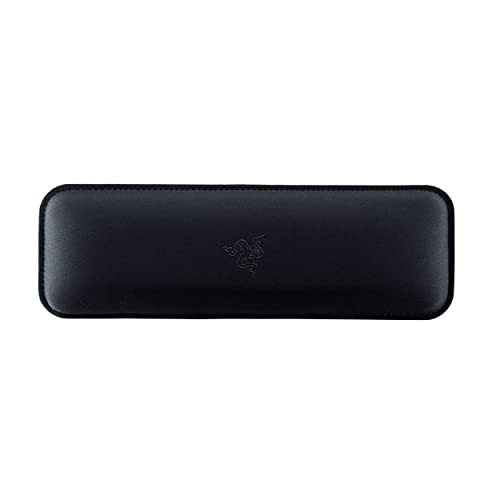
| Razer Ergonomic Wrist Rest for Gaming Mice | B07733H7VP | Angled support shaped specifically for a mouse hand |
| DeltaHub Carpio 2.0 | B098P8C3BT | Players who swipe widely and need the rest to glide along |
| Arisase Cloud Wrist Rest for Mouse | B0C4TQV23Q | A soft, raised cushion with a wipe-clean cover |
What matters most in a mouse wrist rest
Static cushion or gliding design is the first decision. A static rest sits in one place and supports the wrist during pauses and small movements; it suits low-sensitivity players less well, because big swipes leave the rest behind. A gliding rest straps lightly to the hand and travels with it on low-friction feet, supporting the wrist through the whole range of movement.
Height decides whether it helps or harms. The rest should lift the wrist just enough that the hand sits roughly level with the mouse, keeping the wrist in a neutral line rather than bent upward. A rest that is too tall forces the opposite bend. The picks here are low-profile designs measured in millimetres, not inches of foam.
Material controls heat and firmness. Gel-infused memory foam feels cool at first contact and moulds slowly; plain memory foam is warmer and softer; a shaped foam core under leatherette holds a firmer, more defined angle. For gaming, firmer support usually beats a deep, soft sink, because the hand needs a stable platform to pivot from.
The base must not wander. Every pick here has an anti-slip rubber base or, in the gliding case, PTFE feet designed to move deliberately. A rest that slides unexpectedly mid-game is worse than none, so base grip is a genuine buying factor rather than a footnote.
Footprint has to fit your pad and play style. Mouse rests are small — roughly 9 to 23 cm wide in this guide — but they still consume pad space. Measure the area below your mouse’s resting position, especially if you use a compact pad, and remember a static rest occupies the same spot your wrist lands after every swipe.
Cover material decides upkeep. Fabric covers feel soft and can pick up dust and sweat over months of play; leatherette and PU covers wipe clean in seconds. Gaming desks are hard on soft goods, so this choice has real long-term consequences.
HyperX Wrist Rest – Mouse

ASIN: B09SGTWKWV — View on Amazon US
| Spec | Detail |
|---|---|
| Dimensions | 228 × 88 mm (mouse size, model 4Z7X2AA) |
| Fill | Cooling gel-infused memory foam |
| Base | Anti-slip natural rubber |
| Cover | Fabric with anti-fray stitched edges |
| Compatibility | Sized for use with a mouse |
HyperX sells its wrist rest in several lengths, and the one that belongs in this guide is the mouse size: a 228 × 88 mm cushion that sits under the mouse hand only. Its fill pairs memory foam with a cooling gel layer, which addresses the most common complaint about foam rests — the surface warming up and feeling clammy an hour into a session.
Why it fits gaming. The gel layer keeps first contact cool and slows the build-up of heat, the foam underneath gives a measured amount of sink rather than a hard ledge, and the natural rubber base holds the rest where you put it during play. The stitched, anti-fray edges matter more than they sound: the edge of a mouse rest is exactly where a sliding wrist wears a cover out, and stitching is what stops the fabric separating there. At 228 mm wide it also leaves room for the wrist to roll slightly side to side, which suits palm-grip players who plant the heel of the hand and pivot.
Trade-offs. It is a static rest, so wide, low-sensitivity swipes will carry your wrist off it; claw and fingertip players who keep the wrist raised may barely touch it. The fabric cover needs a brush or a damp cloth rather than a quick wipe, and the mouse size must be selected on the listing — the same product family includes keyboard lengths that would be wrong for this job.
Best for / Skip if. Best for palm-grip players in warm rooms who rest the heel of the hand between movements. Skip it if you play at very low sensitivity with long swipes — look at the gliding Carpio below.
Razer Ergonomic Wrist Rest for Gaming Mice
ASIN: B07733H7VP — View on Amazon US
| Spec | Detail |
|---|---|
| Dimensions | Approx. 91.7 × 83.7 × 21 mm |
| Fill | Memory foam cushion |
| Surface | Leatherette cover |
| Shape | Angled incline, contoured for a mouse hand |
| Base | Anti-slip rubber |
Razer’s rest is the only pick here designed exclusively for gaming mice rather than adapted from office use, and it shows in the shape: a compact pad, roughly 92 × 84 mm, with an angled incline that meets the wrist where it naturally rests beside the mouse. The memory foam core is firmer than a typical gel pad, and the leatherette surface is smooth enough that the wrist can slide across it slightly rather than gripping.
Why it fits gaming. The incline is the point. Instead of a flat cushion that the wrist flops onto, the angled face supports the wrist in a neutral line while the hand stays on the mouse, which suits players who keep contact with the rest during play rather than only between fights. The small footprint takes almost no pad space — useful on compact pads — and the anti-slip rubber base keeps that small pad from skating away. The leatherette cover also wipes clean, which suits a product that lives under a gaming hand for years.
Trade-offs. The compact size is a commitment: players with large hands or a wide resting stance may find the wrist overhangs the edges. The firm foam will feel hard to anyone expecting a soft gel cushion, and there is one shape only, with no sizes to choose from.
Best for / Skip if. Best for players who keep the wrist down while aiming and want support shaped for that exact posture. Skip it if you prefer a soft, wide cushion to rest the whole heel of the hand on.
DeltaHub Carpio 2.0
ASIN: B098P8C3BT — View on Amazon US
| Spec | Detail |
|---|---|
| Design | Gliding wrist rest that moves with the hand |
| Feet | PTFE gliding feet |
| Contact pads | Contoured silicone pads |
| Sizing | Small and Large sizes; right- and left-handed versions |
| Extras | Optional adjustable strap; this listing is Large, right-handed, black |
The Carpio 2.0 rejects the static model entirely. It is a small contoured rest that sits under the heel of your hand and glides across the pad on PTFE feet as you move the mouse, with silicone pads shaped to cradle the base of the palm. The idea is that support should follow the wrist through a full swipe instead of waiting at one home position, and an optional strap can keep it attached during fast play.
Why it fits gaming. This is the only design here that works at low sensitivity: arm and wrist travel as far as they need while the palm stays elevated and supported, so the wrist does not drag on the pad surface — a common source of both friction and fatigue in long sessions. DeltaHub developed the shape with medical input and sells it in two sizes and both hand orientations, which matters because a gliding rest has to match the hand it rides under. On a hard or cloth pad the PTFE feet move with very little resistance.
Trade-offs. There is an adjustment period: the sensation of something travelling under your palm feels odd for the first sessions, and some players never take to it. It also works best on a smooth, firm surface; on a very soft or thick pad the feet can dig in rather than glide. And because it is sized, you need to choose the size and hand version carefully on the listing.
Best for / Skip if. Best for low-sensitivity players and anyone whose wrist drags on the pad during long swipes. Skip it if you know you dislike anything attached to or moving under your hand.
Arisase Cloud Wrist Rest for Mouse

ASIN: B0C4TQV23Q — View on Amazon US
| Spec | Detail |
|---|---|
| Design | Raised cloud-shaped mouse wrist cushion |
| Fill | Memory foam |
| Cover | PU leather, wipe-clean |
| Base | Anti-skid base |
| Use | Standalone rest for the mouse hand |
The Arisase rest takes the softest approach in this guide: a raised, cloud-shaped cushion of memory foam under a PU leather cover, shaped to sit under the wrist of the mouse hand. The curved top gives a larger, more forgiving contact area than a flat pad, and the raised profile suits players who rest the wrist itself, rather than just the heel of the palm, while they play.
Why it fits gaming. The PU leather cover is the practical highlight — it wipes clean in seconds, which matters for a cushion that absorbs long sessions, snacks and desk dust. The memory foam fill is soft and slow to rebound, so the wrist settles into a consistent pocket, and the anti-skid base keeps that pocket in place. For players whose main complaint is a hard desk edge or a bare desk surface under the wrist, this is the most direct fix in the guide.
Trade-offs. Softness is the compromise: the deep sink that feels comfortable at rest gives a less stable platform during precise aim than the firmer Razer or HyperX, and the raised height will not suit players who keep the wrist nearly flat. It is also a static design, so it shares the low-sensitivity limitation of the other cushions.
Best for / Skip if. Best for comfort-first players on hard desks who want a soft rest that is easy to keep clean. Skip it if you prioritise a firm, stable platform for competitive aiming.
How to choose between these picks
Start with how your wrist actually behaves in a game. If it stays planted and you play at medium or high sensitivity, a static cushion works, and the choice is about feel: the HyperX for a cooler, wider rest with a fabric cover, the Razer for a firmer angled support in the smallest footprint, and the Arisase for the softest cushion with a wipe-clean surface.
If your wrist travels — long swipes, low sensitivity, the heel of your hand rubbing the pad raw by the end of a session — none of the static rests will be where you need them, and the Carpio 2.0’s gliding design is the answer despite its adjustment period. Players with wrist discomfort from a hard desk edge should weight the Arisase and HyperX highest, since both put real cushioning between wrist and desk.
One caution applies to all four: a wrist rest supports the hand during pauses and steady aim; pressing down hard on any rest while flicking can work against your control. If pain persists beyond ordinary fatigue, that is a question for a medical professional, not a product page.
Using a mouse wrist rest properly
Position a static rest so the heel of your palm lands on it when your hand is relaxed on the mouse — not under the middle of the wrist, and not so close that it pushes your hand up the mouse. Your forearm, wrist and hand should form a roughly straight line. If the rest makes your hand tilt upward to reach the mouse, it is too tall or too close; slide it back a centimetre and try again.
For the Carpio, place your palm on the silicone pads without pressing down, and let it travel with you; the optional strap is for fast games where the rest might otherwise be left behind. Whichever design you choose, build in movement: lift the hand, shake it out and stretch between matches. A rest reduces strain during play, but breaks are what actually keep long sessions sustainable. Clean fabric covers with a damp cloth, leatherette and PU covers with a wipe, and let foam rests air out off the desk now and then to keep them fresh.
FAQ
Should a gaming wrist rest move with my hand or stay still?
Both designs exist because players move differently. Static rests suit planted-wrist, higher-sensitivity play. If you make long swipes at low sensitivity, a gliding rest like the Carpio 2.0 keeps support under your palm across the whole movement instead of only at the start position.
How tall should a wrist rest for a gaming mouse be?
Low. The goal is a wrist held level with the hand on the mouse, in a neutral line. The Razer rest here is about 21 mm tall; much more than that risks bending the wrist upward, which is the posture you are trying to avoid.
Is gel or memory foam better for a mouse wrist rest?
Gel-infused foam, like the HyperX pick, feels cooler and resists the warm, clammy surface plain foam can develop. Firmer memory foam, like the Razer pick, gives a more stable platform for aiming. Choose by whether heat or stability is your bigger complaint.
Will a wrist rest improve my aim?
Not directly. A rest improves comfort and consistency by keeping your wrist position repeatable and reducing fatigue over a session; it does not change your sensor or your settings. Players who rest the wrist heavily may need a short adjustment period with any new rest.
Can I use a keyboard wrist rest for my mouse instead?
It is the wrong shape for the job. Keyboard rests are long bars built for two stationary hands, and the section under your mouse hand will sit in the wrong place and crowd the pad. The mouse-specific rests here are sized and shaped for one moving hand.
Conclusion
For most gaming desks, the HyperX Wrist Rest in its mouse size is the balanced choice: cooling gel over memory foam, a grippy rubber base and enough width for the heel of the hand. Choose the Razer Ergonomic Wrist Rest if you keep your wrist down while aiming and want a firm, angled support that takes up almost no space. Go with the DeltaHub Carpio 2.0 if you play at low sensitivity and need support that travels with your swipes, and pick the Arisase Cloud if a soft, raised cushion with a wipe-clean cover sounds like the fix for a hard desk. Match the design to how your wrist actually moves, check the dimensions against your pad on the listing, and the comfort difference should be obvious within the first long session.
Related guides
More from Amazon
Programs that pair well with the guide above. Offers and eligibility are set by Amazon and may change.
Free shipping on eligible items, Prime Video and more. Eligible new members can start with a free trial.
Start a Prime free trialAd-free music streaming. Eligible new subscribers can start with a free trial.
Try Music Unlimited freeA Prime membership for ages 18-24 with a trial period. Eligibility is set by Amazon.
See Prime for Young AdultsAudiobooks and podcasts to listen to on the go. Eligible new members can start with a free trial.
Try Audible freeAs an Amazon Associate we earn from qualifying purchases.









