
A loud mouse click carries further than most gamers expect. In a shared bedroom, a late-night session can wake a partner, and in a dorm or open office the steady tapping draws attention every time a match heats up. The real decision is not whether to go wireless, but how much click noise you are willing to trade away without giving up the tracking speed and button response that gaming demands.
This guide is for late-night players, dorm residents, shared-room gamers and anyone who works at the same desk they play on. Every mouse below is a wireless gaming mouse whose Amazon listing states quiet or silent clicks, and each one was chosen from the name and specifications shown on its Amazon page, so you can match the click design, sensor ceiling and battery setup to the way you actually play.
Top 3 picks at a glance


Quick Picks
As an Amazon Associate we earn from qualifying purchases.
| Product | Best for | Key spec from title |
|---|---|---|
| LuLabboard Wireless Gaming Mouse | Shared rooms where every button must stay quiet | 6 silent click buttons |
| VEGCOO Wireless Gaming Mouse | Night gaming with colorful lighting on a budget | Silent clicks with RGB LED lights |
| INPHIC A9 Explorer Wireless Mouse | Switching between a gaming PC, laptop and tablet | Tri-mode 2.4G, Type-C wired and Bluetooth |
| INPHIC Upgraded Silent Rechargeable Wireless Mouse | Multi-device play with adjustable polling | 12800 DPI with 1000Hz polling |
| be quiet! Dark Perk Ergo | Competitive shooters that still need muted clicks | PixArt PAW3950 sensor with 32000 DPI |
How to Choose
Silent Switches Are the Whole Point
A quiet wireless gaming mouse earns its place through its switches, not its marketing label. Some listings promise silent clicks on every button, while others hush only the left and right buttons and leave the side buttons clicking at full volume. Read the listing carefully to see which buttons are covered before you buy. The LuLabboard model silences all six of its buttons, which suits a shared room, whereas the VEGCOO listing states that only its left and right clicks are silent. If you lean on side buttons for reloading or abilities, that distinction matters more than any other feature on the box.
Wireless Connection and Latency
Wireless used to mean lag, but a modern 2.4 GHz receiver now keeps up with most games when the link is clean. Bluetooth is handy for a laptop or tablet yet adds latency that fast shooters expose, so treat it as a second connection rather than your main one. Tri-mode mice such as the two INPHIC models give you both, plus a wired USB-C fallback for the moment a battery runs low mid-match. Whichever connection you pick, keep the receiver close to the mouse, away from metal desk legs and USB hubs, since a weak signal causes stutter that feels exactly like lag.
Battery Life and Charging Habits
Rechargeable mice remove the cost and clutter of disposable cells, but they add a charging routine you have to live with. The VEGCOO listing cites a 600 mAh battery rated for about a month between charges, while the LuLabboard model is rated for up to 25 days with its lighting off and 20 days with it on. Bright RGB lighting shortens that span on every mouse that has it, so switch the lights off if you want the longest run. A mouse that keeps working while plugged in, like the LuLabboard, never forces you to stop a session to charge.
Shape, Grip and Weight
Quiet switches will not help if the shell cramps your hand after an hour. Palm grippers need a taller, fuller body with a thumb rest, while claw and fingertip players usually prefer a shorter, lighter shell they can lift and flick. The INPHIC A9 Explorer uses a 39 mm palm rest with anti-slip grips for medium to large hands, and the INPHIC Upgraded Silent model is shaped for palm and claw grips with a sculpted thumb rest. At the other end of the scale, the be quiet! Dark Perk Ergo weighs only 55 g, which suits fast flick shots but can feel insubstantial to players used to a heavier mouse.
The 5 Best Options
LuLabboard Wireless Gaming Mouse
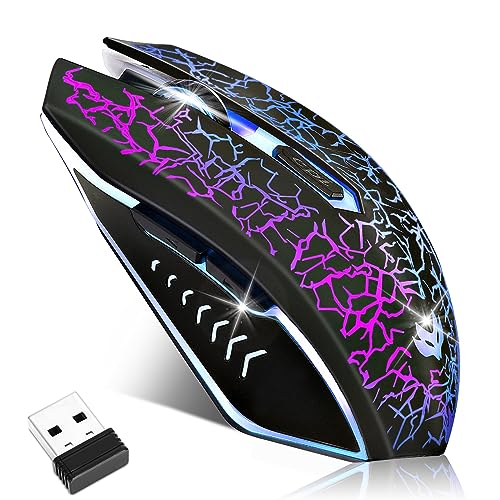
The LuLabboard is the simplest pick in this guide and the best fit for a shared room where every click counts. All six buttons use silent clicks, so side buttons stay as quiet as the main ones, and the rechargeable battery keeps going for up to 25 days with the lighting switched off. It connects over 2.4 GHz wireless with a plug-and-play receiver that stores inside the body, and it keeps working in wired mode while it charges. Casual players, students and night owls who want silence without settings to manage will find it easy to live with.
Specs
- 6 silent click buttons
- 3 adjustable DPI levels: 1200, 1600 and 2400 DPI
- 2.4 GHz wireless connection with up to 10 m range
- Rechargeable battery rated up to 25 days with LED off, 20 days with LED on
- 7-color flowing LED backlight with on and off switch
- Works in wired mode while charging
- Optical tracking, right-handed ergonomic shape
- Rated for up to 5 million clicks
- Compatible with Windows, macOS, Android and iOS
Best for: Shared bedrooms, dorms and libraries where all six buttons need to stay quiet.
Watch out for: The 2400 DPI ceiling is low for high-resolution monitors or competitive shooters, so confirm your sensitivity needs before ordering.
VEGCOO Wireless Gaming Mouse
The VEGCOO suits gamers who want quiet clicks and colorful lighting without a complicated setup. Its left and right buttons are silent, which covers the clicks you press most during play, and the RGB lighting cycles through colors that suit a night gaming desk. A 600 mAh rechargeable battery is rated for about a month between charges, and the mouse sleeps after a period of inactivity, then wakes the moment you click. With six buttons including side buttons and three DPI steps, it covers casual gaming and everyday desk work in one inexpensive package.
Specs
- Silent left and right clicks
- 3 adjustable DPI levels: 1200, 1600 and 2400 DPI
- 600 mAh rechargeable battery rated for about 30 days between charges
- Colorful RGB LED lights
- 6 buttons including side buttons
- 2.4 GHz wireless connection with up to 10 m range
- Ergonomic design for reduced fatigue during long sessions
- USB receiver stored under the mouse
Best for: Night gaming on a budget where quiet main clicks and RGB lighting matter most.
Watch out for: Only the left and right clicks are silent, so check whether noisy side buttons would bother the people around you.
INPHIC A9 Explorer Wireless Mouse
The INPHIC A9 Explorer is the flexible pick for players who move between machines. Tri-mode connectivity covers 2.4 GHz wireless, Bluetooth 5.0 and Type-C wired play, so one mouse can serve a gaming desktop, a work laptop and a tablet. Six DPI steps run from 800 up to 12800 DPI, six programmable buttons handle bindings and macros, and a 500 mAh battery recharges over Type-C with three indicators showing the remaining charge. The RGB light bar and visible battery display make its status easy to read at a glance, and the right-handed shell with a 39 mm palm rest suits medium to large hands.
Specs
- Tri-mode connectivity: 2.4 GHz wireless, Bluetooth 5.0 and Type-C wired
- 6 DPI levels: 800, 1600, 2400, 3200, 4800 and 12800 DPI
- 6 programmable buttons
- 500 mAh rechargeable battery with Type-C charging
- Three battery indicators showing remaining charge
- RGB light bar with on and off switch
- Right-handed ergonomic design with 39 mm palm rest and anti-slip matte grips
- Compatible with Windows, macOS and Linux
Best for: Gamers who switch between a desktop, laptop and tablet and want one quiet mouse for all three.
Watch out for: INPHIC sells several similar-looking mice, so confirm the listing says A9 Explorer before buying.
INPHIC Upgraded Silent Rechargeable Wireless Mouse

The INPHIC Upgraded Silent Rechargeable model is the control-focused pick for players who like to tune their setup. Its left and right buttons use silent clicks, and a Windows driver lets you adjust polling from 125 Hz to 1000 Hz and remap the buttons, which the simpler mice here cannot do. Tri-mode connectivity holds two Bluetooth channels plus a 2.4 GHz device, so switching between three machines takes a button press rather than a fresh pairing. Six DPI presets reach 12800 DPI, the 500 mAh battery charges over Type-C, and a three-level indicator keeps the remaining charge visible.
Specs
- Silent left and right clicks
- Tri-mode connectivity: Bluetooth 5.0 dual channel, 2.4 GHz wireless and USB-C wired
- 6 DPI presets: 800, 1600, 2400, 3200, 4800 and 12800 DPI
- Polling adjustable from 125 Hz to 1000 Hz through the Windows driver
- 500 mAh rechargeable battery with Type-C fast charging
- Three-level battery indicator
- RGB lighting
- Right-handed ergonomic shape with sculpted thumb rest, suited to medium and large hands
- Compatible with Windows, macOS, Linux, Android and iOS
Best for: Players who want silent clicks plus adjustable polling and button remapping across several devices.
Watch out for: The USB-C cable needed for wired mode is not included, and the configuration driver runs on Windows only.
be quiet! Dark Perk Ergo

The be quiet! Dark Perk Ergo is the competitive pick for players who refuse to give up sensor performance for quieter clicks. Its Omron optical switches are built for muted clicks rather than fully silent ones, while the PixArt PAW3950 sensor reaches 32000 DPI with polling up to 8000 Hz, even in wireless mode. At 55 g it is far lighter than the other mice here, and 100 percent PTFE skates keep it gliding smoothly across the pad. Battery life runs up to 110 hours at 1000 Hz polling, and the ergonomic right-handed shell is shaped for long sessions without hand strain.
Specs
- PixArt PAW3950 sensor with up to 32000 DPI
- Polling rate up to 8000 Hz in wireless and wired modes
- Omron optical switches rated for 70 million clicks
- Weight of 55 g
- Battery life up to 110 hours at 1000 Hz polling
- 2.4 GHz wireless and USB-C wired connectivity
- 100 percent PTFE glide skates
- 5 programmable buttons
- Ergonomic right-handed shape
Best for: Competitive shooters where a lightweight shell, a top-tier sensor and muted clicks all matter.
Watch out for: Its clicks are muted rather than fully silent, so it suits players who want quieter clicks, not total silence.
Which One Fits Your Situation
You Game Late in a Shared Room
Pick the LuLabboard Wireless Gaming Mouse. It is the only mouse here with silent clicks on all six buttons, so side-button presses stay quiet too, and its battery runs up to 25 days with the lighting off. The wired-while-charging mode means a low battery never interrupts a late session, and the simple plug-and-play receiver needs no software to configure.
You Want Quiet Clicks and RGB on a Tight Budget
Pick the VEGCOO Wireless Gaming Mouse. Its silent left and right buttons cover the clicks you press most, the RGB lighting suits a night desk, and the 600 mAh battery is rated for about a month between charges. Just remember that its side buttons are not silent, so it fits best when your main clicks are the ones other people hear.
You Play and Work Across Several Devices
Pick the INPHIC A9 Explorer Wireless Mouse or the INPHIC Upgraded Silent Rechargeable Wireless Mouse. Both offer tri-mode connectivity, so a desktop, laptop and tablet can share one mouse. Choose the A9 Explorer for its six programmable buttons and visible battery display, or the Upgraded Silent model if adjustable polling and button remapping through the Windows driver matter more to you.
You Play Competitive Shooters and Want Speed First
Pick the be quiet! Dark Perk Ergo. Its 55 g shell, PixArt PAW3950 sensor and 8000 Hz polling rate are built for fast flick shots, while its muted optical switches keep clicks noticeably quieter than a standard gaming mouse. Accept that the clicks are muted rather than silent, and you get competitive hardware that still respects the people around you.
Common Mistakes
- Assuming every button is silent when a listing only quiets the left and right clicks, then discovering the side buttons still click loudly.
- Buying on DPI alone and ending up with a 2400 DPI ceiling that feels sluggish on a high-resolution monitor.
- Using Bluetooth for fast shooters instead of the 2.4 GHz receiver, then blaming the mouse for input lag.
- Leaving RGB lighting on permanently and wondering why the battery drains far sooner than the listing suggests.
- Skipping the grip check and choosing a shell shaped for large hands when a smaller or lighter mouse would track better.
Frequently Asked Questions
Are silent gaming mice really silent?
No mouse is completely silent, and quieter is the honest word. Silent-click switches use dampened mechanisms that cut most of the click sound, and models like the LuLabboard hush all six buttons. Muted designs such as the be quiet! Dark Perk Ergo reduce the click without removing it entirely. Check which buttons the listing covers before you buy.
Does a quiet wireless mouse lag in games?
A 2.4 GHz wireless connection with a clean signal keeps up with most games, and polling rates up to 1000 Hz are common on the tri-mode models here. Bluetooth adds latency, so use the receiver for shooters and save Bluetooth for browsing or work. Keep the receiver close to the mouse and away from metal objects to avoid stutter.
Can I use a quiet wireless gaming mouse for work too?
Yes, and that is one of their main strengths. Silent clicks suit offices, libraries and shared desks, while tri-mode models switch between a work laptop and a gaming desktop with a button press. The INPHIC models in this guide cover that mixed use best, since they pair over Bluetooth as well as 2.4 GHz wireless.
How long does the battery last on a quiet wireless gaming mouse?
It depends on the battery and whether the lighting stays on. The VEGCOO listing cites about a month between charges, the LuLabboard runs up to 25 days with its lighting off, and the be quiet! Dark Perk Ergo reaches up to 110 hours at 1000 Hz polling. Switching RGB lighting off is the simplest way to stretch any rechargeable mouse further.
Related guides
More from Amazon
Programs that pair well with the guide above. Offers and eligibility are set by Amazon and may change.
Free shipping on eligible items, Prime Video and more. Eligible new members can start with a free trial.
Start a Prime free trialAd-free music streaming. Eligible new subscribers can start with a free trial.
Try Music Unlimited freeA Prime membership for ages 18-24 with a trial period. Eligibility is set by Amazon.
See Prime for Young AdultsAudiobooks and podcasts to listen to on the go. Eligible new members can start with a free trial.
Try Audible freeAs an Amazon Associate we earn from qualifying purchases.









