
An RGB mouse pad looks like a simple buy until the lighting, the surface and the size pull in different directions. Edge-lit cloth mats glow around the border and leave the tracking surface alone, while a backlit hard mat turns the whole surface into the light show. The real decision is not how bright the pad gets. It is whether the lighting style, the surface texture and the footprint fit the way you play, and whether the software behind the lights is something you already use or another app to install.
This guide is for players building a coordinated desk setup, for competitive players who want a large cloth surface, and for anyone whose desk only has room for a mouse-sized mat. The three pads below were chosen from their names and specifications on their Amazon pages: an extended Corsair cloth mat with a USB hub, a HyperX cloth mat with touch-switched lighting profiles, and a fully backlit Razer hard mat.
Top 3 picks at a glance


Quick Picks
As an Amazon Associate we earn from qualifying purchases.
| Product | Best for | Key spec from title |
|---|---|---|
| Corsair MM700 RGB Extended | Full-desk setups that also need extra USB ports | 930 x 400 mm surface with three-zone RGB lighting |
| HyperX Pulsefire Mat RGB | Changing lighting profiles without opening software | Onboard memory for 3 profiles, touch sensor switching |
| Razer Firefly V2 Pro | Maximum RGB coverage on a compact desk | 15-zone Chroma backlit design |
How to Choose
Edge lighting or full backlighting
Most RGB mouse pads light up only around the edge, keeping the glow off the tracking surface. The Corsair MM700 and the HyperX Pulsefire Mat both use this approach, with the light strip running around the perimeter of a cloth mat. The Razer Firefly V2 Pro takes the opposite route: its frosted hard surface is backlit across the whole mat, so the glow comes from underneath the mouse itself. Edge lighting suits players who want a subtle accent, while full backlighting suits a desk where the pad is meant to be the visual centrepiece. Decide which look you want first, because the two styles feel very different in a dark room.
Size and desk fit
An extended pad that holds both keyboard and mouse needs a desk at least as wide as the pad, and the two cloth mats here are both around 900 mm wide. Measure the clear space on your desk before ordering, including room for monitor stands and anything else that sits on the surface. A pad that overhangs the desk edge will curl, and one squeezed between objects will bunch up under the keyboard. The Firefly V2 Pro is the exception in this group: at roughly 360 by 278 mm it covers the mouse area only, so it fits desks where an extended mat would not. Pick the footprint first, then check the lighting.
Cloth or hard surface
Cloth pads give a familiar, slightly textured glide with more friction, which many players prefer for controlled aiming and stopping the mouse exactly where they want it. Both extended mats in this guide use cloth, and the HyperX model is described as a rollable cloth surface tuned for precision tracking. Hard pads glide faster with less resistance, and the Firefly V2 Pro pairs its rigid plastic surface with a micro-textured finish made for optical sensors. If you play low-sensitivity shooters with long arm movements, cloth usually feels more forgiving. If you favour fast flicks and a slick feel, a hard surface is the better match.
Power, software and extras
Every RGB pad in this guide draws power from a USB connection, so a free port near the desk is part of the purchase. The Corsair MM700 turns that requirement into an advantage with a built-in two-port USB hub, letting a mouse receiver or headset dongle plug into the pad itself. Software matters too: Corsair lighting runs through iCUE, HyperX through NGENUITY, and Razer through Synapse, and the HyperX mat adds touch sensor switching so profiles can change without opening the app. If you already run one of these apps for a keyboard or mouse, staying in the same ecosystem keeps the lighting in sync with less fuss.
The 3 Best Options
Corsair MM700 RGB Extended
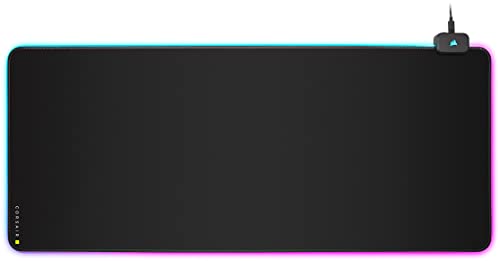
The MM700 is the pad to look at when the mouse pad is a desk mat: it is wide enough for a full-size keyboard and a mouse with room for long sweeps, and the lighting wraps around all four edges in three separately controlled zones. Its cloth surface is the familiar micro-weave style that suits controlled aiming, and the rubber construction keeps it planted during fast movements. The built-in USB hub sets it apart here, giving a tidy place to plug in a mouse receiver or a headset dongle instead of reaching behind the PC. Players who want one large, lit surface under everything will get the most from it.
Specs
- Surface: 930 x 400 mm micro-weave cloth
- Thickness: 4 mm rubber construction
- Lighting: Dynamic 360-degree three-zone RGB lighting
- USB hub: Two-port USB hub
- Cable: Detachable USB-C cable
- Base: Natural rubber base
Best for: A full keyboard-and-mouse desk setup that also needs extra USB ports within reach.
Watch out for: Measure the desk first, because the 930 mm width needs a clear run of space and the pad will not sit flat if it overhangs the edge.
HyperX Pulsefire Mat RGB
The Pulsefire Mat RGB is built for players who like cloth under the mouse but still want lighting that is easy to change mid-session. Its two RGB zones run around the edge of an extra-large cloth surface, and the touch sensor cycles through stored lighting profiles with a tap instead of opening software. Onboard memory holds three profiles, so the lighting you set travels with the mat. The cloth surface is tuned for precision tracking, and the anti-slip rubber base keeps the mat from drifting during long sessions. It is the most straightforward pick here for a large cloth pad with lighting that stays out of the way.
Specs
- Size: 900 x 420 mm, 4 mm thick
- Surface: Rollable cloth surface tuned for precision tracking
- Lighting: Two-zone RGB lighting
- Profiles: Onboard memory for 3 profiles
- Switching: Touch sensor profile switching
- Base: Anti-slip rubber base
- Software: Customizable with HyperX NGENUITY software
Best for: Players who want a large cloth surface and lighting profiles they can switch with a tap.
Watch out for: Confirm the 900 mm width fits the desk with the keyboard in place, and check that a USB port is free for the lighting cable.
Razer Firefly V2 Pro
The Firefly V2 Pro is the most dramatic RGB pad in this guide, and the only hard-surface option. Instead of lighting the edge, it backlights the entire frosted surface across 15 individually customizable Chroma zones, so the glow sits directly under the mouse. The micro-textured hard surface is made for optical sensors and gives a fast, low-friction glide that suits quick flicks. A USB 2.0 port on the mat can hold a mouse receiver, and the detachable USB-C cable makes the pad easy to move. Its compact footprint fits desks where an extended mat would not, and it pairs naturally with other Chroma gear for synchronized lighting.
Specs
- Size: 10.95 x 14.18 inches
- Surface: Micro-textured hard surface
- Lighting: 15-zone Chroma RGB backlit design
- Ports: USB 2.0 port
- Cable: Detachable USB Type-C cable
- Base: Anti-slip base
- Model number: RZ02-04920200-R3M1
- Warranty: 1 year manufacturer
Best for: A compact desk where the mouse pad itself should be the brightest RGB element.
Watch out for: The hard surface feels very different from cloth, so players who prefer friction and control should try a hard pad first if they can; also confirm the listed size covers the full range of mouse movement.
Which One Fits Your Situation
You want one lit surface under keyboard and mouse, plus USB ports
Pick the Corsair MM700 RGB Extended. Its 930 by 400 mm cloth surface covers a full-size keyboard and the mouse area in one piece, and the two-port USB hub gives a home for a receiver or dongle right on the desk. The three-zone edge lighting is visible without washing out the tracking surface, and the 4 mm rubber construction keeps the whole mat stable under a keyboard.
You want the brightest RGB effect possible
Pick the Razer Firefly V2 Pro. Its edge-to-edge backlit design lights the entire surface through 15 Chroma zones, which makes it far more visible than an edge-lit mat, especially in a dark room. The hard micro-textured surface also gives a fast glide for players who like low friction, and the compact size means the effect stays concentrated on the mouse area rather than spread across the desk.
You want a cloth pad with lighting you can change quickly
Pick the HyperX Pulsefire Mat RGB. The touch sensor switches between three stored lighting profiles without opening any software, and the onboard memory keeps those profiles on the mat. Its 900 by 420 mm cloth surface gives plenty of room for keyboard and mouse, while the two RGB zones add colour around the edge without distracting from the tracking area.
You play low-sensitivity shooters with wide mouse sweeps
Pick the Corsair MM700 RGB Extended. The 930 mm width leaves room for long arm movements without the mouse running off the edge, and the micro-weave cloth surface gives the friction needed to stop precisely after a wide sweep. The rubber base holds the mat in place during fast repositioning, which matters more than lighting once a match gets intense.
Common Mistakes
- Buying an extended mat without measuring the desk, then finding it overhangs the edge and curls up under the keyboard.
- Choosing a hard surface for control-heavy aiming, or a cloth surface for the fastest possible flicks, without considering how much friction each style adds.
- Assuming the RGB lighting works without a USB connection, then discovering the pad needs a free port and a cable run to the PC.
- Installing a second lighting app for the pad when the keyboard and mouse already run a different ecosystem, which splits the lighting into two setups that cannot sync.
- Forgetting that a lit edge sits under the wrist, so a pad with a raised light strip can feel uncomfortable during long sessions if the edge is not flush with the surface.
Frequently Asked Questions
Do RGB mouse pads affect mouse tracking?
Edge-lit pads do not, because the light strip sits around the border and the tracking surface is ordinary cloth. Fully backlit pads differ, but the Firefly V2 Pro uses a micro-textured surface made for optical sensors, so the lighting never sits between the sensor and the surface. If tracking feels off, check that the surface is clean and flat, since dust and curling cause more tracking trouble than lighting does.
Do RGB mouse pads need software to light up?
Most RGB pads light up with a default effect as soon as they receive USB power, but changing colours, patterns or zones needs the maker’s software. Corsair lighting uses iCUE, HyperX uses NGENUITY, and Razer uses Synapse. The HyperX Pulsefire Mat RGB is the exception in this group for everyday changes, since its touch sensor cycles through three stored profiles without opening the app at all.
Can I use an RGB mouse pad with a wireless mouse?
Yes. The pad only provides the tracking surface and the lighting, so a wireless mouse works on it as it would on a plain pad. Some pads add an extra: the Corsair MM700 has a two-port USB hub and the Firefly V2 Pro has a USB 2.0 port, so a wireless receiver can plug into the pad and sit close to the mouse, which can help keep the connection stable.
How do I clean an RGB mouse pad?
Unplug the pad first, then wipe the surface with a damp cloth and let it dry before plugging it back in. Cloth pads can handle a gentle wipe, while the hard surface of the Firefly V2 Pro cleans easily with a damp cloth. Avoid soaking an RGB pad or getting water near the light strip or any USB ports, since those parts are not made to be submerged.
Related guides
More from Amazon
Programs that pair well with the guide above. Offers and eligibility are set by Amazon and may change.
Free shipping on eligible items, Prime Video and more. Eligible new members can start with a free trial.
Start a Prime free trialAd-free music streaming. Eligible new subscribers can start with a free trial.
Try Music Unlimited freeA Prime membership for ages 18-24 with a trial period. Eligibility is set by Amazon.
See Prime for Young AdultsAudiobooks and podcasts to listen to on the go. Eligible new members can start with a free trial.
Try Audible freeAs an Amazon Associate we earn from qualifying purchases.









