
A gaming mouse mat decides how far your hand can travel before you lift the mouse, how much friction meets each flick, and whether the surface stays put during a tense round. That choice matters more than the logo on the corner, because a mat that is too small forces constant repositioning, while a surface that is too slick makes small corrections harder to hold. The right mat should match your sensitivity, your desk space, and the way your wrist and arm move together.
This guide is for shooter players who play at low sensitivity, for desk workers who game after hours, for players who want one surface under both keyboard and mouse, and for anyone whose current mat slides, curls, or frays at the edge. The four mats below were chosen from their Amazon titles and listed specifications, with attention to size, surface texture, thickness, edge finish, and base grip.
Our Top Picks
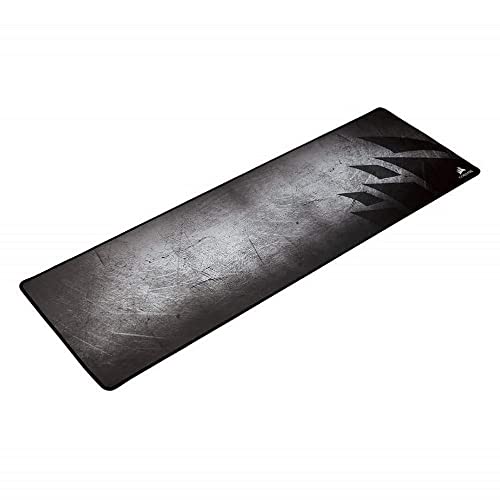 Corsair MM300 Extended Anti-Fray Cloth Gaming Mouse Pad36.6L x 11.8W inches36.6 x 11.8 x 0.1 inches1 poundsCheck on Amazon

Top 3 picks at a glance
Quick Picks
As an Amazon Associate we earn from qualifying purchases
| Product | Best for | Key spec from title |
|---|---|---|
| SteelSeries QcK Large | Low-sensitivity shooter players who want a classic cloth surface | Micro-woven cloth surface, 450 x 400 mm |
| Logitech G640 Large | Control players who want steady, moderate friction | Moderate surface friction, 460 x 400 mm |
| Razer Goliathus Extended Chroma | Players who want a lit desk-wide surface for keyboard and mouse | Chroma RGB lighting, 920 x 294 mm |
| Corsair MM300 Extended | Players who want a wide desk mat with stitched edges | Anti-fray cloth surface, 930 x 300 mm |
How to Choose
Match the size to your sensitivity and desk
Size is the first decision, because it sets the limit on every swipe. Low-sensitivity players move the mouse across a wide arc, so a large mat around 450 mm wide, or an extended mat around 920 mm wide, gives the hand room to travel without lifting. High-sensitivity players can work on a smaller surface, but they still need enough depth for vertical movement. Measure the clear desk area before ordering, leaving room for the keyboard, and check whether a monitor stand, speaker, or lamp intrudes on the mat. A mat that hangs over the desk edge will curl, while one that is too narrow will leave the mouse slipping onto bare wood.
Choose the surface speed that fits your aim
Cloth mats sit on a spectrum from fast to controlled, and the difference shows up in stopping power. A faster weave lets the mouse glide with little resistance, which suits tracking and quick turns, while a denser, more textured weave adds friction that helps the hand stop exactly on a target. The Amazon titles in this guide describe the QcK as micro-woven for control, the G640 as moderate friction, the Goliathus as balanced for speed and control, and the MM300 as a textile weave for control. Think about whether you overshoot targets or struggle to start moving, then pick the surface that corrects that habit rather than the one that sounds fastest.
Check thickness, edges, and the base
Thickness changes how the mat feels under the wrist and how it handles an uneven desk. A 2 mm mat sits almost flush with the desk and suits players who rest the wrist on the desk edge, while a 3 mm or 4 mm mat adds cushion and can smooth over small bumps. Stitched edges resist fraying where the wrist rubs, which matters for daily use, while unstitched edges stay thinner and flatter. The base matters just as much: a rubber or textured rubber underside should hold the mat still during fast swipes. If the mat shifts, every other feature loses value, so treat grip as a core specification rather than a minor detail.
Decide whether you want a mouse-only mat or a desk mat
A mouse-only mat covers the area beside the keyboard and keeps the setup compact, which suits smaller desks and players who move the keyboard often. An extended mat runs beneath the keyboard as well, giving one consistent surface for both hands and hiding cable clutter under a single layer. Extended mats also protect the desk and keep the keyboard from sliding, but they demand a wide, clear desk and are harder to roll up and carry. Consider how often you rearrange the desk, whether you use a full-size keyboard, and whether you want the mouse area to feel identical to the keyboard area before choosing between the two layouts.
The 4 Best Options
SteelSeries QcK Large

The SteelSeries QcK Large is the classic cloth mat in this group, built around a micro-woven surface that aims for steady tracking with optical and laser sensors. Its 450 x 400 mm footprint gives low-sensitivity players room for broad sweeps without taking over the whole desk, and the 2 mm profile keeps the transition from desk to mat almost flat. The non-slip rubber base holds the mat in place during fast movements, and the cloth surface is washable, which helps when dust and skin oils build up over long sessions. It suits players who want a simple, proven surface without lighting or extra features.
Specs
- Surface: micro-woven cloth optimized for optical and laser sensors
- Size: 450 x 400 mm
- Thickness: 2 mm
- Base: non-slip rubber base
- Model number: 63003
Best for: Low-sensitivity shooter players who want a classic cloth mat for broad mouse movement.
Watch out for: The standard version has unstitched edges, so check the edge finish and expect visible wear where the wrist rests over time.
Logitech G640 Large
The Logitech G640 Large takes a deliberate middle path, with a cloth surface that offers moderate friction for players who want control without a sticky, slow glide. Its 460 x 400 mm size covers wide arm movements, and the 3 mm thickness adds a little cushion under the wrist while still feeling firm under the mouse. The surface texture is described as consistent, which helps the sensor read movement evenly across the whole mat, and the rubber base keeps the pad planted during sudden stops. It is a strong fit for players who use Logitech G mice, though the surface works with other optical and laser mice as well.
Specs
- Surface: cloth with moderate surface friction and consistent surface texture
- Size: 460 x 400 x 3 mm
- Base: non-slip rubber base
- Compatibility: optimized for gaming sensors
- Model number: 943-000797
Best for: Control players who want steady friction and consistent tracking across a large cloth surface.
Watch out for: The mat comes in one large size in this listing, so measure the desk first if space is tight.
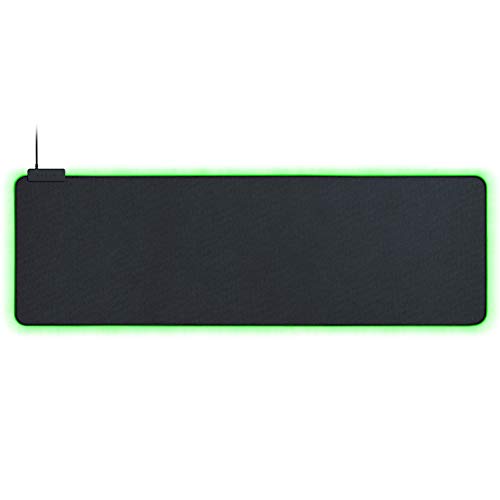
Razer Goliathus Extended Chroma
The Razer Goliathus Extended Chroma turns the mouse mat into part of the desk lighting, with a Chroma RGB strip around the edge. Beneath the lighting, the mat is a soft cloth surface with a micro-textured finish balanced for speed and control, and the non-slip rubber base keeps the long mat from sliding. At 920 x 294 mm, it fits a keyboard and mouse side by side, giving the hand one continuous surface from the keyboard to the far edge. It needs a USB connection for the lighting, so plan a spare port and a cable route before placing it.
Specs
- Surface: soft cloth with micro-textured finish, balanced for speed and control
- Size: 920 x 294 mm
- Thickness: 3 mm
- Base: non-slip rubber base
- Lighting: Chroma RGB lighting with 16.8 million color options
- Cable length: 2.1 m
Best for: Players who want a desk-wide lit mat that holds a keyboard and mouse on one surface.
Watch out for: The lighting needs a USB connection and software setup, so confirm a spare port and check that the cable reaches it.
Corsair MM300 Extended
The Corsair MM300 Extended is a wide cloth mat that covers the desk from keyboard to mouse with a single textile-weave surface. Its 930 x 300 mm size gives low-sensitivity players a long horizontal run, while the 3 mm thickness adds comfort without raising the wrist too high. Anti-fray stitched edges guard the border against peeling, which is a common weak point on cloth mats that see daily use. The anti-skid textured rubber base keeps the mat steady, and the surface is designed for low-friction tracking with optical and laser mice, so the mouse should glide evenly from one end to the other.
Specs
- Surface: anti-fray cloth with textile-weave surface for low friction
- Size: 930 x 300 mm
- Thickness: 3 mm
- Base: anti-skid textured rubber base
- Model: CH-9000108-WW
Best for: Players who want a wide desk mat with stitched edges for keyboard and mouse coverage.
Watch out for: The long, narrow shape leaves less depth than a square large mat, so check that 300 mm of depth fits your arm movement.
Which One Fits Your Situation
You play shooters at low sensitivity on a standard desk
Pick the SteelSeries QcK Large when the desk holds a keyboard and a mouse with room to spare. Its 450 x 400 mm size gives the arm a wide sweep, the micro-woven cloth supports steady tracking, and the slim 2 mm profile keeps the wrist close to the desk. It is the simplest choice here for players who want a proven cloth surface and no extra features.
You want more stopping power and a firmer feel
Pick the Logitech G640 Large when the mouse feels too loose on a fast surface and small corrections overshoot the target. Its moderate friction slows the glide just enough to help the hand stop, the 3 mm thickness adds cushion, and the consistent texture keeps sensor readings even. It suits control players who value accuracy over raw glide speed.
You want one lit surface for keyboard and mouse
Pick the Razer Goliathus Extended Chroma when the desk is the centerpiece of the setup and the keyboard should sit on the same surface as the mouse. Its 920 mm width covers both, the micro-textured cloth balances speed and control, and the RGB edge adds visible light to the desk. Keep a USB port free for the lighting cable.
You want a wide desk mat that resists fraying
Pick the Corsair MM300 Extended when the mat will see daily use and the edges take the most wear. Its stitched anti-fray border protects the perimeter, the 930 mm width gives long horizontal travel, and the textured rubber base holds the mat still. It is the practical pick for a shared desk that hosts both work and play.
Common Mistakes
- Buying a mat that is too small for the sensitivity setting, then lifting the mouse mid-fight because the hand runs out of space.
- Choosing a fast surface when the real problem is overshooting targets, instead of picking a controlled weave that helps the hand stop.
- Ignoring the base and edge finish, then watching the mat slide or fray while the surface itself still feels fine.
- Measuring only the desk width and forgetting depth, keyboard position, and monitor stand clearance.
- Placing a lit mat without checking the cable route and USB port, then leaving the lighting unconnected or tangled behind the desk.
Frequently Asked Questions
What size gaming mouse mat should I buy?
Measure the clear desk space and match it to your sensitivity. Low-sensitivity players need a large mat around 450 mm wide or an extended mat around 920 mm wide for broad arm movement. High-sensitivity players can use a smaller surface, but they still need enough depth for vertical motion. Leave room for the keyboard and check that no stand or lamp intrudes.
Does a cloth mat work with any gaming mouse?
Most cloth mats work with optical and laser mice, because the sensor reads the woven texture rather than a special coating. The QcK, G640, Goliathus, and MM300 all use cloth surfaces designed for gaming sensors. If a mouse skips on one surface, try a different weave density before changing the mouse itself.
How do I stop a mouse mat from sliding?
Start with a mat that has a rubber or textured rubber base, and place it on a clean, dry desk so the base can grip. Dust under the mat breaks that grip, so lift the mat and wipe the desk and the base when movement starts. Avoid cables or a desk seam under the mat, since an uneven base will rock and slide.
Can I wash a cloth gaming mouse mat?
Many cloth mats can be washed by hand with mild soap and cool water, then left flat to dry away from direct heat. The QcK listing describes its cloth surface as washable, which helps restore glide after dust and oils build up. Avoid harsh cleaners, and let the mat dry fully before use so the base regains its grip.
Related guides
More from Amazon
Programs that pair well with the guide above. Offers and eligibility are set by Amazon and may change.
Free shipping on eligible items, Prime Video and more. Eligible new members can start with a free trial.
Start a Prime free trialAd-free music streaming. Eligible new subscribers can start with a free trial.
Try Music Unlimited freeA Prime membership for ages 18-24 with a trial period. Eligibility is set by Amazon.
See Prime for Young AdultsAudiobooks and podcasts to listen to on the go. Eligible new members can start with a free trial.
Try Audible freeAs an Amazon Associate we earn from qualifying purchases.









