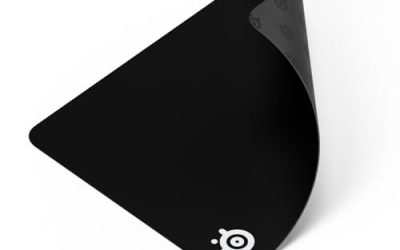
Choosing a mechanical keyboard and mouse for gaming means choosing two tools that must work together every session. A keyboard switch that feels crisp can still frustrate when the layout crowds the mouse hand, and a precise sensor loses its edge when the keyboard misses key presses during fast movement. The real decision is about the pair as a system: switch feel, layout size, connection type, lighting control, and the way both devices fit the space and the games in front of you.
This article is for PC gamers setting up a first matched set, console players moving to a desk or a couch setup, and players replacing mismatched peripherals with one coordinated pair. The four combos below were chosen from Amazon titles and listing details, covering wireless couch play, a compact wired set, a full-size wired pair, and a wireless tenkeyless set, so different desks and play styles each have a clear match.
Top 3 picks at a glance

Quick Picks
As an Amazon Associate we earn from qualifying purchases
| Product | Best for | Key spec from title |
|---|---|---|
| Razer Turret Wireless Mechanical Gaming Keyboard and Mouse Combo | Couch and living-room play on PC or Xbox | 16,000 DPI mouse sensor with retractable magnetic mouse mat |
| Logitech G Wireless Gaming Combo, G715 Keyboard Linear and G705 Mouse | A compact wireless desk with shared lighting | GX Red linear switches with LIGHTSPEED wireless |
| TMKB Falcon M1SE and T68SE Gaming Mouse and 60 Percent Mechanical Gaming Keyboard Combo | A small desk or a portable wired setup | 68-key keyboard with 12,800 DPI mouse |
| Redragon K565 Mechanical Gaming Keyboard and M910-K Gaming Mouse | A full-size wired setup with many programmable controls | Red-switch keyboard with 8,000 DPI mouse |
How to Choose
Match the switch feel to your games
Switch feel shapes every key press, so start with how the keys should respond under your fingers. Linear switches travel smoothly from top to bottom without a tactile bump, which suits rapid repeated presses in fast-paced games where the same key gets tapped again and again. Tactile switches add a small bump midway through the press, giving a clear signal that the key has registered without needing to push all the way down. Clicky switches add sound as well as feel, which some players enjoy and others find distracting in shared rooms. Read the Amazon listing for the switch name on each combo, because two sets can both be called mechanical while feeling very different in daily play.
Choose a layout that leaves room for the mouse
Layout decides how much desk space remains for mouse movement, and that matters most in games that use wide, low-sensitivity sweeps. A full-size keyboard keeps the number pad and dedicated navigation keys, which helps players who use many binds or switch between gaming and typing. A tenkeyless layout drops the number pad and pulls the mouse closer to the centre of the body, which can ease shoulder strain during long sessions. A 60 percent layout goes further, keeping 68 keys with separate arrow and control keys in the TMKB set, and freeing the largest area for the mouse. Measure the desk first, then picture the mouse path at the sensitivity you actually use.
Decide between wireless freedom and a wired link
Wireless combos remove cables from the desk and suit couch play, shared rooms, and setups that move between locations. Look for a single receiver that connects both devices, as the Logitech and Razer sets do, because one dongle keeps a USB port free and simplifies the connection. Check the listed battery life with lighting on and off, since lighting changes run time sharply on the Razer Turret. Wired combos avoid charging entirely and keep both devices ready whenever the computer is on, which suits a fixed desk where cables can be routed out of the way. Neither connection type is better in every case; the right choice follows where and how the set will be used.
Check the mouse sensor, buttons, and software together
The mouse deserves the same attention as the keyboard, because aiming, camera control, and ability timing all run through it. Sensor range, shown as DPI on Amazon listings, sets how far the cursor moves for a given hand movement, and a wider range gives more room to tune sensitivity for different games. Programmable buttons add shortcuts for abilities, weapons, or push-to-talk, with nine on the Redragon M910-K and six on the TMKB Falcon M1SE and the Logitech G705. Software matters too, because lighting, DPI steps, and macros are usually set through the maker’s program. Confirm that the software supports the operating system on the computer before settling on a combo.
The 4 Best Options
Razer Turret Wireless Mechanical Gaming Keyboard and Mouse Combo
The Razer Turret suits players who game away from a desk, on a couch or in a living room, where a separate mouse surface would slide around. Its keyboard carries a retractable magnetic mouse mat that slides out for play and tucks away for storage, keeping the mouse in place on a lap. Razer mechanical switches, a 16,000 DPI sensor, and Chroma RGB lighting give the set a focused gaming character, while the single 2.4 GHz receiver connects both devices. The tenkeyless-style body keeps the package compact for lap use without removing the keys most games need.
Specs
- Wireless mechanical keyboard and mouse combo for PC, Xbox One, and Xbox Series X and S
- Mouse with 16,000 DPI 5G Optical Sensor
- Keyboard with 1000Hz ultrapolling rate, 50g actuation, and mid-height keycaps
- Chroma RGB lighting with 16.8 million colour options
- Keyboard battery up to 43 hours and mouse battery up to 50 hours with lighting disabled; 11 hours and 30 hours with lighting enabled
- Retractable magnetic mouse mat
- 2.4 GHz wireless connection through a single USB receiver
Best for: Couch play on PC or Xbox where the keyboard must also serve as the mouse surface.
Watch out for: The lap design suits a relaxed posture, so players who want a large fixed desk surface and a full-size layout should check the dimensions first.
Logitech G Wireless Gaming Combo, G715 Keyboard Linear and G705 Mouse
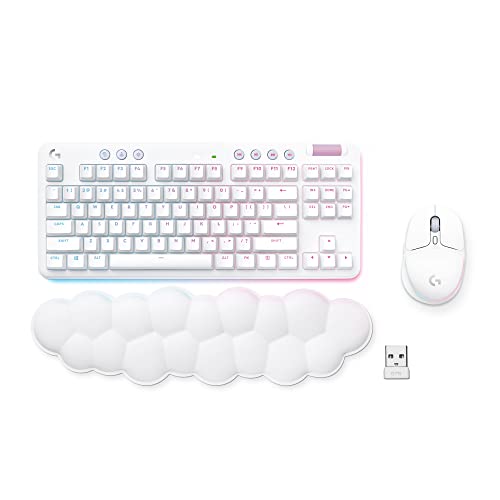
The Logitech G715 and G705 pair suits a tidy wireless desk where lighting, connection, and comfort should feel coordinated rather than assembled from separate parts. The G715 is a tenkeyless mechanical keyboard with GX Red linear switches and a cloud-shaped palm rest, while the G705 is a compact contoured mouse made for smaller hands. Both connect through LIGHTSPEED wireless, and a single USB receiver can link the two devices together. LIGHTSYNC RGB runs across the set, and Bluetooth gives a second way to connect when the receiver is in use elsewhere.
Specs
- G715 wireless mechanical gaming keyboard with LIGHTSYNC RGB, LIGHTSPEED, linear GX Red switches, and palm rest
- G705 wireless gaming mouse with LIGHTSYNC RGB lighting, LIGHTSPEED wireless, and Bluetooth connectivity
- Single USB receiver connects both devices with LIGHTSPEED wireless
- G715 rechargeable battery with 25 gaming hours with full lighting
- G705 rechargeable battery up to 40 gaming hours with full lighting
- G705 with 6 programmable buttons and a top-mounted DPI-shift button
- Compatible with PC and Mac
Best for: A compact wireless desk setup with a smaller mouse and a matching lighting scheme.
Watch out for: The G705 has a compact contoured shape, so players with large hands should check the fit before choosing this pair.
TMKB Falcon M1SE and T68SE Gaming Mouse and 60 Percent Mechanical Gaming Keyboard Combo

The TMKB Falcon M1SE and T68SE combo suits a small desk, a dorm room, or a setup that travels, where a full-size keyboard would crowd the mouse. Its 68-key layout keeps separate arrow and control keys, so the compact size does not force every function onto layered key combinations. The keyboard uses linear red switches for smooth presses, while the honeycomb mouse keeps the hand moving freely with a drag-free paracord cable. Wired USB connections on both devices mean the set is ready as soon as it is plugged in, with no charging routine to manage.
Specs
- 60 percent mechanical gaming keyboard with 68 keys and separate arrow and control keys
- Keyboard with linear red switches and LED backlighting
- Mouse with high-precision optical sensor and 200 to 12,800 DPI range
- Mouse with 6 programmable buttons and customizable RGB lighting
- Mouse with drag-free paracord cable and ergonomic honeycomb design
- Wired USB connection for keyboard and mouse
- Colour: White
Best for: Small desks and portable wired setups where mouse space matters more than a number pad.
Watch out for: The 60 percent layout moves some keys to function layers, so players who rely on dedicated function keys should learn the layout first.
Redragon K565 Mechanical Gaming Keyboard and M910-K Gaming Mouse

The Redragon K565 and M910-K pair suits players who want a full-size wired set with plenty of controls and no need to charge either device. The K565 is a mechanical keyboard with red switches, RGB backlighting, and a durable aluminium frame, plus anti-ghosting so simultaneous key presses register during busy moments. The M910-K mouse adds nine programmable macro buttons and a fire button, with adjustable sensitivity up to 8,000 DPI for tuning aim across games. Software supports custom keybinds on the mouse, giving the pair room to grow as a player adds shortcuts.
Specs
- K565 mechanical gaming keyboard with red switches and RGB backlighting
- K565 with fully programmable keys, durable aluminium frame, and anti-ghosting
- M910-K gaming mouse with RGB backlighting and 8,000 DPI adjustable sensitivity
- M910-K with 9 programmable macro buttons and a fire button
- Mouse software supports custom keybinds
- Wired USB connection for keyboard and mouse
- Compatible with PC, Windows, and Mac
Best for: A full-size wired desk setup with many programmable buttons for abilities and shortcuts.
Watch out for: Both devices are wired, so cable routing matters on a small desk, and the mouse software should be checked for the operating system in use.
Which One Fits Your Situation
You play from a couch or a living room
Pick the Razer Turret. Its retractable magnetic mouse mat turns the keyboard into a stable lap surface, and the single wireless receiver connects both devices without cables running across the room. The long battery life with lighting off also suits evening sessions away from a desk, while Xbox support keeps the same set useful across PC and console play.
Your desk is small and the mouse needs room
Pick the TMKB Falcon M1SE and T68SE combo. The 68-key layout leaves the widest area for mouse movement among the four sets, and the wired connection keeps the pair ready without charging. The honeycomb mouse and paracord cable suit sweeping movements, while the separate arrow keys keep navigation simple despite the compact size.
You want one wireless set that looks coordinated
Pick the Logitech G715 and G705 combo. The tenkeyless keyboard and compact mouse share LIGHTSYNC lighting and a single LIGHTSPEED receiver, so the desk stays tidy and the two devices feel designed together. The palm rest and contoured mouse shape suit long sessions, and Bluetooth adds a useful second connection option.
You use many binds and want a full-size wired pair
Pick the Redragon K565 and M910-K combo. The full-size keyboard keeps the number pad and dedicated keys, while the mouse offers nine programmable buttons for abilities, items, or communication shortcuts. Anti-ghosting on the keyboard and adjustable sensitivity on the mouse support busy moments when several inputs happen at once in the same session.
Common Mistakes
- Choosing a layout by appearance alone, then finding the mouse hand crowded against the keyboard edge during wide sweeps.
- Picking a switch type without checking whether it is linear, tactile, or clicky, and then disliking the feel after the first long session.
- Ignoring battery life with lighting enabled, which can be far shorter than the headline figure with lighting disabled.
- Buying a combo without confirming that its software supports the operating system on the computer.
- Forgetting cable length and routing on a wired set, leaving the mouse cable dragging across the desk.
Frequently Asked Questions
Do mechanical keyboard and mouse combos work on consoles?
Some do, and the Razer Turret is listed for Xbox One and Xbox Series X and S as well as PC. Other combos in this article are listed mainly for PC and Mac, so check the compatible devices line on the Amazon listing before buying for a console. Console support can also vary by game, since not every title accepts keyboard and mouse input.
Is a 60 percent keyboard enough for gaming?
A 60 percent keyboard can be enough when its layout keeps the keys a player actually uses, and the TMKB T68SE keeps separate arrow and control keys alongside its 68 keys. Function keys and navigation often move to layered combinations, which takes practice. Players who use the number pad or many dedicated keys every session may prefer a tenkeyless or full-size layout instead.
What does DPI mean on a gaming mouse?
DPI describes how far the cursor moves with the mouse, and a higher maximum gives more room to tune sensitivity. The mice here list ranges up to 8,000 DPI on the Redragon M910-K, 12,800 DPI on the TMKB Falcon M1SE, and 16,000 DPI on the Razer Turret mouse. The best setting depends on screen size and game type, so a wide range matters more than using the maximum.
Can one receiver really connect a keyboard and a mouse?
Yes, when the listing says so. The Razer Turret uses a single 2.4 GHz receiver for both devices, and the Logitech G715 and G705 can share one LIGHTSPEED receiver. A shared receiver frees a USB port and keeps the desk simpler, but the devices still need their own charging or cable arrangements. Keep the receiver in a clear spot so the wireless link stays steady.
Related guides
More from Amazon
Programs that pair well with the guide above. Offers and eligibility are set by Amazon and may change.
Free shipping on eligible items, Prime Video and more. Eligible new members can start with a free trial.
Start a Prime free trialAd-free music streaming. Eligible new subscribers can start with a free trial.
Try Music Unlimited freeA Prime membership for ages 18-24 with a trial period. Eligibility is set by Amazon.
See Prime for Young AdultsAudiobooks and podcasts to listen to on the go. Eligible new members can start with a free trial.
Try Audible freeAs an Amazon Associate we earn from qualifying purchases.