Our Short List of 3

- Best for: First-time buyers and small to medium hands wanting established software and a safe shape.
- Gaming-grade optical sensor, adjustable 200 to 8,000 DPI
- 6 programmable buttons
- LIGHTSYNC RGB lighting with rainbow optical effect
- On-board memory and screen mapping support

- Best for: MMO, MOBA and macro-heavy players who will genuinely use a large button count.
- Wired optical sensor, up to 8,000 DPI
- 11 programmable buttons
- Rapid fire button
- 5 backlit RGB modes

- Best for: Palm grippers with medium to larger hands who want strong lighting and a fuller shell.
- Optical sensor, adjustable up to 10,000 DPI
- 7 programmable buttons
- 16.8 million colour RGB backlighting with multiple effects
- 5 adjustable DPI levels named in product descriptions
All 4 Picks at a Glance
| Product | Specs | Action |
|---|---|---|
| Logitech G203 LIGHTSYNC |
| Check price on Amazon |
| Redragon M612 Predator |
| Check price on Amazon |
| Redragon M711 Cobra |
| Check price on Amazon |
 HyperX Pulsefire Core |
| Check price on Amazon |
The hard decision with a cheap RGB gaming mouse is not whether the lights look good in a product photo. It is whether the money that went into those lights came out of the parts you actually feel: the sensor, the switches, the cable and the shape of the shell. Two mice can show the same rainbow wave in a listing image and behave completely differently in a shooter, one tracking cleanly at the sensitivity you play at and the other forcing you to fight its weight, its button layout or software you never wanted to install.
This guide is for first-time PC builders finishing a lit setup on a tight budget, students replacing a basic office mouse, and casual players who want extra buttons for shooters and MOBAs without moving into premium territory. Every pick below was chosen from the product names and specifications on its Amazon page, so the sensor range, button count and lighting system quoted here are what the listing itself states.
Our Top Picks
- Logitech G203 Wired Gaming Mouse for Laptop &One Name1.5 x 2.45 x 4.59 inches0.14 poundsCheck on Amazon
Top 3 picks at a glance
Quick Picks
As an Amazon Associate we earn from qualifying purchases
| Product | Best for | Key spec from title |
|---|---|---|
| Logitech G203 LIGHTSYNC | A first gaming mouse with simple, proven software | 8,000 DPI sensor, 6 programmable buttons |
| Redragon M612 Predator | Players who want the most buttons for macros | 8,000 DPI, 11 programmable buttons |
| Redragon M711 Cobra | A larger ergonomic grip with deep lighting options | 10,000 DPI, 7 programmable buttons |
| HyperX Pulsefire Core | A lightweight, symmetrical shape for mixed games | Pixart 3327 sensor up to 6,200 DPI, 87g |
| SteelSeries Rival 3 | Durability and bright three-zone lighting | 8,500 CPI TrueMove Core sensor, 6 buttons |
How to Choose
Read the sensor range you will actually use, not the headline number
Most players settle somewhere between a few hundred and a few thousand DPI, so a ceiling of 6,200, 8,000 or 10,000 DPI matters less than whether the sensor tracks cleanly at those everyday settings. The listings here name their sensors plainly: the HyperX Pulsefire Core lists a Pixart 3327 up to 6,200 DPI, while the SteelSeries Rival 3 lists a TrueMove Core sensor at 8,500 CPI with 300 IPS tracking. Treat the named sensor and its tracking speed as the real information, and treat a huge maximum DPI figure on an unnamed sensor as decoration rather than evidence of accuracy.
Count buttons against the games you play
Button count changes how a mouse fits a genre. A shooter player usually needs two side buttons for melee and push-to-talk, which a six-button layout such as the Logitech G203 or Rival 3 covers comfortably. An MMO or MOBA player mapping a rotation, or a streamer binding scene changes, gets more from the Redragon M612 and its eleven programmable buttons, including a rapid fire button named in its title. Before ordering, list the actions you would actually bind. If that list stops at four, extra buttons only add accidental clicks and a busier shape to learn.
Match the shape and weight to your hand and grip
Cheap mice split into two broad camps in this guide. Symmetrical shells such as the Pulsefire Core, listed at 87 grams, and the compact G203 suit claw and fingertip grips and smaller to medium hands, because either side of the mouse sits at a similar height. Sculpted right-handed shells such as the Redragon M711 Cobra fill the palm more and suit palm grippers with medium to larger hands. Weight matters over a long session: a lighter mouse is easier to flick and stop in shooters, while a heavier, fuller shell can feel steadier for slow tracking in strategy games.
Check what the RGB actually requires to control
RGB on a budget mouse ranges from fixed preset modes cycled by a button on the mouse itself to fully software-controlled zones. The M612 lists five backlit modes in its title, the Rival 3 offers three lighting zones, and the G203 uses Logitech LIGHTSYNC, which the listing ties to its G HUB software. Decide which you prefer before buying. Software control gives per-zone colours and effects that react to the screen or audio, but it means installing and keeping another program. Preset-only lighting is simpler and works on any computer, including a work laptop where you cannot install anything.
The 5 Best Options
Logitech G203 LIGHTSYNC
- Best for: First-time buyers and small to medium hands wanting established software and a safe shape.
- Gaming-grade optical sensor, adjustable 200 to 8,000 DPI
- 6 programmable buttons
- LIGHTSYNC RGB lighting with rainbow optical effect
- On-board memory and screen mapping support
First-time buyers and small to medium hands wanting established software and a safe shape.
The compact shell can feel small under a full palm grip for large hands, so check the listed dimensions against your current mouse.
The G203 is the cautious first purchase in this group, and that is its strength. The listing pairs a gaming-grade sensor adjustable up to 8,000 DPI with six programmable buttons and LIGHTSYNC RGB, all in a compact symmetrical shell that most grip styles can adapt to. Logitech’s G HUB software, named on the page, handles DPI steps, button assignments and lighting in one place, and the listing notes on-board memory, so a chosen profile can travel with the mouse. For a first lit setup, this is the pick with the fewest unknowns.
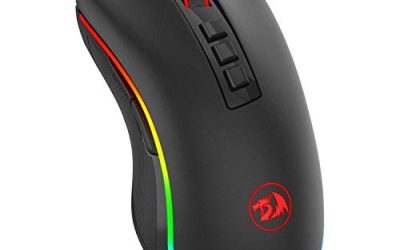
Redragon M612 Predator
- Best for: MMO, MOBA and macro-heavy players who will genuinely use a large button count.
- Wired optical sensor, up to 8,000 DPI
- 11 programmable buttons
- Rapid fire button
- 5 backlit RGB modes
MMO, MOBA and macro-heavy players who will genuinely use a large button count.
Eleven buttons take practice to reach without looking, and the extra side inputs are easy to press by accident while learning the grip.
The M612 Predator is built around button count. Its title lists eleven programmable buttons, a rapid fire button and software support for custom keybinds, which makes it the natural pick here for MMO and MOBA players who map several abilities to the mouse, or for anyone who wants media and push-to-talk controls off the keyboard. The optical sensor adjusts up to 8,000 DPI, and the listing names five backlit modes, so lighting changes can be handled through presets as well as software. The right-handed shape and side button cluster suit a palm or relaxed claw grip.
Redragon M711 Cobra
- Best for: Palm grippers with medium to larger hands who want strong lighting and a fuller shell.
- Optical sensor, adjustable up to 10,000 DPI
- 7 programmable buttons
- 16.8 million colour RGB backlighting with multiple effects
- 5 adjustable DPI levels named in product descriptions
Palm grippers with medium to larger hands who want strong lighting and a fuller shell.
Confirm the exact variant on the listing before ordering, because the Cobra name is used across several Redragon listings with different details.
The Cobra takes a different route from its M612 sibling: fewer buttons, a higher listed sensor ceiling and a bigger emphasis on lighting depth. The title states 10,000 DPI, seven programmable buttons and 16.8 million RGB colour backlighting, with multiple lighting effects described on the page. Its sculpted ergonomic body is the fuller shape in this guide, which palm grippers often prefer during longer sessions because the shell supports more of the hand. The listing also describes several adjustable DPI levels and memory profiles, each of which can carry its own light colour for quick identification.
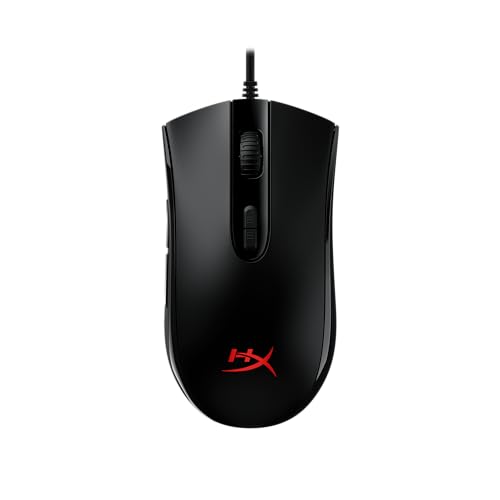
HyperX Pulsefire Core
- Best for: Claw and fingertip players who want a light symmetrical mouse for shooters and mixed gaming.
- Pixart 3327 optical sensor, up to 6,200 DPI
- 7 programmable buttons
- Mouse weight listed at 87g
- Software-controlled RGB light effects
Claw and fingertip players who want a light symmetrical mouse for shooters and mixed gaming.
The 6,200 DPI ceiling is lower than rivals here, which is fine for typical settings but worth noting if you play at very high sensitivity.
The Pulsefire Core is the lightest, simplest symmetrical option here. Its Amazon title names a Pixart 3327 sensor up to 6,200 DPI, seven programmable buttons and a weight of 87 grams, a combination aimed at players who move the mouse with quick wrist and fingertip motions in shooters. The listing describes software-controlled RGB light effects and macro customisation through HyperX software, plus large skates and a braided cable, both of which affect how smoothly the mouse glides and how the cable behaves on the desk. Nothing about the specification is extreme, and that balance is the appeal.
SteelSeries Rival 3
The Rival 3 makes durability its headline. The Amazon page lists mechanical switches rated for 60 million clicks, a shell built from high-grade polymer, and a TrueMove Core optical sensor with true one-to-one tracking at 8,500 CPI, 300 IPS and 35g acceleration. Its redesigned Prism lighting covers three zones with 16.8 million colours, the brightest presentation in this group alongside the Cobra. Six programmable buttons and split-trigger main clicks round out a specification that reads like a checklist for a mouse bought to be used hard for years rather than replaced next season.
Specs
- TrueMove Core optical sensor, 8,500 CPI
- Tracking listed at 300 IPS and 35g acceleration
- 6 programmable buttons with split-trigger design
- Mechanical switches rated for 60 million clicks
- Brilliant Prism RGB lighting in 3 zones
- High-grade polymer shell, wired USB connection
Best for: Players who click hard and often, and anyone prioritising switch lifespan and bright zoned lighting.
Watch out for: The shape is right-handed and moderately sized, so left-handed players and very small hands should look at the symmetrical options above instead.
ASIN: B08176SM7C
Which One Fits Your Situation
You are finishing a first gaming setup and want the safe choice
Start with the Logitech G203 LIGHTSYNC. Its six buttons cover the binds a new player actually uses, the sensor range is generous for any common sensitivity, and the software named on its listing is the most established in this group. The compact symmetrical shape is forgiving while you are still discovering whether you grip with palm, claw or fingertips, and the on-board memory means your settings survive a move to another computer.
You play MMOs or MOBAs and keep running out of binds
Choose the Redragon M612 Predator. Eleven programmable buttons, including the rapid fire input named in its title, give you room for abilities, consumables and voice controls without forcing awkward keyboard reaches mid-fight. Allow yourself a few sessions to build muscle memory for the extra side buttons, because the benefit only appears once reaching them becomes automatic rather than a glance down at the mouse.
You have larger hands and prefer a full palm grip
The Redragon M711 Cobra fits this situation best. Its sculpted body supports the palm instead of asking your fingers to hold a small shell in a claw, and the seven programmable buttons still cover shooter and MOBA essentials. The deep RGB options also suit a setup where the mouse sits visibly on the desk between sessions and its lighting is part of the look you are building.
You play fast shooters and want the mouse to feel light
Look at the HyperX Pulsefire Core or the SteelSeries Rival 3. The Pulsefire Core is the lighter symmetrical pick at 87 grams as listed, suited to fingertip movement, while the Rival 3 answers with its 60 million click switch rating and higher tracking figures for players who flick aggressively. Pick the Core for weight and symmetry, and the Rival 3 if click lifespan and three-zone lighting matter more to you.
Common Mistakes
- Choosing by maximum DPI alone, when the named sensor, its tracking speed and how it behaves at your actual sensitivity setting matter far more.
- Buying an eleven-button mouse for games that only use four binds, then fighting accidental side-button presses for months.
- Ignoring hand size and grip style, so a compact symmetrical mouse ends up under a large palm grip, or a big sculpted shell cramps a fingertip player.
- Assuming all RGB works the same way, then discovering the lighting needs software you cannot install on the computer you play on.
- Forgetting the cable: every pick here is wired, so desk layout, cable slack and where the cable catches deserve a thought before ordering.
Frequently Asked Questions
Is a wired mouse a problem at this level?
For most players, no. Every mouse in this guide is wired, which removes batteries, charging and wireless dropouts from the equation entirely, and wired connections at this level respond consistently. The real consideration is cable management: leave slack, route the cable so it does not snag on the desk edge or monitor stand, and the wire largely disappears from your attention during play.
How much DPI do I actually need for shooters?
Far less than the headline figures suggest. Most shooter players use settings somewhere in the hundreds to low thousands, adjusting in-game sensitivity around that base. A sensor listed up to 6,200 or 8,000 DPI already covers that range with room to spare. What matters is clean tracking at your chosen setting, which is why the sensor name and tracking speed on the listing are better guides than the maximum number.
Can I turn the RGB lighting off or simplify it?
Yes, in different ways depending on the model. Mice with software control, such as the G203 with LIGHTSYNC or the Pulsefire Core, let you set brightness, choose a single colour or switch effects off in the program. Preset-driven models such as the M612 cycle through their listed backlit modes with button combinations. Check the listing’s description for the exact method, because the steps differ between brands.
Will these mice work for school or office work as well as games?
They will, and the programmable buttons can help there too, since the same software that binds game actions can assign copy, paste or media controls. Two cautions apply. Bright animated lighting may be unwelcome in a classroom or meeting, so learn the off setting first, and a sculpted gaming shape is larger in a laptop bag than a basic travel mouse, which matters if the mouse moves daily.
Related guides
More from Amazon
Programs that pair well with the guide above. Offers and eligibility are set by Amazon and may change.
Free shipping on eligible items, Prime Video and more. Eligible new members can start with a free trial.
Start a Prime free trialAd-free music streaming. Eligible new subscribers can start with a free trial.
Try Music Unlimited freeA Prime membership for ages 18-24 with a trial period. Eligibility is set by Amazon.
See Prime for Young AdultsAudiobooks and podcasts to listen to on the go. Eligible new members can start with a free trial.
Try Audible freeAs an Amazon Associate we earn from qualifying purchases.