Shopping for a digital watch for an older adult is mostly an exercise in removing friction. The wearer may have reduced eyesight, less dexterity in the fingers, or simply no interest in pairing a phone, creating an account or updating firmware. A good senior-oriented watch shows the time in numbers that can be read without glasses, survives handwashing and the dishwasher-adjacent hazards of daily life, and asks for nothing in return except an occasional button press.
This guide is for adult children buying for a parent, for caregivers, and for older buyers choosing for themselves. We compare six distinct listings from the facts in their titles: number size, case diameter, water resistance, backlight, alarms, and whether health features work without an app. Where a title is thin, we say what to verify first. A few listings here appear several times under different codes with near-identical wording, so we treat them as one entry rather than padding the list in 2026.
Our Top Picks
Top 3 picks at a glance
Quick Picks
As an Amazon Associate we earn from qualifying purchases at no extra cost to you.


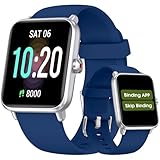

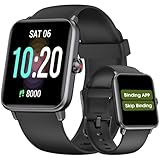

| Product | Best for | Key spec from the title |
|---|---|---|
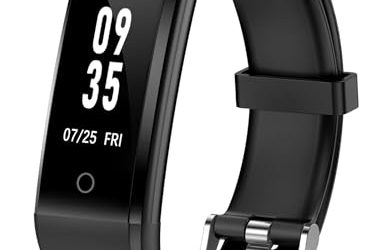
| Senior-friendly pedometer watch (no app) | Walking and health tracking without a phone | No app or phone needed, step counter, heart rate, blood oxygen, sleep tracker |
| Finess senior tracker | Easy-to-read health basics | Senior friendly, no app, easy to read, waterproof |
| Fogitbok Large Display | Big numbers at a glance | Large numbers, waterproof, big square face |
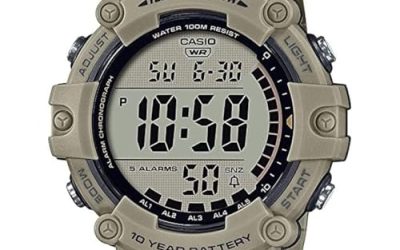
| CakCity 50mm | Strong readability with a stopwatch | 50mm large face, 50m water resistant, EL backlight, alarm |
| PASOY 50mm Big Dial | Simple, rubber-strap daily wear | Big dial, LED light, alarm, swim waterproof |
| Extra Large Numbers Elderly Watch | Maximum number size | Extra large numbers, waterproof, square case |
How to Choose
Readability comes first
Look for explicit large-number language in the title, a case at or near 50mm, and a high-contrast black-and-white display. A big dial only helps if the digits fill it, so prefer listings that mention large or extra large numbers rather than just a large case. A backlight matters for bedside use and evening reading of the time, and an electroluminescent or LED light that stays on for a few seconds is better than a dim glow. Be wary of crowded faces that cram steps, heart rate and date into small segments.
Decide whether health tracking is worth the complexity
Some listings add step counting, heart rate, blood oxygen and sleep tracking with no phone required. That can be valuable for a relative who walks daily and wants simple numbers, but every extra sensor adds menus and a battery that needs charging, whereas a plain digital watch runs on a coin cell for a long time. Consumer wrist sensors are not medical devices, so they should not replace advice from a clinician, and a watch is a poor tool for diagnosing anything. If the wearer only wants the time, skip the tracker.
Check buttons, straps and comfort
Small recessed buttons are the biggest hidden frustration for older hands. Prefer watches with large, raised or well-spaced buttons and few modes. A rubber or silicone strap with plenty of holes is easier to fasten than a metal clasp, and a soft band is gentler on thin skin. If the wearer has arthritis, consider a stretchy or hook-and-loop band, and check that the strap is replaceable. A 50mm case looks bold but can feel heavy, so weigh readability against comfort on a slim wrist.
Water resistance and maintenance
For handwashing, dishes and rain, 30 meters is the minimum worth considering, and 50 meters gives extra margin for showers and gentle swimming. Do not assume “waterproof” means pool-ready without a stated depth. Think about upkeep, too: a coin-cell watch needs a battery swap every year or more, which a family member can handle, whereas a rechargeable tracker needs a daily or weekly charging habit. The watch that fits a routine is the one that stays on the wrist. Budget listings often cut corners on the instruction sheet, so look for a model whose controls are guessable: one button for light, one for mode, one for set. If the wearer will need help changing the time after daylight saving shifts, choose a watch with as few menu layers as possible, because a simple design saves a phone call every spring and autumn.
The 6 Best Options
Senior-friendly pedometer watch (no app)
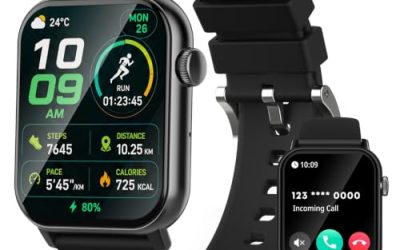
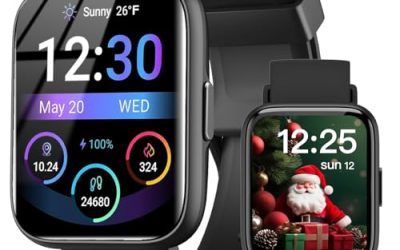
Three listings share this near-identical title, all for a senior-friendly pedometer watch that needs no app and no phone. The wording lists a step counter, heart rate monitor, blood oxygen monitor and sleep tracker. Because the titles are cut off, treat any further features, such as alarms, as unconfirmed until you read the full listing.
- Strength: it works standalone, which avoids the pairing and account setup that frustrates many first-time users.
- Strength: step, heart rate, blood oxygen and sleep data in one device suit a walker who likes seeing daily progress.
- Trade-off: more sensors mean more menus and a battery that needs charging, and the title gives no number size or water depth.
Skip it if the wearer wants a plain time display with large digits. It suits active relatives who like counting steps, and it is a reasonable pick for a family that wants to see whether Grandma is staying active without installing anything on a phone. Since three listings carry nearly the same wording, compare seller return terms before choosing one.
Finess senior tracker
Finess pitches itself as a senior-friendly pedometer watch that needs no app or phone. The title lists easy-to-read display, step counter, waterproofing, heart rate, blood oxygen and sleep monitoring.
- Strength: “easy to read” and “waterproof” both appear in the title, which speaks directly to the target user.
- Strength: standalone operation with no app keeps setup simple for a caregiver.
- Trade-off: the title does not state a water resistance depth, so assume splash and handwashing use only until confirmed.
Skip it if you want a long-life coin-cell watch, since a sensor-equipped tracker will need charging. It fits a relative who wants health basics on the wrist without a phone, particularly when a caregiver can handle the initial setup and show the main screens once.
Fogitbok Large Display
Fogitbok is a digital watch built around readability. The title emphasizes a large display, large numbers, waterproofing and a big square face, and it is marketed to both men and women.
- Strength: large numbers and a big square face prioritize quick, glasses-free reading.
- Strength: waterproof construction makes it practical for handwashing and rain.
- Trade-off: no water depth, backlight or alarm detail appears in the title.
Skip it if you need documented alarms or a stopwatch. It suits wearers who want to glance at the time and be done, such as a retiree checking the clock in the garden or a resident of an assisted-living community who walks to meals on a schedule.
CakCity 50mm
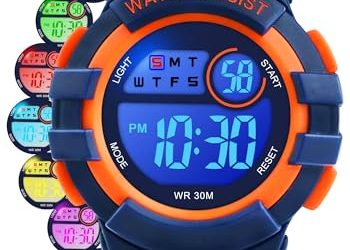
CakCity makes a sports-style digital watch that doubles as a readable senior option thanks to its size. The title lists a 50mm large face, 50m water resistance, stopwatch, alarm, EL backlight and a black finish, and mentions referee-style stopwatch use.
- Strength: a 50mm face with an EL backlight helps readability by day and at night.
- Strength: 50m water resistance covers showers, dishes and gentle swimming.
- Trade-off: a sports-style stopwatch layout may include more buttons than a casual wearer needs.
Skip it if the wrist is slim or the wearer dislikes heavy cases. It suits seniors who also want a stopwatch for timing walks, card games or kitchen tasks, and who value a backlit display for early mornings.
PASOY 50mm Big Dial
PASOY is a unisex outdoor digital watch with a 50mm case. The title highlights a simple design, big dial, digital light, swim-ready waterproofing, rubber band, alarm and LED display in black.
- Strength: a rubber band is comfortable and easy to clean.
- Strength: the unisex design, alarm and LED light cover the essentials without a long feature list.
- Trade-off: the title gives no depth rating, and a 50mm case may be large for small wrists.
Skip it if you want a health tracker or a dressy look. It suits wearers who need a clean, durable daily watch that can be rinsed under a tap, and it works well as a spare for gardening or water exercise classes.
Extra Large Numbers Elderly Watch
This listing speaks to the audience in the title itself, offering extra large numbers, waterproofing and a square case for men, women and the elderly.
- Strength: extra large numbers are the most direct readability claim in the group.
- Strength: a square case and waterproof build keep the design practical.
- Trade-off: the title does not mention a backlight, alarm or depth rating.
Skip it if you want alarms for medication reminders. It suits wearers with low vision who want the biggest digits, and it is worth confirming before purchase whether a backlight is included, since a night-time glance is a common use.
Which One Fits Your Situation
A parent with low vision who only wants the time
Choose the Extra Large Numbers Elderly Watch or the Fogitbok Large Display. Both put number size first and skip the extras that complicate a plain reading.
An active walker who likes numbers
The senior-friendly pedometer watch or the Finess tracker gives step, heart rate and sleep data without a phone, which suits a relative who resists apps.
Someone who needs alarms and a night light
The CakCity 50mm lists an alarm and EL backlight, and the PASOY adds a digital light and alarm in a rubber-band design, so either works for medication reminders and nighttime checks.
A gift for someone who dislikes technology
The PASOY is the simplest of the group: it avoids sensors, charging and menus. Pair it with a quick walk-through of the alarm button, and write the setup steps on a card so the wearer can fix the time without calling anyone after a battery change. Gifts like this land best when they remove tasks instead of adding them.
Common Mistakes
- Buying a heavily featured smart tracker for someone who only wants to read the time.
- Assuming a large case means large numbers, when the digits can still be small inside a big dial.
- Ignoring button size and spacing, which matter more than feature lists for older hands.
- Treating wrist health sensors as medical readings instead of rough trends.
- Forgetting to set the alarm and show the wearer how to use it before gifting the watch.
Related guides
- When I Turn On Record Game In Background On Gamebar. Gamebar Crashes, What Do I Do?
- How To Reduce Background Noise On A Streaming Microphone
- Poly Computer Accessories Company Streaming Evaluation
Frequently Asked Questions
Do health-tracking watches need a smartphone?
Some do not. Listings that say no app or phone required work as standalone devices, though you may lose syncing and long-term history. Check the instructions to see how to set the time and units.
How large should the numbers be for low vision?
There is no single rule, but listings that say large or extra large numbers are a better start than ones that only say large face. If possible, choose a model with a high-contrast black-and-white display and a good backlight.
Is a 50mm watch too big?
It can be heavy on a slim wrist. A 50mm case helps readability, so weigh it against comfort and look for a light rubber strap.
How often does a digital watch need a new battery?
Plain coin-cell watches often run a year or more between changes, depending on backlight use. Rechargeable trackers need regular charging, which some older users find harder to remember.