Overwatch rewards aim that is fast and repeatable. A flick onto a flanking Tracer, a steady track on a Pharah in the sky, and a clean 180 to answer a dive all depend on how your mouse moves, not on how it looks. The wrong shape drags your wrist, a heavy shell slows your corrections, and a sensor that spins out at high speed turns a winnable duel into a whiffed shot. Picking a mouse for Overwatch is therefore a decision about weight, sensor stability, and grip first, and about extras second.
This guide is written for ranked players who climb on hitscan heroes, flex players who swap between tracking and flicking roles, and anyone replacing a worn office mouse with something built for competitive play. Every pick below is drawn from the product title and listed specifications on its Amazon page, so you can compare weight, sensor ceiling, battery life, and button layout before you buy.
Our Top Picks
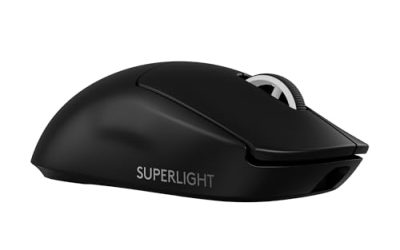
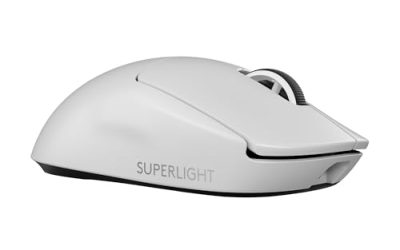
 Logitech G Pro X Superlight 2 Lightspeed WirelessClassic1.57 x 2.5 x 4.92 inches0.1 poundsCheck on Amazon

Top 3 picks at a glance

Quick Picks
As an Amazon Associate we earn from qualifying purchases
| Product | Best for | Key spec from title |
|---|---|---|
| Logitech G Pro X Superlight 2 | Hitscan mains who flick all match | 60g, HERO 2 sensor, up to 44,000 DPI |
| Razer DeathAdder V3 Pro | Ergonomic palm grip and long sessions | 63g, Focus Pro 30K sensor, 90-hour battery |
| Razer Viper V2 Pro | Low-sensitivity players who need control | 58g, Focus Pro 30K sensor, HyperSpeed wireless |
| BenQ Zowie EC2-CW | Players who want a driver-free setup | Enhanced wireless receiver, 24-step scroll wheel |
| Pulsar X2H Wireless | Small hands and fingertip grip | 54g, PAW3395 sensor, up to 26,000 DPI |
How to Choose
Weight and balance
A lighter mouse starts and stops faster, which matters when you flick between targets or correct a shot mid-swing. Most competitive Overwatch mice sit between 54 and 63 grams, and that range suits low-sensitivity players who move their whole arm across a large pad. Heavier mice can feel steadier for high-sensitivity players who aim mostly with the wrist, but extra mass makes long sessions more tiring. Check the listed weight before you buy, and remember that a honeycomb or perforated shell is usually how brands reach the lightest numbers without shrinking the mouse itself.
Sensor ceiling and tracking speed
The sensor decides whether fast swipes stay accurate. Look for a maximum DPI well above what you actually use, since a high ceiling usually means the sensor tracks cleanly at the speeds your arm reaches in a real fight. Tracking speed, listed in inches per second, and acceleration, listed in G, tell you how hard you can move before the sensor loses the surface. A 26,000 DPI sensor with 650 IPS and 50G acceleration covers aggressive flicks easily, while a 30,000 DPI optical sensor gives even more headroom for very low sensitivity play.
Shape and grip style
Shape decides comfort more than any specification. An ergonomic right-handed shell supports the palm and suits players who rest their whole hand on the mouse, while a symmetrical shell suits claw and fingertip grips that lift and reposition often. If your hand measures under 17 centimeters, a medium or small mouse keeps your fingers near the buttons without stretching. If your hand is large, a longer shell stops your palm from hanging off the back. When in doubt, match the shape to your grip first and the sensor second, because an uncomfortable mouse never becomes comfortable with practice.
Wireless latency and battery life
Modern wireless mice report at up to 8,000 Hz, which means the mouse sends its position to the computer eight thousand times per second, and a 2.4 GHz connection with a 1 ms response time behaves like a wired mouse in practice. Battery life matters more than most buyers expect: a mouse rated for 90 hours lasts weeks of evening sessions, while a shorter rating means charging becomes a weekly chore. USB-C charging is worth checking too, since it lets you top up with the same cable as your phone or headset instead of hunting for a special one.
The 5 Best Options
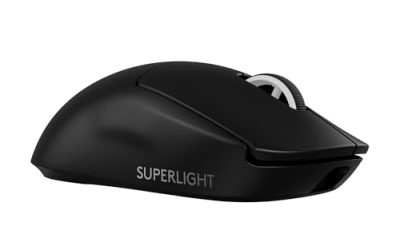
Logitech G Pro X Superlight 2
The Superlight 2 is the default pick for hitscan players who want the lightest possible mouse without giving up a proven shape. At 60 grams it disappears in the hand during long ranked sessions, and the HERO 2 sensor tracks cleanly at the high speeds a Widowmaker flick demands. LIGHTSPEED wireless keeps the connection stable with no cable drag, and the LIGHTFORCE hybrid switches combine optical speed with a mechanical feel that stays consistent over time. It is a plain, focused tool that does the aiming job and gets out of the way.
Specs
- 60g weight
- HERO 2 sensor with up to 44,000 DPI
- 8kHz wireless polling rate
- LIGHTSPEED wireless connection
- LIGHTFORCE hybrid switches
- USB-C charging
Best for: Hitscan mains who flick constantly and want the lightest proven shape.
Watch out for: The minimalist design has no extra side buttons beyond the standard pair, so ability-heavy heroes need keyboard binds.
Razer DeathAdder V3 Pro
The DeathAdder V3 Pro suits players who palm grip and want an ergonomic shell that supports the whole hand through long sessions. Its 63-gram body is light for an ergonomic mouse, and the Focus Pro 30K optical sensor handles fast tracking without spin-out. HyperSpeed wireless keeps latency low, and the 90-hour battery means charging happens rarely. The shape has been refined over many generations, so it feels familiar from the first match rather than needing a week of adjustment.
Specs
- 63g weight
- Focus Pro 30K optical sensor
- Razer Optical Mouse Switches Gen-3
- HyperSpeed wireless connection
- 5 programmable buttons
- Up to 90 hours of battery life
Best for: Palm-grip players who want ergonomic comfort and a long battery life.
Watch out for: The right-handed ergonomic shape does not suit left-handed players or claw grippers who prefer a symmetrical shell.
Razer Viper V2 Pro
The Viper V2 Pro is the lightest Razer option here, and it fits players who run low sensitivity and sweep the mouse across a wide pad. At 58 grams it starts and stops with very little effort, and the Focus Pro 30K sensor keeps tracking stable during fast corrections. Gen-3 optical switches remove the risk of double-clicking that mechanical switches can develop, and HyperSpeed wireless keeps the connection responsive. USB-C charging rounds out a mouse that is built for players who value raw speed over extra features.
Specs
- 58g weight
- Focus Pro 30K optical sensor
- Razer Optical Mouse Switches Gen-3
- HyperSpeed wireless connection
- Up to 90 hours of battery life
- USB-C charging
Best for: Low-sensitivity players who sweep wide and want the lightest Razer shell.
Watch out for: The symmetrical shape has no thumb rest, so palm grippers may find it less supportive than an ergonomic mouse.
BenQ Zowie EC2-CW

The EC2-CW is the pick for players who want to plug in and play with no software at all. Zowie mice are driverless, so DPI and polling rate change with buttons on the mouse itself, which suits players who move between computers or tournament setups. The enhanced wireless receiver keeps the connection steady, and the 24-step scroll wheel gives precise weapon switching. Its medium ergonomic shape is a classic for right-handed players, and the straightforward design means there is nothing to configure before your first match.
Specs
- Enhanced wireless receiver
- 24-step scroll wheel
- Driverless design with on-mouse settings
- Ergonomic right-handed shape
Best for: Players who want a driver-free mouse that works the same on any computer.
Watch out for: There is no configuration software, so lighting, macros, and deep button remapping are not available.
Pulsar X2H Wireless

The X2H Wireless is the smallest and lightest mouse in this guide, and it suits players with small hands or a fingertip grip. At 54 grams it is easy to lift and reposition, which helps when you play heroes that need constant small adjustments. The PAW3395 sensor reaches 26,000 DPI with 650 IPS tracking and 50G acceleration, so fast flicks stay clean. Optical switches keep clicks consistent, and the 2.4 GHz wireless connection responds in 1 ms, which is fast enough for competitive play.
Specs
- 54g weight
- PAW3395 sensor with up to 26,000 DPI
- Optical switches
- 2.4GHz wireless connection with 1 ms response time
- 650 IPS tracking speed
- 50G acceleration
Best for: Small hands and fingertip-grip players who want the lightest mouse here.
Watch out for: The compact shell can feel cramped for large hands, and the high hump suits fingertip grip more than palm grip.
Which One Fits Your Situation
You main hitscan heroes
Pick the Logitech G Pro X Superlight 2 or the Razer Viper V2 Pro. Both are light enough for constant flicking, and their sensors track cleanly at the speeds a Widowmaker or Cassidy duel demands. The Superlight 2 suits a relaxed claw grip, while the Viper V2 Pro suits players who like a flatter symmetrical shell.
You track targets with beam heroes
Pick the Razer DeathAdder V3 Pro. Its ergonomic shape supports your palm during long tracking fights as Zarya or Soldier: 76, and the 90-hour battery means it is always ready. The Focus Pro sensor holds a steady line on moving targets without drifting. The 63-gram weight is light enough for quick corrections without tiring your wrist.
You play on several computers
Pick the BenQ Zowie EC2-CW. With no software to install, your settings travel with the mouse itself, so a tournament computer, a friend’s setup, or a fresh install all feel identical. The driverless design removes one more thing to troubleshoot before a match. Just plug it in and your DPI and polling rate are exactly where you left them.
You have small hands or a fingertip grip
Pick the Pulsar X2H Wireless. At 54 grams it is the lightest mouse in this guide, and its compact shell keeps your fingers close to the buttons. The high tracking speed suits quick repositioning, which fingertip players do constantly. The high hump supports the fingertips without forcing a palm grip you do not use.
Common Mistakes
- Buying the heaviest mouse in the lineup because it feels solid in the hand, then tiring out during long ranked sessions.
- Copying a professional player’s sensitivity without matching their mouse weight and pad size.
- Choosing a mouse with a shape that fights your grip style, then blaming your aim for the discomfort.
- Ignoring battery life and ending up with a wireless mouse that needs charging in the middle of a session.
- Installing configuration software on a shared computer and losing your settings when someone else changes them.
Frequently Asked Questions
Is a lighter mouse always better for Overwatch?
Not always. A lighter mouse starts and stops faster, which helps flicking and repositioning, but some players aim more steadily with a little extra mass. The right weight depends on your sensitivity and grip, so treat 54 to 63 grams as a starting range and adjust from there.
Do I need a wireless mouse to play competitively?
No, but modern wireless mice perform on par with wired ones. A 2.4 GHz connection with a 1 ms response time and a high polling rate behaves like a cable in practice, and the lack of cable drag is a real advantage on a large pad.
What DPI should I use for Overwatch?
Most competitive players use between 400 and 1,600 DPI with a matching in-game sensitivity, because that range gives fine control without huge arm movements. The sensor ceiling matters more than the number you set, so pick a mouse whose sensor tracks cleanly at your speed.
Can I use these mice on a console?
Overwatch on console has limited mouse support, and most of these mice are designed for PC play. If you play on a console, check the game’s input settings first, since a mouse that works perfectly on PC may not be recognized at all.
Related guides
More from Amazon
Programs that pair well with the guide above. Offers and eligibility are set by Amazon and may change.
Free shipping on eligible items, Prime Video and more. Eligible new members can start with a free trial.
Start a Prime free trialAd-free music streaming. Eligible new subscribers can start with a free trial.
Try Music Unlimited freeA Prime membership for ages 18-24 with a trial period. Eligibility is set by Amazon.
See Prime for Young AdultsAudiobooks and podcasts to listen to on the go. Eligible new members can start with a free trial.
Try Audible freeAs an Amazon Associate we earn from qualifying purchases.