A small hand on a full-size gaming mouse faces a specific problem: the shell is long enough that the main clicks sit past your fingertips, the side buttons land under the wrong part of your thumb, and every wide swipe starts with your wrist already extended. Going lighter does not fix any of that on its own. The real decision is pairing a genuinely short, narrow shell with a weight your fingers can stop precisely, because a tiny mouse that is still heavy pulls against every micro-correction you make in a shooter.
This guide is for players with hands under roughly 18.5 cm who use claw or fingertip grip, laptop gamers who carry their mouse between rooms, and anyone whose current mouse forces a stretched palm grip. Every pick below was chosen from the product names and specifications published on its Amazon page, with shell dimensions and weights compared against the needs of smaller hands rather than headline DPI figures.
Our Top Picks


Top 3 picks at a glance
Quick Picks
As an Amazon Associate we earn from qualifying purchases
| Product | Best for | Key spec from title |
|---|---|---|
| Razer Orochi V2 | Switching between a gaming desk and a laptop bag | Under 60 g design with 18K DPI optical sensor |
| Pulsar X2H Mini | Claw-grip shooter players who want the lightest wireless shell here | 52 g ultra lightweight with PAW3395 26,000 DPI sensor |
| Glorious Model O Minus | Wired players who want honeycomb lightness and no charging | 58 g superlight honeycomb design, Pixart 3360 sensor |
| Logitech G305 Lightspeed | Long sessions without thinking about battery swaps | HERO 12K sensor with 250-hour battery life |
How to Choose
Measure Your Hand Before Reading Any Spec Sheet
Mouse fit starts with two numbers you can take in a minute: hand length from middle fingertip to wrist crease, and width across the knuckles. Most shells in this guide run between about 108 mm and 120 mm long, and that gap matters more than any sensor figure. A hand around 17 cm long paired with a 120 mm shell usually ends up in a stretched palm grip whether the player wants one or not, while the same hand on a 108 mm shell can settle into a relaxed claw. Measure first, then filter the listings by the dimensions in their spec tables instead of trusting words like compact in a product name.
Weight Only Helps When the Shell Fits First
Dropping from a heavy office mouse to something in the 50 to 60 gram range changes how a small hand plays: flicks start with less effort, and stopping the cursor takes less finger pressure because there is less mass moving. But grams are not the whole story. A 99 gram mouse with a short shell can feel more controlled than a 55 gram mouse that is too long, because your fingers wrap the shorter body instead of reaching along it. Treat weight as the second filter after length. Once the shell fits, lighter generally means less fatigue across a long session and quicker direction changes in fast games.
Match the Hump Position to Your Grip
Claw and fingertip players control the mouse with different contact points, and small shells place their humps differently. A rear or centre hump that sits under your curled fingers gives claw grip its leverage for vertical movements, while fingertip players barely touch the shell and care more about narrow grip width and low side walls. The Pulsar X2H Mini in this guide uses a noticeably raised hump for claw support, whereas the Orochi V2 keeps a lower, flatter profile. If your fingertips do most of the steering, prioritise width and side shape; if your palm knuckles rest on the back of the mouse, prioritise hump height.
Decide How You Want to Power It
Three of these mice avoid cables, but they handle power very differently. The Orochi V2 and G305 run on replaceable AA or AAA cells, so a flat battery means a thirty-second swap rather than a charging break, and the G305 stretches a single AA to a listed 250 hours. The X2H Mini uses an internal rechargeable cell rated at 90 hours, which keeps weight down but ties you to a cable when it runs low. The wired Model O Minus removes the question entirely. Pick based on your habits: forgetful chargers do better with swappable cells, while tidy-desk players may prefer rechargeable.
The 4 Best Options
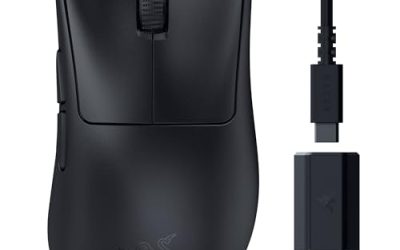
Razer Orochi V2

The Orochi V2 is built around the exact problem this guide covers: the listing describes a compact shell that weighs under 60 grams before its battery goes in, in a footprint closer to a travel mouse than a desktop one. That size suits small hands in fingertip and claw grip without the fingers overhanging the front. Its dual wireless modes add practical range, with HyperSpeed for gaming and Bluetooth for a second machine, and the choice of running a lighter AAA cell lets smaller hands trim the weight further. For players splitting time between a desk and a laptop bag, the listing makes a strong case.
Specs
- Weight: under 60 g excluding battery
- Sensor: Razer 5G Advanced optical sensor, up to 18,000 DPI
- Connectivity: Razer HyperSpeed Wireless and Bluetooth, 2 wireless modes
- Battery life: up to 950 hours as listed in the product title
- Switches: 2nd-gen Razer Mechanical Mouse Switches
- Battery type: works with a single AA or AAA battery
- Dimensions: 4.26 x 2.47 x 1.52 inches; item weight 2.08 ounces
- Model number: RZ01-03730100-R3U1 (Classic Black)
Best for: Small-handed players who game at a desk and on a laptop in different places.
Watch out for: The sub-60 g figure excludes the battery, so check the total with the cell you plan to use; an AA adds noticeably more than an AAA.
ASIN: B0916N2LPZ
Pulsar X2H Mini
The X2H Mini is the specialist pick here, a mini symmetrical shell with a raised rear hump shaped for claw grip and a listed weight of 52 grams, the lightest in this guide. That combination matters for small hands because the hump gives curled fingers something to pull against, so control comes from the grip rather than from squeezing a flat shell. The Amazon listing pairs that shape with a current-generation flagship sensor and optical switches, plus a 90-hour battery rating. Players who found mainstream small mice too flat or vague in claw grip are the audience this model is aimed at.
Specs
- Weight: ultra lightweight 1.83 oz (52 g)
- Shape: symmetrical mini shell with high hump
- Sensor: PAW3395, up to 26,000 DPI
- Tracking: 650 IPS and 50G acceleration as listed
- Switches: optical switch
- Battery life: 90 hours as listed
- Polling: 4K polling rate supported with a separate 4K dongle
- Model number: PX2H13 (Mini, Wireless, Red)
Best for: Claw-grip shooter players with small hands who want the lightest wireless option in this guide.
Watch out for: The listing notes that 4K polling requires a separate 4K dongle, and this listing is a limited colour edition, so confirm the colour and edition before ordering.
ASIN: B0CLGT7JMM
Glorious Model O Minus
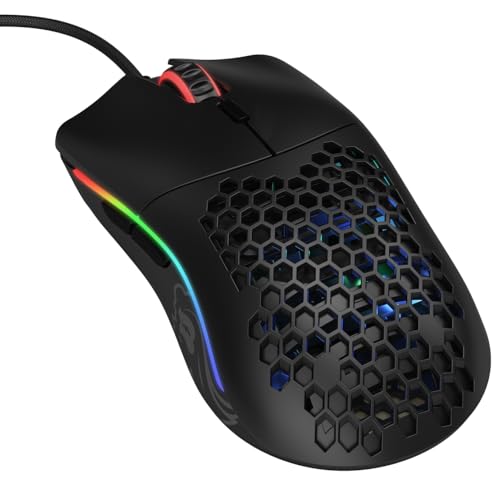
The Model O Minus takes the wired route to low weight: the listing describes a 58 gram honeycomb shell, which reaches its figure without a battery to carry. For small hands the shorter Minus shell is the relevant detail, since the full-size Model O suits medium hands better. The perforated body and flexible cable suit fingertip players who make constant small adjustments and do not want a cable fighting them, and there is never a battery to manage mid-session. Players who dislike charging routines, or who simply prefer the direct feel of a cable that barely pulls, are well served by this design.
Specs
- Weight: 58 g superlight honeycomb design
- Sensor: Pixart 3360 sensor
- Switches: Omron switches
- Shape: ambidextrous compact shell
- Buttons: 6 programmable buttons
- Cable: flexible Ascended paracord-style cable
- Feet: PTFE skates
- Lighting: RGB
- Finish: Matte Black
Best for: Fingertip-grip players who want a very light wired mouse and no battery routine.
Watch out for: The open honeycomb shell collects dust and is harder to wipe clean than a solid body, so check the listing photos and be ready to clean it with compressed air.
ASIN: B07VMM5LKH
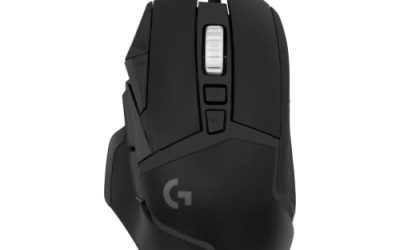
Logitech G305 Lightspeed
The G305 is the heaviest mouse in this guide at a listed 99 grams, yet its compact shell keeps it relevant for small hands: the body is short and narrow, so fingers reach the clicks and side buttons without stretching even though the mass is higher. What the listing sells hardest is endurance, with 250 hours of play from a single AA battery and a receiver that stores inside the shell for travel. Its symmetrical shape works for claw and fingertip grips, and the six programmable buttons cover everyday game binds. It suits players who value never thinking about power over shaving grams.
Specs
- Weight: 99 grams as listed
- Sensor: HERO sensor, 200 to 12,000 DPI
- Connectivity: LIGHTSPEED wireless with 1 ms report rate
- Battery life: 250 hours on a single AA battery
- Buttons: 6 programmable buttons
- Memory: on-board memory for settings
- Tracking speed: over 400 IPS as listed
- Storage: built-in compartment for the USB receiver
Best for: Small-handed players who want a compact wireless mouse that runs for months on one battery.
Watch out for: At 99 grams it is far heavier than the other picks, so if low weight is your main reason for upgrading, compare this figure against the rest of the guide first.
ASIN: B07CMS5Q6P
Which One Fits Your Situation
You Play Shooters With a Claw Grip
Reach for the Pulsar X2H Mini. Its raised hump is shaped to sit against curled fingers, which gives a small hand leverage for vertical recoil control and quick downward pulls, and at 52 grams it is the easiest mouse here to stop mid-flick. The optical switches and PAW3395 sensor listed on its page match that competitive brief. Just remember the 4K polling dongle is a separate purchase if you want the higher polling rate later.
You Game on a Laptop in More Than One Place
The Razer Orochi V2 fits this routine best. The compact shell slips into a laptop sleeve, Bluetooth covers a work machine without the dongle, and HyperSpeed handles proper gaming sessions when you are settled. Battery flexibility helps on the road too: the listing confirms it runs on a single AA or AAA, so a spare cell in the bag replaces any charging plan, and choosing the AAA trims weight for smaller hands.
You Forget to Charge Your Gear
Two picks solve this differently. The Logitech G305 stretches a single AA battery to a listed 250 hours, so charging simply leaves your routine; when it finally runs down, a swap takes seconds. If even that sounds like upkeep, the wired Glorious Model O Minus removes batteries from the equation entirely and still weighs only 58 grams. Choose the G305 for a cable-free desk, or the Model O Minus if a light flexible cable does not bother you.
Your Fingers Cramp During Long Sessions
Cramping usually traces back to a shell that forces your fingers to stretch or squeeze, so the shortest bodies deserve attention first. The Orochi V2, at under 60 grams before its battery and with the smallest footprint here, asks the least of a small hand held in a relaxed claw. Pair it with the AAA battery option the listing supports to keep the total weight down, and avoid forcing a palm grip onto any of these short shells.
Common Mistakes
- Buying by weight alone and ignoring shell length, so a very light but long mouse still forces a stretched grip on a small hand.
- Assuming a mini mouse suits palm grip; most short shells in this guide are shaped for claw or fingertip control, and forcing palm grip causes the heel of the hand to drag.
- Comparing battery figures across brands without checking the mode, since headline hours are often quoted for Bluetooth or power-saving modes rather than gaming connections.
- Forgetting that a listed weight may exclude the battery, cable, or receiver, which changes the real figure a small hand has to move.
- Ordering a limited colour or special edition listing without confirming the exact variant, size, and what is included in the box.
Frequently Asked Questions
What hand size counts as small for a gaming mouse?
A common working range is a hand length under about 18.5 cm measured from middle fingertip to wrist crease, though brands do not share one standard. What matters is the match with shell length: mice around 108 to 120 mm long, like the four listed here, let smaller hands reach the clicks and side buttons without stretching, especially in claw or fingertip grip.
Is lighter always better for small hands?
Not automatically. A lighter mouse reduces the effort needed to start and stop movements, which helps smaller hands during fast flicks, but only when the shell is short enough to grip securely. A very light mouse that is too long still forces reaching and squeezing. Fit comes first; once the length suits your hand, lower weight generally means less fatigue over long sessions.
Can I use palm grip with a mini gaming mouse?
Usually not comfortably. Palm grip needs a shell long enough to support the full hand, and mini mice are deliberately shorter, so the heel of your palm ends up unsupported or dragging on the pad. Small-handed players generally settle into claw or fingertip grip on these shells. If palm grip is non-negotiable, look at short but fuller-bodied shapes rather than the mini category.
Do these mice work for everyday office use as well?
Yes, with small caveats. The wireless picks here connect over 2.4 GHz receivers, and the Orochi V2 adds Bluetooth, so all four handle office machines and laptops without extra software for basic use. Programmable buttons and on-board memory, where the listing includes them, let game settings travel between computers. The main trade-off is shape: claw-oriented shells feel less relaxed for slow spreadsheet work than a dedicated ergonomic office mouse.
Related guides
More from Amazon
Programs that pair well with the guide above. Offers and eligibility are set by Amazon and may change.
Free shipping on eligible items, Prime Video and more. Eligible new members can start with a free trial.
Start a Prime free trialAd-free music streaming. Eligible new subscribers can start with a free trial.
Try Music Unlimited freeA Prime membership for ages 18-24 with a trial period. Eligibility is set by Amazon.
See Prime for Young AdultsAudiobooks and podcasts to listen to on the go. Eligible new members can start with a free trial.
Try Audible freeAs an Amazon Associate we earn from qualifying purchases.