
Plenty of players find ultralight mice twitchy: the cursor jumps at the smallest nudge, stopping a crosshair takes constant correction, and long tracking movements feel skittish. A heavier mouse answers that problem with inertia. Extra mass smooths out micro-movements, keeps the sensor planted during slow drags, and makes low-sensitivity aiming feel deliberate rather than frantic. If your aim style relies on arm movement and controlled sweeps, weight becomes a feature, not a flaw.
This guide gathers gaming mice that are heavy by design or let you add weight yourself, from fixed heavyweight shells to tunable systems with removable metal weights. Every pick is a gaming mouse with its weight figure taken from its Amazon product page, so you can compare real numbers instead of guesses. It suits palm-grip players, MMO fans who carry big button grids, and anyone whose lightweight mouse never felt stable enough.
Our Top Picks
 Logitech G502 LIGHTSPEED Wireless Gaming MouseWireless5.19 x 2.95 x 1.57 inches0.81 poundsCheck on Amazon

Top 3 picks at a glance
Quick Picks
As an Amazon Associate we earn from qualifying purchases
| Product | Best for | Key spec from title |
|---|---|---|
| Logitech G502 HERO | Tunable wired control | 121 g plus five 3.6 g weights |
| Corsair Nightsword RGB | Precise balance tuning | Adjustable from 119 g to 141 g |
| Logitech G502 Lightspeed | Heavy wireless play | 114 g plus up to 16 g of weights |
| Razer Naga Trinity | MMO button grids | 120 g with swappable side plates |
How to Choose
Start With the Total Weight Range
Look at two numbers: the weight out of the box and the maximum with every included weight installed. A mouse that starts near 120 grams already delivers the planted, deliberate feel heavy-mouse fans want, while one that starts lighter but accepts weights gives you an escape hatch. For low-sensitivity aiming, extra mass resists accidental nudges and makes stopping the cursor a single motion instead of a correction. If you mostly flick at targets, though, that same inertia works against you, so match the number to your aim style first.
Fixed Heft Versus an Adjustable Weight System
A fixed heavy mouse is simple: the balance the designers chose is the balance you get, forever. An adjustable system adds removable metal weights, usually in a tray under the mouse or in compartments at the front and rear. Adding weight at the back makes the mouse feel anchored during lifts; loading the front makes it feel eager to move. Systems differ in step size, from single large weights to several small ones, and finer steps make it easier to land on a feel you can reproduce if you ever replace the mouse.
Shape and Grip Decide How the Weight Feels
The same 120 grams can feel planted or punishing depending on the shell. Heavy mice usually pair their mass with large, right-handed ergonomic shapes, deep thumb scoops and palm-grip humps, because a full palm spreads the effort of moving the weight across your whole hand. Fingertip players, who steer with small muscles, feel heavy mice as sluggish far sooner. Check the length and height against your hand size, and favor textured sides or a thumb rest if you lift the mouse often, since a heavier shell is harder to re-grip mid-swipe.
Wired, Wireless and Managing Fatigue
Cable drag quietly adds resistance to a wired mouse, which some heavy-mouse fans count as free stability and others find exhausting. Wireless models remove the drag but carry a battery, which is partly why heavy wireless mice exist at all. Either way, plan for fatigue: heavier mice reward relaxed arm aiming and punish tense wrist play over long sessions. Take breaks, keep your sensitivity low enough that the weight does the smoothing, and if your shoulder or forearm aches, remove some weights before blaming the whole concept.
The 4 Best Options
Logitech G502 HERO

The Logitech G502 HERO is the default recommendation for players who want genuine heft with room to experiment. It starts at 121 grams before you touch the weight tray, and five included 3.6-gram weights let you push it to 139 grams or shift the balance toward the front or back. That mass steadies slow, deliberate tracking, while the HERO 25K sensor and eleven programmable buttons cover everything from shooters to MMOs. The sculpted right-handed shell and dual-mode scroll wheel suit palm grips and long sessions at a desk.
Specs
- Weight: 121 g, plus five 3.6 g tuning weights (up to 139 g)
- Sensor: HERO 25K optical, 100-25,600 DPI
- Buttons: 11 programmable
- Connection: Wired USB
- Dimensions: 132 x 75 x 40 mm
- Extras: Dual-mode hyper-fast scroll wheel, LIGHTSYNC RGB
Best for: Palm-grip players who want maximum tunable heft in a wired mouse
Watch out for: The 121 g starting weight is already heavy, and the large shell crowds small hands and fingertip grips
ASIN: B07GBZ4Q68
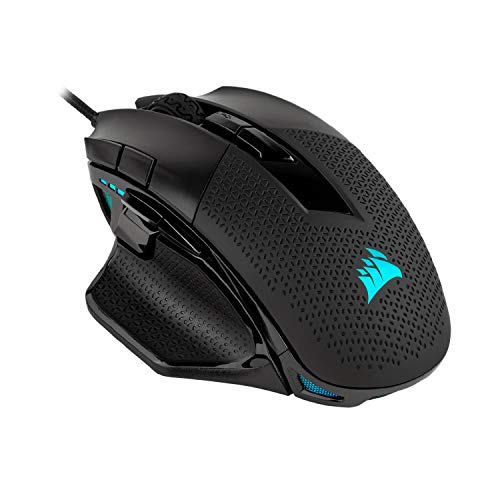
Corsair Nightsword RGB
The Corsair Nightsword RGB treats weight as something to calibrate rather than simply accept. Its base weight is 119 grams, and two sets of weights in six mounting locations create 120 combinations that take the total as high as 141 grams, while Corsair’s iCUE software detects the installed weights and reports the center of gravity in real time. That makes it the pick for players who know a heavy mouse helps but want the balance exactly where their grip wants it. Ten programmable buttons and a contoured thumb rest round out a large, palm-friendly shell.
Specs
- Weight: 119 g base, adjustable up to 141 g
- Weights: 3 x 4.5 g and 3 x 2.8 g blocks, six mounting locations
- Sensor: Custom PixArt PMW3391 optical, up to 18,000 DPI in 1-DPI steps
- Buttons: 10 programmable
- Connection: Wired, 1.8 m cable
- Software: iCUE with real-time center-of-gravity detection
Best for: Players who want to tune balance precisely, not just total weight
Watch out for: It is wired only, and the large contoured shell suits bigger hands best
ASIN: B07QX9C9WH
Logitech G502 Lightspeed
The Logitech G502 Lightspeed proves a heavy mouse does not need a cable. It weighs 114 grams on its own, and the box includes six weights — two 4-gram and four 2-gram pieces — that add up to 16 grams more, split between the front and rear compartments so you can bias the balance. LIGHTSPEED wireless keeps the connection at a 1 ms report rate, and the battery runs up to 60 hours, so the extra mass never comes with cable drag fighting your movements.
Specs
- Weight: 114 g, plus up to 16 g of included weights
- Weights included: 2 x 4 g and 4 x 2 g
- Sensor: HERO 25K optical, up to 25,600 DPI
- Connection: LIGHTSPEED wireless, 1 ms report rate
- Battery: Up to 60 hours
- Buttons: 11 programmable
- Extras: POWERPLAY wireless charging compatible
Best for: Players who want heavy-mouse control with wireless freedom
Watch out for: Fully loaded it reaches 130 g, which flick-shot players will find slow to throw around
ASIN: B07L4BM851
Razer Naga Trinity

The Razer Naga Trinity earns its 120 grams honestly: that mass carries a modular side panel system that swaps between 2, 7 and 12-button layouts, so one heavy mouse can cover shooters, MOBAs and MMOs without changing your grip. The weight keeps the wide shell calm during slow camera pans and long ability rotations, and the 16,000 DPI optical sensor tracks those small movements cleanly. Mechanical switches and up to 19 programmable buttons make it the heavyweight option for players whose games live on the thumb grid.
Specs
- Weight: 120 g
- Sensor: 16,000 DPI optical sensor
- Side plates: Interchangeable 2, 7 and 12-button configurations
- Buttons: Up to 19 programmable
- Switches: Razer mechanical mouse switches
- Lighting: Chroma RGB
- Model: RZ01-02410100-R3U1
Best for: MMO and MOBA players who need a big thumb grid in a steady, planted shell
Watch out for: The 120 g is fixed with no adjustable weights, and the wide body can feel bulky for small hands
ASIN: B0788MCRGC
Which One Fits Your Situation
You Aim With Your Arm at Low Sensitivity
Arm aimers sweep the mouse across big arcs and stop on target with their whole forearm, and that is exactly where extra mass earns its keep. A heavier mouse resists the tiny tremors at the end of a long swipe, so your crosshair settles instead of skating past. Pick a model near or above 115 grams, keep your sensitivity low, and let inertia do the fine control your wrist used to handle.
You Play MMOs and Live on the Thumb Grid
MMO rotations ask for many buttons under one thumb, and the mice that carry full grids are rarely light. The Naga Trinity turns that necessity into an advantage: its 120 grams keep the wide shell steady while your thumb works a 12-button plate, and the swappable 2 and 7-button plates cover shooter nights without a second mouse. If your games are ability-heavy, weight is simply the price of the layout, and it pays you back in stability.
You Want the Heavy Feel Without a Cable
Plenty of players love a planted mouse but hate the way a cable tugs during wide sweeps. The G502 Lightspeed answers with 114 grams of shell and battery, up to 16 grams of add-on weights, and no cord at all. Because nothing drags behind it, every gram you feel is the mouse itself, which makes its weight easier to judge and tune than a wired model of the same mass.
You Are Switching From an Ultralight Mouse
Jumping straight from a 60-gram mouse to a maxed-out heavyweight is a recipe for a sore forearm. Start with an adjustable model, run it with no added weights for a week, then add one weight at a time until stops feel cleaner without slowing your turns. The G502 HERO and Nightsword both allow that gradual climb, which is why they suit first-time heavy-mouse buyers better than a fixed shell with no way back.
Common Mistakes
- Loading every included weight on day one instead of adding mass gradually and judging each step over full sessions.
- Chasing total weight while ignoring balance, when a front-heavy and a rear-heavy mouse at the same grams feel completely different.
- Pairing a heavy mouse with very high sensitivity, which throws away the smoothing effect the weight exists to provide.
- Buying a large heavy shell for a small hand or a fingertip grip, then blaming the weight for discomfort the shape caused.
- Assuming heavier automatically means more accurate, when your aim style and sensitivity decide whether mass helps at all.
Frequently Asked Questions
Is a heavy mouse actually better for accuracy?
It can be, for the right aim style. Extra mass smooths micro-corrections and helps low-sensitivity players stop the cursor in one motion, which suits arm aiming and slow tracking. It does not fix poor sensitivity settings, and flick-heavy players usually lose speed. Accuracy comes from the match between weight, sensitivity and grip, not from grams alone.
How heavy is too heavy for a gaming mouse?
Most deliberately heavy gaming mice sit between about 110 and 140 grams. Past that range, lifting and repositioning starts to cost real effort for most players, especially in fast games. Your hand size, grip and session length matter more than any single cutoff, so treat the numbers in this guide as a working range rather than a hard limit.
Do adjustable weights change anything besides total mass?
Yes — placement matters as much as the total. Weights near the front make a mouse feel eager and nose-led, while weights at the rear make it feel anchored when you lift and reposition. Systems like the Nightsword’s even report the center of gravity in software. Experiment with position before adding more mass; a balanced lighter setup often feels better than a maxed-out one.
Will a heavy gaming mouse tire my hand or arm?
It can during the adjustment period, especially if you aim with a tense wrist grip. Palm and relaxed claw grips spread the work across larger muscles and cope far better. Build up gradually with an adjustable model, take breaks, and remove weights if your forearm or shoulder aches — persistent pain is a sign the setup, not your fitness, is wrong.
Related guides
More from Amazon
Programs that pair well with the guide above. Offers and eligibility are set by Amazon and may change.
Free shipping on eligible items, Prime Video and more. Eligible new members can start with a free trial.
Start a Prime free trialAd-free music streaming. Eligible new subscribers can start with a free trial.
Try Music Unlimited freeA Prime membership for ages 18-24 with a trial period. Eligibility is set by Amazon.
See Prime for Young AdultsAudiobooks and podcasts to listen to on the go. Eligible new members can start with a free trial.
Try Audible freeAs an Amazon Associate we earn from qualifying purchases.









